
“Incorrect syntax near” means the parser met a word it didn’t expect, and a low compatibility level is one cause. The message names the spot where parsing stopped. It rarely names the real mistake.
What Incorrect Syntax Near Tells You
SQL Server reads a batch from left to right. When it reaches a word that can’t follow what came before, it stops and reports that word. Message 102 says “Incorrect syntax near” and quotes the word. Message 156 does the same when the word is a keyword. The real mistake sits at that word or right before it.
The line number counts from the start of the batch, and a batch ends at each GO. In the examples below, the line restarts at 1 after every GO. Read the number against the batch, not against the whole script.
SQL Server 2005 and 2008 printed a longer message, number 325, when a database was too old for the syntax. It still exists on SQL Server 2025. This query reads its text.
SELECT message_id, text
FROM sys.messages
WHERE message_id = 325 AND language_id = 1033;
| message_id | text |
|---|---|
| 325 | Incorrect syntax near ‘%.*ls’. You may need to set the compatibility level of the current database to a higher value to enable this feature. See help for the SET COMPATIBILITY_LEVEL option of ALTER DATABASE. |
In tests on SQL Server 2025, Msg 325 didn’t appear for any feature at any level the server accepts. The server accepts only levels from 100 up. The same cause now shows up as Msg 102, 195 or 208, with no hint about the level. That’s why it confuses people.
What Compatibility Level Controls
Every database has a compatibility level. It tells the engine which language features and optimizer behavior to use for that database. A new database takes the level of the model database. A database restored or attached from an older server keeps its old level, even on a new server.
That’s how an upgraded database falls behind. The application worked on the old version and keeps working on the new one. The first time someone writes newer syntax, the error appears, and nobody remembers the level.
| Level | SQL Server version |
|---|---|
| 100 | 2008 |
| 110 | 2012 |
| 120 | 2014 |
| 130 | 2016 |
| 140 | 2017 |
| 150 | 2019 |
| 160 | 2022 |
| 170 | 2025 |
A low level doesn’t always say “syntax”. Three features were tested at every level. Each one failed below a certain level, and each failure read differently.
| Works from level | Feature | Error below that level |
|---|---|---|
| 110 | TRY_CONVERT | Msg 195, ‘TRY_CONVERT’ is not a recognized built-in function name. |
| 130 | STRING_SPLIT | Msg 208, Invalid object name ‘STRING_SPLIT’. |
| 160 | WINDOW clause | Msg 102, Incorrect syntax near ‘w’. |
Most newer functions run at every level. Only a short list is gated, and STRING_SPLIT, GENERATE_SERIES and the WINDOW clause are examples. A low level is a suspect only for features like these.
Reproduce the Error
The first script creates a demo database and sets its level to 150, the SQL Server 2019 level. It adds a small table of daily bike rentals. The second script shows the levels of the demo database and of model.
IF DB_ID(N'CompatLevelDemo') IS NULL CREATE DATABASE CompatLevelDemo;
GO
ALTER DATABASE CompatLevelDemo SET COMPATIBILITY_LEVEL = 150;
GO
USE CompatLevelDemo;
GO
DROP TABLE IF EXISTS dbo.BikeRentals;
CREATE TABLE dbo.BikeRentals (
    RentalDate date NOT NULL PRIMARY KEY,
    Rentals    int  NOT NULL
);
INSERT INTO dbo.BikeRentals (RentalDate, Rentals)
VALUES ('2026-09-01', 12), ('2026-09-02', 8), ('2026-09-03', 15),
       ('2026-09-04', 9), ('2026-09-05', 11);
GO
SELECT name, compatibility_level
FROM sys.databases
WHERE name IN (N'model', N'CompatLevelDemo')
ORDER BY name;| name | compatibility_level |
|---|---|
| CompatLevelDemo | 150 |
| model | 170 |
Now a query that needs a newer level. The WINDOW clause names a window once, so two functions can share it. It arrived with level 160.
SELECT RentalDate, Rentals,
       SUM(Rentals) OVER w AS RunningTotal,
       CAST(AVG(Rentals * 1.0) OVER w AS decimal(5,2)) AS RunningAverage
FROM dbo.BikeRentals
WINDOW w AS (ORDER BY RentalDate ROWS UNBOUNDED PRECEDING)
ORDER BY RentalDate;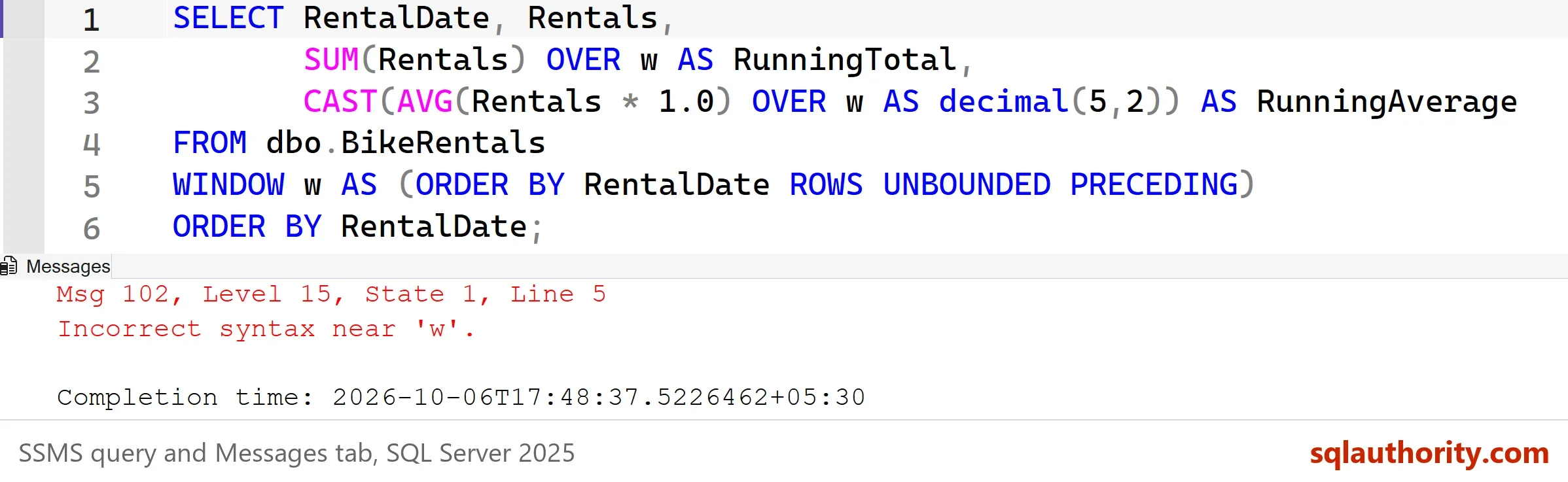
The error points at w on line 5, not at WINDOW. At level 150 the parser reads WINDOW as an alias for the table. A lone WINDOW after a table name is accepted that way. The parser then blames the next word. That’s the rule from the start of this post: the real mistake sits right before the word you see. Nothing is wrong with the query. The database is too old for it.
Check the Level and Raise It
In Management Studio, open Database Properties, choose Options, and read the Compatibility level box. The query above gives the same answer. Drop its WHERE clause and it lists every database on the server.
A common version of this story: a query runs on the development server and fails on a copy of production. The copy came from an older backup and kept its old level. Compare the two levels before you change any code.
Change the level with ALTER DATABASE. Put a GO after it. SQL Server parses a whole batch before it runs any of it. Put both statements in one batch and the query fails with the same message, and the level stays at 150.
ALTER DATABASE CompatLevelDemo SET COMPATIBILITY_LEVEL = 160;
GO
SELECT RentalDate, Rentals,
       SUM(Rentals) OVER w AS RunningTotal,
       CAST(AVG(Rentals * 1.0) OVER w AS decimal(5,2)) AS RunningAverage
FROM dbo.BikeRentals
WINDOW w AS (ORDER BY RentalDate ROWS UNBOUNDED PRECEDING)
ORDER BY RentalDate;| RentalDate | Rentals | RunningTotal | RunningAverage |
|---|---|---|---|
| 2026-09-01 | 12 | 12 | 12.00 |
| 2026-09-02 | 8 | 20 | 10.00 |
| 2026-09-03 | 15 | 35 | 11.67 |
| 2026-09-04 | 9 | 44 | 11.00 |
| 2026-09-05 | 11 | 55 | 11.00 |
The same query now runs. The old fix for this error used EXEC sp_dbcmptlevel. It still runs on SQL Server 2025, but it’s deprecated. Use ALTER DATABASE.
Test Before You Raise the Level
Syntax is the visible part of a level. The optimizer also changes with it, so a raised level can give some queries a different plan. Restore a copy of the database, raise its level there, and run your real workload. If a query gets slower, one more ALTER DATABASE sets the old level back. Query Store can show which plans changed after the raise.
You could argue that raising the level is overkill for one query, and rewriting the query is safer. For one query, that’s true. A rewrite touches one statement, and a new level touches the whole database. Raise the level when you want the newer features everywhere, and rewrite when you want one fix.
Other Causes of Incorrect Syntax Near
Most of these errors have nothing to do with the level. Check the level first because it takes one query, then look for these. The first three batches below fail. The fourth is the corrected version of the third, and it returns three rows.
CREATE TABLE dbo.2026Sales (id int);
GO
SELECT * FROM User;
GO
DECLARE @minimum int = 10
WITH Busy AS (SELECT RentalDate, Rentals FROM dbo.BikeRentals WHERE Rentals >= @minimum)
SELECT * FROM Busy;
GO
DECLARE @minimum int = 10;
WITH Busy AS (SELECT RentalDate, Rentals FROM dbo.BikeRentals WHERE Rentals >= @minimum)
SELECT * FROM Busy;
Msg 102, Level 15, State 1, Line 1
Incorrect syntax near '.2026'.
Msg 156, Level 15, State 1, Line 1
Incorrect syntax near the keyword 'User'.
Msg 319, Level 15, State 1, Line 2
Incorrect syntax near the keyword 'with'. If this statement is a common table expression, an xmlnamespaces clause or a change tracking context clause, the previous statement must be terminated with a semicolon.
| RentalDate | Rentals |
|---|---|
| 2026-09-01 | 12 |
| 2026-09-03 | 15 |
| 2026-09-05 | 11 |
- A name that starts with a digit, or has a hyphen or space. Write
[2026Sales]or[Linked-Server]in square brackets, or rename it toSales2026. An unbracketed hyphen fails with Msg 102 near ‘-‘. - A reserved word used as a name. User, Order and Group are keywords. Use square brackets, or pick a different name.
- A missing semicolon before WITH. End the previous statement with a semicolon, as the fixed batch shows.
- A single quote inside a string.
'O'Brien'fails with Msg 105. Double the quote, as in'O''Brien'. - Old syntax that newer versions removed.
RAISERROR 50001 'text'without parentheses fails with Msg 102, and so does an old outer join written with*=. Rewrite them asRAISERROR(50001, ...)orTHROW, and asLEFT JOIN. - A copy-table statement from another product.
CREATE TABLE x AS SELECT ...fails with Msg 156. T-SQL usesSELECT ... INTO. - A semicolon in the middle of a statement.
BACKUP DATABASE ... TO DISK = '...'; WITH FORMATfails with Msg 102 near ‘FORMAT’. Keep the options in the same statement. - A stray comma. A comma before
FROMgives Msg 156, and a trailing comma afterORDER BY namegives Msg 102.
Application code adds one more cause. When a program builds the query as a string, print the final string and read it. A missing space or a stray quote there produces the same Incorrect syntax near error.
What to Remember
When Incorrect syntax near appears, read the word in the message, then read the word before it. Check the level with one query on sys.databases. If a feature is newer than the level, raise the level in its own batch, or rewrite the query.
Test before you raise a level on a live database, and keep the old number in your notes. Most of the time the fix is a bracket, a semicolon or a quote. Run the cleanup script when you finish.
USE master;
GO
IF DB_ID(N'CompatLevelDemo') IS NOT NULL
BEGIN
    ALTER DATABASE CompatLevelDemo SET SINGLE_USER WITH ROLLBACK IMMEDIATE;
    DROP DATABASE CompatLevelDemo;
END;
A syntax error is not always a typo, it is sometimes a version.
Published by Pinal Dave on SQLAuthority. More of my work at pinaldave.com.
Discover more from SQL Authority with Pinal Dave
Subscribe to get the latest posts sent to your email.




87 Comments. Leave new
adding ; before merge(i.e like ;merge )
I am setting up a job in SQL Server Agent in SQL Server 2000, and successfully parsed this line: EXEC sp_dbcmptlevel ‘QMS Richmond’, 80; However, when I added this line: BACKUP LOG ‘QMS Richmond’ WITH TRUNCATE_ONLY;. with error message Incorrect syntax near ‘QMS Richmond’. How to correctly using sp_dbcmptlevel in this matter? How to solve my problem? Thank you.