
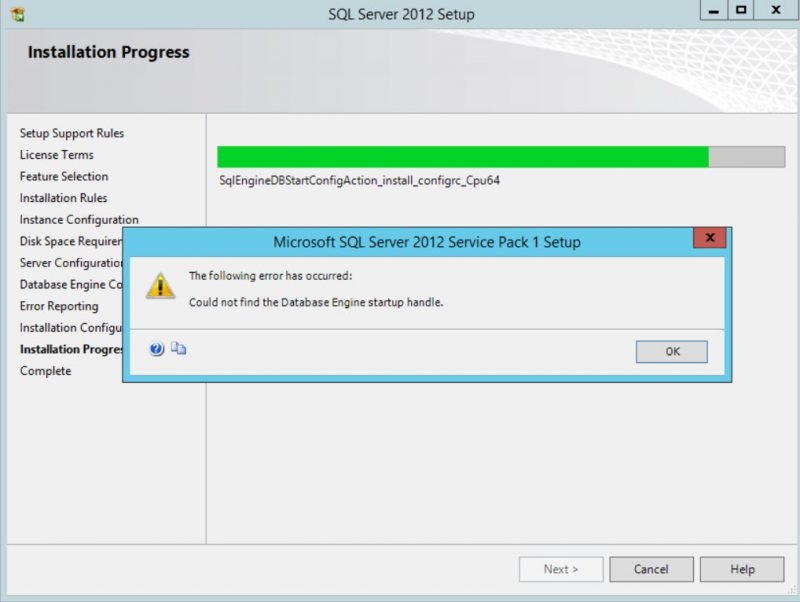
One of the best ways to learn problems faced by individuals and organizations is to look at the forums for these issues. Often I have visited MSDN forums and see if there are some hot or interesting issues. Sometimes it is interesting to see some setup failures and investigate for the root cause. They might look trivial, but the best part is going the path of troubleshooting can be refreshing and gives you immense satisfaction to how things work inside SQL Server or Windows. This blog is inspired by one such error that encountered and I found it interesting enough to share it on this blog for the benefit of a larger audience. Let us learn about SQL Server Installation Error.
How to Find Outdated Statistics? – Interview Question of the Week #081
Recently in one of the webcast, while I was presenting about statistics and performance tuning, I was asked by one of the attendees that if there is anyway to find out all the outdated statistics based on the dates from the server. This is indeed a very interesting question and I will be happy to explain you here.
SQL SERVER – Network Servers List is Empty in SQL Server Management Studio
I have in numerous places told that the first tool that I often open when the computer boots up will be SQL Server Management Studio. I get intrigued whenever someone comes up with an error relating to SSMS. There is something that gets my troubleshooting character out and I get out full swing to solve the same. Don’t you ever like such challenges? I am for sure you like similar challenges. One of my clients reported below problem with Network Servers List in SQL Server Management Studio.
Free DBA Tools for SQL Server Professionals – Notes from the Field #133
[Note from Pinal]: This is a 133rd episode of Notes from the Field series. I know Mike for many years and Mike has always inspired me with his positive energy. I have always enjoyed spending time with him as I have always learned something new but along with it, I have also improved as a human. It is very critical that we often meet someone who is not only technically brilliant but gives us a different viewpoint of life. I really respect Mike and enjoy love talking to him. Today is going to a fun note from Mike about Free DBA Tools.
SQL SERVER – Delayed Durability, or The Story of How to Speed Up Autotests From 11 to 2.5 Minutes
This is one of the most interesting stories written by my friend Syrovatchenko Sergey. He is an expert on SQL Server and works at Devart. Just like me he also shares his passion for Wait Stats and new features of the SQL Server. In this blog post he talks about one of the most interesting feature about Delayed Durability. I strongly encourage that you find sometime during your day to read this blog post and discover more about this topic.
SQL SERVER – Tracking Database Dependencies
If database changes are needed to be made at a column level, it’s essential that you perform impact assessment in order to determine which objects will be affected after the change. This means that SQL table column dependencies within a database need to be analyzed.
ApexSQL Clean is a tool that is used to analyze SQL server database dependencies and also to remove unwanted objects.
To analyze table column dependencies within a SQL database the first thing you need to do is to create a new project. That can be done by clicking the New button in the Home tab and choosing the desired server and the database.






Is your SQL Server running slow and you want to speed it up without sharing server credentials? In my Comprehensive Database Performance Health Check, we can work together remotely and resolve your biggest performance troublemakers in less than 4 hours.
Once you learn my business secrets, you will fix the majority of problems in the future.

Have you ever opened any PowerPoint deck when you face SQL Server Performance Tuning emergencies? SQL Server Performance Tuning Practical Workshop is my MOST popular training with no PowerPoint presentations and 100% practical demonstrations.
Essentially I share my business secrets to optimize SQL Server performance.