
This error is quite common and I have received it few times while I was working on a recent consultation project. The message reads Cannot open database requested by the login, and the fix is simple.
Cannot open database requested by the login. The login failed.
Login failed for user ‘NT AUTHORITY\NETWORK SERVICE’.
This error occurs when you have configured your application with IIS, and IIS goes to SQL Server and tries to login with credentials that do not have proper permissions. This error can also occur when replication or mirroring is set up.
If you search online, there are many different solutions provided to solve this error, and many of these solutions work fine. However, I will be going over a solution that works always and is very simple.
Fix, Workaround, Solution
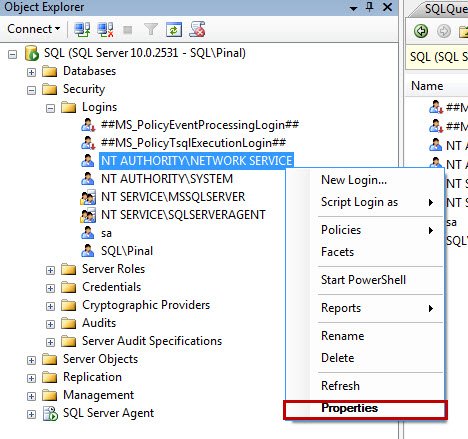
Go to SQL Server >> Security >> Logins and right click on NT AUTHORITY\NETWORK SERVICE and select Properties
In newly opened screen of Login Properties, go to the “User Mapping” tab. Then, on the “User Mapping” tab, select the desired database, especially the database for which this error message is displayed. On the lower screen, check the role db_owner. Click OK.
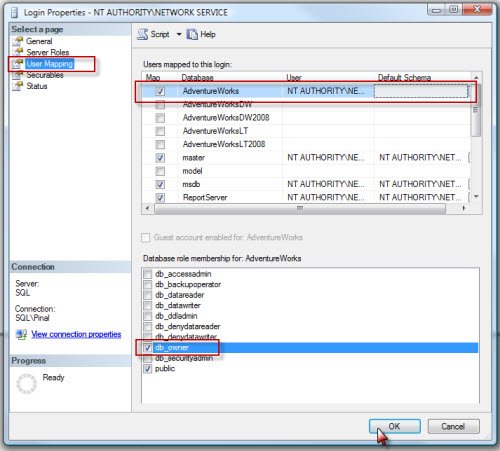
In almost all such cases, this should fix your problem.
The same fix as a script
Clicking works once. If you are setting up a second server, or writing this into a deployment step, here it is as T-SQL.
-- create the login at server level, if it is not there yet
CREATE LOGIN [NT AUTHORITY\NETWORK SERVICE] FROM WINDOWS;
GO

-- create the user inside the database and give it access
USE YourDatabase;
GO
CREATE USER [NT AUTHORITY\NETWORK SERVICE] FOR LOGIN [NT AUTHORITY\NETWORK SERVICE];
GO
ALTER ROLE db_datareader ADD MEMBER [NT AUTHORITY\NETWORK SERVICE];
ALTER ROLE db_datawriter ADD MEMBER [NT AUTHORITY\NETWORK SERVICE];
GO
Notice I have used db_datareader and db_datawriter rather than db_owner. See the note at the end for why.
Why your website appears as NETWORK SERVICE
This is the part that confuses people, and once it clicks the error stops being mysterious.
SQL Server never sees the person using your website. It sees the Windows account that your application is running as. With a Windows Authentication connection string, IIS connects as whatever identity the application pool is set to, and the visitor’s identity never leaves the web server.
So the account you need to grant is the application pool identity, not the developer, and not the person who reported the problem.
On a current version of IIS it is probably not NETWORK SERVICE
Since IIS 7.5, application pools run under ApplicationPoolIdentity by default, which is a separate invented account per pool rather than the shared NETWORK SERVICE. That is a good change, because one website can no longer reach another website’s database by accident.
It does mean the name you grant looks unusual. For a pool called MyAppPool on a machine called WEBSERVER01, it is:
CREATE LOGIN [IIS APPPOOL\MyAppPool] FROM WINDOWS;
And if SQL Server is on a different machine from IIS, that local identity does not exist over there. The connection then arrives as the computer account instead, which looks like this, trailing dollar sign and all:
CREATE LOGIN [DOMAIN\WEBSERVER01$] FROM WINDOWS;
That dollar sign is not a typo, and forgetting it is the reason half an afternoon disappears.
Find out exactly who is connecting
Rather than guessing, ask. Open the application pool in IIS Manager, Advanced Settings, and read the Identity line. Or let SQL Server tell you what it received, by running this from the application itself:
SELECT SUSER_SNAME() AS ConnectedAs,
       ORIGINAL_LOGIN() AS OriginalLogin,
       DB_NAME() AS CurrentDatabase;
Whatever ConnectedAs returns is the name you grant. No guessing needed.
A word about db_owner
The steps above tick db_owner because it always works, and when your site is down you want the thing that always works. I would not leave it there.
db_owner can drop your tables. A website almost never needs to. Once the site is running again, go back and swap it for db_datareader and db_datawriter, then add execute permission if it calls stored procedures:
GRANT EXECUTE ON SCHEMA::dbo TO [NT AUTHORITY\NETWORK SERVICE];
Then if your site is ever compromised, the attacker gets your data rather than the ability to delete it. That difference is worth the five minutes.
Published by Pinal Dave on SQLAuthority. More of my work at pinaldave.com.
Discover more from SQL Authority with Pinal Dave
Subscribe to get the latest posts sent to your email.




225 Comments. Leave new
I am still getting an error : Cannot open the database even though the user is db_owner . Any suggestion what else I can try to resolve it? Thanks!
Still having this error:
Cannot open database “TheDb” requested by the login. The login failed.
Login failed for user ‘NT AUTHORITY\SYSTEM’.
I should say that the database is restored from a backup got from another machine. And also My SSMS is of version: Microsoft SQL Server Management Studio 13.0.16106.4 (2016)
Thank you soo much its working for me..
Works now. Sorry
Nope, won’t work. As it throws the bloody error when clicking on Properties. Extremely annoying SSMS magic behavior driving me nuts every now and then with this nonsense. IIS was stopped, so it isn’t that.
Ah .. right. Silly me, close the program. Reopen, then click Options before sign-in and change the default database there. That’ll work.
In my case, the database that generates the error has been deleted. So going to User Mapping won´t list that database but it will still generate that error. Any ideas?
Pls try following steps:
1. In Microsoft Visual Studio 2010, open Web Application then
Tools> Connect To DataBase> Add Connection Box is coming up.
In this Box, pls choose your connection correctly. Then click OK.
2. Then Pls write the following code in your Web Application asp.net (Default.aspx.cs tab or page)
using System.Data.SqlClient;
namespace WebApplication1
{
public partial class _Default : System.Web.UI.Page
{
SqlCommand cmd = new SqlCommand();
SqlConnection con = new SqlConnection();
protected void Page_Load(object sender, EventArgs e)
{
con.ConnectionString = “Data Source=hp;Initial Catalog=dbname;Persist Security Info=True;User ID=sa;Password=******”;
con.Open();
}
protected void BtnName_Click(object sender, EventArgs e)
{
SqlCommand cmd = new SqlCommand(“Insert into tblTest” + “(Email)values(@email)”, con);
cmd.Parameters.AddWithValue(“@email”, txtname.Text);
cmd.ExecuteNonQuery();
this.lblname.Text = this.txtname.Text;
}
}
}
Thanks for sharing the code.
It effing did. THANK you!
I am glad to hear that.
Solved in 5 sec… thanks!
nice thanks ..
pleasure.
lol sometimes it can be because you wrote a typo.. silly myself had a typo in my database name…
We are humans!
Hello sir,
In mysql database default user is root and password=”. what is the default username and password for SQL database in IIS. i want to connect laravel project with SQL database with username=” and password ” . by i am facing this error
PHP Fatal error: Invalid handle returned. in vendorlaravelframeworksrcIlluminateDatabaseConnectorsConnector.php on line 55
what will be the solution.
Thanks
You need to create login used by IIS.
worked for me
Another and maybe stupid mistake is when you try to connect through management studio, and have forgotten to erase the Additional connection parameters under Options in the login dialogue.
Thanks so much its worked for me
If your hosting server is different than localhost then just restart the server .
I don’t have NT AUTHORITYNETWORK SERVICE in my logins. How do I add that in?
Things are working fine on my system but when same project is run on another system it gives error can any thing be done in generalize way so asp.net core project can run any where without authentication error
Thankyou soo much bro..Its working for me <3
it worked
thanks