
Question: How much of the SQL Server transaction log is currently used?

Quick answer: The original interview answer is DBCC SQLPERF (LOGSPACE). It returns one row per database, including the allocated log size and the percentage occupied:
DBCC SQLPERF (LOGSPACE);This historical SSMS capture shows the complete query and its per-database result. The measured values came from that instance and will differ on yours:
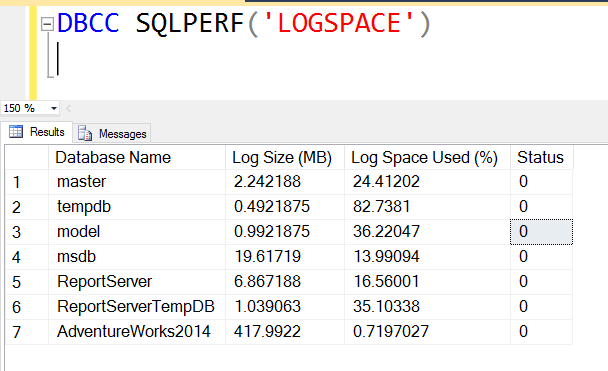
The four columns are database name, log size in MB, log space used in percent, and status. The documented status value for this result is zero. If the log size is 400 MB and 25% is used, about 100 MB is occupied: 400 * 25 / 100. The other 300 MB is allocated space available inside the log file, not disk space freed back to Windows.
For one database on SQL Server 2012 or later, Microsoft recommends sys.dm_db_log_space_usage. Run it in the database you want to inspect:
SELECT DB_NAME(database_id) AS DatabaseName,
       total_log_size_in_bytes / 1048576.0 AS TotalLogMB,
       used_log_space_in_bytes / 1048576.0 AS UsedLogMB,
       used_log_space_in_percent AS UsedPercent
FROM sys.dm_db_log_space_usage;
This DMV combines the database’s log files. On SQL Server 2022 and later this DMV requires VIEW SERVER PERFORMANCE STATE; older supported releases use VIEW SERVER STATE. The DBCC command has its own server-state permission requirement. The DBCC result is still handy when you want all databases in one call.
One correction to the original advice: regular log backups do not guarantee that a log file stops growing. A long-running transaction or another log reuse wait can hold log records active. Check sys.databases.log_reuse_wait_desc before deciding what to do. Reusing internal log space also does not shrink the physical log file, and routine shrinking can cause it to grow again.
Related reading: SQL Basics: Database Datafiles and Log Files, Log File Very Large, Recover Lost Data Using Transaction Log Files, and Restore or Attach Database Without Log File.
Published by Pinal Dave on SQLAuthority. More of my work at pinaldave.com.
Discover more from SQL Authority with Pinal Dave
Subscribe to get the latest posts sent to your email.




3 Comments. Leave new
Normal developer will not have the access to use DBCC so then how can an user can find the used log space of the Database
Hello Mr. Pinal
I’m having a question on how can I reduce the disk space used by sql databases. I have db which occupies 18443.74 MB currently.
You need to provide more details.. Which file? What is the recovery model?