
While we are doing development, we create and drop objects. We build new things and we need to understand the relationships between database objects when we are doing various activities in SQL Server. Well, it is indeed very hard to know all, the relationship between various objects in SQL Server. However, with the help of SQL Server 2014 Management Studio, you can for sure do the same task very easily. The View Dependencies option makes finding object dependencies in SSMS simple.
You have to go the object of which you want to see properties of and right click over it.
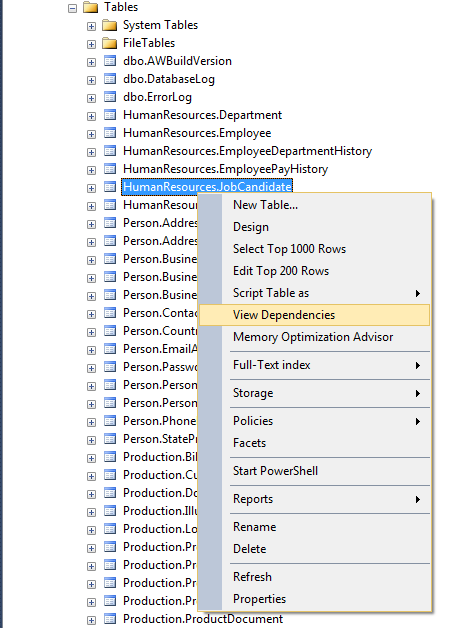
Now click over the option “View Dependencies”. It will bring up a screen listing various dependencies.
I hope this is clear enough. If not, I strongly suggest you watch following quick video where I explain this concept in extremely simple words.
Action Item
Here are the blog posts I have previously written on SSMS. You can read it over here:
- SQL SERVER – SSMS: Memory Consumption Report
- SQL SERVER – Enable SQLCMD Mode in SSMS – SQL in Sixty Seconds #048
- SQL SERVER – Remove Cached Login from SSMS Connect Dialog – SQL in Sixty Seconds #049
- SQL SERVER – SSMS: Scheduler Health Report
- SQL SERVER – Auto Recovery File Settings in SSMS – SQL in Sixty Seconds #034 – Video
You can subscribe to my YouTube Channel for frequent updates.
Published by Pinal Dave on SQLAuthority. More of my work at pinaldave.com.
Discover more from SQL Authority with Pinal Dave
Subscribe to get the latest posts sent to your email.


1 Comment. Leave new
Please remember, that access from dynamic SQL statements in Stored Procedures (using e.g. EXEC or sp_executesql) will NOT show up as a dependency.
For example:
SET @query = ‘SELECT ‘ + @columns + ‘ FROM Customers WHERE City = ‘ + @city
EXEC (@query)
If you look at the dependencies of the table Customers there will be no reference to the above code, as the SQL server cannot predict whatever possible combination will end up in the @query variable.