
Key-Value and Document Databases are two NoSQL models that store data by its key, or as one self-contained document. Neither one asks you to design a set of tables first. Each fits a different kind of job. Picking the wrong one turns a simple feature into a long project.

Why These Two Models Exist
A relational table wants its columns decided up front. That works for orders and invoices. It works less well in two cases. In the first, you need to fetch one thing by one identifier. In the second, every record has a slightly different shape.
Key-value and document databases answer those two cases. A key-value database is the simplest one. A document database keeps the shape of each record inside the record itself. Both are operational databases: they serve live applications, and they’re built for speed on small requests.
Key-Value: A Key and a Value
A key-value database stores pairs. The key is an identifier, such as a session number or a customer name. The value is whatever you saved under it. The store doesn’t look inside the value. It could be text, a number or a block of bytes.
That gives you only a few operations. GET a value by its key. PUT a value under a key, which replaces the old one. DELETE a key. It sounds limited, and that’s why it’s quick. Data can be spread across many machines by hashing the key, so each request goes straight to one machine.
The best jobs are sessions, shopping carts and caches. In each of them you know the key, and you want the whole value back in a moment. Most key-value stores can also expire a key after a set time, which suits sessions and caches. The old trade-off is still true: you can’t ask a pure key-value store for every cart that holds rye bread.
Document: One Record With Its Own Shape
A document database stores a document, usually JSON. A profile is a good example. It holds a name and a city. It holds a list of interests. It holds a nested address with its own street and zip code. Everything about one person sits in one place.
Unlike a key-value store, the database can look inside. You can ask for every profile whose city is Austin. Documents in the same collection don’t need the same fields, so a new field needs no schema change. That fits profiles, product catalogs and content, where records differ from each other and keep changing.
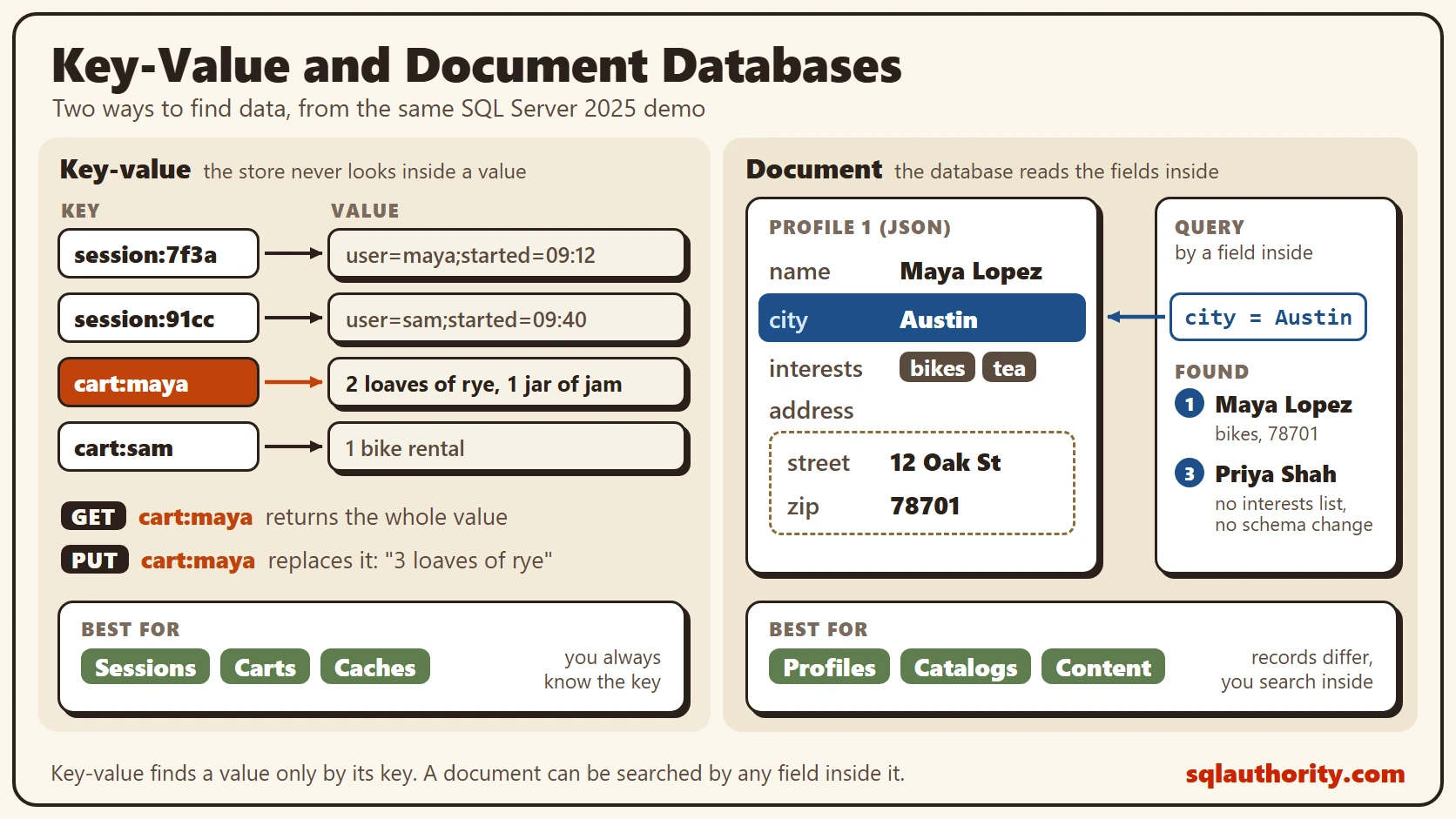
The diagram shows both models side by side. On the left, keys such as cart:maya and session:7f3a each point to a value the store can’t read. GET and PUT are the only moves. On the right, one profile for Maya Lopez holds a name, a city, interests and a nested address. A query finds it by city. Under each side sit the best uses.
Try It: A Key-Value Store in SQL Server
You can build both patterns in SQL Server 2025. This script creates a database called SqlBigDataKeyValue, used only for this example, so run it on a test server. The key-value table has a key and a value, and nothing else.
IF DB_ID(N'SqlBigDataKeyValue') IS NULL CREATE DATABASE SqlBigDataKeyValue;
GO
USE SqlBigDataKeyValue;
GO
DROP TABLE IF EXISTS dbo.KeyValueStore;
DROP TABLE IF EXISTS dbo.Profile;
CREATE TABLE dbo.KeyValueStore
(
    StoreKey nvarchar(100) NOT NULL PRIMARY KEY,
    StoreValue nvarchar(max) NOT NULL
);
INSERT INTO dbo.KeyValueStore (StoreKey, StoreValue)
VALUES (N'session:7f3a', N'user=maya;started=09:12'),
       (N'session:91cc', N'user=sam;started=09:40'),
       (N'cart:maya', N'2 loaves of rye, 1 jar of jam'),
       (N'cart:sam', N'1 bike rental');
A GET is a lookup on the key. A PUT replaces the whole value. SQL Server has no single PUT command, so the script updates first and inserts when nothing was updated. The transaction and the two hints hold the key, so two sessions can’t insert it at the same time.
SELECT StoreValue FROM dbo.KeyValueStore WHERE StoreKey = N'cart:maya';

DECLARE @k nvarchar(100) = N'cart:maya', @v nvarchar(max) = N'3 loaves of rye';
BEGIN TRANSACTION;
UPDATE dbo.KeyValueStore WITH (UPDLOCK, SERIALIZABLE) SET StoreValue = @v WHERE StoreKey = @k;
IF @@ROWCOUNT = 0 INSERT INTO dbo.KeyValueStore (StoreKey, StoreValue) VALUES (@k, @v);
COMMIT TRANSACTION;

SELECT StoreKey, StoreValue FROM dbo.KeyValueStore ORDER BY StoreKey;
The GET returned “2 loaves of rye, 1 jar of jam”. After the PUT, the cart holds “3 loaves of rye”, and the old text is gone. The store never looked inside either value. To find every cart with rye, you must read all the values.
The locking hints matter. Without them, two sessions that write the same new key at the same moment can both find no row. One of them then fails with a primary key error. Two sessions raced on the same 5,000 new keys for four rounds. The plain version failed in every round. This one never failed. The hints settle this race, but they aren’t a promise against every deadlock.
SELECT StoreKey FROM dbo.KeyValueStore WHERE StoreValue LIKE N'%rye%';
It found cart:maya. A leading wildcard can’t use an index, so on a large table that’s a full scan. Whenever you need to search by what’s inside the value, you want a document.
Try It: Documents With the json Type
SQL Server 2025 has a json data type that stores a document in a binary format. This table keeps one profile per row. A check constraint requires every profile to have a name. The third profile has no list of interests, on purpose.
CREATE TABLE dbo.Profile
(
    ProfileID int NOT NULL PRIMARY KEY,
    Doc json NOT NULL,
    CONSTRAINT CK_Profile_Name CHECK (JSON_PATH_EXISTS(Doc, '$.name') = 1)
);
INSERT INTO dbo.Profile (ProfileID, Doc)
VALUES (1, N'{"name":"Maya Lopez","city":"Austin","interests":["bikes","tea"],"address":{"street":"12 Oak St","zip":"78701"}}'),
       (2, N'{"name":"Sam Reed","city":"Denver","interests":["books"],"address":{"street":"4 Elm Ave","zip":"80202"},"newsletter":true}'),
       (3, N'{"name":"Priya Shah","city":"Austin","address":{"street":"9 Pine Rd","zip":"78702"}}');
Now query by a field inside the document. JSON_VALUE reads a single value by its path.
SELECT ProfileID, JSON_VALUE(Doc, '$.name') AS Name, JSON_VALUE(Doc, '$.city') AS City,
       JSON_VALUE(Doc, '$.interests[0]') AS FirstInterest, JSON_VALUE(Doc, '$.address.zip') AS Zip
FROM dbo.Profile
WHERE JSON_VALUE(Doc, '$.city') = N'Austin'
ORDER BY ProfileID;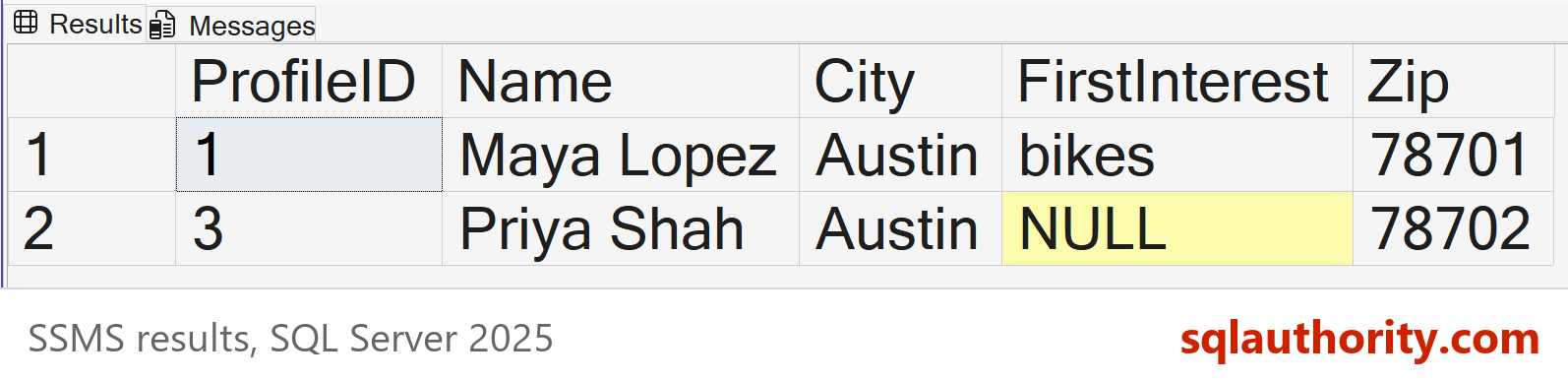
Two profiles live in Austin. Priya’s first interest is NULL, because that document has no interests list. No column had to be added for it.
On a large table, a filter on JSON_VALUE reads every document until an index exists. In a test with 50,000 generated documents it read 668 pages. The fix is a computed column over the same expression, with an index on it. The RETURNING type is part of the expression, so the query repeats it.
ALTER TABLE dbo.Profile ADD City AS JSON_VALUE(Doc, '$.city' RETURNING nvarchar(50));
CREATE INDEX IX_Profile_City ON dbo.Profile (City);

SELECT ProfileID FROM dbo.Profile WHERE JSON_VALUE(Doc, '$.city' RETURNING nvarchar(50)) = N'Austin';
Three rows won’t show a difference. In the 50,000 document test, this filter read 3 pages. A filter written without the RETURNING clause went back to reading 668. The modify method is the other everyday move. It changes one field and leaves the rest of the document alone.
UPDATE dbo.Profile SET Doc.modify('$.city', N'Dallas') WHERE ProfileID = 3;

SELECT ProfileID, CAST(Doc AS nvarchar(max)) AS Doc FROM dbo.Profile WHERE ProfileID = 3;
Profile 3 now shows Dallas as its city, and the name and address are untouched.
Is a Table Already a Key-Value Store?
The case against both models is easy to make. A table with a key column already behaves like a key-value store, and a json column already holds documents. On one server that’s true, and it’s the point of the demo. Here you keep transactions, joins and backups. A dedicated store earns its place when you must spread a huge number of keys over many machines.
A json column has a cost too: the database requires nothing about the document unless you write the rule. The check constraint above is one such rule, and a profile without a name fails it with error 547.
What to Remember
Use key-value when you always know the key and want the whole value back: sessions, carts and caches. Use a document when records differ in shape and you search inside them: profiles, catalogs and content. If you need to search the values of a key-value store, you picked the wrong model.
Before picking a model, ask how the application finds its data. If the answer is always an identifier, a key-value store is enough. Columnar, graph and spatial data need other shapes, and Columnar, Graph and Spatial Databases: Three Shapes of Data covers them.
When you finish testing, remove the example database.
USE master;
GO
ALTER DATABASE SqlBigDataKeyValue SET SINGLE_USER WITH ROLLBACK IMMEDIATE;
DROP DATABASE SqlBigDataKeyValue;
Key-Value and Document Databases are not rival products, they are two answers to how an application finds its data.
Published by Pinal Dave on SQLAuthority. More of my work at pinaldave.com.
Discover more from SQL Authority with Pinal Dave
Subscribe to get the latest posts sent to your email.




1 Comment. Leave new
Good job