I review datetime2 precision changes as value conversions, not cosmetic formatting. Reducing fractional precision can move a value into the next second. Close to midnight, that can also change its date.

Keep the original precision visible
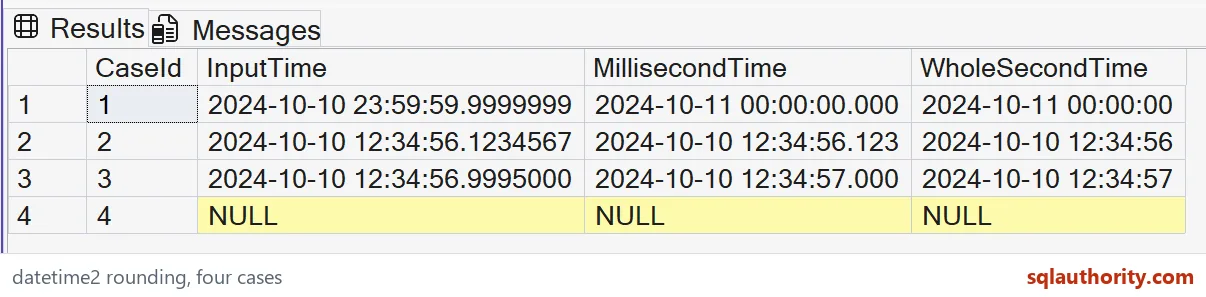
The input column is explicitly datetime2(7), preserving seven fractional digits for these supplied timestamps. Two additional columns convert it to precision three and precision zero. Their declared types remain part of the expected result.
I keep the original timestamp beside both conversions. Looking only at the shorter display can conceal the amount of precision removed. These inputs use an ISO-style date and time with T, avoiding an ambiguous month-and-day ordering.
WITH Inputs AS
(
 SELECT CaseId, CAST(InputText AS datetime2(7)) AS InputTime
 FROM (VALUES
 (1,'2024-10-10T23:59:59.9999999'),
 (2,'2024-10-10T12:34:56.1234567'),
 (3,'2024-10-10T12:34:56.9995000'),
 (4,CAST(NULL AS varchar(27)))) v(CaseId,InputText)
)
SELECT CaseId, InputTime,
       CAST(InputTime AS datetime2(3)) AS MillisecondTime,
       CAST(InputTime AS datetime2(0)) AS WholeSecondTime
FROM Inputs
ORDER BY CaseId;
Read the carry into the next date
The first input ends with 23:59:59.9999999. Its expected millisecond and whole-second conversions are midnight on October 11. The date change belongs to the resulting value, not merely to a shortened display string.
I’d retain this case whenever a consumer requests lower precision. A date derived after conversion can differ from one derived before conversion. That ordering can matter in grouping, exports or comparisons near the end of a day.
Compare ordinary fractional values
The second input has a fraction of .1234567. Its expected millisecond value has .123, while its whole-second value retains second 56. The date and the minute remain unchanged for this case.
That friendly result shouldn’t become a general rule about every conversion. I’d keep it beside the boundary input instead of showing it alone. A demonstration with only modest fractions could make precision reduction look like a harmless removal of trailing characters.

Retain a second-boundary case
The third input ends with .9995000. Its expected converted values carry into second 57. This exposes the same issue away from midnight, where the surrounding date doesn’t change.
I don’t treat the displayed number of digits as the entire contract. The stored value changes during conversion, so equality and range comparisons need review. A consumer that requires millisecond resolution should receive that type deliberately, while the original remains available when needed.
Keep NULL and display formatting separate
The final row supplies typed NULL input and preserves NULL in both converted columns. No default timestamp is inserted. That missing-value case should remain distinct from a valid timestamp that rounds to an exact second.
A display formatter can hide digits without changing the underlying datetime2 value. These CAST expressions instead return values with different declared precision. I’d clarify which operation a request means before implementing a shorter timestamp presentation.
Avoid inferring a time zone
datetime2 doesn’t carry a time-zone offset. Nothing in this conversion assigns UTC or a local zone. The example is about fractional precision on the supplied date and time values.
I’d preserve a separate time-zone contract where an application needs one. Rounding a timestamp doesn’t establish its origin, and adding a label afterward doesn’t convert it. Use the appropriate type and conversion rules before interpreting these values as events from different locations.
Review value changes before changing storage
The SELECT creates no table and changes no column definition. It provides a small read-only comparison for the proposed precision choices. Compare each complete timestamp with the selected precision, including the midnight and NULL cases.
For a schema change, I’d test representative boundary values and the consumer’s comparisons separately. Removing precision can make distinct timestamps equal. Smaller precision is useful when it matches the requirement. It should be a reviewed data decision rather than incidental formatting.
Keep the original beside the conversion, and surprises show up early.
Lower precision is not shorter text, it is a value conversion that can cross a date boundary.
Published by Pinal Dave on SQLAuthority. More of my work at pinaldave.com.
Discover more from SQL Authority with Pinal Dave
Subscribe to get the latest posts sent to your email.