Joining three tables is one join done twice. The safest way is to add one table at a time. Each join follows a key from one table to the next. A quick row count after every step tells you whether the join did what you expected.

Meet the Bookshop Tables
I use a small bookshop for the examples. Customers place orders, each order has one or more lines, and each line names a book. That gives four tables: Customers, Orders, OrderLines and Books.
Every table has a primary key. Each child table stores the key of its parent. Orders holds a CustomerID, and OrderLines holds an OrderID and a BookID. Those stored keys are the path a join follows.
The script below creates a database named SqlBasicsThreeJoins if it’s missing, used only for this example. It then drops and rebuilds the four demo tables inside it, child first, so a second run works. Run it on a test instance, not on a server that matters.
IF DB_ID(N'SqlBasicsThreeJoins') IS NULL CREATE DATABASE SqlBasicsThreeJoins;
GO
USE SqlBasicsThreeJoins;
GO
DROP TABLE IF EXISTS dbo.OrderLines;
DROP TABLE IF EXISTS dbo.Orders;
DROP TABLE IF EXISTS dbo.Books;
DROP TABLE IF EXISTS dbo.Customers;
CREATE TABLE dbo.Customers (
    CustomerID int NOT NULL CONSTRAINT PK_Customers PRIMARY KEY,
    CustomerName nvarchar(60) NOT NULL,
    City nvarchar(40) NOT NULL);
CREATE TABLE dbo.Books (
    BookID int NOT NULL CONSTRAINT PK_Books PRIMARY KEY,
    Title nvarchar(80) NOT NULL,
    Price decimal(6,2) NOT NULL);
CREATE TABLE dbo.Orders (
    OrderID int NOT NULL CONSTRAINT PK_Orders PRIMARY KEY,
    CustomerID int NOT NULL CONSTRAINT FK_Orders_Customers REFERENCES dbo.Customers (CustomerID),
    OrderDate date NOT NULL);
CREATE TABLE dbo.OrderLines (
    OrderLineID int NOT NULL CONSTRAINT PK_OrderLines PRIMARY KEY,
    OrderID int NOT NULL CONSTRAINT FK_OrderLines_Orders REFERENCES dbo.Orders (OrderID),
    BookID int NOT NULL CONSTRAINT FK_OrderLines_Books REFERENCES dbo.Books (BookID),
    Quantity int NOT NULL);
INSERT INTO dbo.Customers (CustomerID, CustomerName, City) VALUES
    (1, N'Asha Rao', N'Denver'), (2, N'Ben Carter', N'Austin'),
    (3, N'Chloe Nguyen', N'Seattle'), (4, N'Dev Patel', N'Austin');
INSERT INTO dbo.Books (BookID, Title, Price) VALUES
    (1, N'The Tea Garden Cookbook', 18.50), (2, N'Seasonal Fruit Salads', 14.00),
    (3, N'Spice Shelf Basics', 22.25), (4, N'The Garden Notebook', 9.75),
    (5, N'Pocket Guide to Chai', 12.00);
INSERT INTO dbo.Orders (OrderID, CustomerID, OrderDate) VALUES
    (101, 1, '2026-09-01'), (102, 1, '2026-09-14'), (103, 2, '2026-09-15'),
    (104, 3, '2026-09-20'), (105, 3, '2026-09-28');
INSERT INTO dbo.OrderLines (OrderLineID, OrderID, BookID, Quantity) VALUES
    (1, 101, 1, 1), (2, 101, 4, 2), (3, 102, 2, 1), (4, 103, 3, 1),
    (5, 103, 1, 1), (6, 104, 5, 3), (7, 105, 2, 1), (8, 105, 4, 1);
Why the Keys Decide the Join
A join works best when the ON clause compares a child’s key column with the parent’s primary key. Orders.CustomerID points at Customers.CustomerID, so each order finds exactly one customer. One customer can own many orders, so the customer row repeats once for each of them.
That repeating is the reason row counts matter. In this bookshop, going from a parent to a child gives one row per child row. Going from a child to its parent keeps the count, because each child has exactly one parent. Knowing which way you travel tells you what number to expect before you run anything.
Count the Rows First
Before any join, I count the rows in each table. Those numbers are the yardstick for every step that follows. With the demo data you should see 4 customers, 5 orders and 8 order lines. Every query below assumes the setup script has run.
SELECT
    (SELECT COUNT(*) FROM dbo.Customers) AS Customers,
    (SELECT COUNT(*) FROM dbo.Orders) AS Orders,
    (SELECT COUNT(*) FROM dbo.OrderLines) AS OrderLines;
Step One: Customers and Orders
Start with two tables. An alias is a short name after the table name, such as c for Customers. It keeps the query readable. The ON clause tells SQL Server which columns must match.
SELECT c.CustomerID, c.CustomerName, o.OrderID, o.OrderDate
FROM dbo.Customers AS c
INNER JOIN dbo.Orders AS o ON o.CustomerID = c.CustomerID
ORDER BY o.OrderID;
You should get 5 rows, one for each order. That matches the 5 rows in Orders, which is what these keys lead us to expect. A matching count alone doesn’t prove a join is right, so read a few rows too. Dev Patel has no orders, so an INNER JOIN leaves that customer out. A LEFT JOIN would keep them, with empty order columns.
Prefix every column with its alias. Both Customers and Orders have a CustomerID column, so a bare CustomerID fails with error 209, Ambiguous column name. The alias removes the doubt for SQL Server and for the next person who reads the query.
Step Two: Joining Three Tables
Now add the third table. Write one more INNER JOIN and point its ON clause at a table that is already in the query. Here, OrderLines.OrderID matches Orders.OrderID. Leave the first join alone.
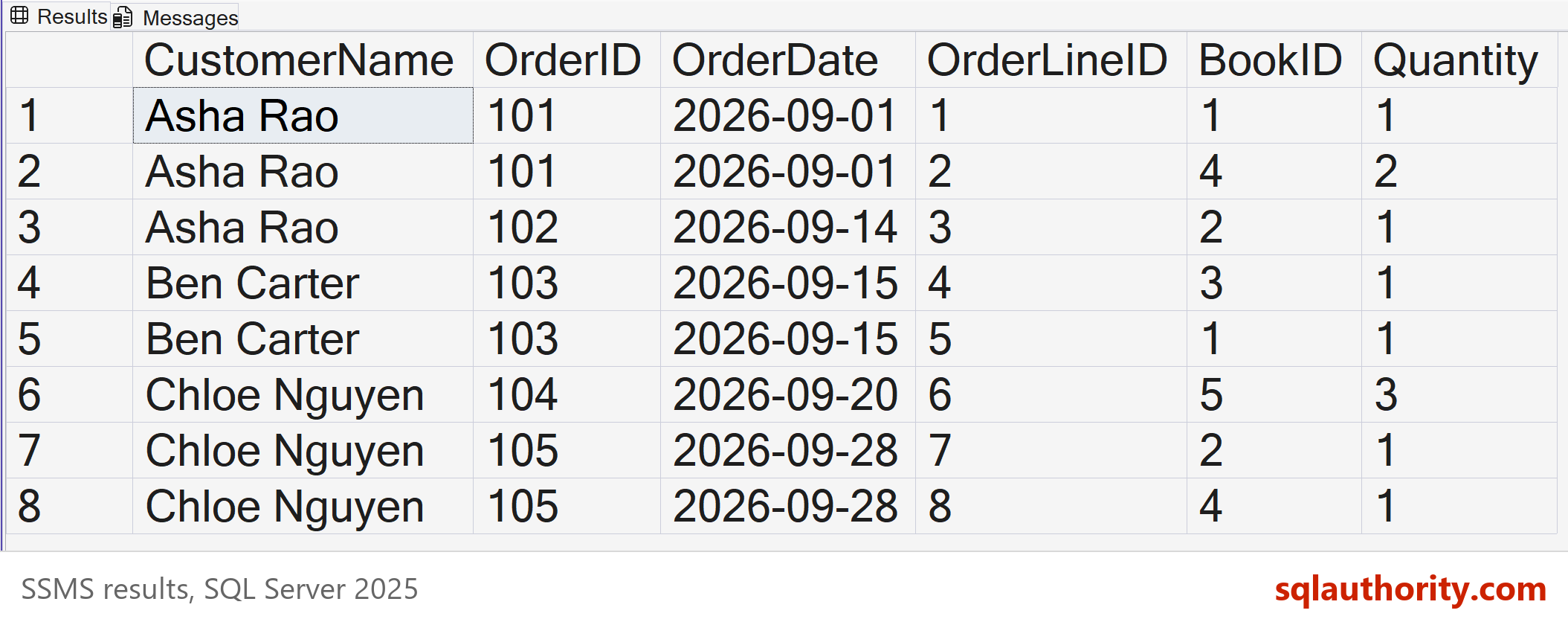
SELECT c.CustomerName, o.OrderID, o.OrderDate, l.OrderLineID, l.BookID, l.Quantity
FROM dbo.Customers AS c
INNER JOIN dbo.Orders AS o ON o.CustomerID = c.CustomerID
INNER JOIN dbo.OrderLines AS l ON l.OrderID = o.OrderID
ORDER BY o.OrderID, l.OrderLineID;
The result grows to 8 rows, one for each order line. That is expected, because an order with two lines now appears twice. Here the row count equals the OrderLines table, because every line has an order and every order has a customer. If it had jumped to 40, I’d stop and read the second ON clause again.
Adding a Book Title
Book numbers are hard to read. A fourth join to Books gives the titles, and it follows the same pattern. The row count stays at 8, because every line names exactly one book.
SELECT c.CustomerName, o.OrderID, b.Title, l.Quantity, l.Quantity * b.Price AS LineTotal
FROM dbo.Customers AS c
INNER JOIN dbo.Orders AS o ON o.CustomerID = c.CustomerID
INNER JOIN dbo.OrderLines AS l ON l.OrderID = o.OrderID
INNER JOIN dbo.Books AS b ON b.BookID = l.BookID
ORDER BY o.OrderID, l.OrderLineID;
Keeping Customers With No Orders
Dev Patel disappeared from every result so far. To keep that customer, change the joins to LEFT JOIN. Change both of them, not only the first one. The extra row has NULL in every order column.
SELECT c.CustomerName, o.OrderID, l.OrderLineID
FROM dbo.Customers AS c
LEFT JOIN dbo.Orders AS o ON o.CustomerID = c.CustomerID
LEFT JOIN dbo.OrderLines AS l ON l.OrderID = o.OrderID
ORDER BY c.CustomerID, o.OrderID, l.OrderLineID;
You get 9 rows: the 8 order lines plus one row for Dev Patel. Turn the second join back into an INNER JOIN and the count drops to 8. A NULL OrderID matches nothing, so the INNER JOIN throws that row away. An INNER JOIN placed after a LEFT JOIN quietly removes the unmatched rows again.
When the Join Condition Goes Missing
A join with no condition pairs every row of one table with every row of the other. The modern syntax protects you, because an INNER JOIN with no ON clause is a syntax error. The older comma style has no such guard.
SELECT COUNT(*) AS RowsReturned
FROM dbo.Customers AS c, dbo.Orders AS o, dbo.OrderLines AS l;
That returns 160 rows, because 4 times 5 times 8 is 160. With a thousand rows in each table, the same slip makes a billion combinations. A count far above your biggest table is a warning sign. It isn’t proof of a mistake, since a legitimate one-to-many join can also grow, so read the ON clauses.
Habits That Keep Joins Honest
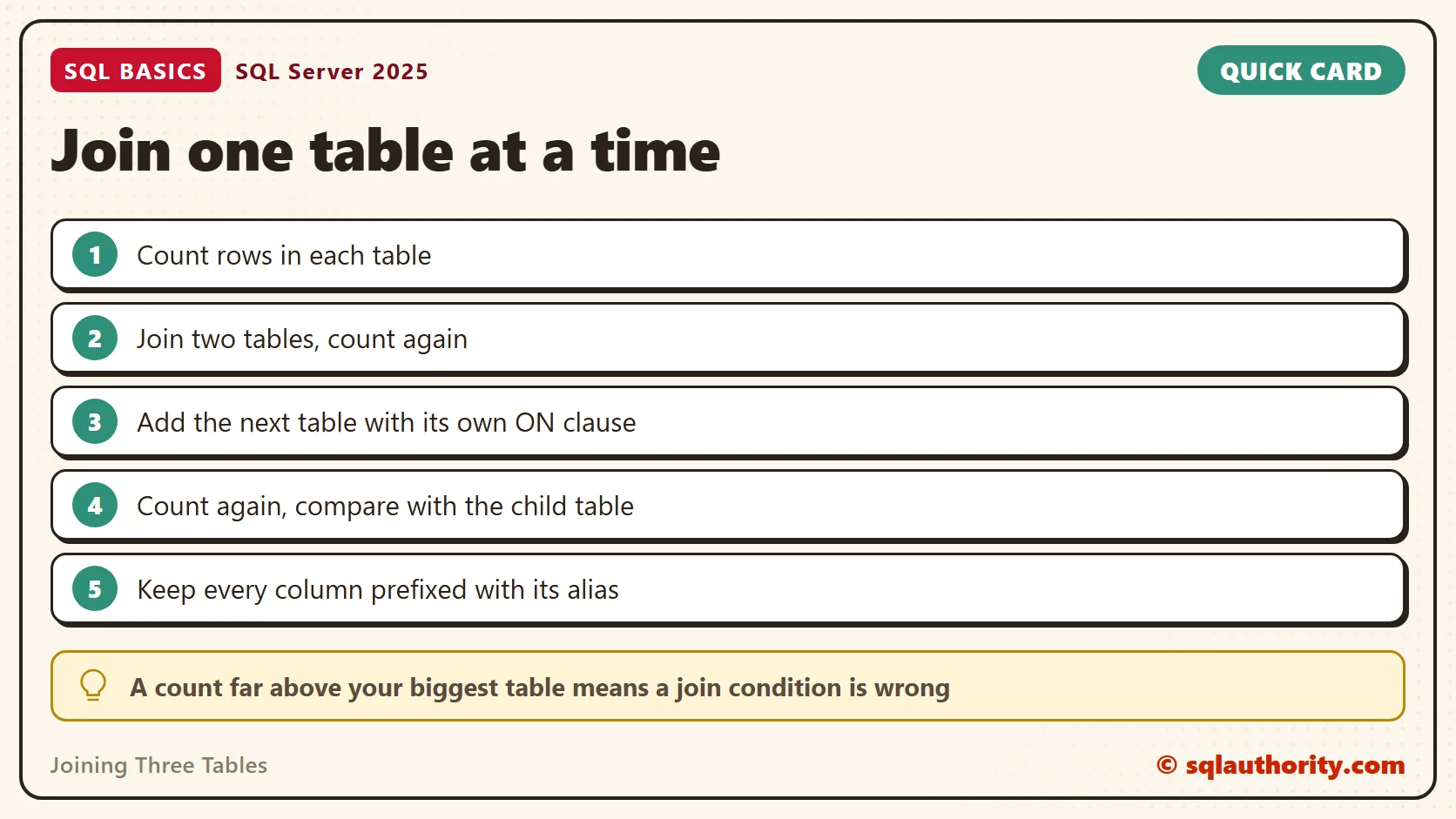
Add one table at a time, and run the query after each addition. Write the ON clause right after the JOIN, while you still remember which two tables it connects. Then compare the row count with the table at the many end of the path. That works when each relationship is required, as in this demo.
The order you write the joins in does not force the order SQL Server runs them. The optimizer chooses that for itself. Write them in the order that reads best. Joining three tables then stays a short, plain sentence. When a count looks wrong, remove the last join and look again.
Related reading
What Is a Foreign Key, and What It Protects: the rule behind the keys these joins follow.
LEFT JOIN ON Clause: Conditions Decide Matches, Not Rows: how to keep customers who have no orders.
CROSS JOIN: Duplicate Inputs Multiply the Result: more on why row counts multiply.
Join Duplicates: Stop Hiding Extra Rows With SELECT DISTINCT: what to do when a join returns repeated rows.
A join is not a way to combine tables, it is a way to follow a key.
Published by Pinal Dave on SQLAuthority. More of my work at pinaldave.com.
Discover more from SQL Authority with Pinal Dave
Subscribe to get the latest posts sent to your email.