When I rename view objects, I inspect references and retained definitions first. SSMS and sp_rename both need dependency planning.

-- Historical rename syntax, after dependency and permission review:
-- EXEC sys.sp_rename @objname=N'dbo.OldViewName',@newname=N'NewViewName',@objtype=N'OBJECT';
SELECT s.name AS SchemaName,v.name AS ViewName,m.definition
FROM sys.views v JOIN sys.schemas s ON s.schema_id=v.schema_id
LEFT JOIN sys.sql_modules m ON m.object_id=v.object_id ORDER BY s.name,v.name;
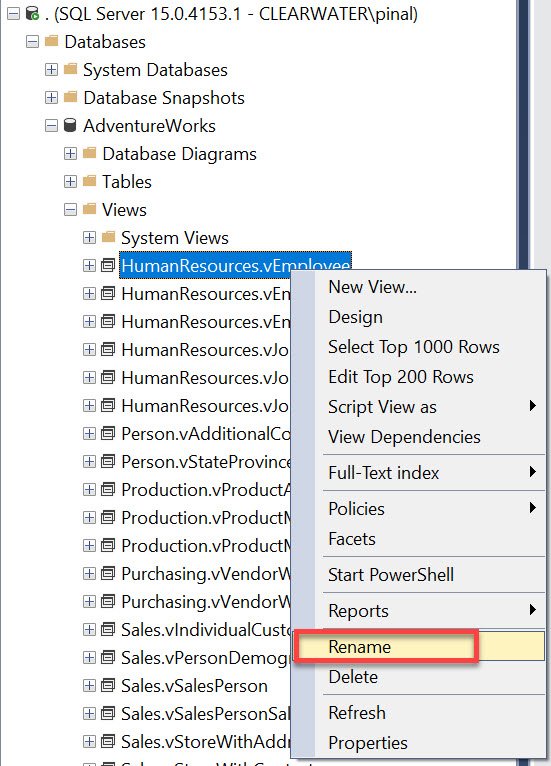
In SSMS, inspect Rename under the intended database Views folder. Graphical execution does not remove dependency concerns. It is not inherently safer than the T-SQL operation.
- In Object Explorer, expand the intended database and its Views folder.
- Right-click the specific view and choose Rename after reviewing its dependencies.
- Enter the approved new name, then update affected references and validate the application.
Microsoft discourages sp_rename for procedures, functions, views and triggers because module definitions retain the old name. References are not rewritten. Dropping and recreating can lose grants, indexes and metadata. It can also affect availability.
Preserve the definition and required metadata while planning dependencies, grants and application validation. Handle schema-bound dependencies specifically. The read-only inventory can return NULL for unavailable or encrypted definitions.
Reference: Module rename limitations.
Related reading
- SQL in Sixty Seconds
- Queries Using Specific Index – SQL in Sixty Seconds #180
- Read Only Tables – Is it Possible? – SQL in Sixty Seconds #179
- One Scan for 3 Count Sum – SQL in Sixty Seconds #178
- SUM(1) vs COUNT(1) Performance Battle – SQL in Sixty Seconds #177
- COUNT(*) and COUNT(1): Performance Battle – SQL in Sixty Seconds #176
A view rename is not an automatic dependency rewrite, it is an object-name change with metadata consequences.
Published by Pinal Dave on SQLAuthority. More of my work at pinaldave.com.
Discover more from SQL Authority with Pinal Dave
Subscribe to get the latest posts sent to your email.