
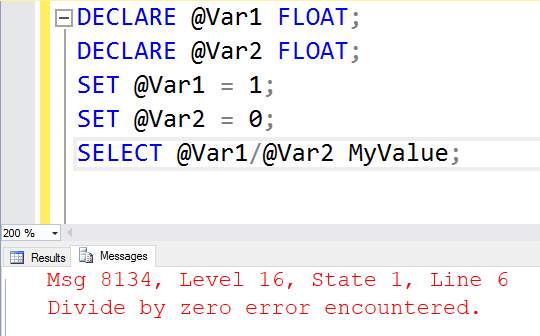
Error 8134 means an expression tried to divide by zero. I choose the intended undefined-result behavior before guarding the division.

DECLARE @Numerator decimal(12,2) = 1,
        @Denominator decimal(12,2) = 0;
BEGIN TRY
    SELECT @Numerator / @Denominator AS FailingValue;
END TRY
BEGIN CATCH
    SELECT ERROR_NUMBER() AS ErrorNumber, ERROR_MESSAGE() AS ErrorMessage;
END CATCH;
SELECT @Numerator / NULLIF(@Denominator, 0) AS NullIfValue;
SELECT CASE WHEN @Denominator = 0 THEN NULL
            ELSE @Numerator / @Denominator END AS CaseValue;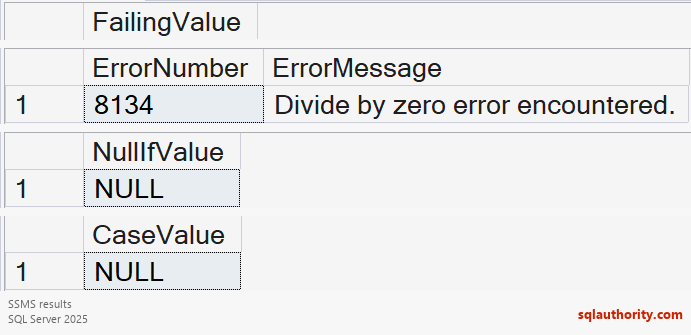
The first statement reproduces the error inside TRY/CATCH. NULLIF returns NULL when its two arguments are equal, so the second ratio has a NULL denominator and returns NULL. The third statement explicitly chooses NULL for the zero case.
Choose the result according to the meaning of the calculation. An undefined rate is usually not the same as a rate of zero. Add COALESCE only if the business rule explicitly requires a replacement value. Decimal inputs also avoid accidental integer division, such as 1 / 2 returning 0.
This CASE protects a simple scalar denominator. More complex expressions, especially aggregates, can be evaluated before CASE chooses a branch. I protect the division itself with NULLIF where appropriate. I keep normal error-reporting settings instead of suppressing warnings across the session.
Reference: NULLIF.
An undefined ratio is not automatically zero, it is a result whose business meaning must be decided.
Published by Pinal Dave on SQLAuthority. More of my work at pinaldave.com.
Discover more from SQL Authority with Pinal Dave
Subscribe to get the latest posts sent to your email.


10 Comments. Leave new
Hi,
Please check the below code to avoid 8134 error.
DECLARE @Var1 FLOAT;
DECLARE @Var2 FLOAT;
SET @Var1 = 1;
SET @Var2 = ”; –0, 1, NULL,”
IF(@Var2=0)
SELECT NULL;
ELSE
SELECT @Var1/@Var2;
Regards,
SubbaReddy AV
That should work as well. Thanks for sharing.
begin try
select @var1/@var2
end try
begin catch
if error_number() = 8134 select null
else select error_number()
end catch
A solution
DECLARE @Var1 FLOAT;
DECLARE @Var2 FLOAT;
SET @Var1 = 1;
SET @Var2 = 0;
SELECT nullif((@Var1/@Var2),0);
Disclaimer: I don’t recommend this, I’d rather see it handled via code, but it works.
SET ARITHABORT OFF;
SET ANSI_WARNINGS OFF;
DECLARE @Var1 FLOAT = 1, @Var2 FLOAT = 0;
SELECT @Var1 / @Var2;
DECLARE @Var1 FLOAT;
DECLARE @Var2 FLOAT;
SET @Var1 = 1;
SET @Var2 = 0;
SELECT @Var1/IIF(@Var20,@Var2,Null)MyValue;
Good one.
I don’t think returning NULL will solve the problem. For example what will happen if we get divided by zero exception in aggregate function?
In that case as well, it should be handled. Either send NULL and send proper error message
it works well… Great to learn