
To change join type for a query, add one hint to its OPTION clause. The hint is HASH JOIN, LOOP JOIN or MERGE JOIN. SQL Server picks a join type by itself, and the choice is sound for most queries. A hint lets you see what the other types cost, or fix a plan that went wrong.

The Three Join Types
A nested loops join takes each row of one input and looks for matches in the other. It is fast when the first input is small and the second has an index on the join column. A hash join builds a hash table from one input and probes it with the other. It suits large inputs that are not sorted, and it needs memory. A merge join reads two inputs that are already sorted on the join column and walks through them together.
The demo database JoinTypeDemo holds 5,000 customers and 200,000 orders. Twenty customers live in Alaska, and the rest live on the mainland. The orders have an index on the customer ID. The query adds up the order amounts for one region. The cleanup at the end drops the database.
IF DB_ID(N'JoinTypeDemo') IS NULL CREATE DATABASE JoinTypeDemo;
GO
USE JoinTypeDemo;
GO
DROP TABLE IF EXISTS dbo.Orders;
DROP TABLE IF EXISTS dbo.Customer;
CREATE TABLE dbo.Customer (CustomerID int NOT NULL CONSTRAINT PK_Customer PRIMARY KEY, FullName nvarchar(60) NOT NULL, Region nvarchar(10) NOT NULL);
CREATE TABLE dbo.Orders (OrderID int NOT NULL CONSTRAINT PK_Orders PRIMARY KEY, CustomerID int NOT NULL, Amount decimal(10,2) NOT NULL);
WITH n AS (SELECT TOP (200000) ROW_NUMBER() OVER (ORDER BY (SELECT NULL)) AS i FROM sys.all_columns AS a CROSS JOIN sys.all_columns AS b)
INSERT INTO dbo.Customer (CustomerID, FullName, Region)
SELECT i, CONCAT(N'Customer ', i), CASE WHEN i <= 20 THEN N'Alaska' ELSE N'Mainland' END FROM n WHERE i <= 5000;
WITH n AS (SELECT TOP (200000) ROW_NUMBER() OVER (ORDER BY (SELECT NULL)) AS i FROM sys.all_columns AS a CROSS JOIN sys.all_columns AS b)
INSERT INTO dbo.Orders (OrderID, CustomerID, Amount)
SELECT i, i % 5000 + 1, (i % 300) + 0.5 FROM n;
CREATE INDEX IX_Orders_Customer ON dbo.Orders (CustomerID) INCLUDE (Amount);
ALTER TABLE dbo.Orders ADD CONSTRAINT FK_Orders_Customer FOREIGN KEY (CustomerID) REFERENCES dbo.Customer (CustomerID);
Change Join Type for a Query With Each Hint
You can change join type for a query without touching the tables. The next script runs the query for both regions. It runs once with no hint, and once for each join hint. A hint in the OPTION clause applies to every join in the query. The comment at the end of each statement is a label that a later query reads.
SELECT SUM(o.Amount) AS Total FROM dbo.Customer AS c INNER JOIN dbo.Orders AS o ON o.CustomerID = c.CustomerID WHERE c.Region = N'Alaska'; -- jt: Alaska, no hint
GO
SELECT SUM(o.Amount) AS Total FROM dbo.Customer AS c INNER JOIN dbo.Orders AS o ON o.CustomerID = c.CustomerID WHERE c.Region = N'Alaska' OPTION (HASH JOIN); -- jt: Alaska, HASH JOIN
GO
SELECT SUM(o.Amount) AS Total FROM dbo.Customer AS c INNER JOIN dbo.Orders AS o ON o.CustomerID = c.CustomerID WHERE c.Region = N'Alaska' OPTION (LOOP JOIN); -- jt: Alaska, LOOP JOIN
GO
SELECT SUM(o.Amount) AS Total FROM dbo.Customer AS c INNER JOIN dbo.Orders AS o ON o.CustomerID = c.CustomerID WHERE c.Region = N'Alaska' OPTION (MERGE JOIN); -- jt: Alaska, MERGE JOIN
GO
SELECT SUM(o.Amount) AS Total FROM dbo.Customer AS c INNER JOIN dbo.Orders AS o ON o.CustomerID = c.CustomerID WHERE c.Region = N'Alaska' OPTION (HASH JOIN, LOOP JOIN); -- jt: Alaska, HASH JOIN and LOOP JOIN
GO
SELECT SUM(o.Amount) AS Total FROM dbo.Orders AS o INNER LOOP JOIN dbo.Customer AS c ON o.CustomerID = c.CustomerID WHERE c.Region = N'Alaska'; -- jt: Alaska, INNER LOOP JOIN in FROM, Orders first
GO
SELECT SUM(o.Amount) AS Total FROM dbo.Customer AS c INNER JOIN dbo.Orders AS o ON o.CustomerID = c.CustomerID WHERE c.Region = N'Mainland'; -- jt: Mainland, no hint
GO
SELECT SUM(o.Amount) AS Total FROM dbo.Customer AS c INNER JOIN dbo.Orders AS o ON o.CustomerID = c.CustomerID WHERE c.Region = N'Mainland' OPTION (HASH JOIN); -- jt: Mainland, HASH JOIN
GO
SELECT SUM(o.Amount) AS Total FROM dbo.Customer AS c INNER JOIN dbo.Orders AS o ON o.CustomerID = c.CustomerID WHERE c.Region = N'Mainland' OPTION (LOOP JOIN); -- jt: Mainland, LOOP JOIN
GO
SELECT SUM(o.Amount) AS Total FROM dbo.Customer AS c INNER JOIN dbo.Orders AS o ON o.CustomerID = c.CustomerID WHERE c.Region = N'Mainland' OPTION (MERGE JOIN); -- jt: Mainland, MERGE JOIN
Now read the join type and the logical reads of each query from the plan cache. The join type comes from the first Inner Join operator of the cached plan. The permission needed is VIEW SERVER STATE, which is VIEW SERVER PERFORMANCE STATE on SQL Server 2022 and later.
WITH XMLNAMESPACES (DEFAULT 'http://schemas.microsoft.com/sqlserver/2004/07/showplan')
SELECT REPLACE(REPLACE(SUBSTRING(st.text, CHARINDEX(N'-- jt: ', st.text) + 7, 60), CHAR(13), N''), CHAR(10), N'') AS Query,
       qp.query_plan.value('(//RelOp[@LogicalOp="Inner Join"]/@PhysicalOp)[1]', 'nvarchar(30)') AS JoinInPlan,
       qs.last_logical_reads AS LogicalReads
FROM sys.dm_exec_query_stats AS qs
CROSS APPLY sys.dm_exec_sql_text(qs.sql_handle) AS st
CROSS APPLY sys.dm_exec_query_plan(qs.plan_handle) AS qp
WHERE st.text LIKE N'%-- jt: %' AND st.text NOT LIKE N'%dm_exec_query_stats%'
ORDER BY qs.creation_time, Query;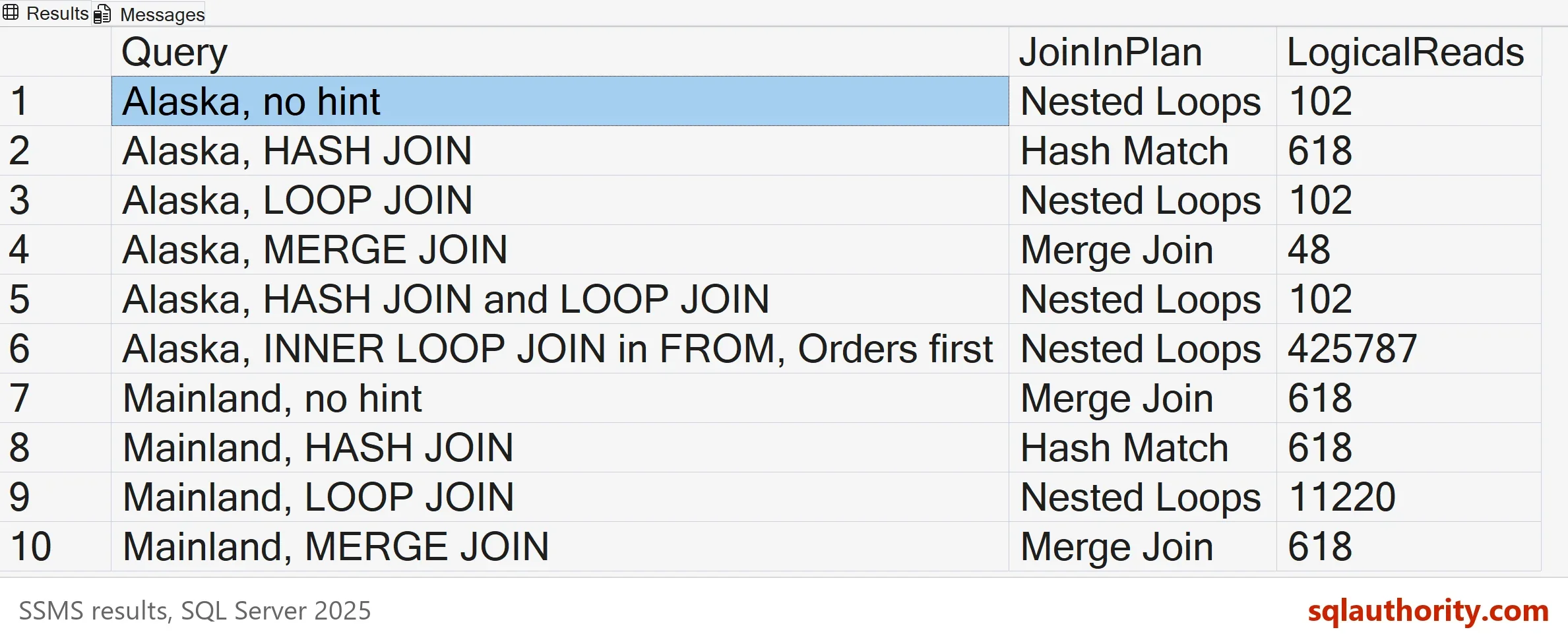
| Query | JoinInPlan | LogicalReads |
|---|---|---|
| Alaska, no hint | Nested Loops | 102 |
| Alaska, HASH JOIN | Hash Match | 618 |
| Alaska, LOOP JOIN | Nested Loops | 102 |
| Alaska, MERGE JOIN | Merge Join | 48 |
| Alaska, HASH JOIN and LOOP JOIN | Nested Loops | 102 |
| Alaska, INNER LOOP JOIN in FROM, Orders first | Nested Loops | 425787 |
| Mainland, no hint | Merge Join | 618 |
| Mainland, HASH JOIN | Hash Match | 618 |
| Mainland, LOOP JOIN | Nested Loops | 11220 |
| Mainland, MERGE JOIN | Merge Join | 618 |
What the Numbers Say
For the Alaska filter, which returns 800 orders, SQL Server chose nested loops on its own and read 102 pages. The HASH JOIN hint read 618 pages, six times as many. For the mainland filter, SQL Server chose a merge join and read 618 pages. The LOOP JOIN hint read 11,220 pages, about eighteen times as many. Each join type wins in a different case, and no type is the most efficient in general.
The MERGE JOIN hint on the Alaska filter read only 48 pages, fewer than the optimizer chose. That does not make the hint better. The optimizer picks by estimated cost, and the cost includes more than page reads. Compare reads, CPU and elapsed time before you keep a hint.
Query Hints Versus Join Hints
A hint in the OPTION clause names a join type for every join in the query. The optimizer still chooses the join order. A join hint in the FROM clause, such as INNER LOOP JOIN, sets the type for that join. It also fixes the join order as you wrote it. The sixth query writes the orders table first and the customer table second. The result is nested loops that read 425,787 pages, against 102 for the same query with no hint.
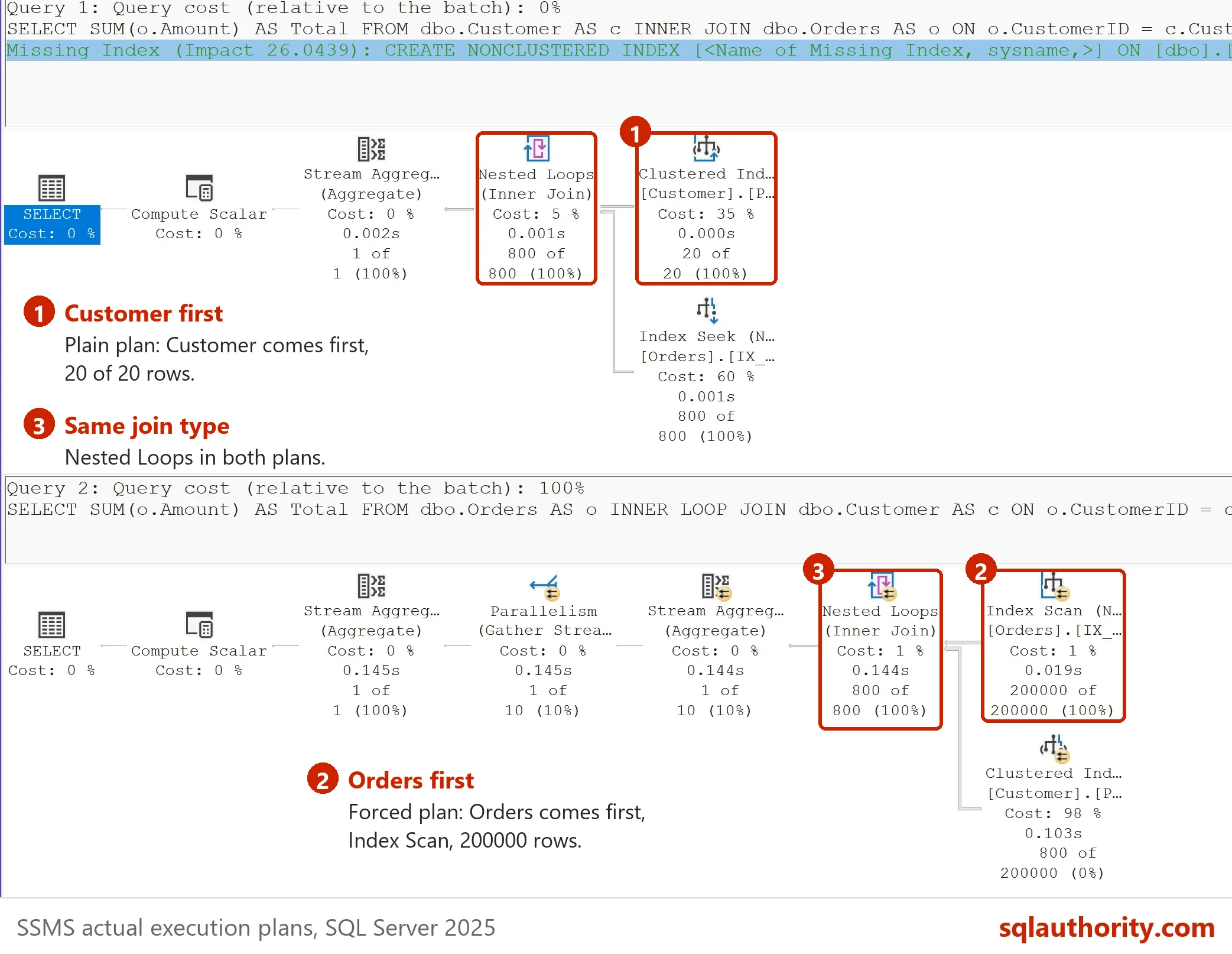
Several hints are allowed in one OPTION clause. With HASH JOIN and LOOP JOIN together, the optimizer picks the cheaper of the two. For the Alaska filter it picked nested loops and read 102 pages. SQL Server uses the cheapest of the allowed types, by its own estimates.
When SQL Server Picks a Bad Join
The optimizer chooses from estimates. A bad join follows from a bad estimate. Outdated statistics, a filter on correlated columns, or an unrepresentative parameter value can cause one. A hint does not fix the estimate. It forces a choice that holds for the data you tested.
A hint also stays in the query text. It forces the join type on every compile until someone removes it. If the data grows, the forced join can turn from fast to slow. For queries whose row counts swing between runs, an adaptive join lets SQL Server decide at run time. It is explained in Adaptive Threshold Rows: How an Adaptive Join Chooses.
Are Hints a Good Idea?
You could argue that join hints are always a mistake, because they freeze a choice for today’s data. That is a fair rule for production code. As a test tool, a hint is useful. Running one query with each hint shows what the optimizer rejected and what each choice costs. Fix the statistics and the indexes first, and keep the hint as a recorded exception.
What to Remember
To change join type for a query, use HASH JOIN, LOOP JOIN or MERGE JOIN in the OPTION clause. Compare logical reads and elapsed time with and without the hint. Avoid join hints in the FROM clause unless you also want the join order fixed. Run the cleanup script when you finish.
USE master;
GO
IF DB_ID(N'JoinTypeDemo') IS NOT NULL
BEGIN
    ALTER DATABASE JoinTypeDemo SET SINGLE_USER WITH ROLLBACK IMMEDIATE;
    DROP DATABASE JoinTypeDemo;
END;
A join hint is not an optimization, it is a decision that stays after the data changes.
Published by Pinal Dave on SQLAuthority. More of my work at pinaldave.com.
Discover more from SQL Authority with Pinal Dave
Subscribe to get the latest posts sent to your email.



3 Comments. Leave new
Hello Pinal Sir,
In which case SQL server will use bad join or when it’s possible that the performance will be degraded?
Thank you, Sir!
I am a rookie to the execution plan. I’d like to know which join you list here is more efficient? If you can point me to your previous articles that would be great!
Thanks again!
Yvonne
Hi Pinal,
do you think OPTION will “force” specific execution plan till option is removed from query?
Thank you
Alex