Growing varchar updates quietly turn a small table into a big one. A row that starts nearly empty needs room later, and when the page has none, SQL Server splits it.

The table that was fine on day one
Picture a Notes column. Every row is created with an empty note. Months later, support staff start typing into it, and a few hundred characters land in each row. Nobody changes the schema. Yet the table is suddenly several times larger and the nightly job crawls.
Nothing is wrong with the insert. The trouble is that a varchar value takes only the bytes it needs. An empty one costs almost nothing, so SQL Server packs many rows on each 8 KB page. When the note grows, the row no longer fits where it sits.
Here the table has a clustered index, so the rows live in order on leaf pages. A heap behaves differently, with forwarded records. That is another story. Today I want to watch the clustered case.
Watch the pages before and after
The demo inserts 2,000 rows with empty notes and counts the leaf pages. The first query shows the pages and how full they are. The second shows how many leaf pages were allocated so far.
DROP TABLE IF EXISTS dbo.GrowingNotes;
CREATE TABLE dbo.GrowingNotes (Id int PRIMARY KEY CLUSTERED, Notes varchar(800) NOT NULL);
INSERT dbo.GrowingNotes SELECT value, '' FROM GENERATE_SERIES(1, 2000);

SELECT N'Before growth' AS Stage, index_level, page_count, avg_page_space_used_in_percent
FROM sys.dm_db_index_physical_stats(DB_ID(), OBJECT_ID(N'dbo.GrowingNotes'), 1, NULL, 'DETAILED')
WHERE index_level = 0 AND alloc_unit_type_desc = N'IN_ROW_DATA';

SELECT leaf_allocation_count AS AllocationsBefore
FROM sys.dm_db_index_operational_stats(DB_ID(), OBJECT_ID(N'dbo.GrowingNotes'), 1, NULL);
Now every note grows to 700 characters, and we measure again.
UPDATE dbo.GrowingNotes SET Notes = REPLICATE('x', 700);

SELECT N'After growth' AS Stage, index_level, page_count, avg_page_space_used_in_percent
FROM sys.dm_db_index_physical_stats(DB_ID(), OBJECT_ID(N'dbo.GrowingNotes'), 1, NULL, 'DETAILED')
WHERE index_level = 0 AND alloc_unit_type_desc = N'IN_ROW_DATA';

SELECT leaf_allocation_count AS AllocationsAfter
FROM sys.dm_db_index_operational_stats(DB_ID(), OBJECT_ID(N'dbo.GrowingNotes'), 1, NULL);
One more query, for contrast. A char(800) column holds 800 bytes even when empty. A varchar(800) holds none. That difference is exactly why varchar is so tempting, and why it can bite.
DECLARE @fixed char(800) = '', @variable varchar(800) = '';
SELECT DATALENGTH(@fixed) AS FixedPayloadBytes, DATALENGTH(@variable) AS VariablePayloadBytes;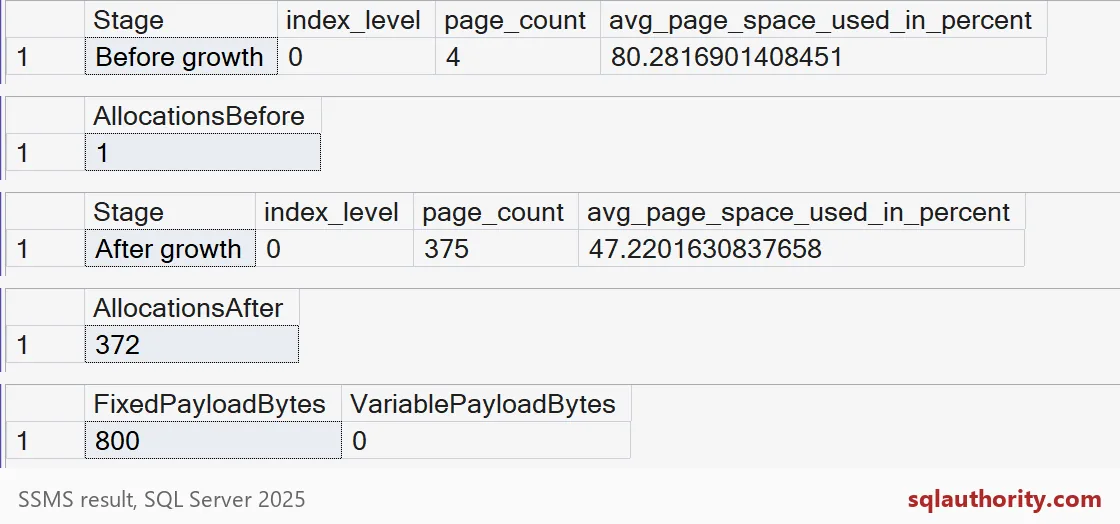
Read the grids from top to bottom. Before the update, the leaf level has 4 pages, about 80 percent full. After it, 375 pages, under half full. Allocations went from 1 to 372, so nearly every page in the final table was allocated during that one update. The last grid shows the char versus varchar payload: 800 bytes against 0.
Why half-empty pages
Seven hundred bytes times 2,000 rows is about 1.4 MB. Packed tightly, that fits in far fewer than 375 pages. But a split moves about half the rows to a new page and leaves both pages partly empty. Do that again and again during one big update, and you pay for space you never fill.

Does a lower fill factor save you?
A lower fill factor leaves free space on each page at rebuild time. Let me try 70 percent. I empty the notes, rebuild at 70, then grow them again.
UPDATE dbo.GrowingNotes SET Notes = '';
ALTER INDEX ALL ON dbo.GrowingNotes REBUILD WITH (FILLFACTOR = 70);

SELECT N'Rebuilt at 70' AS Stage, page_count, avg_page_space_used_in_percent
FROM sys.dm_db_index_physical_stats(DB_ID(), OBJECT_ID(N'dbo.GrowingNotes'), 1, NULL, 'DETAILED')
WHERE index_level = 0 AND alloc_unit_type_desc = N'IN_ROW_DATA';

UPDATE dbo.GrowingNotes SET Notes = REPLICATE('x', 700);

SELECT N'Grown again' AS Stage, page_count, avg_page_space_used_in_percent
FROM sys.dm_db_index_physical_stats(DB_ID(), OBJECT_ID(N'dbo.GrowingNotes'), 1, NULL, 'DETAILED')
WHERE index_level = 0 AND alloc_unit_type_desc = N'IN_ROW_DATA';
On my run the rebuild gave 5 pages, and the growth still ended at 372. Each row grows by 700 bytes, and the reserve was only a handful of bytes per row. The reserve is finite. It only helps when growth is small or spread over a long time.
Last step: rebuild at 100 percent and cleanup. The pages drop to 182 and are about 97 percent full. So the splits had doubled the table.
ALTER INDEX ALL ON dbo.GrowingNotes REBUILD WITH (FILLFACTOR = 100);

SELECT N'Rebuilt full' AS Stage, page_count, avg_page_space_used_in_percent
FROM sys.dm_db_index_physical_stats(DB_ID(), OBJECT_ID(N'dbo.GrowingNotes'), 1, NULL, 'DETAILED')
WHERE index_level = 0 AND alloc_unit_type_desc = N'IN_ROW_DATA';
GO
DROP TABLE IF EXISTS dbo.GrowingNotes;
What to do on your own server
Ask one question when you design a varchar column: how big will this value be a year from now? If a payload will certainly be large, plan for it. Keep it in its own table, or accept rows that start bigger. Then measure with your own table. Compare page count and page fullness before and after a big update. Your numbers will differ from mine, so use them as a shape.
Be careful with DETAILED mode on a big table, because it reads every page. Use it on a copy, or at a quiet hour.
Next time a table grows faster than its row count, look at how the rows changed after the insert.
A compact insert is not a compact lifetime, it is only the starting size.
Published by Pinal Dave on SQLAuthority. More of my work at pinaldave.com.
Discover more from SQL Authority with Pinal Dave
Subscribe to get the latest posts sent to your email.