Line endings hide in plain sight. A value can end its lines with CHAR(13), CHAR(10), or both. Your split, compare, or import will care which one it is.

Why a clean-looking value fails a compare
A file arrives from another system. You load it, and a lookup for “second” finds nothing. In the grid the value looks perfect. The problem is one character you cannot see.
CHAR(13) is a carriage return, CR. CHAR(10) is a line feed, LF. Windows files usually use the pair, CRLF. Other systems use LF alone, and some old ones use CR alone. A result grid hides all of them, so ask SQL Server to show you.
See the characters first
This demo stores the same two words with three different line endings. CHARINDEX tells you where each character sits, and a double REPLACE swaps them for visible markers. A zero means the character was not found.
DROP TABLE IF EXISTS #LineDemo;
GO
CREATE TABLE #LineDemo (ItemId int PRIMARY KEY, Body varchar(200));

INSERT #LineDemo VALUES
(1, 'first' + CHAR(13) + CHAR(10) + 'second'),
(2, 'first' + CHAR(10) + 'second'),
(3, 'first' + CHAR(13) + 'second');

SELECT ItemId,
       CHARINDEX(CHAR(13), Body) AS FirstCR,
       CHARINDEX(CHAR(10), Body) AS FirstLF,
       REPLACE(REPLACE(Body, CHAR(13), '[CR]'), CHAR(10), '[LF]') AS VisibleText
FROM #LineDemo
ORDER BY ItemId;
Row 1 has CR at position 6 and LF at position 7, side by side: a CRLF pair. Row 2 has only LF. Row 3 has only CR. Same words, three different values.
Normalize in the right order
To end up with LF only, replace the CRLF pair first, then any CR that is left. If you replace the single CR first, the pair turns into two line breaks. The next query counts lines both ways.
SELECT d.ItemId,
       (SELECT COUNT(*) FROM STRING_SPLIT(
            REPLACE(d.Body, CHAR(13), CHAR(10)), CHAR(10))) AS LinesWrongOrder,
       (SELECT COUNT(*) FROM STRING_SPLIT(
            REPLACE(REPLACE(d.Body, CHAR(13) + CHAR(10), CHAR(10)), CHAR(13), CHAR(10)), CHAR(10))) AS LinesRightOrder
FROM #LineDemo AS d
ORDER BY d.ItemId;
The wrong order reports three lines for row 1, because an empty line sneaked in between CR and LF. The right order reports two for every row. Preview an expression like this in a SELECT before you run an UPDATE on real data.
Now I normalize the demo table for real and split it. STRING_SPLIT takes a single-character separator. The third argument, the ordinal, keeps the original order of the pieces. It needs SQL Server 2022 or later.
UPDATE #LineDemo
SET Body = REPLACE(REPLACE(Body, CHAR(13) + CHAR(10), CHAR(10)), CHAR(13), CHAR(10));

SELECT d.ItemId, x.LineCount
FROM #LineDemo AS d
CROSS APPLY (SELECT COUNT_BIG(*) AS LineCount FROM STRING_SPLIT(d.Body, CHAR(10))) AS x
ORDER BY d.ItemId;

SELECT d.ItemId, s.ordinal, s.value
FROM #LineDemo AS d
CROSS APPLY STRING_SPLIT(d.Body, CHAR(10), 1) AS s
ORDER BY d.ItemId, s.ordinal;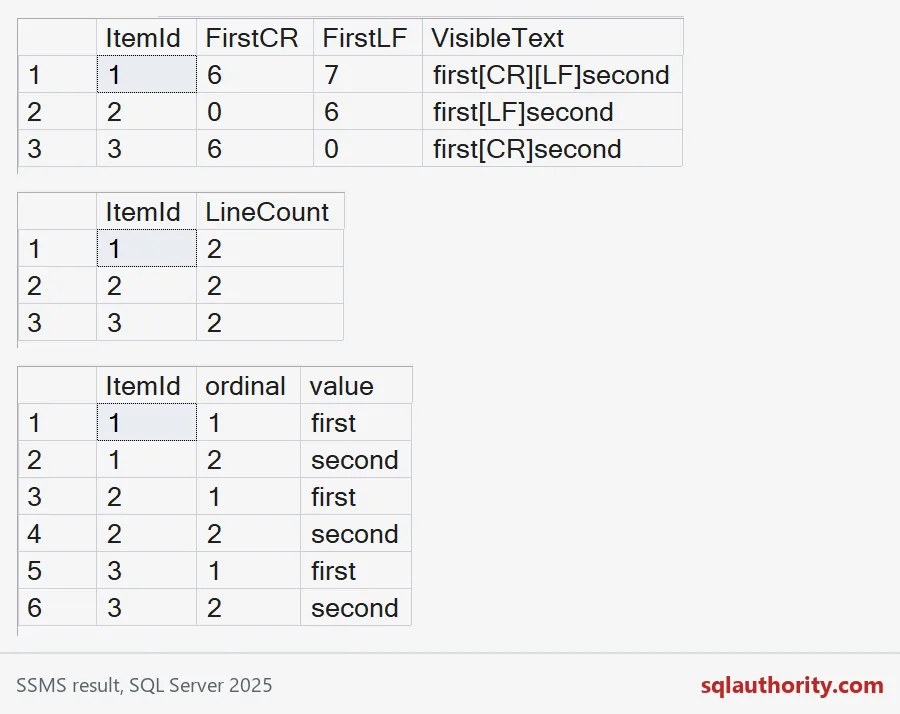
Every row now has two lines, first and second, in order. Decide in advance whether empty lines count. Consecutive separators and a final separator create empty pieces, and your report needs a rule for them.

Check again with the same markers
Run the marker query once more. Row 1 no longer shows [CR][LF], and rows 1 to 3 should now read identically.
SELECT ItemId, REPLACE(REPLACE(Body, CHAR(13), '[CR]'), CHAR(10), '[LF]') AS VisibleText
FROM #LineDemo
ORDER BY ItemId;
The leftover CR on the last field
The sneakiest version can appear when a file with CRLF endings is read as if LF were the terminator. Each last field then keeps a trailing CR. It looks fine, but it never matches. The demo simulates one such field.
DECLARE @LastField varchar(20) = 'second' + CHAR(13);

SELECT LEN(@LastField) AS Length,
       CASE WHEN @LastField = 'second' THEN 'match' ELSE 'no match' END AS RawCompare,
       CASE WHEN TRIM(CHAR(13) FROM @LastField) = 'second' THEN 'match' ELSE 'no match' END AS TrimmedCompare;
The raw value is seven characters long and does not match. After trimming the CR, it matches. When you import a file, check the last column for a stray CR, and set the loader’s row terminator on purpose.
One caution. Normalizing changes the stored value. If you need exact bytes for a hash, a signature, or a file comparison, keep the original and do the cleanup in a view or a second column. Then write down the contract: which endings you accept, what you store, and where the cleanup happens, once.
DROP TABLE IF EXISTS #LineDemo;Make the invisible visible first, and the fix is usually one REPLACE away.
A line ending is not invisible decoration, it is stored data.
Published by Pinal Dave on SQLAuthority. More of my work at pinaldave.com.
Discover more from SQL Authority with Pinal Dave
Subscribe to get the latest posts sent to your email.