A dynamic ORDER BY is safe when the sort column comes from a short approved list. The user picks a name, you check it against the list, and only then does it touch the SQL string. Values still travel as parameters.

Why ORDER BY is the awkward one
Parameters work for values. They do not work for column names. You cannot write ORDER BY @SortColumn and expect a sort by that column. So many grids that let users click a header end up gluing the header name straight into a string. That is where trouble starts.
Imagine a grid on an internal screen. A curious user edits the request and sends a sort name that is not a column at all. If the code trusts it, that text becomes part of your statement. First, a small table to play with.
DROP TABLE IF EXISTS dbo.SortDemo;
CREATE TABLE dbo.SortDemo (Id int PRIMARY KEY, Name nvarchar(50), Amount decimal(12,2));
INSERT dbo.SortDemo VALUES (1, N'Alpha', 10), (2, N'Beta', 20), (3, N'Gamma', 20);
See the bad statement without running it
The next block only builds statements and shows them. Nothing runs. The first column is what naive concatenation produces for a hostile sort name. The second shows what QUOTENAME does to the same input.
DECLARE @SortColumn nvarchar(128) = N'Amount; DROP TABLE dbo.SortDemo';

SELECT N'SELECT Id, Name, Amount FROM dbo.SortDemo ORDER BY ' + @SortColumn AS NaiveStatement,
       N'SELECT Id, Name, Amount FROM dbo.SortDemo ORDER BY ' + QUOTENAME(@SortColumn) AS QuotedStatement;
The naive statement contains a second command after the semicolon. The quoted one wraps everything in square brackets, so it becomes one odd column name, and the query would fail instead of running the extra command. That helps, but QUOTENAME only delimits an identifier. It does not decide whether the identifier is allowed. The approved list does that job.
Check the list, then build the statement
Here is the whole pattern as a procedure. Three rules: the column must be on the list, the direction must be ASC or DESC, and the amount filter stays a real parameter. Id is a tie breaker, so rows with equal amounts always come back in the same order.
CREATE OR ALTER PROCEDURE dbo.SortedList
    @SortColumn sysname, @Direction varchar(20), @MinAmount decimal(12,2)
AS
BEGIN
    SET NOCOUNT ON;
    IF @SortColumn IS NULL OR @SortColumn NOT IN (N'Id', N'Name', N'Amount')
        THROW 50000, N'Choose a supported sort column.', 1;
    IF @Direction IS NULL OR @Direction NOT IN ('ASC', 'DESC')
        THROW 50000, N'Choose ASC or DESC.', 1;

    DECLARE @sql nvarchar(max) =
        N'SELECT Id, Name, Amount FROM dbo.SortDemo WHERE Amount >= @MinAmount ORDER BY '
        + QUOTENAME(@SortColumn) + N' ' + @Direction + N', Id;';
    EXEC sys.sp_executesql @sql, N'@MinAmount decimal(12,2)', @MinAmount = @MinAmount;
END;
Now call it twice. The first call is a normal request. The second sends a hostile sort name.
EXEC dbo.SortedList @SortColumn = N'Amount', @Direction = 'DESC', @MinAmount = 0;

BEGIN TRY
    EXEC dbo.SortedList @SortColumn = N'Amount;SELECT 1', @Direction = 'DESC', @MinAmount = 0;
END TRY
BEGIN CATCH
    SELECT ERROR_NUMBER() AS RejectedInputError, ERROR_MESSAGE() AS RejectedInputMessage;
END CATCH;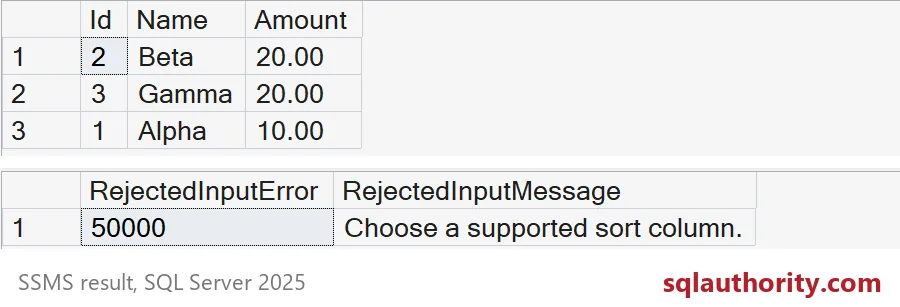
The good call returns Beta, Gamma, then Alpha. Beta and Gamma both have 20, so Id decides, and Beta comes first. The hostile call never reaches the query. It stops at the list with error 50000 and a message a user can understand.

Try the other inputs
EXEC dbo.SortedList @SortColumn = N'Name', @Direction = 'ASC', @MinAmount = 15;

BEGIN TRY
    EXEC dbo.SortedList @SortColumn = N'Name', @Direction = 'DESC; SELECT 1', @MinAmount = 0;
END TRY
BEGIN CATCH
    SELECT ERROR_NUMBER() AS ErrorNumber, ERROR_MESSAGE() AS Problem;
END CATCH;
The first call sorts by name and filters out Alpha, so you get Beta and Gamma. The second tries to sneak something into the direction. The direction check catches it, and the message says to choose ASC or DESC. I made the direction parameter wide enough to hold the junk, so the check sees the whole text. Also check NULL and empty input, because a missing value should fail the same way. And treat a saved screen preference like any other input. Storing it does not make it trusted.
A static alternative
If you only need two or three sort choices, you can skip dynamic SQL. A CASE expression picks the sort inside a normal query. Keep one CASE per data type, so each sort keeps its own type.
DECLARE @SortColumn nvarchar(20) = N'Name';

SELECT Id, Name, Amount
FROM dbo.SortDemo
ORDER BY CASE WHEN @SortColumn = N'Name' THEN Name END,
         CASE WHEN @SortColumn = N'Amount' THEN Amount END DESC,
         Id;
With Name chosen you get Alpha, Beta, Gamma. I like the CASE version for tiny lists and the approved-list version when there are many columns. Test the plans on real filters, then choose the simpler one that behaves.
Clean up
DROP PROCEDURE IF EXISTS dbo.SortedList;
DROP TABLE IF EXISTS dbo.SortDemo;
Next time a grid asks for a custom sort, make the list short and make it yours.
A sort name is not trusted SQL, it is an identifier to approve.
Published by Pinal Dave on SQLAuthority. More of my work at pinaldave.com.
Discover more from SQL Authority with Pinal Dave
Subscribe to get the latest posts sent to your email.