EXECUTE AS OWNER lets a stored procedure do work the caller is not allowed to do directly. That is its power and its danger. Let me show you both in a few small steps.

Why a procedure borrows the owner’s rights
Say a support person needs to log one action in a protected table. You do not want to give them rights on the table. So you wrap the insert in a stored procedure and mark it EXECUTE AS OWNER. The caller needs only permission to run the procedure.
It works well. It also means the procedure carries more authority than the person calling it. So every line inside deserves more care than usual.
Build a small demo
The demo uses a table, a user with no login called OwnerCaller, and one procedure. The procedure writes the identity it runs under into the table. OwnerCaller gets permission to run the procedure and nothing else. Everything is removed in the last block.
DROP PROCEDURE IF EXISTS dbo.RunOwnerOperation;
DROP TABLE IF EXISTS dbo.OwnerAudit;
DROP USER IF EXISTS OwnerCaller;
CREATE TABLE dbo.OwnerAudit (ActorUser sysname, ConnectionLogin sysname);
CREATE USER OwnerCaller WITHOUT LOGIN;
GO
CREATE PROCEDURE dbo.RunOwnerOperation
WITH EXECUTE AS OWNER
AS
BEGIN
    SET NOCOUNT ON;
    INSERT dbo.OwnerAudit VALUES (USER_NAME(), ORIGINAL_LOGIN());
    SELECT USER_NAME() AS ModuleUser;
END;
GO
GRANT EXECUTE ON dbo.RunOwnerOperation TO OwnerCaller;
Compare the identities during the call
Now act as OwnerCaller. Check whether the user can read the table directly, call the procedure, and check the identity again afterward. REVERT switches you back to yourself.
EXECUTE AS USER = 'OwnerCaller';
SELECT USER_NAME() AS CallerUser,
       HAS_PERMS_BY_NAME(N'dbo.OwnerAudit', N'OBJECT', N'SELECT') AS DirectReadAllowed;
EXEC dbo.RunOwnerOperation;
SELECT USER_NAME() AS AfterModuleUser;
REVERT;
SELECT ActorUser FROM dbo.OwnerAudit;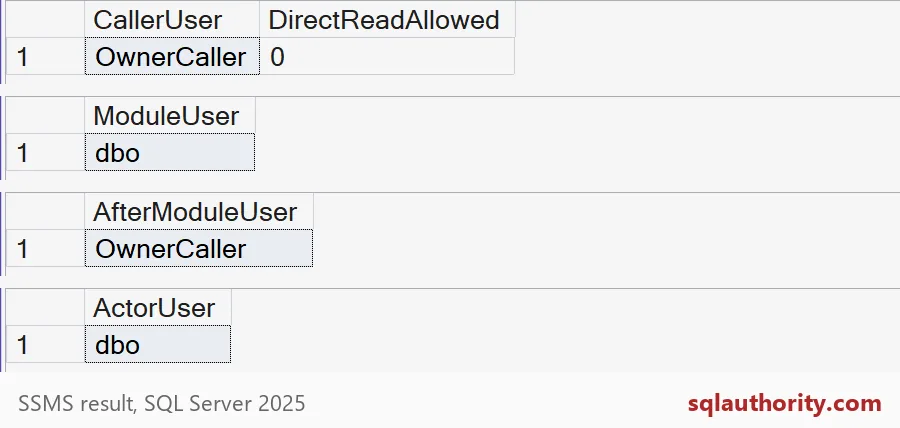
OwnerCaller shows DirectReadAllowed as 0. Inside the procedure, ModuleUser is dbo. After the call, the identity is back to OwnerCaller. The audit table stored dbo, not OwnerCaller. So an audit trail built on USER_NAME() records the borrowed identity, not the person who asked.
Who really connected?
The procedure also saved ORIGINAL_LOGIN(). That function answers a different question: which login opened the connection. This check compares the saved value with my own login, so no machine name shows up.
SELECT ActorUser,
       CASE WHEN ConnectionLogin = ORIGINAL_LOGIN() THEN 1 ELSE 0 END AS LoginIsMine
FROM dbo.OwnerAudit;
It returns dbo and 1. The actor is dbo, but the connection login is mine. If you need to know who did it, log ORIGINAL_LOGIN() too.
Where an owner procedure goes wrong
Here is the classic mistake. A procedure takes a table name from the caller and builds a query with it. Dynamic SQL inside an EXECUTE AS OWNER procedure runs with the owner’s rights too. So the caller can read any table through it.
CREATE OR ALTER PROCEDURE dbo.CountRowsIn @TableName sysname
WITH EXECUTE AS OWNER
AS
    EXEC (N'SELECT COUNT(*) AS RowsSeen FROM ' + @TableName);
GO
GRANT EXECUTE ON dbo.CountRowsIn TO OwnerCaller;
GO
EXECUTE AS USER = 'OwnerCaller';
BEGIN TRY
    SELECT COUNT(*) AS DirectCount FROM dbo.OwnerAudit;
END TRY
BEGIN CATCH
    SELECT ERROR_NUMBER() AS DirectError;
END CATCH;
EXEC dbo.CountRowsIn N'dbo.OwnerAudit';
REVERT;
The direct query fails with error 229, a permission denied. The procedure call succeeds and returns RowsSeen of 1. The caller never got rights on the table, yet it read the table. Keep parameters narrow, do not accept object names, and use QUOTENAME if you must build SQL.

Clean up and think about alternatives
First, remove everything the demo created.
DROP PROCEDURE IF EXISTS dbo.CountRowsIn;
DROP PROCEDURE IF EXISTS dbo.RunOwnerOperation;
DROP TABLE IF EXISTS dbo.OwnerAudit;
DROP USER IF EXISTS OwnerCaller;
When a procedure needs just one extra permission, signing it with a certificate is often a narrower answer. Never turn on broad database trust only to make a test pass. Review who owns the module, who can run it and every dynamic SQL path.
Test the caller, the module and the audit identity separately.
Owner execution is not caller identity, it is authority borrowed during a call.
Published by Pinal Dave on SQLAuthority. More of my work at pinaldave.com.
Discover more from SQL Authority with Pinal Dave
Subscribe to get the latest posts sent to your email.