A comma-separated column looks harmless until someone needs to search it, count it or join to it. Then every query turns into string surgery. Today I will turn that column into a proper child table, with a clean result you can verify before you drop anything.

Why the list in one column keeps hurting
A report once asked me, “How many products carry the tag red?” The table stored tags as one string per product. The first attempt used LIKE and returned a chair. The chair was tagged redwood.
One cell holding many values breaks the basic rule that a column holds one fact. You cannot put a key on it, you cannot enforce a valid tag, and every search reads every string. A child table fixes all three.
A product table with a messy Tags column
Real lists are never tidy. This table has spaces after commas, an empty piece, a repeated tag, a trailing comma and a NULL. Product 6 is the redwood chair. Run each block in order in one query window.
DROP TABLE IF EXISTS dbo.DemoProductTags;
DROP TABLE IF EXISTS dbo.DemoProducts;
CREATE TABLE dbo.DemoProducts (ProductId int PRIMARY KEY, ProductName varchar(30) NOT NULL, Tags varchar(100) NULL);
INSERT dbo.DemoProducts VALUES (1, 'Trail Shoe', 'red,blue, green'), (2, 'Rain Jacket', 'blue,,yellow, blue'),
 (3, 'Sun Hat', NULL), (4, 'Belt', 'black'), (5, 'Scarf', ' red ,wool,'), (6, 'Chair', 'redwood,oak');
Split first and look before you load
STRING_SPLIT turns one string into rows. I pass 1 as the third argument so it also returns the position of each piece. That argument needs SQL Server 2022 or later. On older versions you lose the position, so keep that in mind.
SELECT p.ProductId, s.ordinal AS Position, '[' + s.value + ']' AS RawPiece
FROM dbo.DemoProducts AS p
CROSS APPLY STRING_SPLIT(p.Tags, ',', 1) AS s
ORDER BY p.ProductId, s.ordinal;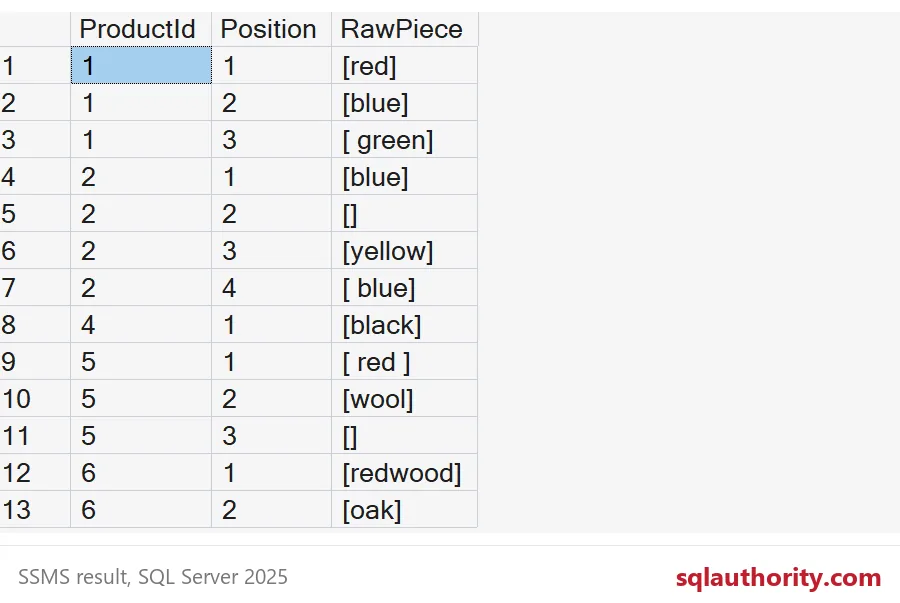
The square brackets make the trouble visible. You get 13 pieces. Product 1 gives [ green] with a leading space. Product 2 has an empty piece at position 2 and [ blue] at position 4. Product 5 has [ red ] and a trailing empty piece. Product 3 has a NULL list, and it produces no rows at all. Sun Hat simply vanishes from the split, which matters later.
Clean the pieces and load the child table
Trim every piece, skip the empty ones, and collapse repeats. The primary key on ProductId and Tag guards against duplicates from now on, so the load has to respect it. MIN of the position keeps the first place each tag appeared. The foreign key means a tag can never point at a product that does not exist.
CREATE TABLE dbo.DemoProductTags (
    ProductId int NOT NULL REFERENCES dbo.DemoProducts (ProductId),
    Tag varchar(30) NOT NULL,
    Position int NOT NULL,
    CONSTRAINT PK_DemoProductTags PRIMARY KEY (ProductId, Tag));

INSERT dbo.DemoProductTags (ProductId, Tag, Position)
SELECT p.ProductId, TRIM(s.value), MIN(s.ordinal)
FROM dbo.DemoProducts AS p
CROSS APPLY STRING_SPLIT(p.Tags, ',', 1) AS s
WHERE TRIM(s.value) <> ''
GROUP BY p.ProductId, TRIM(s.value);

SELECT ProductId, Tag, Position FROM dbo.DemoProductTags ORDER BY ProductId, Position;
Ten rows land in the child table, down from 13 pieces. Product 2 keeps blue at position 1 and yellow at position 3. The gap at position 2 is where the empty piece was. I leave gaps alone, since only the order matters.

Prove the new table is better
Back to the report question. The LIKE search on the old column returns three products: Trail Shoe, Scarf and Chair. The exact match on the child table returns two. The chair was never red. It was redwood.
SELECT ProductName FROM dbo.DemoProducts WHERE Tags LIKE '%red%' ORDER BY ProductId;

SELECT p.ProductName
FROM dbo.DemoProducts AS p
WHERE EXISTS (SELECT 1 FROM dbo.DemoProductTags AS t WHERE t.ProductId = p.ProductId AND t.Tag = 'red')
ORDER BY p.ProductId;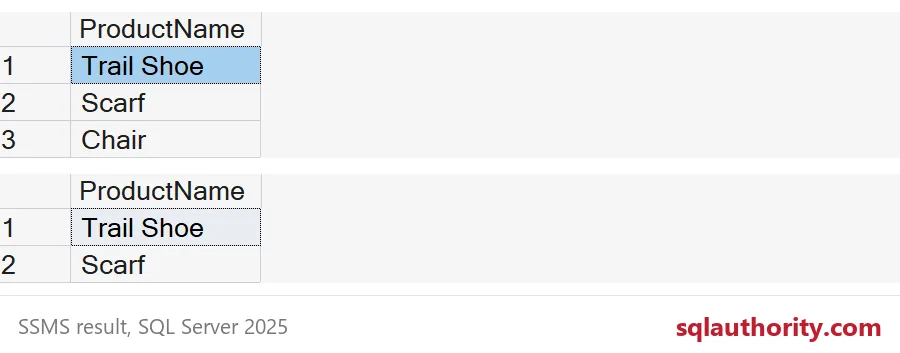
Before dropping the list, rebuild it from the new table and compare by eye. STRING_AGG puts the tags back together in position order. LEFT JOIN keeps Sun Hat in the output with a NULL list, which matches the NULL in the source.
SELECT p.ProductId, p.ProductName, STRING_AGG(t.Tag, ',') WITHIN GROUP (ORDER BY t.Position) AS RebuiltList
FROM dbo.DemoProducts AS p
LEFT JOIN dbo.DemoProductTags AS t ON t.ProductId = p.ProductId
GROUP BY p.ProductId, p.ProductName
ORDER BY p.ProductId;
Every rebuilt list should equal the old list, minus the junk: product 1 is red,blue,green, product 2 is blue,yellow and product 5 is red,wool. If a row differs in a way you did not expect, stop and look. Do not drop the old column yet.
Retire the old column last
Once the check passes and the application reads the child table, drop the Tags column in its own step. Anything that still writes comma lists will fail loudly, which is better than quietly drifting. The block below drops the column and then removes the demo tables.
ALTER TABLE dbo.DemoProducts DROP COLUMN Tags;
DROP TABLE IF EXISTS dbo.DemoProductTags;
DROP TABLE IF EXISTS dbo.DemoProducts;
Next time a column holds a list, split it, clean it and give it a table of its own.
A comma-separated column is not a design, it is a table waiting to be born.
Published by Pinal Dave on SQLAuthority. More of my work at pinaldave.com.
Discover more from SQL Authority with Pinal Dave
Subscribe to get the latest posts sent to your email.