Paging in SQL Server, done five ways against the same 1,200,000 rows, the same sort, and the same page size. Every completed method produced the same checksum at each depth, which checks consistency without proving row-by-row equality. Then I counted the reads.
Every application pages. Most do it the way the first tutorial showed them, and never measure it again.
So I measured it. Same table, same order, page 1, page 1,000 and page 20,000.
How we tested paging in SQL Server
A 1,200,000 row orders table on SQL Server 2025, with a nonclustered index on OrderDate. Sort order OrderDate descending, then OrderID descending, so every page is deterministic.
Page size 50. Three depths: page 1, page 1,000 (skip 49,950 rows) and page 20,000 (skip 999,950 rows).
Each method lives in its own stored procedure. Each was warmed once, then measured on logical reads and CPU. Five methods completed page 1 and their results checksummed the same. Four completed the deeper pages, with matching checksums again.
A matching checksum is a consistency check, not a proof that every row was identical. Double TOP didn’t finish the deeper pages at all. That’s a result, and it’s in the table.
The five methods
OFFSET and FETCH. The modern syntax. ORDER BY ... OFFSET @skip ROWS FETCH NEXT 50 ROWS ONLY.
ROW_NUMBER. The pre-2012 way. Number every row in a CTE, then filter on the number.
Keyset. Remember the last row of the previous page and seek past it. WHERE OrderDate < @lastDate OR (OrderDate = @lastDate AND OrderID < @lastId), then TOP (50).
Double TOP. The old trick: TOP (50) ... WHERE OrderID NOT IN (SELECT TOP (@skip) OrderID ...).
Cursor. A static cursor over the whole ordered set, FETCH ABSOLUTE to the start row, then fifty FETCH NEXT.
The ratings
| Method | Page 1 | Page 1,000 | Page 20,000 | Verdict |
|---|---|---|---|---|
| Keyset | 168 reads, 0 ms | 159 reads, 0 ms | 159 reads, 0 ms | Recommended |
| OFFSET / FETCH | 156 reads, 0 ms | 153,233 reads, 109 ms | 3,064,485 reads, 1,391 ms | Shallow pages only |
| ROW_NUMBER | 156 reads, 0 ms | 153,233 reads, 93 ms | 3,064,485 reads, 1,797 ms | Same as OFFSET |
| Double TOP | 156 reads, 0 ms | did not finish in 120 s | not attempted | Not acceptable |
| Cursor | 20,370 + 3,495,750 worktable, 3,875 ms | 20,370 + 3,495,750 worktable, 3,360 ms | 20,370 + 3,495,750 worktable, 3,375 ms | Not acceptable |
Every cell uses the same scope. Logical reads on the orders table from STATISTICS IO, plus the tempdb worktable where the cursor keeps its copy. CPU is that statement’s alone. The earlier draft of this table mixed in bookkeeping reads and a neighbouring query’s CPU. This one doesn’t.
What the numbers say
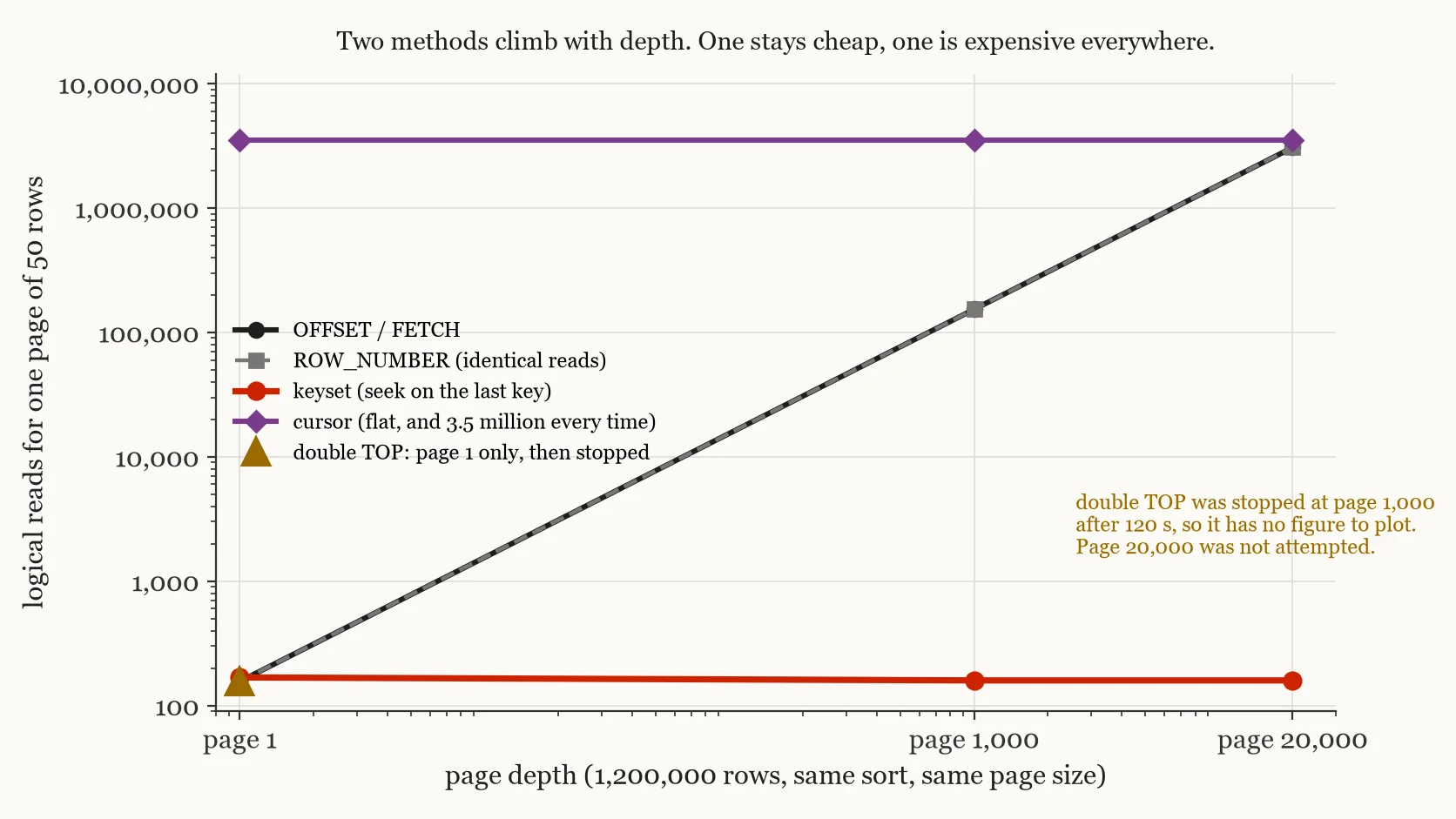
Keyset is flat. Page 1 and page 20,000 cost the same. The seek starts where the last page ended and reads 50 rows. That’s the whole trick.
OFFSET and ROW_NUMBER climb in a straight line. To skip 999,950 rows they read all 999,950 rows and threw them away. Page 20,000 cost about 19,600 times the reads of page 1.
They behave identically because the optimiser turns them into nearly the same plan. Choose OFFSET for the cleaner syntax and know what it does.
Double TOP is the one to remove from any code you still own. At page 1,000 it ran for 800 seconds and 10 million reads before I killed it the first time. On the rerun I gave it 120 seconds and it didn’t make it.
The cursor is a different kind of wrong. It costs 3.5 million reads on every page, including page 1. A static cursor copies the entire ordered result into tempdb before it fetches anything.
The catch with OFFSET
One thing the ratings table can’t show. OFFSET’s cost depends on which page the plan was compiled for.
The 3,064,485 reads above came from a plan compiled for page 1 and reused for page 20,000. It walks the date index and looks up every row on the way past.
I then forced a recompile at page 20,000 and captured the plan. The optimiser chose a parallel scan and a sort: 25,370 reads and 1,871 ms of CPU. Reused from page 1 in the same session, the lookup plan did 2,876,967 reads and 2,115 ms.
So the reads fall by a hundredfold and the CPU barely moves. Sorting a million rows costs what it costs. OFFSET is parameter sensitive in its reads, and expensive at depth either way.
What keyset costs you
It isn’t free. You can’t jump to page 20,000 directly, because you need the last row of page 19,999. It suits “next page” and infinite scroll, not “go to page 500”.
The sort key must be unique, which is why OrderID is in there. And the index has to match the sort, or the seek turns into a scan.
For a customer paging through their own orders, none of that matters. That’s most paging.
Recommendation
Keyset for anything a user scrolls through. OFFSET for admin screens where nobody goes past page ten, with an index that matches the ORDER BY.
Delete the double TOP wherever you find it. Delete the cursor twice.
If your application pages a large table and nobody has measured the method, that’s a two-hour job I’d enjoy.
Page depth is not a small number, it is the number of rows you agreed to read and discard.
Published by Pinal Dave on SQLAuthority. More of my work at pinaldave.com.
Discover more from SQL Authority with Pinal Dave
Subscribe to get the latest posts sent to your email.