This SQL Server 2025 cheat sheet puts the T-SQL I use every day on 4 printable pages. Every query on it ran on SQL Server 2025 before it went in. All the scripts are below, so you can copy them.
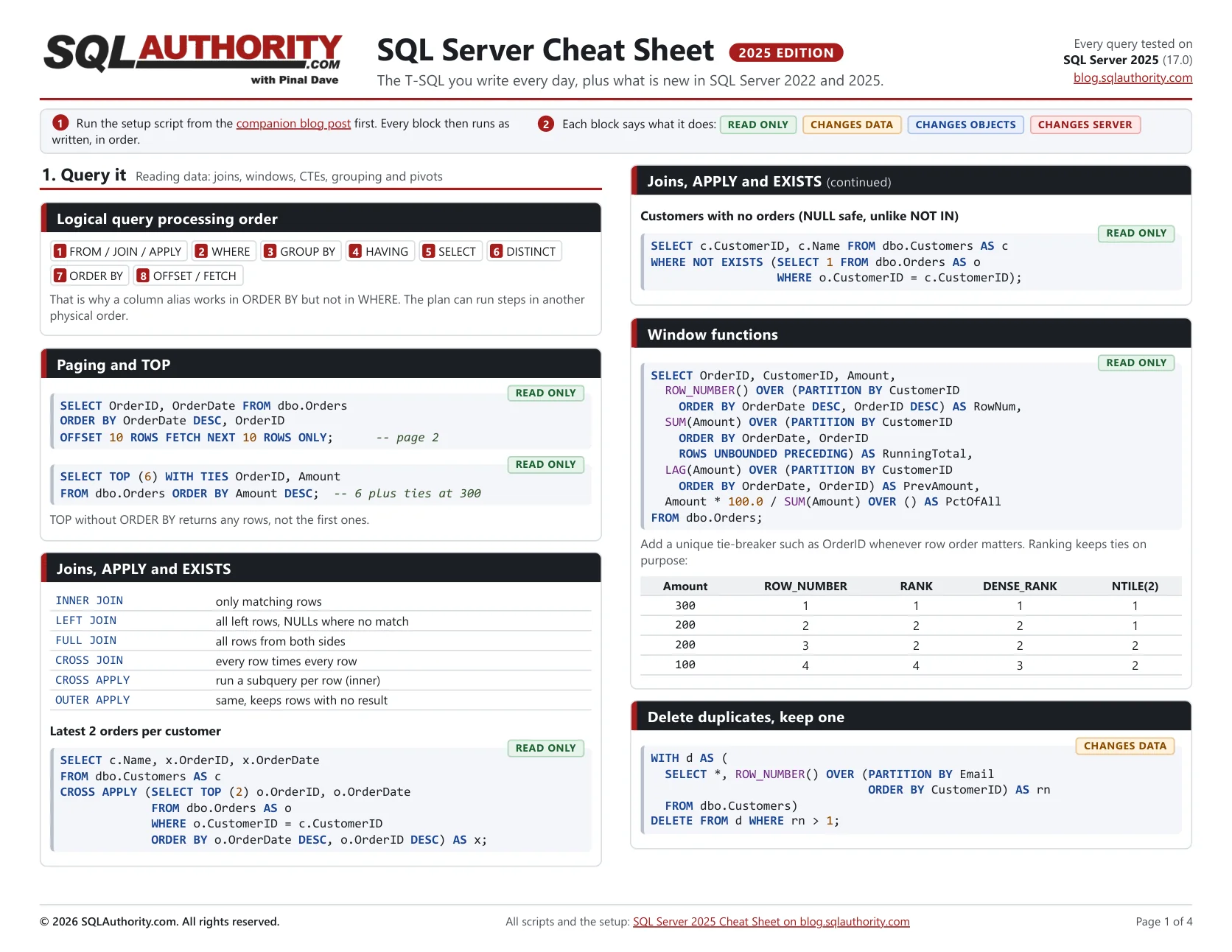
My first SQL Server cheat sheet goes back to TechEd India in 2009. The last update carried a 2016 label, and SQL Server has changed a lot since then. Regular expressions, a json type and the || operator weren’t there. So I started over.
I kept one rule while building it: no code on the sheet that I hadn’t run. Each block ran on SQL Server 2025 CU9 against a small demo database, in the same order as this post. Anything that failed, I fixed or dropped. One new string function didn’t make it, because it still needs a preview switch.
Each block on the sheet carries a small label: read only, changes data, changes objects or changes server. Print it on both sides and it fits on 2 sheets of paper.
Download the SQL Server 2025 Cheat Sheet (PDF, 4 pages)
Set Up the Demo Database
Run this script first. It creates a small database called CheatDemo with the tables the examples use. Every example below then runs as written. The examples change the demo data as they go, so run them in order if you want my results.
Turn on SQLCMD mode before you run it (Query menu, SQLCMD Mode). The first line stops the script if a database named CheatDemo already exists, so it never touches one that isn’t from this demo.
:ON ERROR EXIT
IF DB_ID(N'CheatDemo') IS NOT NULL
  THROW 50000, N'A database named CheatDemo already exists. Nothing was changed.', 1;
GO
CREATE DATABASE CheatDemo;
GO
USE CheatDemo;
GO
EXEC sys.sp_addextendedproperty @name = N'CreatedBy',
     @value = N'SQLAuthority cheat sheet';
GO
CREATE TABLE dbo.Customers (CustomerID int PRIMARY KEY, Name nvarchar(100) NOT NULL,
  Email nvarchar(200) NULL, Phone varchar(30) NULL, City nvarchar(50) NULL);
INSERT dbo.Customers VALUES
 (1, N'Asha', N'asha@example.com', '+1 (512) 555-0101', N'Austin'),
 (2, N'Ben', N'ben@example.com', NULL, N'Boston'),
 (3, N'Chen', N'chen@example', '617.555.0103', N'Boston'),
 (4, N'Dana', N'dana@example.com', '555-0100', N'Denver'),
 (5, N'Asha Two', N'asha@example.com', NULL, N'Austin'),
 (6, N'Eli', N'eli@example.org', NULL, N'Denver');
CREATE TABLE dbo.Orders (OrderID int PRIMARY KEY, CustomerID int NOT NULL, OrderDate date NOT NULL,
  Amount decimal(10,2) NULL, Qty int NOT NULL, Status varchar(20) NOT NULL);
INSERT dbo.Orders VALUES
 (1,1,'2019-06-01',50,1,'Closed'),(2,2,'2019-11-12',75,2,'Closed'),
 (3,1,'2023-02-10',120,2,'Shipped'),(4,2,'2023-07-04',300,3,'Shipped'),
 (5,3,'2024-01-15',NULL,0,'Open'),(6,1,'2024-03-02',220,1,'Shipped'),
 (7,4,'2024-05-20',640,4,'Closed'),(8,2,'2024-08-09',90,1,'Open'),
 (9,1,'2024-11-30',510,5,'Shipped'),(10,3,'2025-01-05',45,1,'Open'),
 (11,4,'2025-02-14',NULL,2,'Open'),(12,1,'2025-03-03',300,3,'Open'),
 (13,2,'2025-04-18',300,2,'Shipped'),(14,4,'2025-06-21',80,0,'Open'),
 (15,1,'2025-07-07',125,1,'Closed'),(16,3,'2025-08-15',700,7,'Shipped'),
 (17,2,'2025-09-09',60,1,'Open'),(18,1,'2025-10-01',410,4,'Open'),
 (19,4,'2025-11-11',150,2,'Shipped'),(20,2,'2025-12-24',990,9,'Open');
CREATE TABLE dbo.Employees (EmployeeID int PRIMARY KEY, ManagerID int NULL, Name nvarchar(100));
INSERT dbo.Employees VALUES (1,NULL,N'Avery'),(2,1,N'Blake'),(3,1,N'Casey'),(4,2,N'Drew'),(5,4,N'Emery');
CREATE TABLE dbo.Categories (CategoryID int PRIMARY KEY, Name nvarchar(100));
CREATE TABLE dbo.Accounts (AccountID int PRIMARY KEY, Balance decimal(12,2));
INSERT dbo.Accounts VALUES (1, 500), (2, 100);
Comments marked 2022 or 2025 show the version that added a feature. On an older version, that line won’t run. A few examples also need compatibility level 170, which new SQL Server 2025 databases use by default.
Query It: Reading Data
The first page covers the queries that read data. This is where most of my day goes.
Logical query processing order
You write SELECT first, but SQL Server binds names starting from FROM. Once this logical order clicks, the odd alias errors start to make sense. The execution plan can still run the steps in another order.
The logical processing order is: 1. FROM / JOIN / APPLY, 2. WHERE, 3. GROUP BY, 4. HAVING, 5. SELECT, 6. DISTINCT, 7. ORDER BY, 8. OFFSET / FETCH.
That is why a column alias works in ORDER BY but not in WHERE. The plan can run steps in another physical order.
Paging and TOP
Paging is two lines once you remember that OFFSET comes before FETCH. WITH TIES keeps you from cutting a tie in half.
SELECT OrderID, OrderDate FROM dbo.Orders
ORDER BY OrderDate DESC, OrderID
OFFSET 10 ROWS FETCH NEXT 10 ROWS ONLY;      -- page 2
SELECT TOP (6) WITH TIES OrderID, Amount
FROM dbo.Orders ORDER BY Amount DESC; -- 6 plus ties at 300TOP without ORDER BY returns any rows, not the first ones.
Joins, APPLY and EXISTS
Here's the join list I keep in my head, plus the two patterns I write most in health checks.
| Pattern | What it returns |
|---|---|
| INNER JOIN | only matching rows |
| LEFT JOIN | all left rows, NULLs where no match |
| FULL JOIN | all rows from both sides |
| CROSS JOIN | every row times every row |
| CROSS APPLY | run a subquery per row (inner) |
| OUTER APPLY | same, keeps rows with no result |
Latest 2 orders per customer:
SELECT c.Name, x.OrderID, x.OrderDate
FROM dbo.Customers AS c
CROSS APPLY (SELECT TOP (2) o.OrderID, o.OrderDate
             FROM dbo.Orders AS o
             WHERE o.CustomerID = c.CustomerID
             ORDER BY o.OrderDate DESC, o.OrderID DESC) AS x;
Customers with no orders (NULL safe, unlike NOT IN):
SELECT c.CustomerID, c.Name FROM dbo.Customers AS c
WHERE NOT EXISTS (SELECT 1 FROM dbo.Orders AS o
                  WHERE o.CustomerID = c.CustomerID);
Window functions
Window functions answer questions that used to need a self join. The small table shows how the ranking functions treat a tie.
SELECT OrderID, CustomerID, Amount,
  ROW_NUMBER() OVER (PARTITION BY CustomerID
    ORDER BY OrderDate DESC, OrderID DESC) AS RowNum,
  SUM(Amount) OVER (PARTITION BY CustomerID
    ORDER BY OrderDate, OrderID
    ROWS UNBOUNDED PRECEDING) AS RunningTotal,
  LAG(Amount) OVER (PARTITION BY CustomerID
    ORDER BY OrderDate, OrderID) AS PrevAmount,
  Amount * 100.0 / SUM(Amount) OVER () AS PctOfAll
FROM dbo.Orders;
Add a unique tie-breaker such as OrderID whenever row order matters. Ranking keeps ties on purpose:
| Amount | ROW_NUMBER | RANK | DENSE_RANK | NTILE(2) |
|---|---|---|---|---|
| 300 | 1 | 1 | 1 | 1 |
| 200 | 2 | 2 | 2 | 1 |
| 200 | 3 | 2 | 2 | 2 |
| 100 | 4 | 4 | 3 | 2 |
Delete duplicates, keep one
ROW_NUMBER inside a CTE is my favorite way to remove duplicates. Change the PARTITION BY list to the columns that define a duplicate.
WITH d AS (
  SELECT *, ROW_NUMBER() OVER (PARTITION BY Email
                               ORDER BY CustomerID) AS rn
  FROM dbo.Customers)
DELETE FROM d WHERE rn > 1;
CASE, NULL and safe math
NULL causes more wrong answers than any other value I know. These lines keep it from surprising you.
SELECT OrderID,
  CASE WHEN Amount >= 500 THEN 'A'
       WHEN Amount >= 100 THEN 'B' ELSE 'C' END AS Tier,
  IIF(Status = 'Open', 1, 0) AS IsOpen,
  Amount / NULLIF(Qty, 0) AS UnitPrice,       -- no divide by 0
  COALESCE(Amount, 0) AS AmountOrZero
FROM dbo.Orders;
Compare values that can be NULL (new in SQL Server 2022):
SELECT c.CustomerID FROM dbo.Customers AS c
WHERE c.Phone IS DISTINCT FROM '555-0100';   -- NULL counts
Group and pivot
I reach for conditional aggregation first, because I can still read it a year later. PIVOT is here for when you need it.
SELECT CustomerID,
  SUM(CASE WHEN YEAR(OrderDate) = 2024 THEN Amount END) AS Y24,
  SUM(CASE WHEN YEAR(OrderDate) = 2025 THEN Amount END) AS Y25
FROM dbo.Orders GROUP BY CustomerID;
SELECT * FROM (SELECT CustomerID, Status, Amount
FROM dbo.Orders) AS s
PIVOT (SUM(Amount) FOR Status
IN ([Open], [Shipped], [Closed])) AS p;CTE and recursive CTE
A recursive CTE walks a hierarchy in one query. The anchor runs once, and the second part repeats until it finds no more rows.
WITH Org AS (
  SELECT EmployeeID, ManagerID, Name, 0 AS Lvl
  FROM dbo.Employees WHERE ManagerID IS NULL     -- anchor
  UNION ALL
  SELECT e.EmployeeID, e.ManagerID, e.Name, o.Lvl + 1
  FROM dbo.Employees AS e
  JOIN Org AS o ON e.ManagerID = o.EmployeeID)   -- recursion
SELECT * FROM Org
OPTION (MAXRECURSION 100);     -- default 100, 0 = no limit
Habits that save you
None of these are new. I still see each one break a production query every year.
- Avoid functions on a filtered column. A range lets an index help.
- NOT EXISTS is safer than NOT IN when NULLs are possible.
- SELECT only the columns you need. Skip SELECT *.
- BEGIN TRANSACTION before a risky change, check the row count, then COMMIT.
- SET STATISTICS IO, TIME ON, then compare reads and time before and after a change.
- Test the restore, not only the backup.
Shape It: Strings, Regex, Dates and JSON
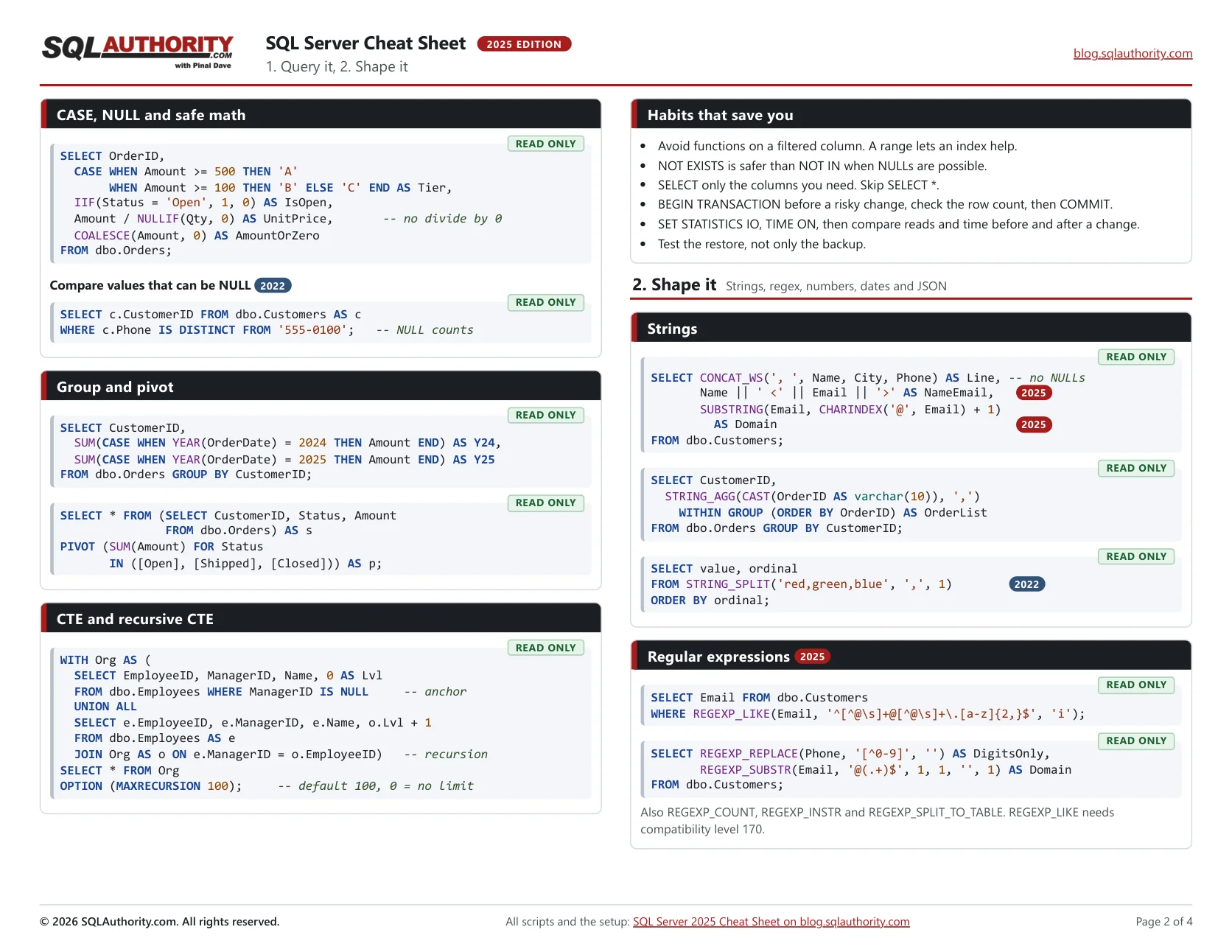
The second page is about shaping values. It's also where most of the SQL Server 2022 and 2025 features live.
Strings
SQL Server 2025 finally lets you join strings with two pipes, like most other databases. SUBSTRING also works without a length now.
SELECT CONCAT_WS(', ', Name, City, Phone) AS Line, -- no NULLs
       Name || ' <' || Email || '>' AS NameEmail,   -- 2025
       SUBSTRING(Email, CHARINDEX('@', Email) + 1)
         AS Domain                                  -- 2025
FROM dbo.Customers;
SELECT CustomerID,
STRING_AGG(CAST(OrderID AS varchar(10)), ',')
WITHIN GROUP (ORDER BY OrderID) AS OrderList
FROM dbo.Orders GROUP BY CustomerID;SELECT value, ordinal
FROM STRING_SPLIT('red,green,blue', ',', 1) -- 2022
ORDER BY ordinal;Regular expressions (2025)
This is the 2025 feature I've waited for the longest. No more CLR functions or LIKE patterns that run ten lines.
SELECT Email FROM dbo.Customers
WHERE REGEXP_LIKE(Email, '^[^@\s]+@[^@\s]+\.[a-z]{2,}$', 'i');
SELECT REGEXP_REPLACE(Phone, '[^0-9]', '') AS DigitsOnly,
REGEXP_SUBSTR(Email, '@(.+)$', 1, 1, '', 1) AS Domain
FROM dbo.Customers;Also REGEXP_COUNT, REGEXP_INSTR and REGEXP_SPLIT_TO_TABLE. REGEXP_LIKE needs compatibility level 170.
Numbers and safe conversion
TRY_CAST and TRY_CONVERT turn bad input into NULL instead of an error. PRODUCT is new in 2025 and handy for compound growth.
SELECT GREATEST(10, 42, 7) AS Biggest,              -- 2022
       LEAST(10, 42, 7) AS Smallest,                  -- 2022
       TRY_CAST('12x' AS int) AS BadToNull,
       TRY_CONVERT(date, '2025-02-30') AS NoSuchDay;
SELECT PRODUCT(1 + Rate) - 1 AS Compounded -- 2025
FROM (VALUES (0.05), (0.10), (0.02)) AS r (Rate);Dates and times
Dates are where I find most of the slow WHERE clauses. Keep the column bare and put the math on the other side.
SELECT SYSDATETIME() AS Now2,
       CURRENT_DATE AS Today,                       -- 2025
       DATEADD(day, -7, CURRENT_DATE) AS WeekAgo,
       DATEDIFF(day, '2025-01-01', '2025-12-31') AS Days,
       EOMONTH(CURRENT_DATE) AS MonthEnd,
       DATETRUNC(month, SYSDATETIME()) AS MonthStart, -- 2022
       DATE_BUCKET(week, 1, CURRENT_DATE) AS Wk,      -- 2022
       SYSDATETIMEOFFSET()
         AT TIME ZONE 'Eastern Standard Time' AS Eastern;
Index friendly date range (no function on the column):
SELECT OrderID FROM dbo.Orders
WHERE OrderDate >= '2025-01-01' AND OrderDate < '2026-01-01';
CONVERT styles for the date 2025-03-07 14:05:09:
| Style | Result |
|---|---|
| 23 | 2025-03-07 |
| 101 | 03/07/2025 |
| 103 | 07/03/2025 |
| 112 | 20250307 |
| 120 | 2025-03-07 14:05:09 |
JSON (2025)
SQL Server 2025 adds a real json type. It checks the text on the way in and stores it in a binary format.
CREATE TABLE dbo.Events (
  EventID int IDENTITY PRIMARY KEY,
  Payload json NOT NULL);                  -- native json type
INSERT dbo.Events (Payload)
VALUES ('{"user":"pinal","tags":["sql","ai"],"score":9}');
SELECT JSON_VALUE(Payload, '$.user') AS UserName,
JSON_QUERY(Payload, '$.tags') AS Tags
FROM dbo.Events;SELECT e.EventID, t.value AS Tag -- array to rows
FROM dbo.Events AS e
CROSS APPLY OPENJSON(e.Payload, '$.tags') AS t;SELECT CustomerID, Name FROM dbo.Customers FOR JSON PATH;Change It: Tables, Data and Indexes
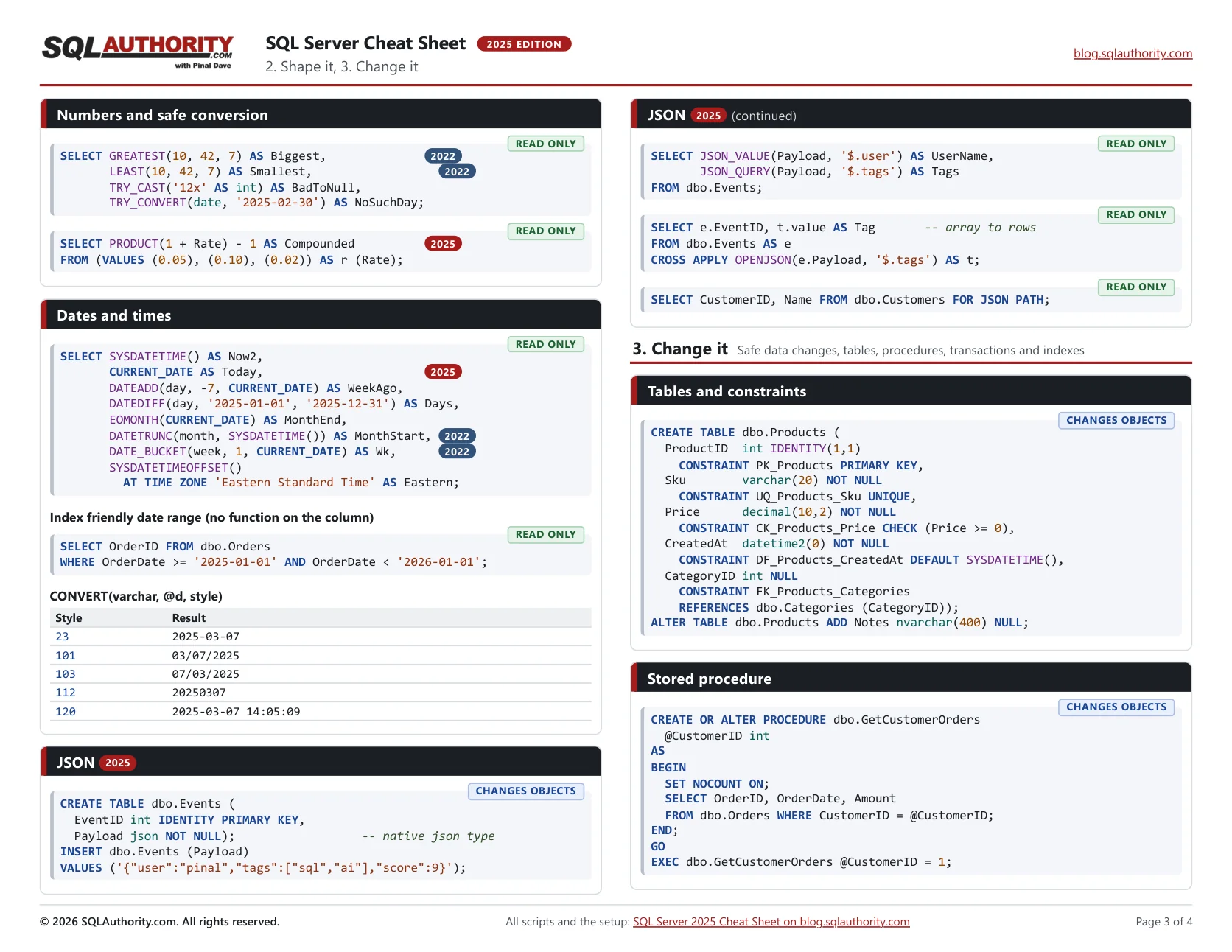
The third page changes things. Test each of these on a copy before you run it on a server that matters.
Tables and constraints
Name your constraints. A name like CK_Products_Price tells you what broke when an insert fails.
CREATE TABLE dbo.Products (
  ProductID  int IDENTITY(1,1)
    CONSTRAINT PK_Products PRIMARY KEY,
  Sku        varchar(20) NOT NULL
    CONSTRAINT UQ_Products_Sku UNIQUE,
  Price      decimal(10,2) NOT NULL
    CONSTRAINT CK_Products_Price CHECK (Price >= 0),
  CreatedAt  datetime2(0) NOT NULL
    CONSTRAINT DF_Products_CreatedAt DEFAULT SYSDATETIME(),
  CategoryID int NULL
    CONSTRAINT FK_Products_Categories
    REFERENCES dbo.Categories (CategoryID));
ALTER TABLE dbo.Products ADD Notes nvarchar(400) NULL;
Stored procedure
CREATE OR ALTER saves you the drop-and-create dance. SET NOCOUNT ON keeps the row count messages out of your application.
CREATE OR ALTER PROCEDURE dbo.GetCustomerOrders
  @CustomerID int
AS
BEGIN
  SET NOCOUNT ON;
  SELECT OrderID, OrderDate, Amount
  FROM dbo.Orders WHERE CustomerID = @CustomerID;
END;
GO
EXEC dbo.GetCustomerOrders @CustomerID = 1;
Insert, update, delete
OUTPUT is the clause I wish I'd learned years earlier. It shows exactly which rows changed.
INSERT dbo.Categories (CategoryID, Name)
VALUES (10, N'Books'), (11, N'Courses');   -- many rows
UPDATE o SET o.Status = 'Shipped' -- update with join
FROM dbo.Orders AS o
JOIN dbo.Customers AS c ON c.CustomerID = o.CustomerID
WHERE c.City = N'Austin' AND o.Status = 'Open';UPDATE dbo.Orders SET Status = 'Closed' -- see what changed
OUTPUT deleted.Status AS OldStatus,
inserted.Status AS NewStatus, inserted.OrderID
WHERE OrderDate < '2024-01-01' AND Status = 'Shipped';Transactions, errors, dynamic SQL
XACT_ABORT with TRY and CATCH is my default for anything that touches more than one table. For dynamic SQL, sp_executesql with parameters keeps it safe.
SET XACT_ABORT ON;          -- runtime errors roll back
BEGIN TRY
  BEGIN TRANSACTION;
  UPDATE dbo.Accounts SET Balance -= 100 WHERE AccountID = 1;
  UPDATE dbo.Accounts SET Balance += 100 WHERE AccountID = 2;
  COMMIT;
END TRY
BEGIN CATCH
  IF @@TRANCOUNT > 0 ROLLBACK;
  THROW;                          -- re-raise to the caller
END CATCH;
Raise your own: THROW 50001, 'Order not found.', 1;
DECLARE @sql nvarchar(max) = N'SELECT OrderID FROM dbo.Orders
  WHERE CustomerID = @cid';
EXEC sys.sp_executesql @sql, N'@cid int', @cid = 1;
Indexes
Put the equality columns first, then the range column, then INCLUDE the rest of the SELECT list. Online and resumable rebuilds need Enterprise, Enterprise Developer or Evaluation edition.
CREATE NONCLUSTERED INDEX IX_Orders_Customer_Date
  ON dbo.Orders (CustomerID, OrderDate DESC) -- equality first
  INCLUDE (Amount)                     -- covers the SELECT
  WITH (ONLINE = ON, DATA_COMPRESSION = PAGE);
CREATE INDEX IX_Orders_Open ON dbo.Orders (OrderDate)
WHERE Status = 'Open'; -- filteredALTER INDEX IX_Orders_Customer_Date ON dbo.Orders
REBUILD WITH (ONLINE = ON, RESUMABLE = ON);
ALTER INDEX ALL ON dbo.Orders REORGANIZE;
DROP INDEX IF EXISTS IX_Orders_Open ON dbo.Orders;ONLINE and RESUMABLE need Enterprise, Enterprise Developer or Evaluation edition. On Standard, leave them out.
Run It: Backups and Shortcuts
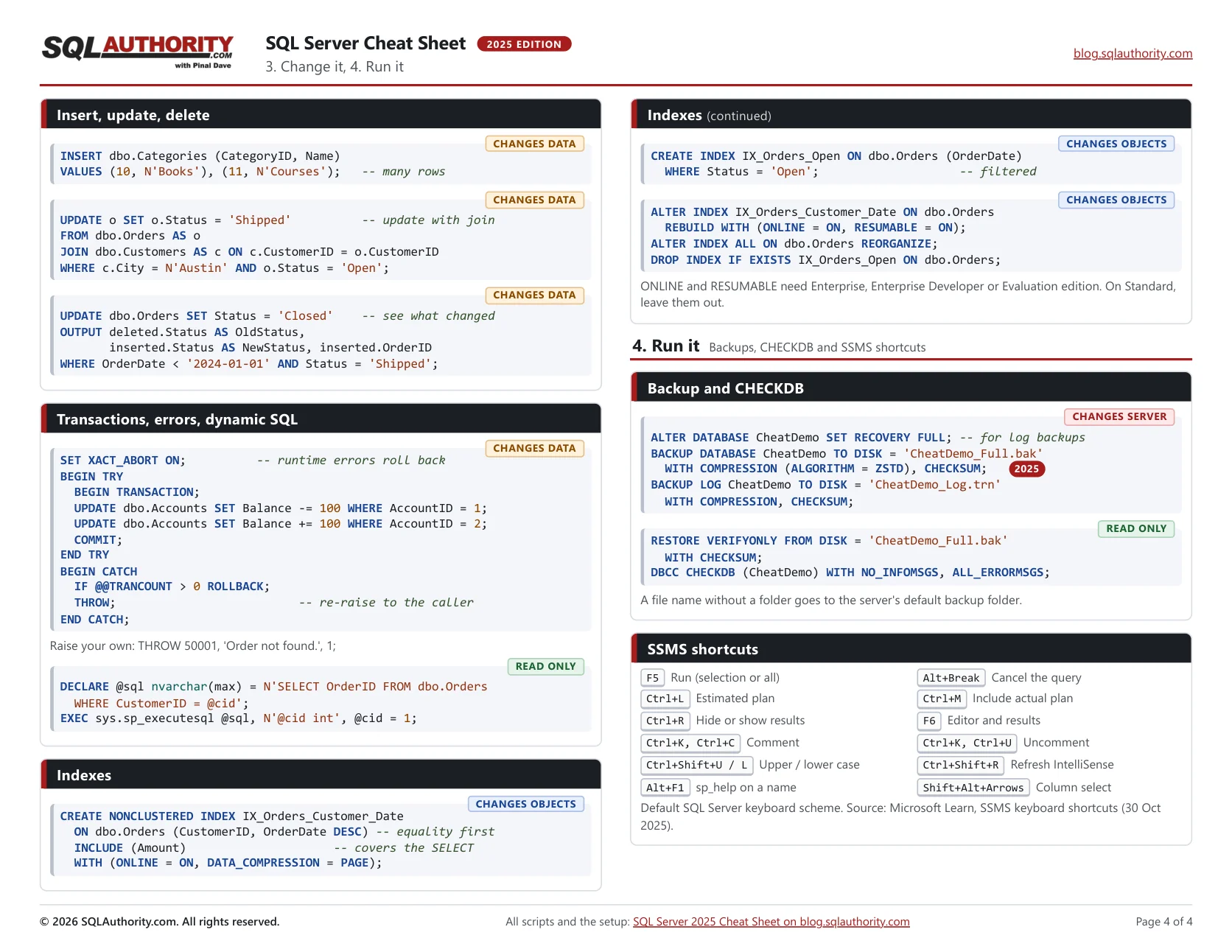
The last part keeps the database safe and saves you keystrokes: backups, CHECKDB and SSMS shortcuts.
Backup and CHECKDB
A backup you've never restored is a hope, so at least verify it. ZSTD backup compression is new in 2025. Log backups need the FULL recovery model, so the first line sets it on the demo database.
ALTER DATABASE CheatDemo SET RECOVERY FULL; -- for log backups
BACKUP DATABASE CheatDemo TO DISK = 'CheatDemo_Full.bak'
  WITH COMPRESSION (ALGORITHM = ZSTD), CHECKSUM;   -- 2025
BACKUP LOG CheatDemo TO DISK = 'CheatDemo_Log.trn'
  WITH COMPRESSION, CHECKSUM;
RESTORE VERIFYONLY FROM DISK = 'CheatDemo_Full.bak'
WITH CHECKSUM;
DBCC CHECKDB (CheatDemo) WITH NO_INFOMSGS, ALL_ERRORMSGS;A file name without a folder goes to the server's default backup folder.
SSMS shortcuts
These come from the official SSMS keyboard shortcut list for the default keyboard scheme. I picked the twenty I use most.
| Shortcut | What it does |
|---|---|
| F5 | Run (selection or all) |
| Alt+Break | Cancel the query |
| Ctrl+L | Estimated plan |
| Ctrl+M | Include actual plan |
| Ctrl+R | Hide or show results |
| F6 | Editor and results |
| Ctrl+K, Ctrl+C | Comment |
| Ctrl+K, Ctrl+U | Uncomment |
| Ctrl+Shift+U / L | Upper / lower case |
| Ctrl+Shift+R | Refresh IntelliSense |
| Alt+F1 | sp_help on a name |
| Shift+Alt+Arrows | Column select |
Default SQL Server keyboard scheme. Source: Microsoft Learn, SSMS keyboard shortcuts (30 Oct 2025).
Clean Up
When you’re done, run this in SQLCMD mode. It drops CheatDemo, but only if the setup script created it. Close other query windows on CheatDemo first.
:ON ERROR EXIT
USE master;
GO
-- Drops CheatDemo only if the setup script created it.
DECLARE @mine int = 0;
IF DB_ID(N'CheatDemo') IS NOT NULL
  SELECT @mine = COUNT(*) FROM CheatDemo.sys.extended_properties
  WHERE class = 0 AND name = N'CreatedBy'
    AND CAST(value AS nvarchar(100)) = N'SQLAuthority cheat sheet';
IF @mine = 1
BEGIN
  ALTER DATABASE CheatDemo SET SINGLE_USER WITH ROLLBACK IMMEDIATE;
  DROP DATABASE CheatDemo;
END;
Get the PDF
Print it, keep it next to your keyboard, and tell me in the comments what you’d add for the next edition. If a slow server needs more than a cheat sheet, that’s what my Comprehensive Database Performance Health Check is for.
Download the SQL Server 2025 Cheat Sheet (PDF, 4 pages)
A cheat sheet is not a replacement for testing, it is a faster first try.
Published by Pinal Dave on SQLAuthority. More of my work at pinaldave.com.
Discover more from SQL Authority with Pinal Dave
Subscribe to get the latest posts sent to your email.