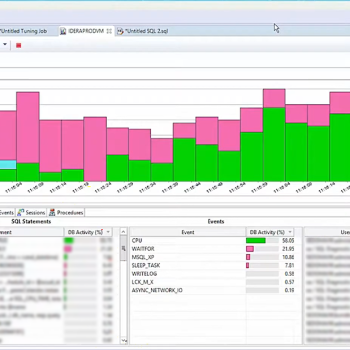
Most database monitoring tools are built for the wrong audience. The dashboards are designed to reassure managers, the alerts are calibrated to satisfy compliance checklists, and the reports are formatted for quarterly reviews. None of that is useful at 10 PM when an application is returning timeouts and the on-call developer is asking for an update every three minutes.What a DBA needs in that moment is a tool that already has the context. Not raw data that needs to be assembled under pressure. Not a list of thresholds that were crossed. The actual context: what was running, what was waiting, what changed, and how that compares to what normal looks like for this specific instance at this time of day. That is a harder problem than it looks, and most monitoring tools do not solve it. Let us talk about Deeper Diagnostics and Actionable Dashboards.
The Problem With Alerting Without Context
An alert tells you something is wrong. What it almost never tells you is why. CPU is at 90 percent. That is the alert. But is it one rogue query, a sudden connection spike, a parallelism misconfiguration, a plan regression triggered by stale statistics, or a scheduled batch that runs every night and always looks exactly like this?
The alert does not know. And the tools a DBA typically reaches for to find out are different from the tool that fired the alert. That gap, between notification and diagnosis, is where incident resolution time disappears.
The answer is not more alerts or more dashboards. It is deeper context surfaced in the same interface, at the same moment the alert fires. The sessions running when the threshold was crossed, the wait statistics accumulating at that moment, the top resource-consuming queries, and how all of it compares to the historical baseline for that instance. Without that context, every alert is the beginning of an investigation that requires switching tools, writing queries from memory, and hoping the problem is still visible by the time you find it.
Dynamic Baselines: Why Fixed Thresholds Fail
A CPU threshold of 80 percent sounds like a reasonable starting point until you realize that a specific instance runs a nightly ETL that pushes CPU to 85 percent every night between 2 AM and 4 AM and has done so without incident for three years. An alert that fires every night at 2 AM teaches the on-call team to ignore it. When CPU hits 85 percent at 2 PM on a Tuesday because something is genuinely wrong, nobody responds in time.
The same problem occurs with I/O thresholds, memory thresholds, and wait time thresholds. Every instance has its own normal, and that normal shifts by time of day, day of week, and workload cycle. A fixed threshold applied uniformly across instances with different workload patterns is either too sensitive, producing noise, or too permissive, missing real problems.
Dynamic baselines solve this by building expected behavior from actual historical data on a per-instance, per-metric basis. The monitoring system compares current values against the historical distribution of values for that instance at that time of day on that day of the week. Deviations from the learned baseline fire alerts. Expected elevated activity does not. The table below shows the diagnostic categories where this depth of context matters most.
What a Deeper Diagnostic View Covers
The categories that matter most during a SQL Server incident, the data source behind each one, the appropriate observation window, and what each actually tells you are mapped below.
| Diagnostic Category | Primary Data Source | Observation Window | What It Tells You |
|---|---|---|---|
| Blocking Chain Analysis | sys.dm_exec_requests, sys.dm_exec_sessions | Sub-minute, preserved historically | Head blocker and full dependent chain rendered as tree. History retained after blocking clears, enabling post-incident review. |
| Wait Stat Deltas | sys.dm_os_wait_stats sampled at intervals | 30 to 60 seconds | Rate of change across PAGEIOLATCH, LCK_M, CXPACKET, SOS_SCHEDULER_YIELD. Cumulative totals reset on service restart or DBCC SQLPERF clear. Deltas are the reliable real-time signal. |
| Cached Execution Plans | sys.dm_exec_query_plan, sys.dm_exec_text_query_plan | On demand for active requests | Plan SQL Server is currently using. Reveals costly operators, key lookups, and spills. Use sys.dm_exec_query_profiles for live operator-level stats. |
| Query Store Analysis | sys.query_store_plan, sys.query_store_runtime_stats correlated via query_hash | Current vs historical aggregate | Plan regressions, top queries by CPU or reads, forced plan status, and whether a query is slow today or always slow. |
| Tempdb Pressure | sys.dm_db_session_space_usage, sys.dm_db_task_space_usage, sys.dm_exec_requests | 60 seconds | Version store size, allocation page contention, and per-session tempdb usage. Tempdb problems often look like generic slowness from the application side. |
| Index Health | sys.dm_db_index_usage_stats, sys.dm_db_index_physical_stats, sys.dm_db_missing_index_details | Scheduled collection | Fragmentation levels, missing indexes ranked by estimated impact, and unused indexes. Proactive visibility helps prevent deferred maintenance from becoming incidents. |
| Memory Pressure | sys.dm_os_performance_counters, sys.dm_exec_query_memory_grants | 60 seconds | Sustained downward PLE trend and pending memory grants. These signals show workload pressure and memory allocation delays. |
| Dynamic Baselines | Collected history per instance, per metric | Per instance, time-of-day aware | Expected behavior built from historical data. Deviations fire alerts while routine high-activity windows stay quiet. |
The Diagnostic Path From Alert to Root Cause
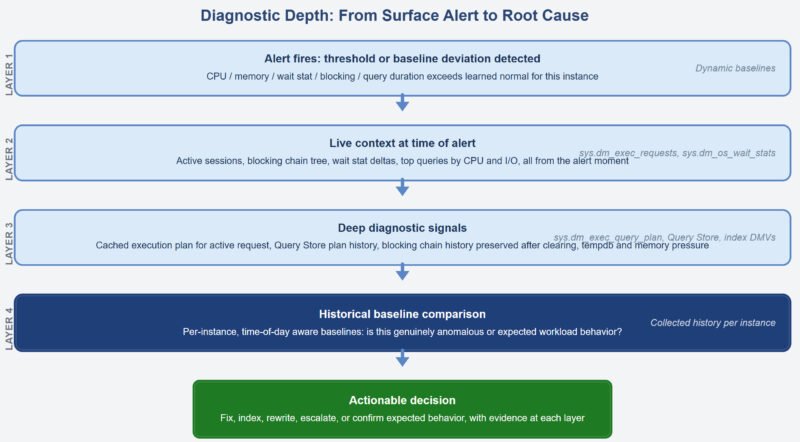
The flow is simple in theory. The alert is the starting point. What follows should be a steady narrowing from surface symptom to root cause, with each layer providing the context needed to move to the next step.
Blocking Chain Analysis: Finding the Head, Not Just the Tail
When an application reports timeouts or slow response, the instinct is to look at what the application is waiting for. That session is usually blocked. But the session it is waiting on may also be blocked. And the session that one is waiting on may be blocked by something else. Finding the real cause requires tracing the blocking_session_id chain through sys.dm_exec_requests until you reach a session that is not itself waiting on a lock held by another.
In a raw DMV workflow, that is a manual process written under pressure. A monitoring tool that renders blocking chains as a tree structure makes the head blocker and every dependent session visible immediately without writing a single query. More importantly, the tool should preserve this history because by the time the DBA opens the monitoring screen, the blocking chain may already have cleared.
A four-minute blocking event that caused a burst of application errors and then disappeared is still extremely useful diagnostically. It tells you which query held the lock, which sessions were waiting, how long each waited, and when the chain cleared. That is the information needed to stop the problem from coming back.
Execution Plan Access During an Active Incident
Wait statistics tell you what the server is waiting for. They do not tell you which query is responsible or why that query is behaving badly. For that, you need the execution plan.
sys.dm_exec_query_plan returns the cached execution plan for a query given its plan_handle. Used together with sys.dm_exec_requests, it allows the cached plan for a currently executing request to be retrieved. sys.dm_exec_text_query_plan returns the same data in XML form and can isolate the plan for a specific statement inside a larger batch. In most incidents, the cached plan is enough to explain what is going wrong.
The real value is not that the DMV exists. Any DBA can query it. The real value is having the plan rendered graphically for any selected active session without leaving the monitoring tool. A parameter-sniffed plan that was perfect for a small result set and is now running against a large one will quickly reveal where the pain is landing.
Index Health as a Proactive Discipline
Index health is one of those things that quietly waits in the corner until it turns into a production problem. Fragmentation grows gradually. Missing index recommendations sit in sys.dm_db_missing_index_details asking for attention like polite interns. Unused indexes keep consuming space and slowing writes without making much noise.
The data is available. sys.dm_db_index_usage_stats shows access patterns. sys.dm_db_index_physical_stats shows fragmentation levels. sys.dm_db_missing_index_details shows what the optimizer has been asking for. The problem is not availability. The problem is that very few DBAs are manually reviewing all of this across many servers and databases on a regular schedule.
A monitoring tool that collects this information continuously and presents it in a prioritized form changes the operating model from reactive to proactive. The backlog becomes visible before it becomes a midnight surprise.
Query Store as the Historical Performance Record
Query Store persists execution statistics and plan history inside the user database. For each query, it stores execution count, CPU, reads, duration, and plan history including forced plans. It acts like a flight recorder for query performance.
A monitoring layer that surfaces Query Store data gives DBAs fast access to plan regressions without manually inspecting Query Store views. Correlating current executions with historical behavior makes it clear whether a query running right now is performing within its normal range or has shifted away from that baseline.
A query that is slow and has always been slow needs a different response than one that was fast yesterday and is suddenly slow today. That distinction changes the entire troubleshooting path.
The Gap That Matters in Practice
Generic monitoring tools can tell you that something is wrong. The diagnostic depth described above, including blocking chain history, execution plan access, dynamic baselines, Query Store integration, and index health visibility, is what allows a DBA to determine why something is wrong and decide what to do next without jumping between five tools and ten tabs.
The difference between resolving an incident in 12 minutes and taking 90 is rarely knowledge. It is usually access to the right context, organized properly, at the right moment.
Where Idera SQL Diagnostic Manager Fits
Idera SQL Diagnostic Manager is built for the diagnostic depth this kind of environment requires. It surfaces blocking chain trees with sub-minute historical capture, graphical execution plans for active sessions, Query Store regression detection, wait statistics presented as deltas, tempdb and memory pressure indicators, and index health across monitored instances.
Dynamic baselines calibrated per instance mean alerts reflect genuine anomalies rather than expected workload patterns. Agentless architecture means it can work across on-premises SQL Server, Azure SQL Database, Azure SQL Managed Instance, Amazon RDS for SQL Server, and SQL Server on GCP Compute Engine without requiring software installation on managed hosts.
For teams where incident resolution still involves switching between multiple tools and writing diagnostic queries from memory, that is the gap SQL Diagnostic Manager is designed to close.
Reference: Pinal Dave (https://blog.sqlauthority.com/), X