
Login database access is easy to check with one question: which databases hold a user for this login? Each database keeps its own list of users. A query over those lists answers for any login. You never sign in as that login. Login database access then becomes a question you can ask of the catalog.

Ask the Catalog, Not the Login
The function HAS_DBACCESS answers for whoever runs it. To check another login, you must impersonate it first. The post HAS_DBACCESS Function: List the Databases You Can Open covers that route. This post reads the catalog instead. It also answers a common question: where do you name the user? For your own login, the quick form is SELECT name FROM sys.databases WHERE HAS_DBACCESS(name) = 1;
A login lives on the server. A user lives inside one database and points back to the login through its SID, a binary identifier. Login database access depends on that link. Matching on the SID is safer than matching on a name. A user can be renamed, and a user restored from another server can carry a SID that matches no login.
Build Three Databases and One Login
The setup creates three databases and a login named LoginMapTestLogin. The password is a placeholder, and the login is disabled at once, so nobody can sign in with it. Run the script on a test server, because it creates a login. The cleanup drops it. In the first database the login has a user. In the second it has none, but the guest user is allowed to connect. In the third it has a user with CONNECT denied.
USE master;
GO
IF DB_ID(N'LoginMapOneDemo') IS NULL CREATE DATABASE LoginMapOneDemo;
IF DB_ID(N'LoginMapTwoDemo') IS NULL CREATE DATABASE LoginMapTwoDemo;
IF DB_ID(N'LoginMapThreeDemo') IS NULL CREATE DATABASE LoginMapThreeDemo;
GO
IF SUSER_ID(N'LoginMapTestLogin') IS NULL
BEGIN
    CREATE LOGIN LoginMapTestLogin WITH PASSWORD = N'ReplaceWithYourOwnPassword1!', CHECK_POLICY = OFF;
    ALTER LOGIN LoginMapTestLogin DISABLE;
END;
GO
USE LoginMapOneDemo;
CREATE USER LoginMapTestLogin FOR LOGIN LoginMapTestLogin;
GO
USE LoginMapTwoDemo;
GRANT CONNECT TO guest;
GO
USE LoginMapThreeDemo;
CREATE USER LoginMapTestLogin FOR LOGIN LoginMapTestLogin;
DENY CONNECT TO LoginMapTestLogin;
GO
USE master;
One Query for Every Database
One FROM clause cannot name every database. So the query builds one statement per online database with STRING_AGG, then runs them together. QUOTENAME protects odd database names. An offline database is skipped, because its catalog cannot be read. The LIKE line keeps the demo to its own databases. Remove it to cover the whole server. Run it as a sysadmin. A caller that cannot open one of the databases gets Msg 916 and the query stops. It needs SQL Server 2017 or later because of STRING_AGG.
The first insert finds the user by SID and reads its CONNECT state. The second insert reads the same state for guest, because guest is a back door worth seeing. Change the first line to check another login.
DECLARE @login sysname = N'LoginMapTestLogin';
DECLARE @sid varbinary(85) = SUSER_SID(@login);
CREATE TABLE #Users (DatabaseName sysname, UserName sysname, ConnectState nvarchar(60));
CREATE TABLE #Guest (DatabaseName sysname, GuestConnect nvarchar(60));
DECLARE @sql nvarchar(max) = (
    SELECT STRING_AGG(CAST(
        N'INSERT INTO #Users SELECT N' + QUOTENAME(d.name, '''') + N', dp.name, ISNULL(pm.state_desc, N''none'') FROM ' + QUOTENAME(d.name) +
        N'.sys.database_principals AS dp LEFT JOIN ' + QUOTENAME(d.name) +
        N'.sys.database_permissions AS pm ON pm.grantee_principal_id = dp.principal_id AND pm.class = 0 AND pm.permission_name = N''CONNECT'' WHERE dp.sid = @sid;' + NCHAR(10) +
        N'INSERT INTO #Guest SELECT N' + QUOTENAME(d.name, '''') + N', ISNULL(pm.state_desc, N''none'') FROM ' + QUOTENAME(d.name) +
        N'.sys.database_principals AS dp LEFT JOIN ' + QUOTENAME(d.name) +
        N'.sys.database_permissions AS pm ON pm.grantee_principal_id = dp.principal_id AND pm.class = 0 AND pm.permission_name = N''CONNECT'' WHERE dp.name = N''guest'';'
        AS nvarchar(max)), NCHAR(10))
    FROM sys.databases AS d
    WHERE d.state_desc = N'ONLINE' AND d.name LIKE N'LoginMap%Demo');
EXEC sys.sp_executesql @sql, N'@sid varbinary(85)', @sid = @sid;
SELECT d.name AS DatabaseName, u.UserName, u.ConnectState, g.GuestConnect
FROM sys.databases AS d
LEFT JOIN #Users AS u ON u.DatabaseName = d.name
LEFT JOIN #Guest AS g ON g.DatabaseName = d.name
WHERE d.name LIKE N'LoginMap%Demo'
ORDER BY d.name;
DROP TABLE #Users, #Guest;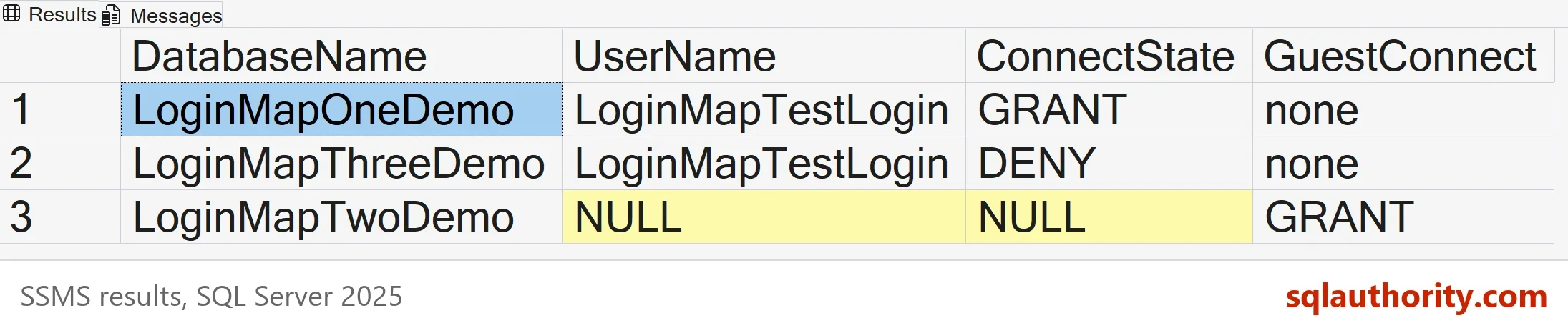
Read the Result
Each row has a different story. In LoginMapOneDemo the user exists and CONNECT is granted, so the login can open it. In LoginMapThreeDemo the user exists but CONNECT is denied, so the login cannot. In LoginMapTwoDemo the login has no user at all, yet the guest column says GRANT. A login without a user enters a database as guest when guest is allowed to connect.
Compare this with the function. The next block impersonates the login and calls HAS_DBACCESS for the same three databases. Impersonation needs the IMPERSONATE permission on the login, which a sysadmin has.
EXECUTE AS LOGIN = N'LoginMapTestLogin';
SELECT name, HAS_DBACCESS(name) AS HasDBAccess FROM sys.databases WHERE name LIKE N'LoginMap%Demo' ORDER BY name;
REVERT;
| name | HasDBAccess |
|---|---|
| LoginMapOneDemo | 1 |
| LoginMapThreeDemo | 0 |
| LoginMapTwoDemo | 1 |
The answers agree with the catalog. The function returns 1 for the guest door as well. The catalog query shows the reason behind each number, which the function cannot.
Where the Catalog Query Is Blind
A sysadmin has no user in any database. The login maps to dbo everywhere, so the SID match finds nothing. Add the demo login to the sysadmin role for a moment and the function shows what the catalog cannot. The block removes the role again before it ends.
ALTER SERVER ROLE sysadmin ADD MEMBER LoginMapTestLogin;
EXECUTE AS LOGIN = N'LoginMapTestLogin';
SELECT name, HAS_DBACCESS(name) AS HasDBAccess FROM sys.databases WHERE name LIKE N'LoginMap%Demo' ORDER BY name;
REVERT;
ALTER SERVER ROLE sysadmin DROP MEMBER LoginMapTestLogin;
| name | HasDBAccess |
|---|---|
| LoginMapOneDemo | 1 |
| LoginMapThreeDemo | 1 |
| LoginMapTwoDemo | 1 |
Even the database with the DENY opens for a sysadmin. The same blindness applies to a person who gets in through a Windows group. The user in the database carries the group SID, not the person SID. A search by the person SID finds nothing. Check IS_SRVROLEMEMBER first, and search for the group SID too. The statement EXEC xp_logininfo N'DOMAIN\Person', N'all'; lists the groups that give a Windows account its access.
You could argue that the function is simpler, and for your own login it is. Use it there. For other logins, the catalog needs no impersonation permission. It also names the user, the state and the guest back door in one grid.
Remove the LIKE line and the grid also lists the system databases. In master, msdb and tempdb the guest user holds GRANT on CONNECT, so every login can open those three. Read that as normal, and look harder when guest is open in a user database.
What to Remember
For login database access, match the login SID against sys.database_principals in each online database. Read the CONNECT state, and read guest too. Treat sysadmin and Windows groups as special cases, and confirm a surprise with HAS_DBACCESS under EXECUTE AS.
A new database does not change this. A normal login has no user in it, so the answer is no until someone adds one. If HAS_DBACCESS returns 1 for a new database, the caller maps to dbo, like the sysadmin above. When you finish, drop the demo objects.
USE master;
GO
DROP LOGIN LoginMapTestLogin;
ALTER DATABASE LoginMapOneDemo SET SINGLE_USER WITH ROLLBACK IMMEDIATE;
DROP DATABASE LoginMapOneDemo;
ALTER DATABASE LoginMapTwoDemo SET SINGLE_USER WITH ROLLBACK IMMEDIATE;
DROP DATABASE LoginMapTwoDemo;
ALTER DATABASE LoginMapThreeDemo SET SINGLE_USER WITH ROLLBACK IMMEDIATE;
DROP DATABASE LoginMapThreeDemo;
A login is not a key to every door, it is a name each database must choose to recognize.
Published by Pinal Dave on SQLAuthority. More of my work at pinaldave.com.
Discover more from SQL Authority with Pinal Dave
Subscribe to get the latest posts sent to your email.




3 Comments. Leave new
Even if I create a new database not create a user, the HAS_DBACCESS returns 1. Some default users are created with default db creation.
This is exactly what I needed – thank you!
I don’t really know SQL well, so I don’t get where I specify which user it is checking for?