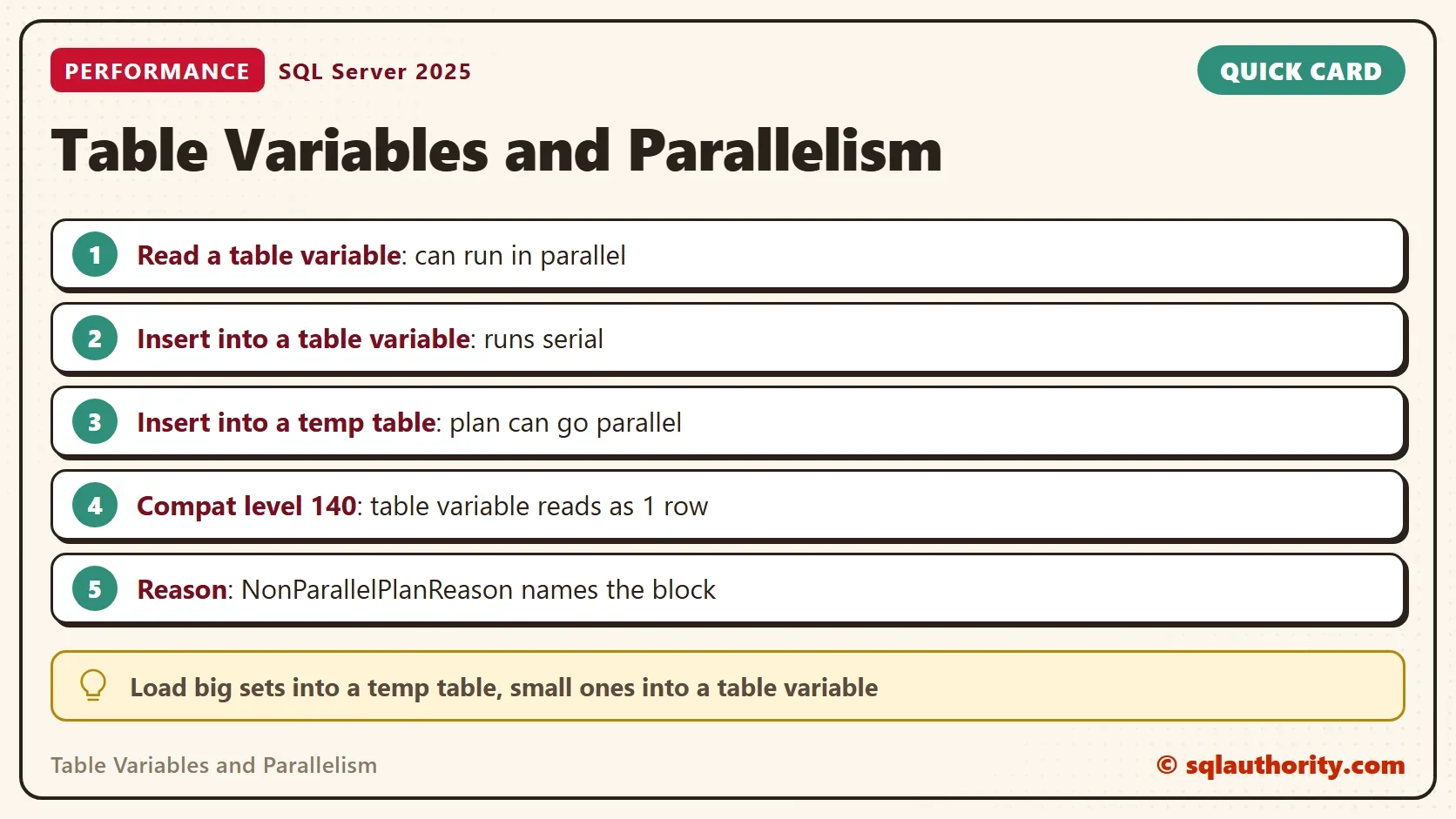
Table variables and parallelism work together for reads, but not for writes. A query can read a table variable with several threads. An INSERT into a table variable runs on one thread.

Build a Table Big Enough to Go Parallel
A parallel plan needs a serial cost above the setting cost threshold for parallelism. It then uses at most max degree of parallelism threads. A tiny table never goes parallel, so this demo needs a large one. The query below shows both settings.
SELECT name, value_in_use
FROM sys.configurations
WHERE name IN (N'cost threshold for parallelism', N'max degree of parallelism');
| name | value_in_use |
|---|---|
| cost threshold for parallelism | 50 |
| max degree of parallelism | 2 |
On this server the threshold is 50 and the limit is 2 threads. So the degree of parallelism here never exceeds 2. Your values can differ, and so can the numbers below. The next script creates a database named ParallelTempDemo with one million orders. Run it on a test server.
IF DB_ID(N'ParallelTempDemo') IS NULL CREATE DATABASE ParallelTempDemo;
GO
USE ParallelTempDemo;
GO
DROP TABLE IF EXISTS dbo.BigOrders;
CREATE TABLE dbo.BigOrders (
    OrderID    int           NOT NULL PRIMARY KEY,
    CustomerID int           NOT NULL,
    Amount     decimal(10,2) NOT NULL
);
WITH Numbers AS (
    SELECT TOP (1000000) ROW_NUMBER() OVER (ORDER BY (SELECT NULL)) AS n
    FROM sys.all_objects AS a CROSS JOIN sys.all_objects AS b CROSS JOIN sys.all_objects AS c
)
INSERT INTO dbo.BigOrders (OrderID, CustomerID, Amount)
SELECT n, n % 5000, n % 977 + 0.25
FROM Numbers;
Read and Write Table Variables and Temp Tables
The procedure below does the same work twice. It loads a table variable and a temp table from the large table. It then reads each one back. The load ranks the rows inside each customer, because a plain copy costs too little to go parallel.
CREATE OR ALTER PROCEDURE dbo.LoadAndRead
AS
BEGIN
    SET NOCOUNT ON;
    DECLARE @TableVar TABLE (OrderID int, CustomerID int, Amount decimal(10,2), RankInCustomer bigint);
    INSERT INTO @TableVar (OrderID, CustomerID, Amount, RankInCustomer)
    SELECT OrderID, CustomerID, Amount, ROW_NUMBER() OVER (PARTITION BY CustomerID ORDER BY Amount DESC)
    FROM dbo.BigOrders;
    CREATE TABLE #TempTable (OrderID int, CustomerID int, Amount decimal(10,2), RankInCustomer bigint);
    INSERT INTO #TempTable (OrderID, CustomerID, Amount, RankInCustomer)
    SELECT OrderID, CustomerID, Amount, ROW_NUMBER() OVER (PARTITION BY CustomerID ORDER BY Amount DESC)
    FROM dbo.BigOrders;
    SELECT COUNT(*) AS TableVarRows FROM (SELECT ROW_NUMBER() OVER (ORDER BY Amount, OrderID) AS RowNo FROM @TableVar) AS g WHERE g.RowNo % 100000 = 0;
    SELECT COUNT(*) AS TempTableRows FROM (SELECT ROW_NUMBER() OVER (ORDER BY Amount, OrderID) AS RowNo FROM #TempTable) AS g WHERE g.RowNo % 100000 = 0;
END;
A second procedure reports what happened. It reads the cached statistics for each statement of the first procedure. last_dop is the degree of parallelism of the last run. The plan XML holds the attribute NonParallelPlanReason, which names the reason when a plan stays serial.
CREATE OR ALTER PROCEDURE dbo.ShowParallel
AS
BEGIN
    SET NOCOUNT ON;
    SELECT qs.plan_handle, qs.statement_start_offset AS StartOffset, qs.statement_end_offset AS EndOffset,
           SUBSTRING(st.text, qs.statement_start_offset / 2 + 1, 28) AS Statement, qs.last_dop AS Dop
    INTO #Seen
    FROM sys.dm_exec_query_stats AS qs
    CROSS APPLY sys.dm_exec_sql_text(qs.sql_handle) AS st
    WHERE st.text LIKE N'%PROCEDURE dbo.LoadAndRead%' AND st.text NOT LIKE N'%dm_exec%';
    WITH XMLNAMESPACES (DEFAULT 'http://schemas.microsoft.com/sqlserver/2004/07/showplan')
    SELECT s.Statement, s.Dop, p.x.value('(//QueryPlan/@NonParallelPlanReason)[1]', 'nvarchar(100)') AS NonParallelReason,
           p.x.value('(//RelOp[@PhysicalOp = "Table Scan"]/@EstimateRows)[1]', 'float') AS ScanEstimate
    FROM #Seen AS s
    CROSS APPLY sys.dm_exec_text_query_plan(s.plan_handle, s.StartOffset, s.EndOffset) AS t
    CROSS APPLY (SELECT TRY_CAST(t.query_plan AS xml) AS x) AS p
    ORDER BY s.StartOffset;
END;
Run the load first, then the report. The load prints two counts of 10, which prove that both tables hold the same rows.
ALTER DATABASE SCOPED CONFIGURATION CLEAR PROCEDURE_CACHE;
GO
EXEC dbo.LoadAndRead;
GO
EXEC dbo.ShowParallel;
| Statement | Dop | NonParallelReason | ScanEstimate |
|---|---|---|---|
| INSERT INTO @TableVar (Order | 1 | TableVariableTransactionsDoNotSupportParallelNestedTransaction | NULL |
| INSERT INTO #TempTable (Orde | 2 | NULL | NULL |
| SELECT COUNT(*) AS TableVarR | 2 | NULL | 1000000.0 |
| SELECT COUNT(*) AS TempTable | 2 | NULL | 1000000.0 |
Both reads ran with two threads. Table variables support parallel reads, as temp tables do. The two inserts differ. The INSERT into the temp table used two threads. The INSERT into the table variable used one, and the plan says why: TableVariableTransactionsDoNotSupportParallelNestedTransaction. A statement that changes a table variable cannot go parallel. In a separate test, an UPDATE and a DELETE on the table variable gave the same single thread and reason.
Check Your Own Query
Open the actual plan in Management Studio. Operators that run in parallel carry a small yellow arrow icon. Click the root operator, the one named INSERT or SELECT, and read its properties. A serial plan lists NonParallelPlanReason there when something blocked parallelism.
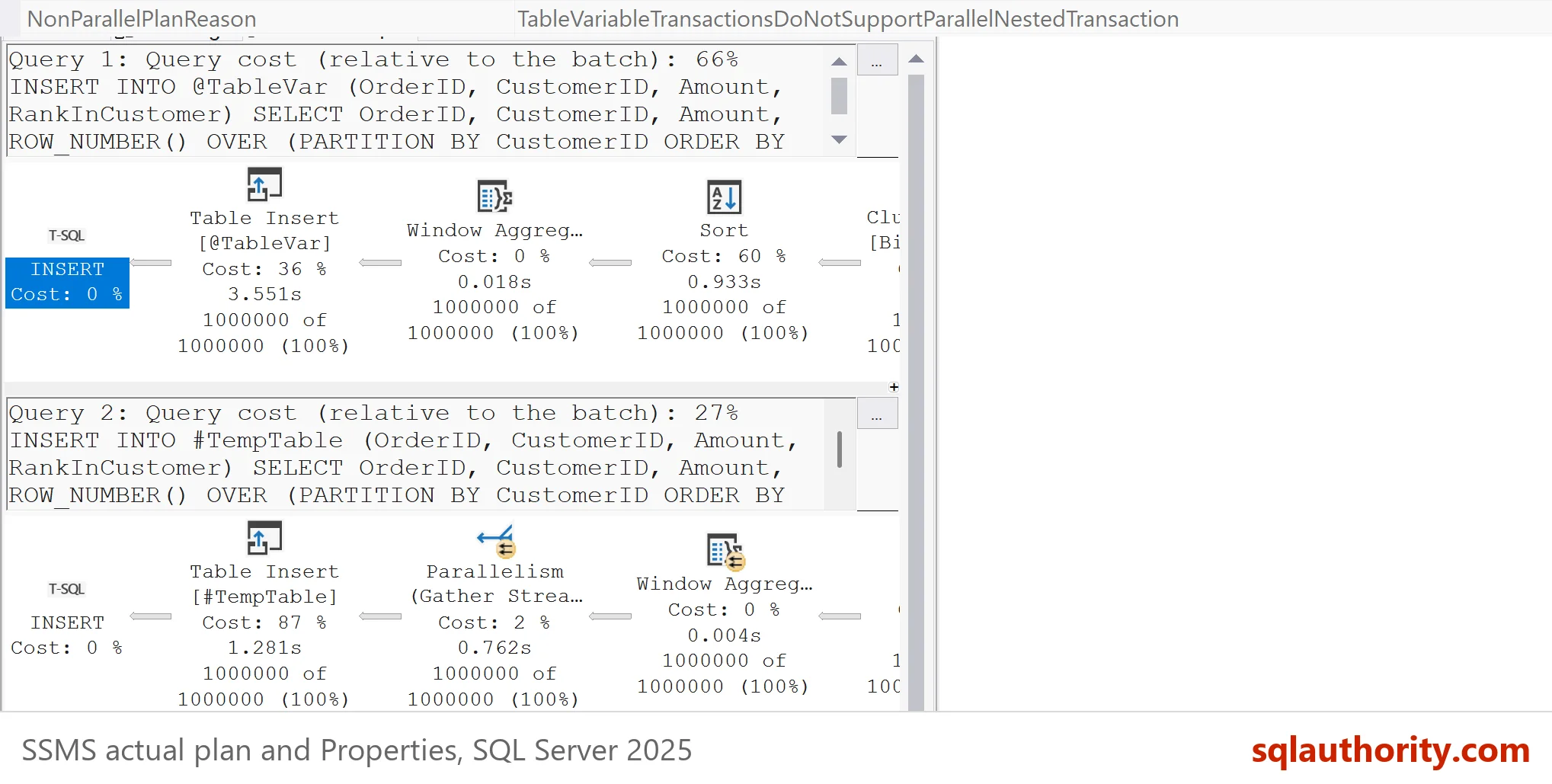
An empty reason does not mean the plan could have been parallel. The cost can also sit below the threshold, as the second test below shows. Read the reason first, then the estimated cost, and only then change the code.
When a Table Variable Read Stays Serial
Older advice says table variables never go parallel. The advice has a real cause. Before compatibility level 150, SQL Server compiled a statement with a table variable as if the table held one row. A one-row scan costs almost nothing, so the plan stayed serial. SQL Server 2019 added deferred compilation, which waits for the real row count.
The script below repeats the test at compatibility level 140, then restores level 170, the default of SQL Server 2025. In the last line, use 160 on SQL Server 2022 and 150 on SQL Server 2019. The last column shows what SQL Server believed about the scan of each table.
ALTER DATABASE ParallelTempDemo SET COMPATIBILITY_LEVEL = 140;
GO
ALTER DATABASE SCOPED CONFIGURATION CLEAR PROCEDURE_CACHE;
GO
EXEC dbo.LoadAndRead;
GO
EXEC dbo.ShowParallel;
GO
ALTER DATABASE ParallelTempDemo SET COMPATIBILITY_LEVEL = 170;
| Statement | Dop | NonParallelReason | ScanEstimate |
|---|---|---|---|
| INSERT INTO @TableVar (Order | 1 | TableVariableTransactionsDoNotSupportParallelNestedTransaction | NULL |
| INSERT INTO #TempTable (Orde | 2 | NULL | NULL |
| SELECT COUNT(*) AS TableVarR | 1 | NULL | 1.0 |
| SELECT COUNT(*) AS TempTable | 2 | NULL | 1000000.0 |
The read of the table variable now ran on one thread. SQL Server expected one row, and it expected one million for the temp table. The reason is empty because the plan was never blocked. It was cheap. On an older level, an OPTION (RECOMPILE) on the reading statement lets SQL Server see the real row count.
Which One to Use
For table variables and parallelism, the rule is short. Use a temp table when the data is large. The plan that loads it can use parallelism, and it has column statistics. A table variable has no statistics, and its load runs on one thread.
You could argue that a table variable is still the better tool for a short list. That is fair. For a few hundred rows, one thread finishes quickly, and a table variable causes fewer recompiles. The load speed matters when the row count reaches thousands.
Parallel load is not free. It used two threads here because the limit is 2. A higher limit buys more threads for the load, and it takes them from other queries. Check max degree of parallelism before you rely on any speedup from the numbers above.
What to Remember
Table variables and parallelism meet only on reads. Reads from table variables and temp tables can run in parallel. Writes to a table variable cannot. Check NonParallelPlanReason in the plan before you blame the data type. Remove the demo database when you finish.
USE master;
GO
DROP DATABASE ParallelTempDemo;
A table variable is not slow for reading, it is slow for loading.
Published by Pinal Dave on SQLAuthority. More of my work at pinaldave.com.
Discover more from SQL Authority with Pinal Dave
Subscribe to get the latest posts sent to your email.