Group by query hash to add up what one query costs, because every cached copy lands in one group. A query that SQL Server compiled many times looks small in every single entry.

Why One Query With Many Plans Is Hard to Tune
The hard part is not the tuning. The hard part is finding the query. Tuning starts with the most expensive query, and the cache reports cost per entry. When one query owns many entries, each entry holds only a slice of the work.
A query gets many entries in three ways. Its text carries literal values. A small change in text, such as letter case, makes a new entry. Different session settings make one too. The post Same Query Plan, Different Cache Entry in SQL Server shows each case and measures what it costs.
The demo builds a table of 50,000 orders in a database named QueryHashPlansDemo. Three cities have 30 orders each. Three others have thousands. An index on City exists, so the rare cities are cheap to find and the common ones are not.
IF DB_ID(N'QueryHashPlansDemo') IS NULL CREATE DATABASE QueryHashPlansDemo;
GO
USE QueryHashPlansDemo;
GO
DROP TABLE IF EXISTS dbo.HashOrders;
CREATE TABLE dbo.HashOrders (
    OrderID int           NOT NULL PRIMARY KEY,
    City    nvarchar(30)  NOT NULL,
    Amount  decimal(10,2) NOT NULL,
    Note    char(100)     NOT NULL DEFAULT ''
);
WITH Numbers AS (
    SELECT TOP (50000) ROW_NUMBER() OVER (ORDER BY (SELECT NULL)) AS n
    FROM sys.all_objects AS a CROSS JOIN sys.all_objects AS b
)
INSERT INTO dbo.HashOrders (OrderID, City, Amount)
SELECT n,
       CASE WHEN n <= 30 THEN N'Austin' WHEN n <= 60 THEN N'Boise' WHEN n <= 90 THEN N'Cleveland'
            WHEN n <= 20090 THEN N'Denver' WHEN n <= 35090 THEN N'Eugene' ELSE N'Fresno' END,
       n % 500 + 0.50
FROM Numbers;
CREATE INDEX IX_HashOrders_City ON dbo.HashOrders (City);
Now the script runs the same query six times, with a different city each time. It also runs a second query, one that counts large orders, twice. The query text carries the city as a literal, so every city becomes new text. The GO 2 line repeats the last batch twice.
ALTER DATABASE SCOPED CONFIGURATION CLEAR PROCEDURE_CACHE;
GO
SELECT City, SUM(Amount) AS Total FROM dbo.HashOrders WHERE City = N'Austin' GROUP BY City;
GO
SELECT City, SUM(Amount) AS Total FROM dbo.HashOrders WHERE City = N'Boise' GROUP BY City;
GO
SELECT City, SUM(Amount) AS Total FROM dbo.HashOrders WHERE City = N'Cleveland' GROUP BY City;
GO
SELECT City, SUM(Amount) AS Total FROM dbo.HashOrders WHERE City = N'Denver' GROUP BY City;
GO
SELECT City, SUM(Amount) AS Total FROM dbo.HashOrders WHERE City = N'Eugene' GROUP BY City;
GO
SELECT City, SUM(Amount) AS Total FROM dbo.HashOrders WHERE City = N'Fresno' GROUP BY City;
GO
SELECT COUNT(*) AS BigOrders FROM dbo.HashOrders WHERE Amount > 499;
GO 2
The listing below reads every entry from sys.dm_exec_query_stats. It sorts by total logical reads, the pages the query read from memory. PlanGroup is a small label for the plan fingerprint.
SELECT st.text AS QueryText, qs.execution_count AS Runs, qs.total_logical_reads AS Reads,
       DENSE_RANK() OVER (ORDER BY qs.query_plan_hash) AS PlanGroup
FROM sys.dm_exec_query_stats AS qs
CROSS APPLY sys.dm_exec_sql_text(qs.sql_handle) AS st
WHERE st.text LIKE N'%dbo.HashOrders%' AND st.text NOT LIKE N'%dm_exec%'
ORDER BY qs.total_logical_reads DESC, st.text;| QueryText | Runs | Reads | PlanGroup |
|---|---|---|---|
| SELECT COUNT(*) AS BigOrders FROM dbo.HashOrders WHERE Amount > 499; | 2 | 1734 | 1 |
| SELECT City, SUM(Amount) AS Total FROM dbo.HashOrders WHERE City = N’Denver’ GROUP BY City; | 1 | 867 | 2 |
| SELECT City, SUM(Amount) AS Total FROM dbo.HashOrders WHERE City = N’Eugene’ GROUP BY City; | 1 | 867 | 2 |
| SELECT City, SUM(Amount) AS Total FROM dbo.HashOrders WHERE City = N’Fresno’ GROUP BY City; | 1 | 867 | 2 |
| SELECT City, SUM(Amount) AS Total FROM dbo.HashOrders WHERE City = N’Austin’ GROUP BY City; | 1 | 122 | 3 |
| SELECT City, SUM(Amount) AS Total FROM dbo.HashOrders WHERE City = N’Boise’ GROUP BY City; | 1 | 122 | 3 |
| SELECT City, SUM(Amount) AS Total FROM dbo.HashOrders WHERE City = N’Cleveland’ GROUP BY City; | 1 | 122 | 3 |
The counting query wins the list with 1,734 reads. No city query comes close, since the biggest has 867. Anyone who reads this list starts with the counting query. That is the wrong place to start.
Group by Query Hash to See the Whole Query
Each of the six city queries has different text, but the same query hash. The query hash is a fingerprint of the query logic. Queries that differ only in literal values share it. Group by query hash, and the six slices add up.
SELECT COUNT(DISTINCT qs.plan_handle) AS Entries, SUM(qs.execution_count) AS Runs,
       SUM(qs.total_logical_reads) AS Reads, COUNT(DISTINCT qs.query_plan_hash) AS Plans,
       MIN(LEFT(st.text, 30)) AS QueryStart
FROM sys.dm_exec_query_stats AS qs
CROSS APPLY sys.dm_exec_sql_text(qs.sql_handle) AS st
WHERE st.text LIKE N'%dbo.HashOrders%' AND st.text NOT LIKE N'%dm_exec%'
GROUP BY qs.query_hash
ORDER BY SUM(qs.total_logical_reads) DESC;| Entries | Runs | Reads | Plans | QueryStart |
|---|---|---|---|---|
| 6 | 6 | 2967 | 2 | SELECT City, SUM(Amount) AS To |
| 1 | 2 | 1734 | 1 | SELECT COUNT(*) AS BigOrders F |
Now the city query is first, with 2,967 reads over six entries. It is the real top query. The query hash also shows that six entries hide only two plans. The three rare cities share a plan with a seek. The three common cities share a scan.
Two plans for one query is normal here. The data is skewed, and each plan fits its own cities. A plan with many seeks would be a poor choice for a city with 20,000 orders. Many plans are a symptom to read, not a defect to remove.
One Shared Plan Is Not Always Better
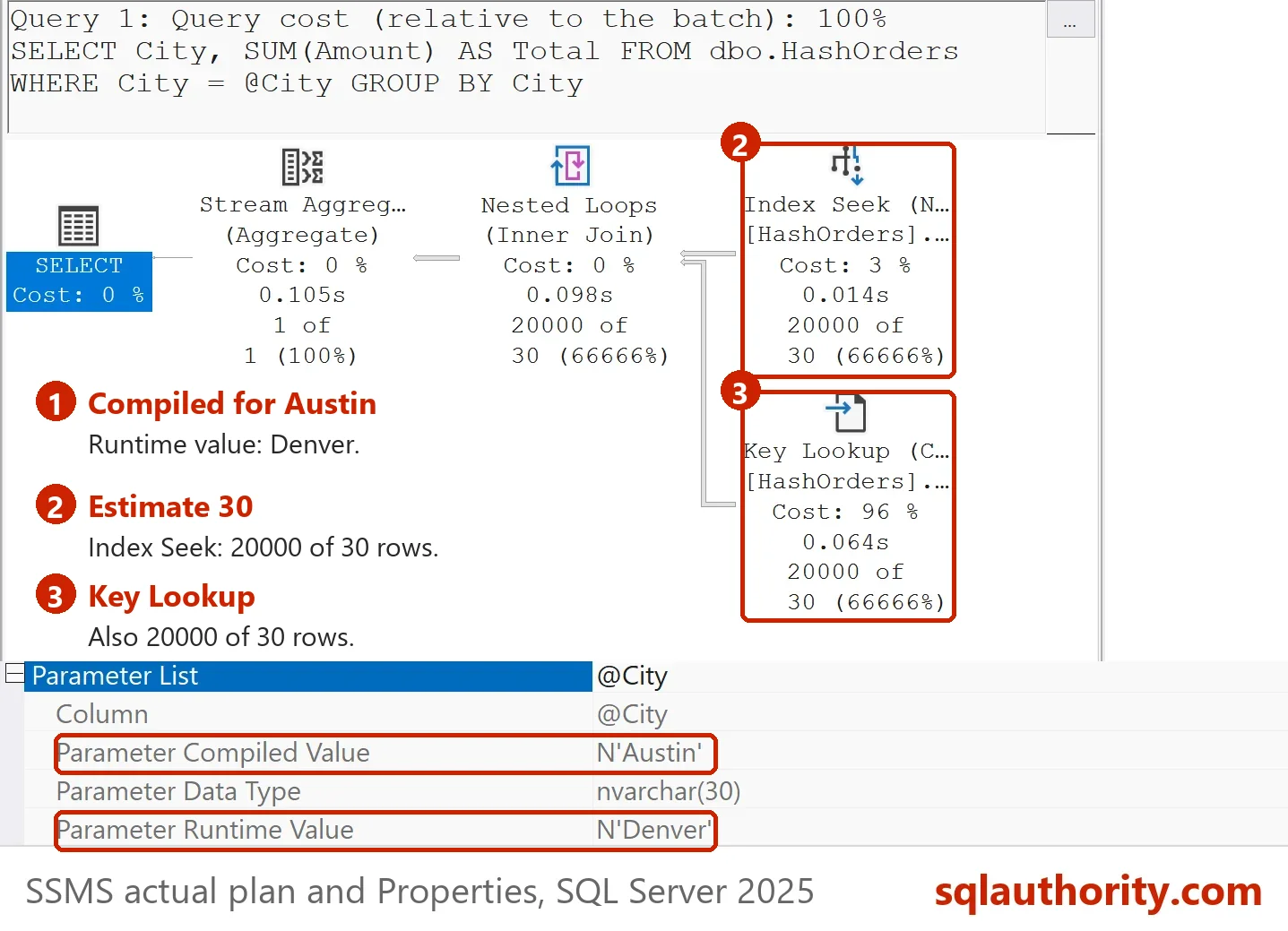
The usual advice is to pass the city as a parameter, so that one entry serves every value. That removes the clutter. It can also make one run much slower. The script below sends Austin first, then Denver, through the same parameterized text.
ALTER DATABASE SCOPED CONFIGURATION CLEAR PROCEDURE_CACHE;
GO
EXEC sys.sp_executesql N'SELECT City, SUM(Amount) AS Total FROM dbo.HashOrders WHERE City = @City GROUP BY City;', N'@City nvarchar(30)', @City = N'Austin';
GO
EXEC sys.sp_executesql N'SELECT City, SUM(Amount) AS Total FROM dbo.HashOrders WHERE City = @City GROUP BY City;', N'@City nvarchar(30)', @City = N'Denver';
GO
SELECT qs.execution_count AS Runs, qs.total_logical_reads AS Reads, qs.last_logical_reads AS LastRunReads
FROM sys.dm_exec_query_stats AS qs
CROSS APPLY sys.dm_exec_sql_text(qs.sql_handle) AS st
WHERE st.text LIKE N'%@City%' AND st.text LIKE N'%dbo.HashOrders%' AND st.text NOT LIKE N'%dm_exec%';
| Runs | Reads | LastRunReads |
|---|---|---|
| 2 | 63939 | 63817 |
One entry served both runs, and the plan built for Austin was reused for Denver. The Denver run read 63,817 pages. With its own plan, the same city read 867. This is parameter sniffing: SQL Server builds the plan for the first value it sees. SQL Server 2022 can keep several plans for one parameterized query with Parameter Sensitive Plan optimization. It did not apply here, because one plan served both cities. Check your own plans before you rely on it.
You could argue that the many ad hoc plans were the better design after all. For this table they were. The price is compile time and cache memory. Choose by measuring both.
Where to Start Tuning
Start with wait statistics, not with a single query. They tell you which resource the server waits for most, such as CPU, disk or locks. Then group by query hash to find the queries behind that wait. To find queries behind one index, read Find Queries Using an Index in the SQL Server Plan Cache.
Read the numbers with care. sys.dm_exec_query_stats holds only the entries still in the cache. When an entry leaves, its counters leave with it, so the totals cover a window, not the history. Reading the view needs the VIEW SERVER STATE permission, or VIEW SERVER PERFORMANCE STATE on SQL Server 2022 and later.
What to Remember
A cache entry shows one text and one plan. A query can own many of them. Group by query hash before you rank queries by cost, or the real top query hides.
Remove the demo database when you finish.
USE master;
GO
DROP DATABASE QueryHashPlansDemo;
A slow query is not always one entry, it is the sum of its copies.
Published by Pinal Dave on SQLAuthority. More of my work at pinaldave.com.
Discover more from SQL Authority with Pinal Dave
Subscribe to get the latest posts sent to your email.