
Simple interest in SQL Server is principal times rate times years, divided by 100. A T-SQL function can return it in one line. The function is easy to write and easy to get wrong. A wrong return type drops the cents. With inlining off, a scalar function runs once for every row and is slow in a table.

Simple Interest in SQL Server: The Formula and a First Function
For a principal of 10,000 at 8.5 percent a year for 3 years, the interest is 2,550. The total to repay is 12,550. In one health check, a financial client had a slow function for this formula. It used a cursor. I am not a fan of cursors, and this formula needs none. One expression does the work.
A common first version returns an int, because the example result is a whole number. The script creates a demo database named SimpleInterestDemo and that first version. It uses CREATE OR ALTER, which needs SQL Server 2016 SP1 or later. The cleanup at the end drops the database.
IF DB_ID(N'SimpleInterestDemo') IS NULL CREATE DATABASE SimpleInterestDemo;
GO
USE SimpleInterestDemo;
GO
CREATE OR ALTER FUNCTION dbo.SimpleInterestInt (@Principal decimal(18,2), @Rate decimal(18,2), @Years decimal(18,2))
RETURNS int
AS
BEGIN
    RETURN (@Principal * @Rate * @Years / 100);
END;
Return a Decimal, Not an Int
For simple interest in SQL Server, return a decimal, because an int has no cents. SQL Server converts the result to the return type, and it throws the fraction away. The next function returns decimal(18,2), which keeps two places and rounds the rest. It also carries WITH SCHEMABINDING, which a later section explains.
CREATE OR ALTER FUNCTION dbo.SimpleInterest (@Principal decimal(18,2), @Rate decimal(18,2), @Years decimal(18,2))
RETURNS decimal(18,2)
WITH SCHEMABINDING
AS
BEGIN
    RETURN (@Principal * @Rate * @Years / 100);
END;
The query below calls both versions with three loans. The first loan has a whole number result. The others do not.
SELECT v.Principal, v.Rate, v.Years,
       dbo.SimpleInterestInt(v.Principal, v.Rate, v.Years) AS WithInt,
       dbo.SimpleInterest(v.Principal, v.Rate, v.Years) AS WithDecimal
FROM (VALUES (10000.00, 8.5, 3.0), (1234.56, 7.25, 2.5), (999.99, 3.3, 0.5)) AS v(Principal, Rate, Years);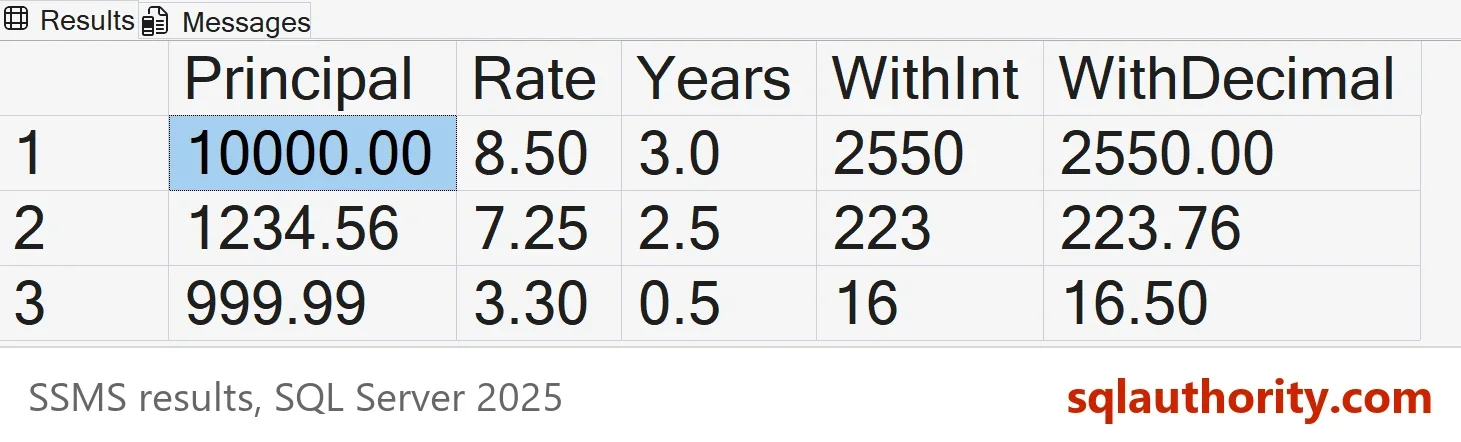
| Principal | Rate | Years | WithInt | WithDecimal |
|---|---|---|---|---|
| 10000.00 | 8.50 | 3.0 | 2550 | 2550.00 |
| 1234.56 | 7.25 | 2.5 | 223 | 223.76 |
| 999.99 | 3.30 | 0.5 | 16 | 16.50 |
The int version agrees only for the first loan. For the second it returns 223 instead of 223.76. For the third it returns 16 instead of 16.50. The decimal version rounds the exact result of 16.499835 to 16.50. A lender would not accept either truncation.
Why SCHEMABINDING Matters
The function above uses schema binding, and the option has a real effect. A function with SCHEMABINDING that uses no outside data is deterministic. SQL Server lets you store its result in a persisted computed column. The script creates a second copy without the option and asks about both.
CREATE OR ALTER FUNCTION dbo.SimpleInterestLoose (@Principal decimal(18,2), @Rate decimal(18,2), @Years decimal(18,2))
RETURNS decimal(18,2)
AS
BEGIN
    RETURN (@Principal * @Rate * @Years / 100);
END;
GO
SELECT OBJECTPROPERTY(OBJECT_ID(N'dbo.SimpleInterest'), 'IsDeterministic') AS BoundIsDeterministic,
OBJECTPROPERTY(OBJECT_ID(N'dbo.SimpleInterestLoose'), 'IsDeterministic') AS LooseIsDeterministic;| BoundIsDeterministic | LooseIsDeterministic |
|---|---|
| 1 | 0 |
Now try to store the result in a computed column. A persisted column keeps the value on disk and needs a deterministic expression. The first column works. The second fails.
DROP TABLE IF EXISTS dbo.Loan;
CREATE TABLE dbo.Loan (LoanID int NOT NULL PRIMARY KEY, Principal decimal(18,2) NOT NULL, Rate decimal(18,2) NOT NULL, Years decimal(18,2) NOT NULL);
ALTER TABLE dbo.Loan ADD InterestBound AS dbo.SimpleInterest(Principal, Rate, Years) PERSISTED;
GO
ALTER TABLE dbo.Loan ADD InterestLoose AS dbo.SimpleInterestLoose(Principal, Rate, Years) PERSISTED;
Msg 4936, Level 16, State 1, Line 1
Computed column 'InterestLoose' in table 'Loan' cannot be persisted because the column is non-deterministic.
The price is a dependency. While a table uses the bound function, SQL Server blocks changes to it. Drop the computed column first, then alter the function.
How Fast Is a Scalar Function
Older versions ran a scalar function once for every row, and that was slow. SQL Server 2019 can inline a simple function into the query, at compatibility level 150 or higher. The column is_inlineable says whether it can.
SELECT OBJECT_NAME(object_id) AS FunctionName, is_inlineable
FROM sys.sql_modules
WHERE object_id = OBJECT_ID(N'dbo.SimpleInterest');
| FunctionName | is_inlineable |
|---|---|
| SimpleInterest | 1 |
The next script loads 500,000 loans. It runs the same sum three ways. The first inlines the function. The second switches inlining off with a hint. The third uses an inline table-valued function with the same formula. The labels at the end of each statement let a later query find them.
DROP TABLE IF EXISTS dbo.Loan;
CREATE TABLE dbo.Loan (LoanID int NOT NULL PRIMARY KEY, Principal decimal(18,2) NOT NULL, Rate decimal(18,2) NOT NULL, Years decimal(18,2) NOT NULL);
WITH n AS (SELECT TOP (500000) ROW_NUMBER() OVER (ORDER BY (SELECT NULL)) AS i FROM sys.all_columns AS a CROSS JOIN sys.all_columns AS b)
INSERT INTO dbo.Loan (LoanID, Principal, Rate, Years)
SELECT i, 1000 + (i % 9000) + 0.25, 3 + (i % 8) + 0.5, 1 + (i % 10) FROM n;
GO
CREATE OR ALTER FUNCTION dbo.SimpleInterestTable (@Principal decimal(18,2), @Rate decimal(18,2), @Years decimal(18,2))
RETURNS TABLE WITH SCHEMABINDING
AS
RETURN SELECT CONVERT(decimal(18,2), @Principal * @Rate * @Years / 100) AS Interest;
GO
SELECT SUM(dbo.SimpleInterest(Principal, Rate, Years)) AS Total FROM dbo.Loan; -- speed: function inlined
GO
SELECT SUM(dbo.SimpleInterest(Principal, Rate, Years)) AS Total FROM dbo.Loan OPTION (USE HINT('DISABLE_TSQL_SCALAR_UDF_INLINING')); -- speed: function not inlined
GO
SELECT SUM(f.Interest) AS Total FROM dbo.Loan AS l CROSS APPLY dbo.SimpleInterestTable(l.Principal, l.Rate, l.Years) AS f; -- speed: table function
Read the CPU time of each statement from the plan cache. The query needs VIEW SERVER STATE, which is VIEW SERVER PERFORMANCE STATE on SQL Server 2022 and later.
SELECT REPLACE(REPLACE(SUBSTRING(st.text, CHARINDEX(N'-- speed: ', st.text) + 10, 40), CHAR(13), N''), CHAR(10), N'') AS Query,
       CONVERT(int, qs.last_worker_time / 1000.0) AS CpuMs
FROM sys.dm_exec_query_stats AS qs
CROSS APPLY sys.dm_exec_sql_text(qs.sql_handle) AS st
WHERE st.text LIKE N'%-- speed: %' AND st.text NOT LIKE N'%dm_exec_query_stats%'
ORDER BY qs.creation_time;| Query | CpuMs |
|---|---|
| function inlined | 223 |
| function not inlined | 4182 |
| table function | 278 |
The CPU times come from one run and move a little between runs. The ratio holds. The inlined function and the table function cost about the same. Without inlining, the same function cost about eighteen times more. On SQL Server 2017 and earlier, every scalar function behaves like the second row. There, the inline table-valued function is the faster form.
Compound Interest
Compound interest follows the same shape. The formula is principal times one plus the rate per period, raised to the number of periods, minus the principal. A trap sits in the power function. With decimal arguments, POWER returns a decimal of limited precision. The plain calculation for 10,000 at 8.5 percent over 3 years returned 2770.000 in the test. The correct value is 2772.89. Converting to float first fixes it.
CREATE OR ALTER FUNCTION dbo.CompoundInterest (@Principal decimal(18,2), @Rate decimal(18,2), @Years decimal(18,2), @TimesPerYear int)
RETURNS decimal(18,2)
WITH SCHEMABINDING
AS
BEGIN
    RETURN CONVERT(decimal(18,2), @Principal * POWER(CONVERT(float, 1 + @Rate / 100 / @TimesPerYear), @TimesPerYear * @Years) - @Principal);
END;
GO
SELECT dbo.CompoundInterest(10000, 8.5, 3, 1) AS Yearly,
       dbo.CompoundInterest(10000, 8.5, 3, 12) AS Monthly,
dbo.SimpleInterest(10000, 8.5, 3) AS Simple;| Yearly | Monthly | Simple |
|---|---|---|
| 2772.89 | 2893.02 | 2550.00 |
Yearly compounding earns 2,772.89, and monthly compounding earns 2,893.02. Simple interest earns 2,550.00. Compounding more frequently earns more, and the gap grows with the term.
Is a Function Needed at All?
You could argue that a one-line formula needs no function. An expression in the query is the fastest form, and it is easy to read. A function earns its place when many queries share the formula. Then one definition keeps every report in agreement, and a change to the rounding rule happens in one place.
What to Remember
Simple interest in SQL Server should return a decimal, because an int drops the cents. Add SCHEMABINDING when you want to store the result in a computed column. On SQL Server 2019 and later, a simple scalar function can be inlined. In the test, inlining made it about eighteen times cheaper. Run the cleanup script when you finish.
USE master;
GO
IF DB_ID(N'SimpleInterestDemo') IS NOT NULL
BEGIN
    ALTER DATABASE SimpleInterestDemo SET SINGLE_USER WITH ROLLBACK IMMEDIATE;
    DROP DATABASE SimpleInterestDemo;
END;
A formula is not finished when it works, it is finished when it keeps the cents.
Published by Pinal Dave on SQLAuthority. More of my work at pinaldave.com.
Discover more from SQL Authority with Pinal Dave
Subscribe to get the latest posts sent to your email.




2 Comments. Leave new
Why didn’t you use “with schema binding” for the function?
How about calculating compound interest ?