
Identity overflow is about how many values you have used, not how many rows you have left. A table with a few thousand rows can be one insert away from an error. Here is a query that tells you how close every INT identity column is.

The error nobody planned for
Picture a 3 AM page. The orders application is failing on every insert. The message says “Arithmetic overflow error converting IDENTITY to data type int.” Someone checks the table and finds far fewer than two billion rows.
That is the trap. Old rows were purged, but the identity counter never went backward. The counter counts values handed out, and it only moves forward. So let me build a small lab at the edge and then write a check you can run on your own server.
Build three tables at the edge
I do not want to insert two billion rows, so I start the counters near the limits. IdentityUp starts at 2,147,483,645 and counts up by 2. IdentityDown starts at -2,147,483,646 and counts down by 1. IdentityUnused is a normal table that has never inserted a row. Run this in a test database. The last block drops all three.
DROP TABLE IF EXISTS dbo.IdentityUp;
DROP TABLE IF EXISTS dbo.IdentityDown;
DROP TABLE IF EXISTS dbo.IdentityUnused;

CREATE TABLE dbo.IdentityUp     (Id int IDENTITY(2147483645, 2),  Label char(1));
CREATE TABLE dbo.IdentityDown   (Id int IDENTITY(-2147483646, -1), Label char(1));
CREATE TABLE dbo.IdentityUnused (Id int IDENTITY,                  Label char(1));

INSERT dbo.IdentityUp (Label)   VALUES ('A');
INSERT dbo.IdentityDown (Label) VALUES ('B');
Calculate how many allocations are left
The check reads sys.identity_columns. It widens the values to bigint first, because subtracting from an INT limit inside an INT would overflow. Then it divides the room left by the step size and rounds down. A NULL last value means the table has never handed out a number.
WITH i AS (
    SELECT object_id, name,
           CONVERT(bigint, seed_value)      AS SeedValue,
           CONVERT(bigint, increment_value) AS IncrementValue,
           CONVERT(bigint, last_value)      AS LastValue
    FROM sys.identity_columns
    WHERE system_type_id = 56
      AND OBJECTPROPERTY(object_id, 'IsMSShipped') = 0)
SELECT OBJECT_SCHEMA_NAME(object_id) AS SchemaName,
       OBJECT_NAME(object_id)        AS TableName,
       name                          AS ColumnName,
       SeedValue, IncrementValue, LastValue,
       CASE WHEN IncrementValue > 0
            THEN (CONVERT(bigint, 2147483647) - LastValue) / IncrementValue
            ELSE (LastValue - CONVERT(bigint, -2147483648)) / (-IncrementValue)
       END AS FurtherAllocations
FROM i
ORDER BY SchemaName, TableName, ColumnName;
IdentityUp has one allocation left. IdentityDown has two. IdentityUnused shows NULL, because nothing has been allocated yet. This query covers the current database, so repeat it in each database you own. It checks INT columns only. For smallint or tinyint, change the type filter.
Cross the edge and read the error
Now use up the last value in IdentityUp. The next insert reaches 2,147,483,647, the INT maximum. One more insert fails, and the CATCH block shows the error.
INSERT dbo.IdentityUp (Label) VALUES ('C');

SELECT Id, Label FROM dbo.IdentityUp ORDER BY Id;

BEGIN TRY
    INSERT dbo.IdentityUp (Label) VALUES ('D');
END TRY
BEGIN CATCH
    SELECT ERROR_NUMBER() AS OverflowError, ERROR_MESSAGE() AS OverflowMessage;
END CATCH;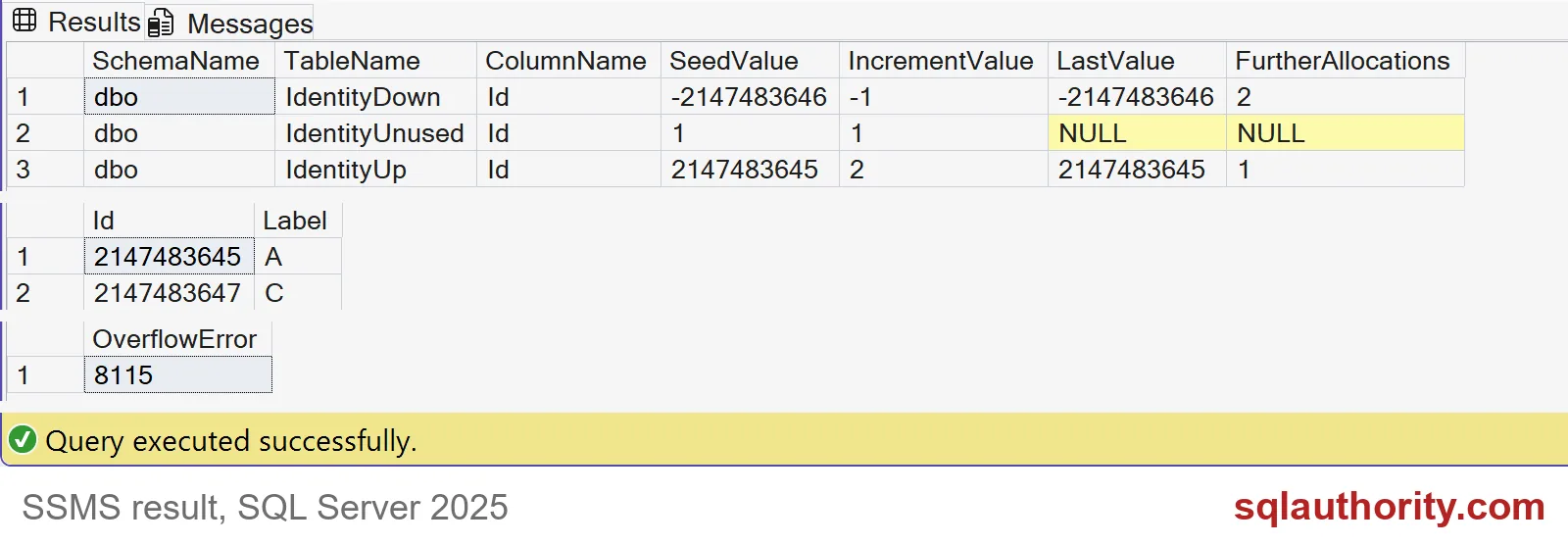
The rows hold 2,147,483,645 and 2,147,483,647. The last attempt reports error 8115. SQL Server does not wrap around or skip ahead. It simply stops.
Rows are not allocations
Here is why a row count lies. The next block inserts A, then rolls back B, then inserts C. It then deletes everything and inserts D. In the end there is one row in the table, yet four values were used.
DROP TABLE IF EXISTS #Gap;
CREATE TABLE #Gap (Id int IDENTITY(1, 1), Label char(1));

INSERT #Gap (Label) VALUES ('A');
BEGIN TRAN;
INSERT #Gap (Label) VALUES ('B');
ROLLBACK;
INSERT #Gap (Label) VALUES ('C');
DELETE #Gap;
INSERT #Gap (Label) VALUES ('D');

SELECT COUNT(*) AS rows_in_table, MAX(Id) AS id_in_use FROM #Gap;
The result is one row and a highest Id of 4. The rollback burned a value, and the delete gave nothing back. This is why you forecast from LastValue and never from COUNT(*).

Plan the fix before the alert turns red
Run the check on a schedule and keep dated results. A sudden jump tells you someone reseeded a table. Moving to BIGINT is the real cure, but it touches primary keys, foreign keys, indexes and application code. Give yourself months, not a weekend. Reseeding into the negative range buys time only if you have tested how old data and the application will cope.
DROP TABLE IF EXISTS #Gap;
DROP TABLE IF EXISTS dbo.IdentityUp;
DROP TABLE IF EXISTS dbo.IdentityDown;
DROP TABLE IF EXISTS dbo.IdentityUnused;
Run the check this week, while the numbers are still boring.
Identity headroom is not your row count, it is the range you have not yet used.
Published by Pinal Dave on SQLAuthority. More of my work at pinaldave.com.
Discover more from SQL Authority with Pinal Dave
Subscribe to get the latest posts sent to your email.


1 Comment. Leave new
Congrats sir indeed a great success.
Just would love to say the Quote that i always have in my mind.
The woods are lovely, dark, and deep, But I have promises to keep, And miles to go before I sleep.
Keep going …:)
Just loved the last part of conversation between you and Shaivi.
Best Regards,
P.Anish Shenoy
Bangalore.