Top 1 and index scan can sit in the same plan, and the scan still reads only a few pages. A scan operator does not mean the whole table was read. It means the engine reads in order until it has what the query asked for. With TOP 1, that can be one row.

A Scan Is Not a Full Read
A common belief says every scan reads the entire table, and every seek is faster. The first half is wrong for a query that needs few rows. A scan can then cost almost nothing. A scan in a plan is a hint that a better access path can exist. It is not proof that something is wrong.
The demo shows top 1 and index scan together. The database TopScanDemo holds one table, dbo.Invoice, with 100,000 rows. The row with the highest invoice number has an unusual customer number. A query can find it only at the end of the table. The cleanup at the end drops the database.
IF DB_ID(N'TopScanDemo') IS NULL CREATE DATABASE TopScanDemo;
GO
USE TopScanDemo;
GO
DROP TABLE IF EXISTS dbo.Invoice;
CREATE TABLE dbo.Invoice (
    InvoiceID        int           NOT NULL CONSTRAINT PK_Invoice PRIMARY KEY,
    BillToCustomerID int           NOT NULL,
    Comments         nvarchar(100) NOT NULL,
    Notes            char(120)     NOT NULL DEFAULT 'n'
);
WITH n AS (SELECT TOP (100000) ROW_NUMBER() OVER (ORDER BY (SELECT NULL)) AS i FROM sys.all_columns AS a CROSS JOIN sys.all_columns AS b)
INSERT INTO dbo.Invoice (InvoiceID, BillToCustomerID, Comments)
SELECT i, i % 1000 + 1, CONCAT(N'Invoice note ', i) FROM n;
UPDATE dbo.Invoice SET BillToCustomerID = 5000 WHERE InvoiceID = 100000;
SELECT INDEXPROPERTY(OBJECT_ID(N'dbo.Invoice'), N'PK_Invoice', 'IndexDepth') AS IndexDepth,
       used_page_count AS UsedPages, row_count AS TotalRows
FROM sys.dm_db_partition_stats
WHERE object_id = OBJECT_ID(N'dbo.Invoice') AND index_id = 1;| IndexDepth | UsedPages | TotalRows |
|---|---|---|
| 3 | 2227 | 100000 |
The clustered index has three levels, and the table uses 2,227 pages. Those two numbers explain every result below.
Six Queries, Six Read Counts
The next script runs six queries. Each carries a label in a comment at the end of its text. The label lets a later query find the cached statistics of each one.
SELECT TOP (1) InvoiceID, BillToCustomerID, Comments FROM dbo.Invoice; -- test: TOP 1, no filter
GO
SELECT SUM(BillToCustomerID) AS Total FROM dbo.Invoice; -- test: No TOP, SUM of the table
GO
SELECT TOP (1) InvoiceID, BillToCustomerID, Comments FROM dbo.Invoice ORDER BY InvoiceID; -- test: TOP 1, ORDER BY the key
GO
SELECT TOP (1) InvoiceID, BillToCustomerID, Comments FROM dbo.Invoice ORDER BY Comments; -- test: TOP 1, ORDER BY Comments
GO
SELECT TOP (1) InvoiceID, BillToCustomerID, Comments FROM dbo.Invoice WHERE BillToCustomerID = 5000; -- test: TOP 1, match on the last row
GO
SELECT TOP (1) InvoiceID, BillToCustomerID, Comments FROM dbo.Invoice WHERE BillToCustomerID = 7; -- test: TOP 1, match on the sixth row
Now read the logical reads of each query from the plan cache. Logical reads count the pages the query touched. The query needs the VIEW SERVER STATE permission, which is VIEW SERVER PERFORMANCE STATE on SQL Server 2022 and later.
SELECT REPLACE(REPLACE(SUBSTRING(st.text, CHARINDEX(N'-- test: ', st.text) + 9, 60), CHAR(13), N''), CHAR(10), N'') AS Query,
       qs.last_logical_reads AS LogicalReads
FROM sys.dm_exec_query_stats AS qs
CROSS APPLY sys.dm_exec_sql_text(qs.sql_handle) AS st
WHERE st.text LIKE N'%-- test: %' AND st.text NOT LIKE N'%dm_exec_query_stats%'
ORDER BY qs.last_logical_reads, Query;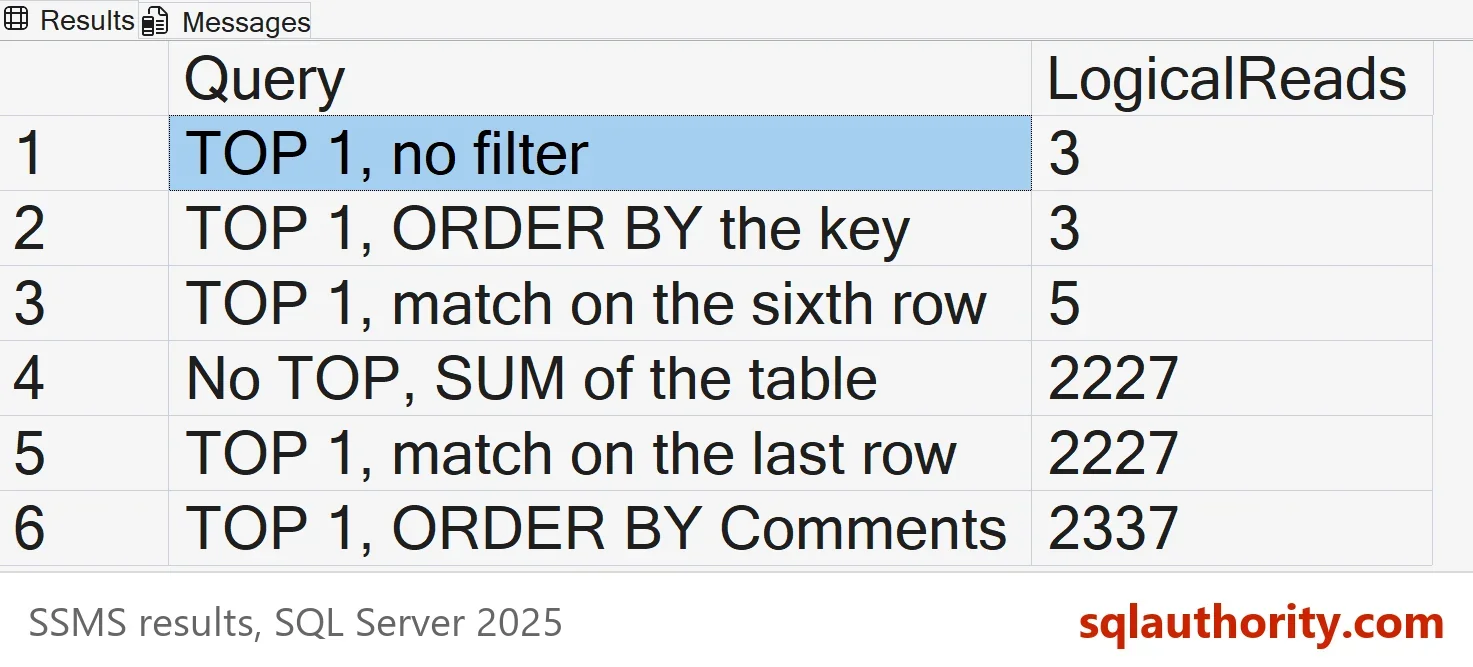
| Query | LogicalReads |
|---|---|
| TOP 1, no filter | 3 |
| TOP 1, ORDER BY the key | 3 |
| TOP 1, match on the sixth row | 5 |
| No TOP, SUM of the table | 2227 |
| TOP 1, match on the last row | 2227 |
| TOP 1, ORDER BY Comments | 2337 |
Why Top 1 and Index Scan Cost Three Pages
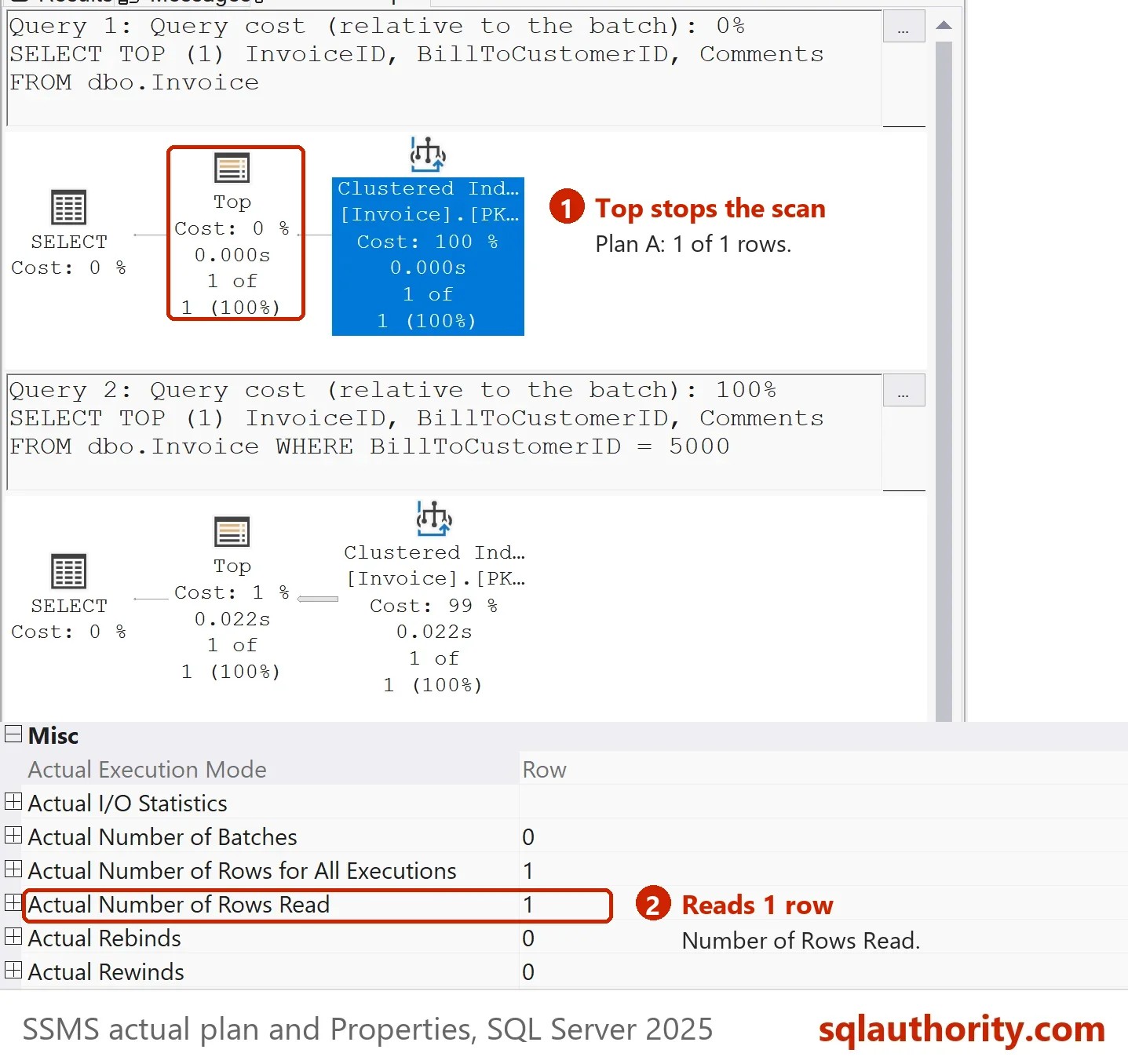
The plain TOP 1 query shows a Clustered Index Scan in the plan. STATISTICS IO reports scan count 1 and logical reads 3. The scan starts at the first leaf page. Three reads match the three levels of the index. They are the root page, one page below it, and the first leaf page. The Top operator asks for one row and stops the scan. The scan operator reports one row read.
The same plan shape with the SUM aggregate has no TOP, so the scan runs to the end. It reads all 2,227 pages and 100,000 rows. The scan operator is the same in both plans, and only the demand above it differs.
When TOP 1 Still Reads Everything
The reads depend on how fast the engine finds a row that satisfies the query. Ordering by the clustered key is free, because the index is already in that order. The scan reads three pages and stops. Ordering by Comments is a different case. No index holds that order, so SQL Server must look at every row to find the smallest one. It scans all 2,227 pages to return one row. The capture server counted 2,337 reads here, the test server 2,227.
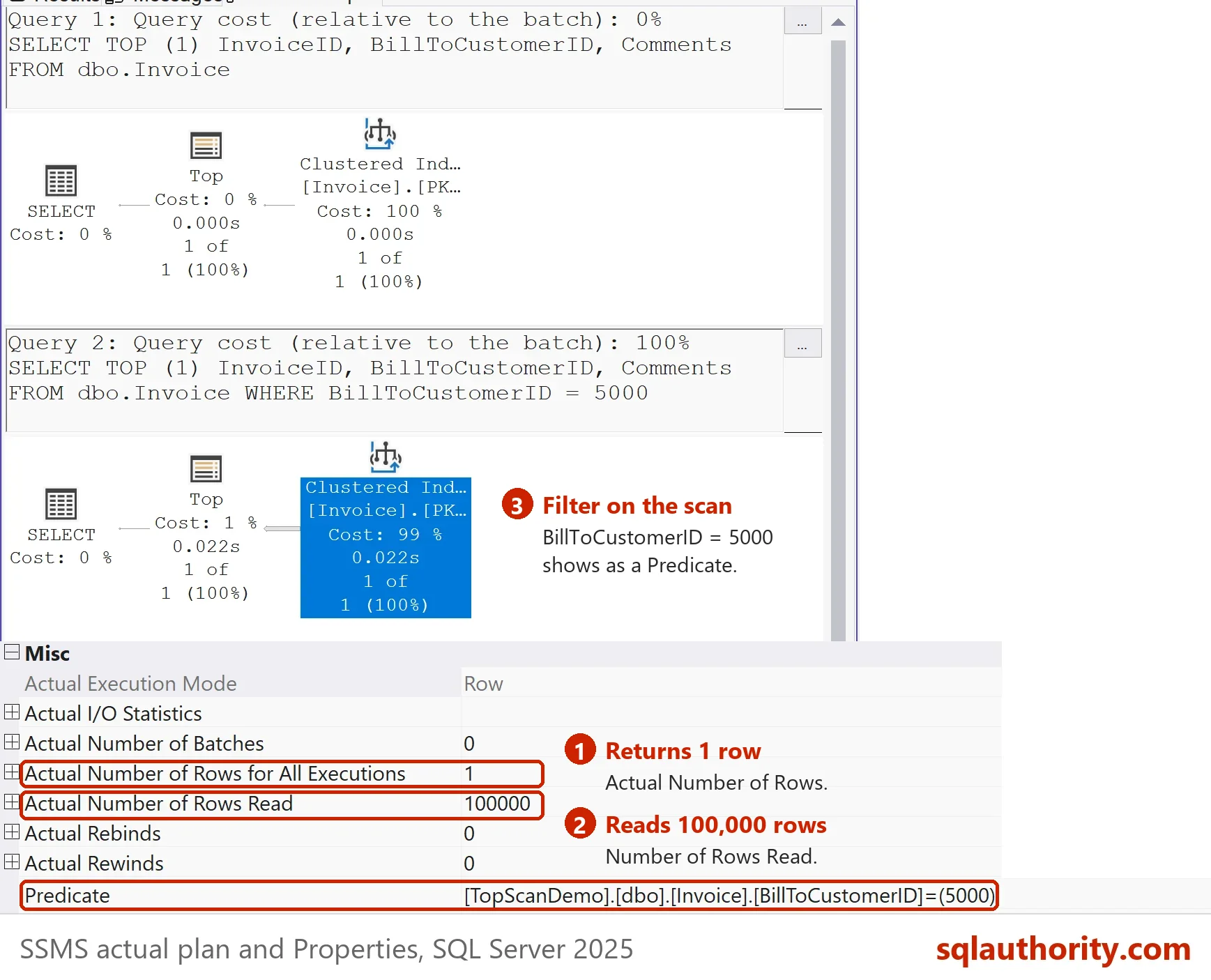
A filter behaves the same way. The sixth row has customer number 7, so the scan stops after six rows and five reads. The customer number 5000 exists only in the last row. The scan reads every row before it, then returns the match. The plan reported 6 rows read for the first filter and 100,000 for the second, each with one row returned. Read the Number of Rows Read property of the scan operator for this value.
Are Scans Bad?
You could argue that a scan should always be removed. That advice fits queries that read a big table to return a few rows. It does not fit a query that stops early. It does not fit a query that needs most of the table, or a small table. For a top 1 and index scan plan, ask how many rows the scan reads. Then compare that with how many it returns. When the two are close, the scan is doing honest work.
To check a scan yourself, switch on the actual execution plan with Ctrl+M and run the first query. Click the Clustered Index Scan operator and read its Properties pane. The value Number of Rows Read is 1, and the value Actual Number of Rows is 1. For a scan that reads far more rows than it returns, the two values differ widely. That gap is worth a look.
What to Remember
In top 1 and index scan plans, the scan reads in order and TOP 1 tells it when to stop. The cost depends on where the first matching row sits and on whether the order is free. Check the rows read and the logical reads before you call a scan a problem. The cleanup script drops the demo database.
USE master;
GO
IF DB_ID(N'TopScanDemo') IS NOT NULL
BEGIN
    ALTER DATABASE TopScanDemo SET SINGLE_USER WITH ROLLBACK IMMEDIATE;
    DROP DATABASE TopScanDemo;
END;
A scan is not a verdict, it is a question about how much it had to read.
Published by Pinal Dave on SQLAuthority. More of my work at pinaldave.com.
Discover more from SQL Authority with Pinal Dave
Subscribe to get the latest posts sent to your email.