Conditional COUNT includes zero when the CASE expression returns it. I leave the nonmatching branch NULL when counting qualifying rows. Adding ELSE 0 changes the expression’s meaning, even though the predicate stays the same.

Inspect what CASE returns
A count receives an expression value from each input row. It doesn’t decide whether that value represents success. Zero remains a supplied value, so COUNT includes it. NULL is the value COUNT excludes.
I first look at the expression before choosing the aggregate. The example contains two ready rows, two nonready rows and two missing flags. Both ready rows belong to group A. Group B has inputs, but none satisfy the condition.
The predicate requires ReadyFlag to equal one. A missing flag doesn’t satisfy that predicate. The zero-ELSE expression therefore returns zero for that input. Omitting ELSE returns NULL for the same input.
WITH Inputs AS
(
    SELECT RowId, GroupCode, ReadyFlag
    FROM (VALUES
        (1, CAST('A' AS varchar(1)), CAST(1 AS int)),
        (2, 'A', 1), (3, 'A', 0), (4, 'A', NULL),
        (5, 'B', 0), (6, 'B', NULL)
    ) AS v(RowId, GroupCode, ReadyFlag)
)
SELECT RowId, GroupCode, ReadyFlag,
       CASE WHEN ReadyFlag = 1 THEN 1 ELSE 0 END AS ZeroElseValue,
       CASE WHEN ReadyFlag = 1 THEN 1 END AS NullElseValue
FROM Inputs
ORDER BY RowId;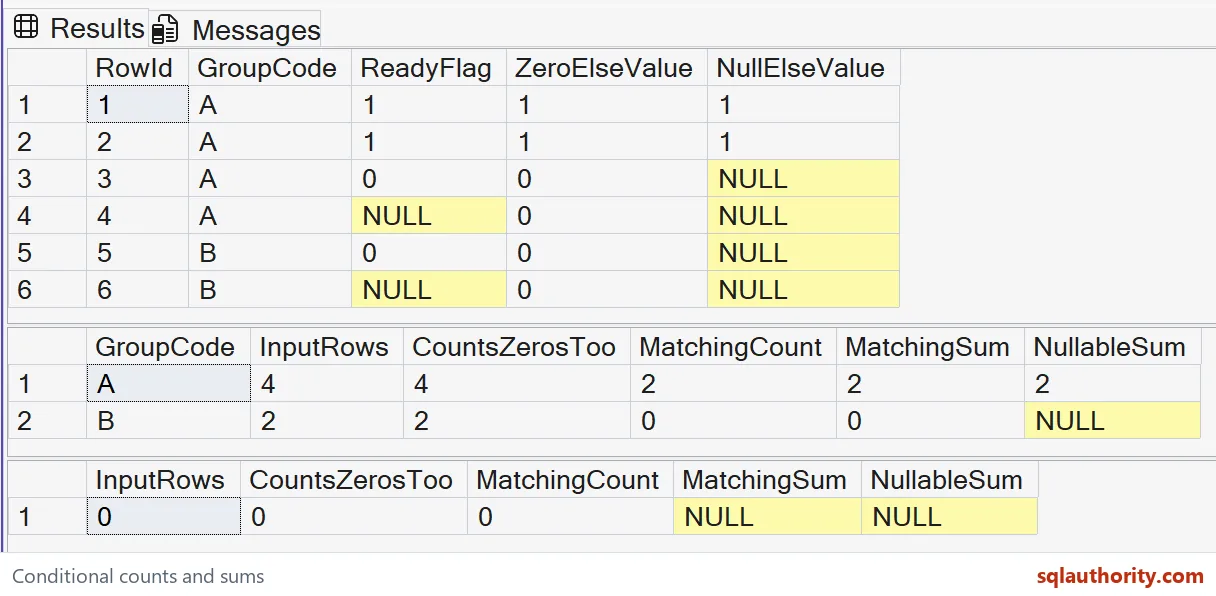
Compare two ways to count matches
Read the five columns for all six source rows. ZeroElseValue contains two ones and four zeros. NullElseValue contains two ones and four NULLs. Both expressions preserve every source row.
COUNT with ELSE 0 counts four values in group A. It counts two in group B. Those numbers describe input rows, including the nonmatching zeros. They don’t describe the ready population.
MatchingCount omits ELSE and counts only the returned ones. Its expected results are two for A and zero for B. MatchingSum instead adds the zero-ELSE values. Its expected results match those counts for these populated groups.
WITH Inputs AS
(
    SELECT RowId, GroupCode, ReadyFlag
    FROM (VALUES
        (1, CAST('A' AS varchar(1)), CAST(1 AS int)),
        (2, 'A', 1), (3, 'A', 0), (4, 'A', NULL),
        (5, 'B', 0), (6, 'B', NULL)
    ) AS v(RowId, GroupCode, ReadyFlag)
)
SELECT GroupCode, COUNT(*) AS InputRows,
       COUNT(CASE WHEN ReadyFlag = 1 THEN 1 ELSE 0 END) AS CountsZerosToo,
       COUNT(CASE WHEN ReadyFlag = 1 THEN 1 END) AS MatchingCount,
       SUM(CASE WHEN ReadyFlag = 1 THEN 1 ELSE 0 END) AS MatchingSum,
       SUM(CASE WHEN ReadyFlag = 1 THEN 1 END) AS NullableSum
FROM Inputs
GROUP BY GroupCode
ORDER BY GroupCode;
Keep zero matches separate from missing input
Group B still exists because it contains two source rows. Neither row qualifies, so MatchingCount returns zero. MatchingSum also returns zero because both supplied values are zero. The group has evidence for that result.
NullableSum omits ELSE and receives only NULL values for B. Its expected result is NULL rather than zero. Removing ELSE therefore affects SUM differently from COUNT. I check the aggregate alongside the branch expression.
A missing flag also remains different from a known nonready flag. This condition treats both as nonmatches. If a report needs their separate populations, add separate measures. Don’t interpret the ready count as proof that every flag was supplied.
Check an empty input separately
The final query removes every source row before aggregating. It has no GROUP BY, so it still produces one summary row. Both COUNT expressions return zero. Both SUM expressions return NULL because no values reach them.
WITH Inputs AS
(
    SELECT RowId, GroupCode, ReadyFlag
    FROM (VALUES
        (1, CAST('A' AS varchar(1)), CAST(1 AS int)),
        (2, 'A', 1), (3, 'A', 0), (4, 'A', NULL),
        (5, 'B', 0), (6, 'B', NULL)
    ) AS v(RowId, GroupCode, ReadyFlag)
)
SELECT COUNT(*) AS InputRows,
       COUNT(CASE WHEN ReadyFlag = 1 THEN 1 ELSE 0 END) AS CountsZerosToo,
       COUNT(CASE WHEN ReadyFlag = 1 THEN 1 END) AS MatchingCount,
       SUM(CASE WHEN ReadyFlag = 1 THEN 1 ELSE 0 END) AS MatchingSum,
       SUM(CASE WHEN ReadyFlag = 1 THEN 1 END) AS NullableSum
FROM Inputs
WHERE 1 = 0;
I’d use conditional COUNT when the required outcome is a count, including zero for an empty scalar input. Conditional SUM remains useful when its missing-input behavior fits the report. Neither choice changes the qualifying predicate. State the empty-input rule separately.
Keep the population and range explicit
These queries read fixed VALUES rows and change no database objects or session settings. They count rows after the source is formed. A join that duplicates input rows also duplicates qualifying contributions. This expression doesn’t count distinct entities automatically.
The supplied integers keep both counting and addition inside int range. Larger populations need a suitable aggregate and receiving type. COUNT_BIG supplies bigint for counting; summing a bigint branch supplies a wider sum. Changing the type doesn’t repair a wrong population.
Compare every projected branch before trusting the grouped summary. Keep group B and the empty query in the test. A populated group with some matches can conceal the NULL difference. A plausible total alone doesn’t establish the intended rule.
Leave the nonmatching branch NULL, and the count tells the truth.
ELSE 0 is not a harmless default, it is a value that COUNT will count.
Published by Pinal Dave on SQLAuthority. More of my work at pinaldave.com.
Discover more from SQL Authority with Pinal Dave
Subscribe to get the latest posts sent to your email.