A dropped table can leave transaction-log clues, but those clues are not a complete audit trail. My original investigation had limits.

-- Historical undocumented log inspection, in the affected database:
-- SELECT [Begin Time], SUSER_SNAME([Transaction SID]) AS [User]
-- FROM sys.fn_dblog(NULL,NULL) WHERE [Transaction Name] = 'DROPOBJ';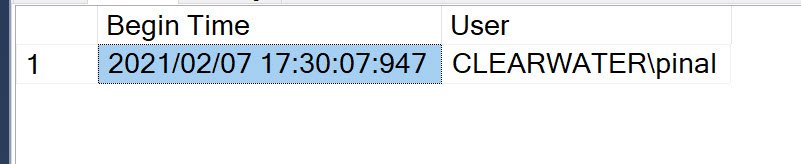
My lab deliberately created and dropped ImpTable before reading the log. Don’t repeat that DROP on production to investigate an existing incident. Preserve available logs, audit files and backups before retention removes them.
fn_dblog is undocumented, including its internal columns. Results can refer to other dropped objects. A SID need not resolve to a current login. A displayed time alone does not establish who initiated the operation.
Correlate clues with Audit, retained events, deployment logs, application logs and database context. Uncollected or expired sources can’t reliably be reconstructed here. The original native result illustrates its historical execution. It does not promise attribution.
Reference: Supported SQL Server Audit records.
Related reading
Original video
A transaction-log clue is not proof of personal attribution, it is evidence to correlate with retained audit and operational records.
Published by Pinal Dave on SQLAuthority. More of my work at pinaldave.com.
Discover more from SQL Authority with Pinal Dave
Subscribe to get the latest posts sent to your email.