
Free Log Space is reusable capacity inside an allocated transaction log. I measure disk space and file size separately.

DBCC SQLPERF(LOGSPACE);
SELECT DB_NAME(database_id) AS DatabaseName,
       total_log_size_in_bytes / 1048576.0 AS TotalLogMB,
       used_log_space_in_bytes / 1048576.0 AS UsedLogMB,
       (total_log_size_in_bytes - used_log_space_in_bytes) / 1048576.0 AS FreeLogMB
FROM sys.dm_db_log_space_usage;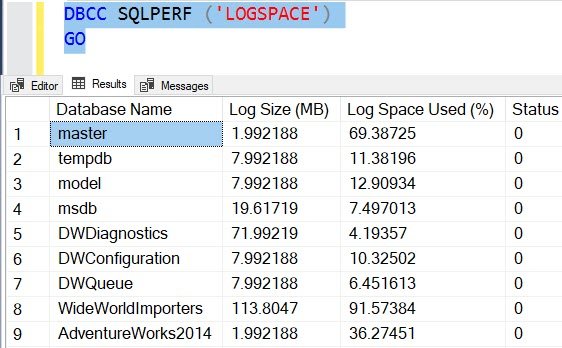

The first method reports log size and usage across databases. The second reports total, used and free megabytes for the current database. It aggregates the database log. It does not measure each physical log file separately.
A mostly empty log can still occupy a large disk file. Monitor volume space, planned growth and log_reuse_wait_desc separately. Resolve unexpected growth before considering a one-off shrink. Routine shrink-and-grow cycles add work.
Use an account with the documented DMV permission for the target SQL Server release. For unexpected log growth, also review the recovery model and log-reuse waits.
Reusable log space is not free disk capacity, it is space inside the allocated transaction log.
Published by Pinal Dave on SQLAuthority. More of my work at pinaldave.com.
Discover more from SQL Authority with Pinal Dave
Subscribe to get the latest posts sent to your email.




2 Comments. Leave new
“Before we continue to read this blog post here are some blog post where I have explained what you should do when the log file grows too big.”
I am not seeing any links to other blog posts on this topic.
As the original blog got deleted, I have to delete the broken links.