
These 7 Questions about OUTPUT Clause follow my INSERT and DELETE videos. I clarify destinations, triggers and performance scope below.

1. Does OUTPUT work with UPDATE?
Yes, OUTPUT works with UPDATE. It also works with INSERT, DELETE and MERGE. The relevant statement exposes its supported row versions.
2. Can it insert into a variable?
Use a table variable rather than a scalar variable for OUTPUT INTO. Declare it before the statement. Its columns must match the output contract.
3. Must I name the target columns?
Explicit column names help avoid mapping mistakes. Otherwise output and destination columns must line up compatibly. Exclude identity and computed destination columns as documented.
4. Can the OUTPUT INTO destination have a trigger?
The OUTPUT INTO destination can’t have enabled triggers. Those restrictions differ from triggers on the modified table. Assess the correct object and trigger scope.
5. Can it process multiple rows?
Yes, OUTPUT can capture multiple rows. It does not guarantee their order. Add an appropriate later ordering when consuming stored output.
6. Can INSERT use deleted, or DELETE use inserted?
No. INSERT exposes inserted rows, not deleted rows. DELETE exposes deleted rows, not inserted rows. UPDATE can expose both before and after values.
7. What is the performance impact?
I measure the workload before comparing OUTPUT with a trigger. OUTPUT to a client or table variable uses a serial plan. Other OUTPUT INTO cases have documented parallelism rules. It is not universally faster.
DECLARE @Source table (ID int, Value int);
DECLARE @Changes table (ID int, BeforeValue int, AfterValue int);
INSERT @Source VALUES (1,10),(2,20);
UPDATE @Source SET Value = Value + 1
OUTPUT inserted.ID, deleted.Value, inserted.Value
INTO @Changes (ID, BeforeValue, AfterValue);
SELECT ID, BeforeValue, AfterValue FROM @Changes ORDER BY ID;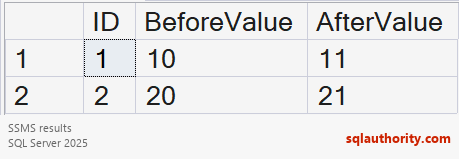
OUTPUT can return rows even when execution later errors and rolls back. Check success before trusting them. The two videos provide examples. When was the OUTPUT clause introduced in SQL Server?
Reference: OUTPUT restrictions and behavior.
Related reading
- Insert Multiple Values into Multiple Tables in a Single Statement – SQL in Sixty Seconds #132
- Remove Trigger for Delete – SQL in Sixty Seconds #133
An OUTPUT row is not proof of a committed change, it is returned data to trust only after execution succeeds.
Published by Pinal Dave on SQLAuthority. More of my work at pinaldave.com.
Discover more from SQL Authority with Pinal Dave
Subscribe to get the latest posts sent to your email.



3 Comments. Leave new
SQL Server 2005
SQL Server 2012
SQL Server 2008, if I am not grossly mistaken.