Statistics that never auto update, in a database where auto update is on, carry a hidden flag called NORECOMPUTE. A flagged statistic stays stale until someone updates it by hand. The flag sits in an index definition that nobody remembers writing.

The Symptom
During a Comprehensive Database Performance Health Check, a senior DBA showed me one statistic that never updated by itself. The table had changed far past the update threshold. Every other statistic on the table refreshed on schedule. The team had updated that one by hand for a long time, and nobody knew why it behaved differently.
The cause was one option. The index had been created with STATISTICS_NORECOMPUTE = ON. That option tells SQL Server to build the statistic once and never refresh it automatically. Database-level auto update stays on and changes nothing for that statistic.
Build the Case
The demo creates a database named FlaggedStatsDemo with a 100,000-row Orders table and two indexes. One index carries the flag and the other does not. Run it on a test server.
IF DB_ID(N'FlaggedStatsDemo') IS NULL CREATE DATABASE FlaggedStatsDemo;
GO
USE FlaggedStatsDemo;
GO
ALTER DATABASE FlaggedStatsDemo SET AUTO_UPDATE_STATISTICS ON;
DROP TABLE IF EXISTS dbo.Orders;
CREATE TABLE dbo.Orders (
    OrderID    int IDENTITY(1,1) NOT NULL PRIMARY KEY,
    CustomerID int          NOT NULL,
    Status     nvarchar(10) NOT NULL
);
WITH n AS (
    SELECT TOP (100000) ROW_NUMBER() OVER (ORDER BY (SELECT NULL)) AS k
    FROM sys.all_objects AS a CROSS JOIN sys.all_objects AS b
)
INSERT INTO dbo.Orders (CustomerID, Status)
SELECT k % 500 + 1, CASE WHEN k % 10 = 0 THEN N'Open' ELSE N'Shipped' END FROM n;
CREATE INDEX IX_Orders_Customer ON dbo.Orders (CustomerID) WITH (STATISTICS_NORECOMPUTE = ON);
CREATE INDEX IX_Orders_Status ON dbo.Orders (Status);
The view sys.stats holds the flag in its no_recompute column. The function sys.dm_db_stats_properties adds the row count and the number of changes since the last update.
SELECT s.name AS StatName, s.no_recompute, sp.rows, sp.modification_counter
FROM sys.stats AS s
CROSS APPLY sys.dm_db_stats_properties(s.object_id, s.stats_id) AS sp
WHERE s.object_id = OBJECT_ID(N'dbo.Orders') AND s.name LIKE N'IX[_]Orders%'
ORDER BY s.name;
| StatName | no_recompute | rows | modification_counter |
|---|---|---|---|
| IX_Orders_Customer | 1 | 100000 | 0 |
| IX_Orders_Status | 0 | 100000 | 0 |
Watch One Statistic Go Stale
Now add 40,000 orders for new customers. At compatibility level 130 and higher, the update threshold is the smaller of two numbers. One is 500 plus 20 percent of the rows. The other is the square root of 1,000 times the rows. For 100,000 rows that is 10,000 changes, so 40,000 is far past it. A flagged statistic ignores both numbers. A query that filters on both columns makes SQL Server look at both statistics.
WITH n AS (
    SELECT TOP (40000) ROW_NUMBER() OVER (ORDER BY (SELECT NULL)) AS k
    FROM sys.all_objects AS a CROSS JOIN sys.all_objects AS b
)
INSERT INTO dbo.Orders (CustomerID, Status)
SELECT 501 + k % 40, N'Open' FROM n;
GO
SELECT COUNT(*) AS MatchingOrders FROM dbo.Orders WHERE CustomerID = 520 AND Status = N'Open';
Run the properties query again.
| StatName | no_recompute | rows | modification_counter |
|---|---|---|---|
| IX_Orders_Customer | 1 | 100000 | 40000 |
| IX_Orders_Status | 0 | 140000 | 0 |
The unflagged statistic refreshed itself during the query. It now knows all 140,000 rows, and its counter is back at zero. The flagged statistic still describes 100,000 rows, and 40,000 changes are waiting. The histogram shows what that costs. It lists the customer values the statistic knows about.
SELECT MAX(CAST(h.range_high_key AS int)) AS HighestCustomerKnown
FROM sys.dm_db_stats_histogram(OBJECT_ID(N'dbo.Orders'), (SELECT stats_id FROM sys.stats WHERE object_id = OBJECT_ID(N'dbo.Orders') AND name = N'IX_Orders_Customer')) AS h;
| HighestCustomerKnown |
|---|
| 500 |
The new customers are 501 to 540, and the histogram stops at 500. SQL Server cannot see the new customers when it estimates a plan, so it guesses. A guess can pick the wrong index, the wrong join type or a memory grant that is too small.
Find Every Flagged Statistic
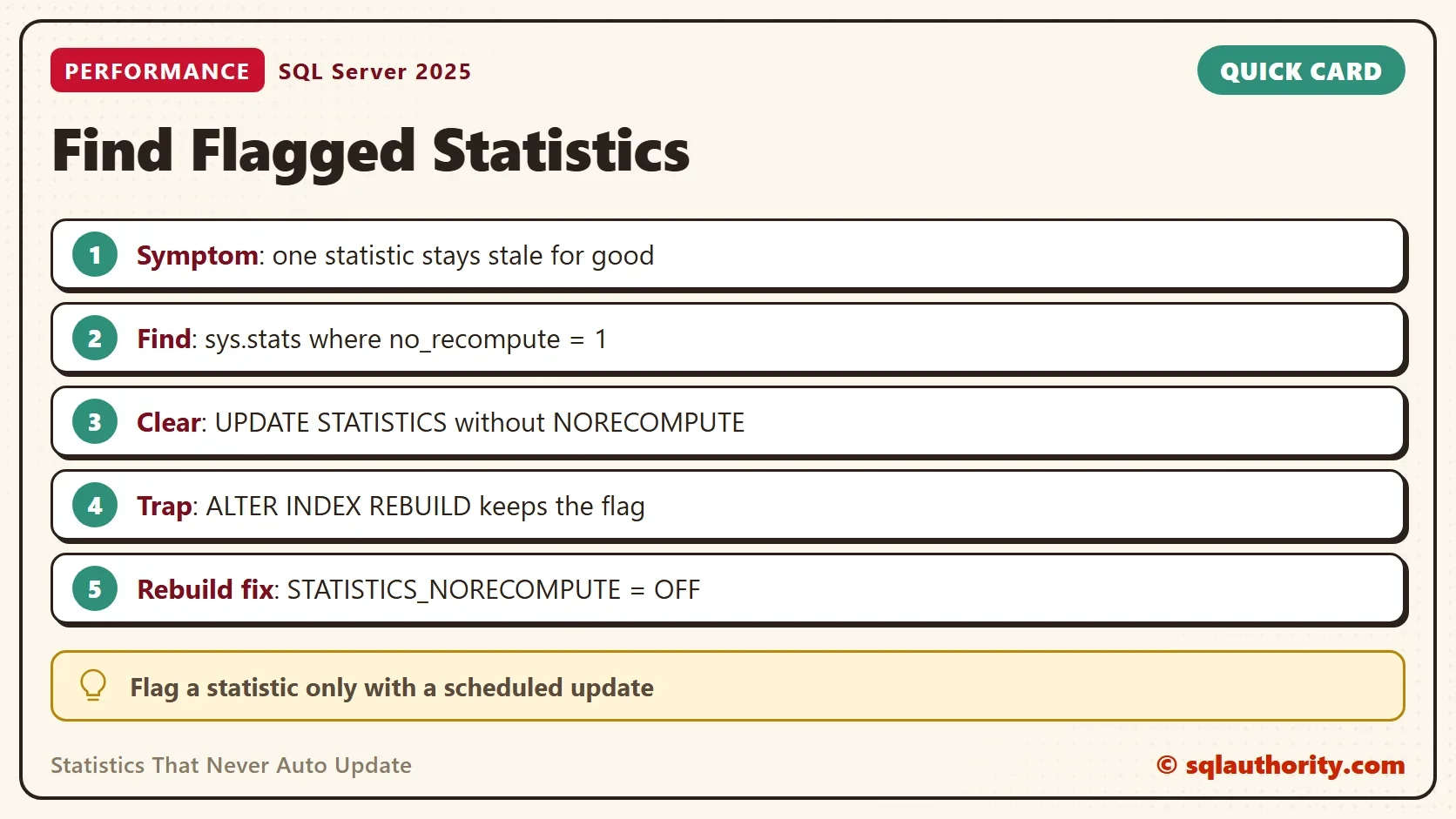
Look for the flag before you chase a plan problem. Statistics that never auto update leave a trail in sys.stats. This query lists every flagged statistic in the current database, with the share of rows changed since its last update. Run it in each database that matters.
SELECT OBJECT_SCHEMA_NAME(s.object_id) AS SchemaName, OBJECT_NAME(s.object_id) AS TableName, s.name AS StatName,
       sp.rows, sp.modification_counter,
       CAST(100.0 * sp.modification_counter / NULLIF(sp.rows, 0) AS decimal(7,1)) AS ChangedPercent
FROM sys.stats AS s
CROSS APPLY sys.dm_db_stats_properties(s.object_id, s.stats_id) AS sp
WHERE s.no_recompute = 1 AND OBJECTPROPERTY(s.object_id, 'IsUserTable') = 1
ORDER BY ChangedPercent DESC;| SchemaName | TableName | StatName | rows | modification_counter | ChangedPercent |
|---|---|---|---|---|---|
| dbo | Orders | IX_Orders_Customer | 100000 | 40000 | 40.0 |
A flagged statistic with a low change percent is harmless today. One with a high percent is a stale statistic with a reason. Compare the percent with the update threshold before you act.
Clear the Flag
Updating the statistic without the NORECOMPUTE option refreshes it and clears the flag in the same step. A full scan reads every row, which is what you want for a one-time repair.
UPDATE STATISTICS dbo.Orders IX_Orders_Customer WITH FULLSCAN;
SELECT s.name AS StatName, s.no_recompute, sp.rows, sp.modification_counter,
       (SELECT MAX(CAST(h.range_high_key AS int)) FROM sys.dm_db_stats_histogram(s.object_id, s.stats_id) AS h) AS HighestCustomerKnown
FROM sys.stats AS s
CROSS APPLY sys.dm_db_stats_properties(s.object_id, s.stats_id) AS sp
WHERE s.object_id = OBJECT_ID(N'dbo.Orders') AND s.name = N'IX_Orders_Customer';| StatName | no_recompute | rows | modification_counter | HighestCustomerKnown |
|---|---|---|---|---|
| IX_Orders_Customer | 0 | 140000 | 0 | 540 |
The flag shows 0, the row count shows 140,000, and the histogram reaches customer 540. From here on, auto update works for this statistic like any other.
The Commands That Keep the Flag
Index maintenance does not clear the flag, and that surprises people. The next script sets the flag back on, tries each command, and records the flag afterward.
DECLARE @r table (Command nvarchar(70), NoRecompute bit);
UPDATE STATISTICS dbo.Orders IX_Orders_Customer WITH FULLSCAN, NORECOMPUTE;
ALTER INDEX IX_Orders_Customer ON dbo.Orders REBUILD;
INSERT @r SELECT N'ALTER INDEX REBUILD', no_recompute FROM sys.stats WHERE object_id = OBJECT_ID(N'dbo.Orders') AND name = N'IX_Orders_Customer';
ALTER INDEX IX_Orders_Customer ON dbo.Orders REORGANIZE;
INSERT @r SELECT N'ALTER INDEX REORGANIZE', no_recompute FROM sys.stats WHERE object_id = OBJECT_ID(N'dbo.Orders') AND name = N'IX_Orders_Customer';
UPDATE STATISTICS dbo.Orders IX_Orders_Customer WITH FULLSCAN, NORECOMPUTE;
INSERT @r SELECT N'UPDATE STATISTICS WITH FULLSCAN, NORECOMPUTE', no_recompute FROM sys.stats WHERE object_id = OBJECT_ID(N'dbo.Orders') AND name = N'IX_Orders_Customer';
ALTER INDEX IX_Orders_Customer ON dbo.Orders REBUILD WITH (STATISTICS_NORECOMPUTE = OFF);
INSERT @r SELECT N'REBUILD WITH (STATISTICS_NORECOMPUTE = OFF)', no_recompute FROM sys.stats WHERE object_id = OBJECT_ID(N'dbo.Orders') AND name = N'IX_Orders_Customer';
UPDATE STATISTICS dbo.Orders IX_Orders_Customer WITH FULLSCAN, NORECOMPUTE;
UPDATE STATISTICS dbo.Orders IX_Orders_Customer WITH FULLSCAN;
INSERT @r SELECT N'UPDATE STATISTICS WITH FULLSCAN', no_recompute FROM sys.stats WHERE object_id = OBJECT_ID(N'dbo.Orders') AND name = N'IX_Orders_Customer';
SELECT Command, NoRecompute FROM @r;
| Command | NoRecompute |
|---|---|
| ALTER INDEX REBUILD | 1 |
| ALTER INDEX REORGANIZE | 1 |
| UPDATE STATISTICS WITH FULLSCAN, NORECOMPUTE | 1 |
| REBUILD WITH (STATISTICS_NORECOMPUTE = OFF) | 0 |
| UPDATE STATISTICS WITH FULLSCAN | 0 |
A weekly rebuild keeps the statistic fresh at the moment of the rebuild, and it leaves the flag in place. Between rebuilds the statistic goes stale again. Name the option in the rebuild, or run the plain update, to clear it.
When the Flag Makes Sense
You could argue that the flag is a tool and not a mistake. On a table with billions of rows, an automatic update at midday can hurt. A scheduled update at night is kinder. That is a fair design when the job runs. It fails when the job stops or the table grows faster than the job expects. If you set the flag, write down the table and schedule the update in the same change.
Two related posts cover the other side. One explains how to set the option on a table, in WITH NORECOMPUTE: Stop Auto Updates on One Table. The other shows how to read and undo it, in the sp_autostats post.
What to Remember
When you meet statistics that never auto update, check no_recompute first. A flagged statistic with a high change percent is the problem, and an update without NORECOMPUTE is the fix. Do not trust a rebuild to clear the flag, because it keeps it unless you ask otherwise. When you finish testing, drop the demo database.
USE master;
GO
ALTER DATABASE FlaggedStatsDemo SET SINGLE_USER WITH ROLLBACK IMMEDIATE;
DROP DATABASE FlaggedStatsDemo;
A stale statistic is not bad luck, it is a decision somebody made once and forgot.
Published by Pinal Dave on SQLAuthority. More of my work at pinaldave.com.
Discover more from SQL Authority with Pinal Dave
Subscribe to get the latest posts sent to your email.