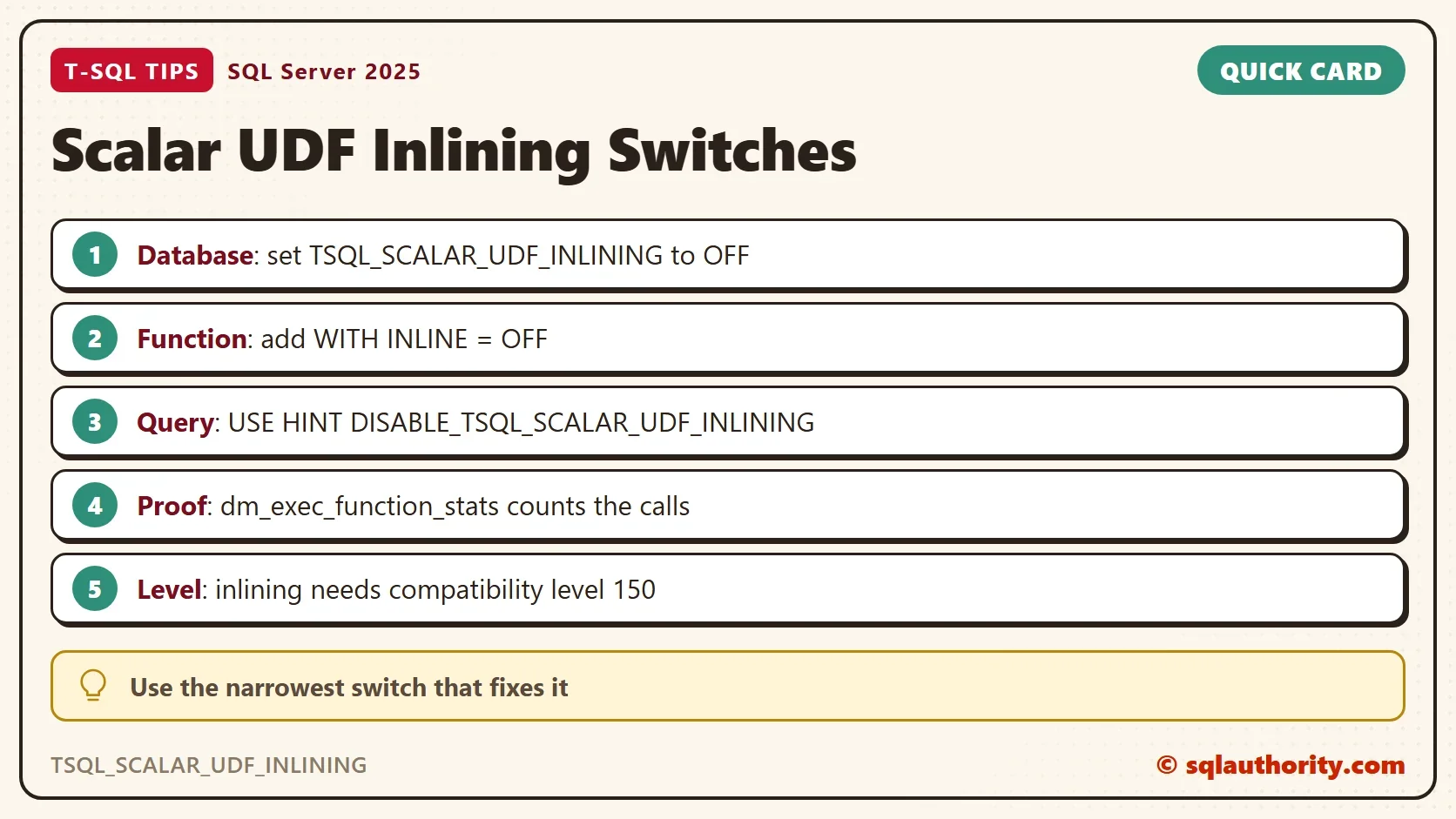
TSQL_SCALAR_UDF_INLINING is the database scoped setting that turns scalar function inlining on or off for a whole database. SQL Server 2019 switched inlining on by default, and for most queries that helps. Three switches turn it off, and so does a low compatibility level.

What Scalar UDF Inlining Does
A scalar user-defined function (UDF) returns one value, such as a discount for a customer. Before SQL Server 2019, the engine called the function once for every row and could not see inside it. Inlining changes that. SQL Server copies the function body into the calling query as a subquery. The optimizer then plans one statement instead of many calls. For when inlining helps, read Scalar UDF Inlining: When Old Functions Suddenly Get Fast.
Inlining works at compatibility level 150 or higher. The demo below builds a database named ScalarUdfOffDemo with 1,000 customers and 200,000 orders. The function reads a customer’s tier from one table and returns a discount. Run it on a test server.
IF DB_ID(N'ScalarUdfOffDemo') IS NULL CREATE DATABASE ScalarUdfOffDemo;
GO
USE ScalarUdfOffDemo;
GO
DROP TABLE IF EXISTS dbo.Orders;
DROP TABLE IF EXISTS dbo.Customers;
CREATE TABLE dbo.Customers (
    CustomerID int     NOT NULL PRIMARY KEY,
    Tier       tinyint NOT NULL
);
CREATE TABLE dbo.Orders (
    OrderID    int IDENTITY(1,1) NOT NULL PRIMARY KEY,
    CustomerID int           NOT NULL,
    Amount     decimal(10,2) NOT NULL
);
WITH n AS (
    SELECT TOP (200000) ROW_NUMBER() OVER (ORDER BY (SELECT NULL)) AS k
    FROM sys.all_objects AS a CROSS JOIN sys.all_objects AS b
)
INSERT INTO dbo.Customers (CustomerID, Tier)
SELECT k, k % 3 FROM n WHERE k <= 1000;
WITH n AS (
    SELECT TOP (200000) ROW_NUMBER() OVER (ORDER BY (SELECT NULL)) AS k
    FROM sys.all_objects AS a CROSS JOIN sys.all_objects AS b
)
INSERT INTO dbo.Orders (CustomerID, Amount)
SELECT k % 1000 + 1, 10 + k % 90 FROM n;
GO
CREATE OR ALTER FUNCTION dbo.CustomerDiscount (@CustomerID int)
RETURNS decimal(4,2)
AS
BEGIN
    DECLARE @Tier tinyint = (SELECT c.Tier FROM dbo.Customers AS c WHERE c.CustomerID = @CustomerID);
    RETURN CASE @Tier WHEN 2 THEN 0.15 WHEN 1 THEN 0.05 ELSE 0.00 END;
END;
Two catalog queries show where you stand. The first reads the compatibility level and the setting. The second asks whether the function can be inlined at all.
SELECT d.compatibility_level, c.value AS InliningSetting
FROM sys.databases AS d
CROSS JOIN sys.database_scoped_configurations AS c
WHERE d.database_id = DB_ID() AND c.name = N'TSQL_SCALAR_UDF_INLINING';

SELECT OBJECT_NAME(m.object_id) AS FunctionName, m.is_inlineable, m.inline_type
FROM sys.sql_modules AS m
WHERE m.object_id = OBJECT_ID(N'dbo.CustomerDiscount');
| compatibility_level | InliningSetting |
|---|---|
| 170 | 1 |
| FunctionName | is_inlineable | inline_type |
|---|---|---|
| CustomerDiscount | 1 | 1 |
The setting is 1, which means on. The column is_inlineable says the function body qualifies, and inline_type says inlining is active for it.
Prove That Inlining Is Working
A switch you cannot check is a guess. An inlined function never runs as a function, so SQL Server keeps no function statistics for it. The next script clears this database’s plan cache and calls the function for five rows. Then it counts the function’s executions.
ALTER DATABASE SCOPED CONFIGURATION CLEAR PROCEDURE_CACHE;
GO
SELECT o.OrderID, dbo.CustomerDiscount(o.CustomerID) AS Discount
FROM dbo.Orders AS o
WHERE o.OrderID <= 5;
SELECT ISNULL(MAX(execution_count), 0) AS FunctionExecutions
FROM sys.dm_exec_function_stats
WHERE database_id = DB_ID() AND object_id = OBJECT_ID(N'dbo.CustomerDiscount');
| OrderID | Discount |
|---|---|
| 1 | 0.15 |
| 2 | 0.00 |
| 3 | 0.05 |
| 4 | 0.15 |
| 5 | 0.00 |
| FunctionExecutions |
|---|
| 0 |
Five discounts came back, and the function ran zero times. That is inlining at work. Now switch the setting off, clear the cache again, and repeat the same query.
ALTER DATABASE SCOPED CONFIGURATION SET TSQL_SCALAR_UDF_INLINING = OFF;
ALTER DATABASE SCOPED CONFIGURATION CLEAR PROCEDURE_CACHE;
GO
SELECT o.OrderID, dbo.CustomerDiscount(o.CustomerID) AS Discount
FROM dbo.Orders AS o
WHERE o.OrderID <= 5;
SELECT ISNULL(MAX(execution_count), 0) AS FunctionExecutions
FROM sys.dm_exec_function_stats
WHERE database_id = DB_ID() AND object_id = OBJECT_ID(N'dbo.CustomerDiscount');
The five discounts are the same. This time FunctionExecutions shows 5, one call for each row. With TSQL_SCALAR_UDF_INLINING off, SQL Server runs the function the old way, and the result proves the change took effect.
Measure Before You Switch
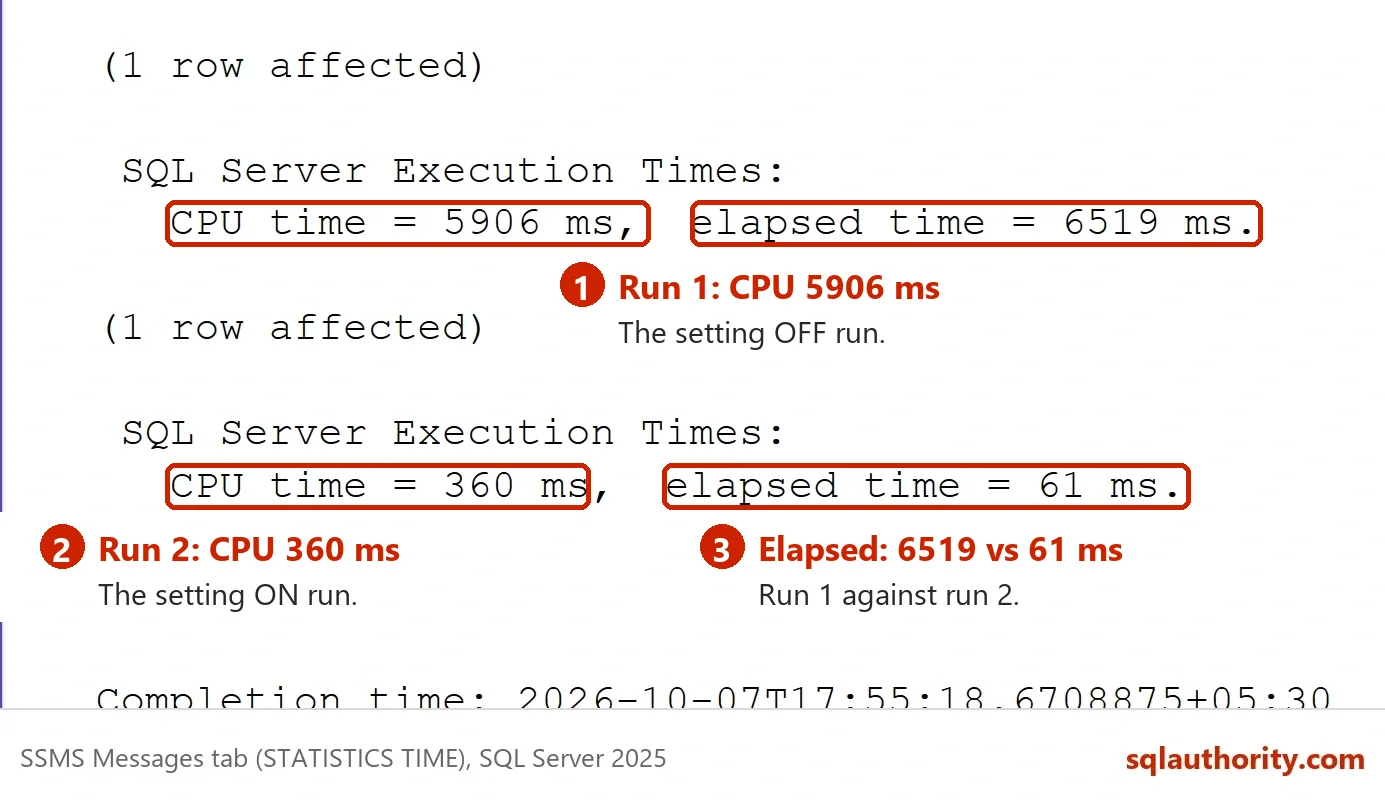
Do not switch TSQL_SCALAR_UDF_INLINING off on a hunch. In this demo, inlining is the faster choice. The next script runs a 200,000-row query with the setting off, then switches it on and runs the query again. SET STATISTICS TIME prints the CPU time of each run on the Messages tab.
ALTER DATABASE SCOPED CONFIGURATION SET TSQL_SCALAR_UDF_INLINING = OFF;
ALTER DATABASE SCOPED CONFIGURATION CLEAR PROCEDURE_CACHE;
GO
SET STATISTICS TIME ON;
SELECT SUM(o.Amount * (1 - dbo.CustomerDiscount(o.CustomerID))) AS NetTotal FROM dbo.Orders AS o;
SET STATISTICS TIME OFF;
GO
ALTER DATABASE SCOPED CONFIGURATION SET TSQL_SCALAR_UDF_INLINING = ON;
ALTER DATABASE SCOPED CONFIGURATION CLEAR PROCEDURE_CACHE;
GO
SET STATISTICS TIME ON;
SELECT SUM(o.Amount * (1 - dbo.CustomerDiscount(o.CustomerID))) AS NetTotal FROM dbo.Orders AS o;
SET STATISTICS TIME OFF;
| Setting | CPU time, three runs |
|---|---|
| OFF, function called per row | 3,700 to 4,900 ms |
| ON, function inlined | 300 to 600 ms |
Your times will differ, but the gap is the point. A client on SQL Server 2019 hit the opposite case. A slow area of a large eCommerce application called a scalar function. Switching the setting off made the server much faster, and they left it off. A case like that is the exception, and only a measurement can name it. The picture shows one run on a second server. It used 5,906 ms of CPU with the setting off and 360 ms with it on.
Narrower Switches Come First
The database setting hits every function at once. Two smaller switches exist. A function can opt out for itself with WITH INLINE = OFF. A single query can opt out with the hint DISABLE_TSQL_SCALAR_UDF_INLINING. The setting stays on for everything else.
CREATE OR ALTER FUNCTION dbo.CustomerDiscountNoInline (@CustomerID int)
RETURNS decimal(4,2)
WITH INLINE = OFF
AS
BEGIN
    DECLARE @Tier tinyint = (SELECT c.Tier FROM dbo.Customers AS c WHERE c.CustomerID = @CustomerID);
    RETURN CASE @Tier WHEN 2 THEN 0.15 WHEN 1 THEN 0.05 ELSE 0.00 END;
END;
The catalog now tells the two functions apart. Both qualify, but only the first is inlined. Then both functions run for the same five rows with the database setting on. A third query adds the hint to the first function.
SELECT OBJECT_NAME(m.object_id) AS FunctionName, m.is_inlineable, m.inline_type
FROM sys.sql_modules AS m
WHERE m.object_id IN (OBJECT_ID(N'dbo.CustomerDiscount'), OBJECT_ID(N'dbo.CustomerDiscountNoInline'))
ORDER BY FunctionName;

ALTER DATABASE SCOPED CONFIGURATION CLEAR PROCEDURE_CACHE;
GO
SELECT o.OrderID, dbo.CustomerDiscount(o.CustomerID) AS A, dbo.CustomerDiscountNoInline(o.CustomerID) AS B
FROM dbo.Orders AS o
WHERE o.OrderID <= 5;
SELECT o.OrderID, dbo.CustomerDiscount(o.CustomerID) AS WithHint
FROM dbo.Orders AS o
WHERE o.OrderID <= 5
OPTION (USE HINT ('DISABLE_TSQL_SCALAR_UDF_INLINING'));
SELECT OBJECT_NAME(object_id) AS FunctionName, execution_count
FROM sys.dm_exec_function_stats
WHERE database_id = DB_ID()
ORDER BY FunctionName;| FunctionName | is_inlineable | inline_type |
|---|---|---|
| CustomerDiscount | 1 | 1 |
| CustomerDiscountNoInline | 1 | 0 |
| FunctionName | execution_count |
|---|---|
| CustomerDiscount | 5 |
| CustomerDiscountNoInline | 5 |
The count of 5 for CustomerDiscount comes from the hinted query alone, because the first query inlined it. The opted-out function ran 5 times in the first query. Both narrow switches work while the database setting stays on.
When a Function Cannot Be Inlined
Some functions never inline, so the setting changes nothing for them. In this test, a function that reads GETDATE and a function with a WHILE loop both show is_inlineable 0.
CREATE OR ALTER FUNCTION dbo.DiscountToday (@CustomerID int)
RETURNS decimal(4,2)
AS
BEGIN
    RETURN CASE DATENAME(weekday, GETDATE()) WHEN N'Sunday' THEN 0.10 ELSE 0.00 END;
END;
GO
CREATE OR ALTER FUNCTION dbo.DiscountLoop (@CustomerID int)
RETURNS decimal(4,2)
AS
BEGIN
    DECLARE @i int = 0, @d decimal(4,2) = 0;
    WHILE @i < 3 BEGIN SET @d += 0.01; SET @i += 1; END;
    RETURN @d;
END;
GO
SELECT OBJECT_NAME(m.object_id) AS FunctionName, m.is_inlineable
FROM sys.sql_modules AS m
WHERE m.object_id IN (OBJECT_ID(N'dbo.DiscountToday'), OBJECT_ID(N'dbo.DiscountLoop'))
ORDER BY FunctionName;| FunctionName | is_inlineable |
|---|---|
| DiscountLoop | 0 |
| DiscountToday | 0 |
A low compatibility level has the same effect on every function. The next script saves the current level and drops the database to level 140. It runs the five-row query and then puts the level back.
DROP TABLE IF EXISTS #Level;
SELECT compatibility_level INTO #Level FROM sys.databases WHERE database_id = DB_ID();
ALTER DATABASE ScalarUdfOffDemo SET COMPATIBILITY_LEVEL = 140;
ALTER DATABASE SCOPED CONFIGURATION CLEAR PROCEDURE_CACHE;
GO
SELECT o.OrderID, dbo.CustomerDiscount(o.CustomerID) AS Discount
FROM dbo.Orders AS o
WHERE o.OrderID <= 5;
SELECT ISNULL(MAX(execution_count), 0) AS ExecutionsAtLevel140
FROM sys.dm_exec_function_stats
WHERE database_id = DB_ID() AND object_id = OBJECT_ID(N'dbo.CustomerDiscount');
GO
DECLARE @sql nvarchar(200) = N'ALTER DATABASE ScalarUdfOffDemo SET COMPATIBILITY_LEVEL = '
    + CAST((SELECT TOP (1) compatibility_level FROM #Level) AS nvarchar(3)) + N';';
EXEC (@sql);| ExecutionsAtLevel140 |
|---|
| 5 |
At level 140 the function ran 5 times for 5 rows, and is_inlineable still showed 1. The script restored the saved level at the end. That column describes the function body, not the database level. Check both before you blame the setting. If is_inlineable shows 0, no switch can be the cause of a change, and none can be the fix.
Undo and Clean Up
The demo left the setting on, and that is where it belongs. Before you touch a production database, write down its value. The undo for a switched-off database is one line.
ALTER DATABASE SCOPED CONFIGURATION SET TSQL_SCALAR_UDF_INLINING = ON;
SELECT name, value FROM sys.database_scoped_configurations WHERE name = N'TSQL_SCALAR_UDF_INLINING';
You could argue that the database-wide switch is the fastest fix when users are waiting. It is, and it is also the broadest. It takes the gain away from every other function in the database. Try the function switch or the query hint first, and keep the database setting for last. When you finish testing, drop the demo database.
USE master;
GO
ALTER DATABASE ScalarUdfOffDemo SET SINGLE_USER WITH ROLLBACK IMMEDIATE;
DROP DATABASE ScalarUdfOffDemo;
What to Remember
Leave TSQL_SCALAR_UDF_INLINING on unless a measured query gets slower with it. Prove each switch with sys.dm_exec_function_stats, since an inlined function leaves no row there. Use the narrowest switch first: the query hint, then the function option, then the database setting.
A switch is not a fix, it is a way to find out whether inlining was the problem.
Published by Pinal Dave on SQLAuthority. More of my work at pinaldave.com.
Discover more from SQL Authority with Pinal Dave
Subscribe to get the latest posts sent to your email.