
To show a smiley in SSMS, put an N before the string and type the emoji between the quotes. SQL Server stores the symbol as Unicode text. A result grid, a table column and even a database name can hold it. The surprises start when you count, compare or search that text.

Run a Smiley in SSMS
The simplest way to show a smiley in SSMS needs no table. Paste the symbols into a query window, keep the N before the opening quote, and run it. The N tells SQL Server that the text is Unicode. Without it, SQL Server reads the string in the code page of the database. A symbol missing from that code page becomes a question mark.
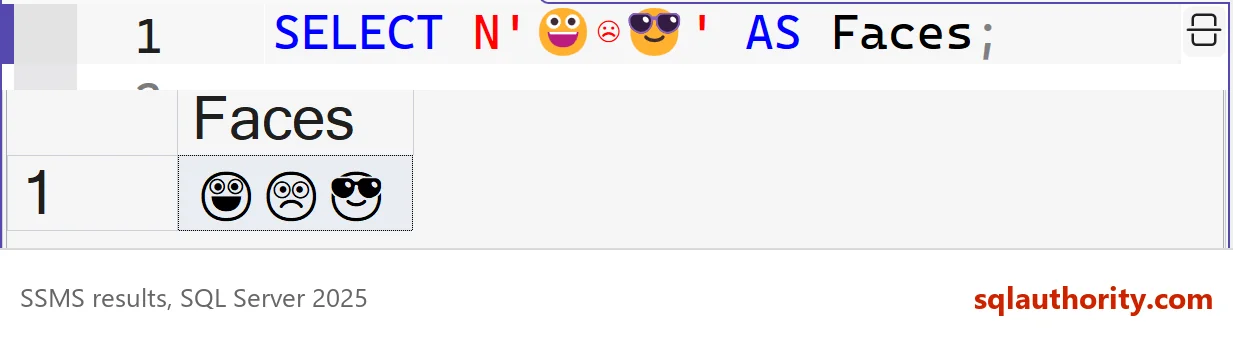
SELECT N'😀☹😎' AS Faces;

SELECT '😀' AS NoPrefix, N'😀' AS WithPrefix;
| Faces |
|---|
| 😀☹😎 |
| NoPrefix | WithPrefix |
|---|---|
| ?? | 😀 |
Two question marks appear without the prefix. SQL Server reads the symbol as two UTF-16 units, and each one becomes a question mark in the code page.
A varchar column or variable loses an emoji the same way. The text N'ok 😀' stored in a varchar(20) variable reads back as ok ??, so use nvarchar for any column that can hold emoji. Save the script as a Unicode file, such as UTF-8, so the symbols reach the server unchanged. If a grid cell shows an empty box instead of a picture, the font has no drawing for that symbol. The stored value is still correct, and UNICODE() will prove it.
How SQL Server Stores an Emoji
A smiley in SSMS looks like one symbol, but most emoji have a code point above 65,535. UTF-16, the format SQL Server uses for nvarchar, cannot fit that number in one 2-byte unit. It stores the symbol as a surrogate pair of two units, which is 4 bytes. Collations whose names end in _SC (supplementary characters) count the pair as one character. Older collations count two.
The demo database below uses an _SC collation. A COLLATE clause on one expression shows the older behavior beside it. The table holds four short order notes, two of them with an emoji.
IF DB_ID(N'EmojiDemo') IS NULL CREATE DATABASE EmojiDemo COLLATE Latin1_General_100_CI_AS_SC;
GO
USE EmojiDemo;
GO
DROP TABLE IF EXISTS dbo.Notes;
CREATE TABLE dbo.Notes (
    NoteID int IDENTITY(1,1) NOT NULL PRIMARY KEY,
    Note   nvarchar(100) NOT NULL
);
INSERT INTO dbo.Notes (Note)
VALUES (N'Order shipped 😀'), (N'Waiting for payment'), (N'Great service 😎😎'), (N'Refund sent');
SELECT N'😀' AS Face,
       LEN(N'😀') AS CharsHere,
       LEN(N'😀' COLLATE SQL_Latin1_General_CP1_CI_AS) AS CharsOldCollation,
       DATALENGTH(N'😀') AS Bytes,
       UNICODE(N'😀') AS CodePointHere,
UNICODE(N'😀' COLLATE SQL_Latin1_General_CP1_CI_AS) AS CodePointOld;| Face | CharsHere | CharsOldCollation | Bytes | CodePointHere | CodePointOld |
|---|---|---|---|---|---|
| 😀 | 1 | 2 | 4 | 128512 | 55357 |
The _SC collation reports one character and the real code point, 128512. The older collation reports two characters, and UNICODE() returns 55357, which is only the first half of the pair. You can also build the symbol from numbers. NCHAR(128512) works only when the database collation is an _SC one, while the pair of halves works anywhere.
SELECT NCHAR(128512) AS FromCodePoint, NCHAR(0xD83D) + NCHAR(0xDE00) AS FromPair;
| FromCodePoint | FromPair |
|---|---|
| 😀 | 😀 |
Why Two Emoji Can Compare as Equal
Under the older collation, a comparison ignores supplementary characters. The next query compares a smiley with a sunglasses face under both collations. It also compares the smiley with an empty string.
SELECT CASE WHEN N'😀' = N'😎' THEN N'equal' ELSE N'different' END AS HereCollation,
       CASE WHEN N'😀' COLLATE SQL_Latin1_General_CP1_CI_AS = N'😎' COLLATE SQL_Latin1_General_CP1_CI_AS THEN N'equal' ELSE N'different' END AS OldCollation,
CASE WHEN N'😀' COLLATE SQL_Latin1_General_CP1_CI_AS = N'' COLLATE SQL_Latin1_General_CP1_CI_AS THEN N'equal' ELSE N'different' END AS OldAgainstEmpty;| HereCollation | OldCollation | OldAgainstEmpty |
|---|---|---|
| different | equal | equal |
That has a practical effect. In the older collation, LIKE N'%😀%' matches every row. As far as the comparison can tell, the pattern is empty. In the _SC database, the same pattern returns only the first note.
Find the Emoji in a Column
To find and extract the emoji in an nvarchar value, start from the surrogate pair. Every emoji above 65,535 starts with a high surrogate, a unit between D800 and DBFF. A binary collation compares units by their numbers, so a character range can find that first unit. SUBSTRING then takes the pair.
SELECT NoteID, Note,
       SUBSTRING(Note COLLATE Latin1_General_100_BIN2,
                 PATINDEX(N'%[' + NCHAR(0xD800) + N'-' + NCHAR(0xDBFF) + N']%', Note COLLATE Latin1_General_100_BIN2), 2) AS FirstEmoji
FROM dbo.Notes
WHERE Note COLLATE Latin1_General_100_BIN2 LIKE N'%[' + NCHAR(0xD800) + N'-' + NCHAR(0xDBFF) + N']%'
ORDER BY NoteID;| NoteID | Note | FirstEmoji |
|---|---|---|
| 1 | Order shipped 😀 | 😀 |
| 3 | Great service 😎😎 | 😎 |
The query returns the two notes with an emoji and the first symbol of each. The range also matches other characters above 65,535, such as rare letters, so it finds supplementary characters, not only smileys.
Emoji in a Database Name
You can name a database with an emoji. The next script creates one on a server whose collation has no _SC ending. The name is stored with the symbol, and so are the file names on disk. Then it tries a second database that differs only in the symbol.
USE master;
GO
CREATE DATABASE [EmojiNameDemo😀];
GO
SELECT name, CASE WHEN DB_ID(N'EmojiNameDemo') = DB_ID(name) THEN N'yes' ELSE N'no' END AS FoundWithoutEmoji
FROM sys.databases
WHERE name LIKE N'EmojiNameDemo%';
GO
CREATE DATABASE [EmojiNameDemo😎];
| name | FoundWithoutEmoji |
|---|---|
| EmojiNameDemo😀 | yes |
Msg 1801, Level 16, State 3, Line 1
Database 'EmojiNameDemo😎' already exists. Choose a different database name.
The second statement fails. SQL Server compares names with the server collation, so the symbol counts for nothing. On a server with an _SC collation, the second name is accepted. A lookup by the name without the symbol finds the first database. For the same reason, two names made only of emoji collide.
When Emoji Don’t Belong
You could argue that emoji in object names are a bad idea, and the argument is sound. A name nobody can type is hard to script. Some tools draw the symbols as boxes. The collation rule above makes collisions easy. A smiley in a data column is different. Notes, reviews and chat messages hold emoji every day, and nvarchar handles them well.
What to Remember
A smiley in SSMS needs the N prefix and a Unicode script file. Pick an _SC collation for a new database that stores emoji. Then LEN and SUBSTRING count symbols the way people do. A version 140 collation or a UTF8 collation does the same. An older collation ignores supplementary characters in comparisons, and that includes LIKE and database names.
Keep emoji in data and out of names. When you finish with the demo, drop both databases.
USE master;
GO
DROP DATABASE IF EXISTS [EmojiNameDemo😀];
DROP DATABASE IF EXISTS EmojiDemo;
An emoji is not one unit of storage, it is a pair of units that looks like one.
Published by Pinal Dave on SQLAuthority. More of my work at pinaldave.com.
Discover more from SQL Authority with Pinal Dave
Subscribe to get the latest posts sent to your email.



6 Comments. Leave new
Interesting – I can’t really imagine why one would want to use emojis in object names! (I have seen WiFi names with emojis though.)
In SQL Server Management Studio 17.9.1, this doesn’t work all the way though: When selecting results to grid, the emojis are mostly displayed as blocks but in results to text it shows correctly. Also, the database name shows only as blocks.
Dear lord i hope I never come across a database like this, I have no desire to write those queries.
While I would not recommend naming databases using emojis. An interesting point to add, is that you cannot make two databases with emojis as their name (e.g. you cannot have [?] and [?]). This is because in the underlying code it strips the emojis out. So effectively the first database becomes [] and therefore you cannot have another one with the same name of [].
This is of course assuming they haven’t fixed this “bug” in newer versions.
it would nice if the appropriate emoji could be displayed on the status bar while a query is running. ex: system overload, cpu, disk, network
Can I find and extract emoji from the nvarchar variable in SQL. Is there SQL function available for this?
Oh dear God, What have they done!?!?!?