
A listener creation failure in a cluster has more than one cause, and this post covers another one. I’ve written about a few of them before. This time the listener failed with error 5, and the cluster log showed exactly which account was denied.
The Error
The most relevant line in the cluster log was this one:
Network Name <ProdListener>: AccountAD: Enabling object ProdListener failed with error 5How to Check
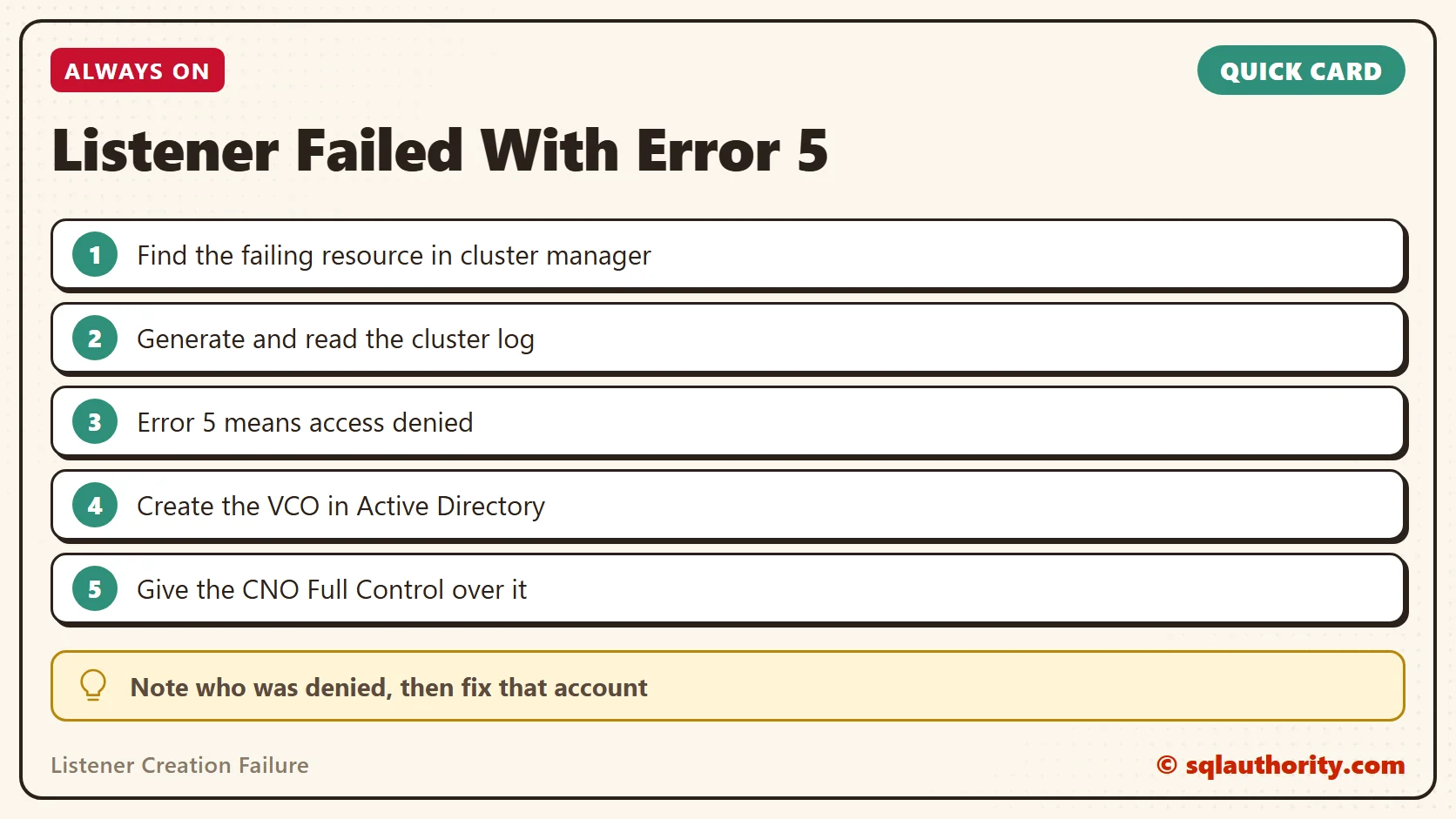
Whenever I get issues while creating a listener, I look at Failover Cluster Manager to find the resource that is failing. Then I generate a cluster log. If you’re not sure how, read my steps to generate a Windows cluster log.
Here is the setup of my lab, which will help you match this log to your own environment:
- Listener name: ProdListener
- Windows cluster name: WinCluster
The listener is a client access point in the cluster manager, and it was failing. Here is a trimmed cluster log from the node where the network name resource would not come online. I removed the timestamps to avoid clutter.
INFO [RES] Network Name : AccountAD: Initializing Name: ProdListener, NetbiosName: ProdListener, Type: Singleton, Created: false
INFO [RES] Network Name : AccountAD: PopulateNetnameADState - DCFlags 1073745937 LdapReferralAllowed 0
INFO [RES] Network Name: [NNLIB] FindSuitableDCNew - objectName ProdListener, username - WinCluster$, firstChoiceDCName - \\domain.com
INFO [RES] Network Name: [NNLIB] Found first choice DC that has the object ProdListener DCName - \\domain.com.
INFO [RES] Network Name: [NNLIB] GetOUForVCOCreation - OU name of CNO is OU=IN,DC=Domain,DC=Com
INFO [RES] Network Name: [NNLIB] GetOUForVCOCreation - CNO SID is S-1-5-21-2987268983-2468375096-37832846-293957
INFO [RES] Network Name : AccountAD: Object ProdListener already exists, using DC: \\domain.com
INFO [RES] Network Name: [NNLIB] Trying to enable disabled object ProdListener on DC: \\domain.com (Flags 0000000000001022)
WARN [RES] Network Name : AccountAD: Enabling object ProdListener failed with error 5
Why It Happens
The cluster log uses INFO, WARN and ERR the way the Windows event log uses Information, Warning and Error. Error 5 means access is denied, so the cluster is trying to enable the object and failing.
The key part is who is doing it: username WinCluster$. This is not a domain user. It is the cluster computer object, also known as the CNO.
Access denied can have many other causes. In my experience, one of the most common is that the domain administrator has not allowed the CNO “Read All Properties” and “Create Computer Objects” permissions. You might also see “Access is denied” in the event log.
The Fix
The log made it clear that a domain admin needs to give the CNO access to the VCO. The VCO is a virtual computer object, which is the listener in an Always On setup. The CNO is the computer object for the Windows cluster network name in Active Directory.
- Open the Active Directory Users and Computers snap-in (dsa.msc) on a domain controller.
- In the View menu, check Advanced Features. Without it, you will not see the option in the later steps.
- Right-click the OU or container where the VCO should be created (ProdListener in this example), then click New and Computer.
- Enter the name of the object, which will be the listener name for the availability group, and click OK.
- Right-click the VCO you just created and select Properties. Click the Security tab, then click Add.
- Enter the CNO and click OK. Select the Computers option under Object Types first. The CNO is the Windows cluster name, not the listener or FCI name.
- Give the CNO Full Control over the VCO.
Confirm It Worked
After this, the VCO should come online in the cluster manager. In this case, listener creation worked too, and it was a happy ending.
How to Prevent It
Talk to your domain admin before you create the listener. Check that the CNO has the two permissions named above, or create the VCO ahead of time with the steps in this post.
For the related cases, read about the provisioning failure with error 5 and the listener that would not come online.
Error 5 is not a cluster mystery, it is a permission waiting for the right account.
Published by Pinal Dave on SQLAuthority. More of my work at pinaldave.com.
Discover more from SQL Authority with Pinal Dave
Subscribe to get the latest posts sent to your email.




3 Comments. Leave new
Very helpful thank you for posting
Hi,
I’ve found an issue when attempting this on our own new setup. The difference is we have multi-site AG. We have two sites main and DR. Primary SQL server is in the main, backup node is in the DR. When I created the cluster initially, the CNO was automatically created in our DR site OU, maybe because the server names from the DR site are alphabetically higher. No matter which order I’d add the servers in the cluster creation, the DR site server always came first, and the CNO is always created there. Cluster and AG create without issue.
The issue comes when attempting to create a listener. SQL attempts to create it in the same OU as the primary server (main site). When I give the CNO “create object” rights over this OU, it still fails (19471). The strange thing is that the icon for the CNO in the permissions dialog looks like a computer. When I move the CNO to the same OU as the primary SQL node in the main site and attempt the permissions again, the icon for the CNO in the permissions dialog looks like a user. Only then does the listener create without issue.
I’ve attempted this multiple times, and have been able to produce it each time.
Servers are all running Win2019, SQL2019. Domain is running in 2012 compatibility.
Brad
I’ve discovered, the hard way, that you must assign the Create Computer Object rights directly to the CNO, you cannot use a security group that contains the CNO.