
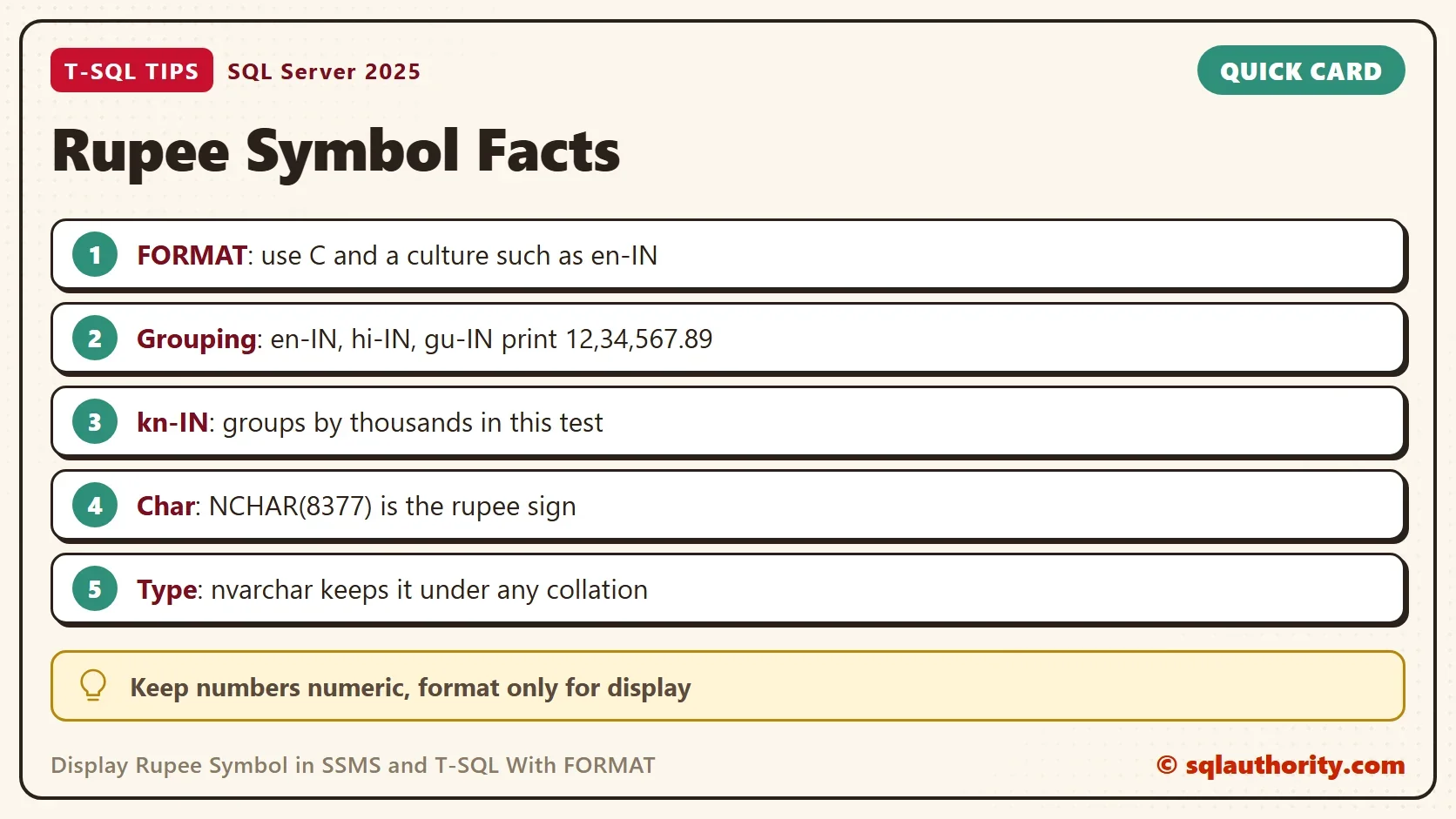
To display rupee symbol and Indian digit grouping in SSMS, format the number with an Indian culture. The FORMAT function does it in one call. When you need the symbol alone, the Unicode character 8377 does it, with no culture at all.

Format a Number With an Indian Culture
A system built for dollars shows a dollar sign next to every amount. Some businesses need the rupee sign instead, and they want no change to the data, the collation or the application. The answer is display formatting. FORMAT needs SQL Server 2012 or later. It takes three arguments: a value, a format string, and a culture. The format string C means currency. The culture decides the symbol and the grouping.
The next query formats one amount for the United States and for four Indian cultures. Use it to display rupee symbol output side by side with the dollar version. The amount is 1,234,567.89. It needs no database, so there is nothing to clean up.
DECLARE @amount decimal(12,2) = 1234567.89;
SELECT FORMAT(@amount, 'C', 'en-us') AS UsDollar,
       FORMAT(@amount, 'C', 'en-in') AS EnIn,
       FORMAT(@amount, 'C', 'hi-in') AS HiIn,
       FORMAT(@amount, 'C', 'gu-in') AS GuIn,
FORMAT(@amount, 'C', 'kn-in') AS KnIn;| UsDollar | EnIn | HiIn | GuIn | KnIn |
|---|---|---|---|---|
| $1,234,567.89 | ₹ 12,34,567.89 | ₹12,34,567.89 | ₹12,34,567.89 | ₹1,234,567.89 |
Two differences stand out. The rupee sign is the same in every Indian culture, and the layout is not. Three of the four group digits the Indian way, in lakhs and crores, so the amount reads 12,34,567.89. The Kannada culture, kn-IN, groups by thousands in this test. The English culture, en-IN, puts a space between the sign and the number. Hindi and Gujarati put none. A report that must match a house style should name its culture and check the result.
What FORMAT Returns
FORMAT returns text, not a number. The type is nvarchar, because the symbol is a Unicode character. The first query below proves both points. It reads the type of the result, and it asks for the code point of the first character. The code point of the rupee sign is 8377. The lengths show the space: the en-IN text has one more character than the hi-IN text.
DECLARE @amount decimal(12,2) = 1234567.89;
SELECT SQL_VARIANT_PROPERTY(FORMAT(@amount, 'C', 'en-in'), 'BaseType') AS ResultType,
       UNICODE(LEFT(FORMAT(@amount, 'C', 'en-in'), 1)) AS FirstCodePoint,
       LEN(FORMAT(@amount, 'C', 'en-in')) AS EnInLength,
LEN(FORMAT(@amount, 'C', 'hi-in')) AS HiInLength;| ResultType | FirstCodePoint | EnInLength | HiInLength |
|---|---|---|---|
| nvarchar | 8377 | 14 | 13 |
Keep the number numeric in storage and format it only for display. Text cannot be added up. FORMAT also runs slower than CONVERT over many rows. FORMAT Function in SQL Server: Dates, Numbers and Speed covers that point. For a report of a few thousand rows, that cost does not matter.
Use the Character Directly
When you only need the sign, skip the culture. NCHAR(8377) returns the rupee sign. The same character in a varchar column does not survive. In a varchar column with a code page collation, the conversion replaces the sign with a question mark. A UTF-8 collation keeps it, and nvarchar works under every collation, so use nvarchar.
DECLARE @amount decimal(12,2) = 1234567.89;
SELECT NCHAR(8377) AS FromNchar,
       UNICODE(NCHAR(8377)) AS Code,
       CAST(NCHAR(8377) AS varchar(5)) AS InVarchar,
       CONCAT(NCHAR(8377), N' ', FORMAT(@amount, 'N2', 'en-in')) AS WithSpace,
CONCAT(NCHAR(8377), FORMAT(@amount, '#,##0.00', 'en-in')) AS NoSpace;| FromNchar | Code | InVarchar | WithSpace | NoSpace |
|---|---|---|---|---|
| ₹ | 8377 | ? | ₹ 12,34,567.89 | ₹12,34,567.89 |
The sign comes back from NCHAR, and the varchar cast shows a question mark. The last two columns put the sign in front of a number that FORMAT grouped the Indian way. The first keeps a space and the second keeps none. You choose the layout, and the culture only supplies the grouping.
Other Numeric Types and Negative Values
FORMAT accepts any numeric type. A money value, an int and a negative decimal all work. The sign comes first in each result, and a negative value keeps its minus sign after the symbol.
SELECT FORMAT(CAST(1234.56 AS money), 'C', 'en-in') AS FromMoney,
       FORMAT(CAST(5 AS int), 'C', 'en-in') AS FromInt,
FORMAT(CAST(-1234.5 AS decimal(10,2)), 'C', 'en-in') AS Negative;| FromMoney | FromInt | Negative |
|---|---|---|
| ₹ 1,234.56 | ₹ 5.00 | ₹ -1,234.50 |
The Same Cultures for Dates
The culture argument does more than the currency. When a string holds more than a symbol, the cultures differ a lot. A date is the best example. The style D writes a long date. This query formats one fixed date for the same four cultures.
DECLARE @d date = '2026-10-07';
SELECT FORMAT(@d, 'D', 'en-us') AS EnUs,
       FORMAT(@d, 'D', 'hi-in') AS HiIn,
       FORMAT(@d, 'D', 'gu-in') AS GuIn,
FORMAT(@d, 'D', 'kn-in') AS KnIn;| EnUs | HiIn | GuIn | KnIn |
|---|---|---|---|
| Wednesday, October 7, 2026 | 07 अक्तूबर 2026 | 07 ઑક્ટોબર 2026 | 07 ಅಕ್ಟೋಬರ್ 2026 |
The month names come in the script of each language. The layout of each date differs from the English one. FORMAT reads this data from the operating system and the .NET Framework. A different Windows version can return slightly different text. Check a sample on the server that will run the report.
When the Grid Shows a Box
A result can show a box or a question mark in place of the sign. A question mark means a varchar conversion happened somewhere, as in the demo. A box means the font of the grid has no glyph for the character. The text is correct and only the display fails. Change the grid font in the options of Management Studio. Or copy the value into an application that has the glyph.
Should the Symbol Live in SQL?
You could argue that currency symbols belong in the application. For an app with its own formatting layer, that is right. Keep numbers numeric in storage and format at the edge. A report has no such layer. Neither does a script that emails a table, or a query that feeds a text file. FORMAT with a named culture lets them display rupee symbol amounts cleanly in one call.
What to Remember
Use FORMAT with the C pattern and an Indian culture to display rupee symbol and the digit grouping together. Check the grouping, because the cultures differ. Use NCHAR(8377) when you need the sign alone, and keep every column that holds it nvarchar.
Format only for display, and keep the stored number numeric. This post creates nothing, so there is nothing to clean up.
A symbol is not part of the number, it is part of how you show it.
Published by Pinal Dave on SQLAuthority. More of my work at pinaldave.com.
Discover more from SQL Authority with Pinal Dave
Subscribe to get the latest posts sent to your email.



3 Comments. Leave new
Is there a reason you are declaring ‘currancy’ and not ‘currency’?
Just curious on the spelling
Just an incorrect auto-correct filter did that. I just fixed it.
Thanks for bringing to my attention my friend.
I learnt something new and interesting today.
Thanks for making my day.