Stored totals need a reconciliation query because a cached header value can drift from its underlying lines. First define which lines belong in that total. Then find mismatches before deciding how to repair or maintain the value.

Define the authoritative calculation first
This example treats every stored line amount as authoritative for its order. Amounts are nonnullable, and negative amounts represent valid credits. An order without lines has a calculated total of zero. Those rules are explicit demonstration choices.
A real order total may include tax, discounts, rounding and excluded lines. A sum that ignores those rules can report false mismatches. Document the calculation before running a repair. A stored header is not automatically wrong whenever it differs from a simplistic sum.
Audit stored totals with a read-only comparison
The setup below creates four orders and five lines. It includes a correct positive total, an empty order and a valid negative total. These examples are not a repair script for application tables. Run the blocks in order in one query window.
DROP TABLE IF EXISTS #ADStoredLines;
DROP TABLE IF EXISTS #ADStoredOrders;
CREATE TABLE #ADStoredOrders (OrderId int NOT NULL PRIMARY KEY,StoredTotal decimal(18,2) NOT NULL);
CREATE TABLE #ADStoredLines (LineId int NOT NULL PRIMARY KEY,OrderId int NOT NULL,Amount decimal(12,2) NOT NULL);
INSERT #ADStoredOrders VALUES(1,0),(2,52),(3,9),(4,-5);
INSERT #ADStoredLines VALUES(1,1,20),(2,1,30),(3,2,21),(4,2,31),(5,4,-5);
SELECT o.OrderId,o.StoredTotal,COALESCE(a.LineTotal,0) AS CalculatedTotal,
CASE WHEN o.StoredTotal<>COALESCE(a.LineTotal,0) THEN 'Mismatch' ELSE 'Matches' END AS CheckResult
FROM #ADStoredOrders AS o
OUTER APPLY(SELECT SUM(l.Amount) AS LineTotal FROM #ADStoredLines AS l WHERE l.OrderId=o.OrderId) AS a
ORDER BY o.OrderId;The outer row remains present even when its order has no lines. SUM returns NULL for that empty input. The example’s COALESCE implements its explicitly chosen zero-total rule. It does not hide nullable line amounts, because the demo table rejects them.

Exercise mismatches and ordinary edge cases
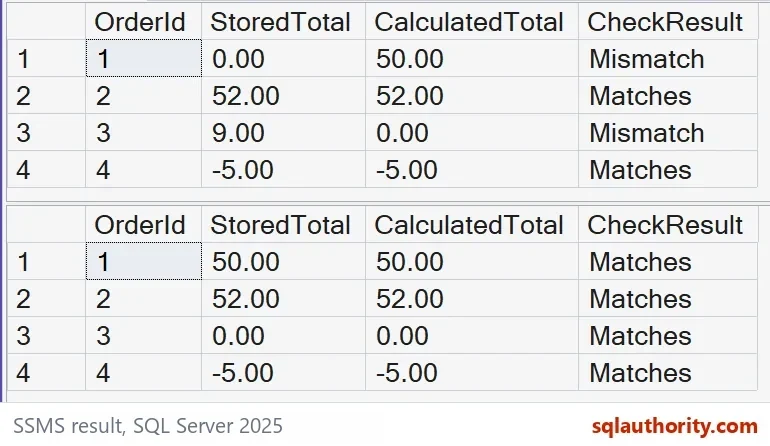
Order 1 stores zero while its two lines total 50. Order 2 correctly stores 52. Order 3 stores nine despite having no lines. Order 4 correctly stores negative five from a credit line.
| Order | Stored | Calculated | Meaning |
|---|---|---|---|
| 1 | 0.00 | 50.00 | Mismatch |
| 2 | 52.00 | 52.00 | Matches |
| 3 | 9.00 | 0.00 | No lines, mismatch |
| 4 | -5.00 | -5.00 | Valid credit, matches |
The expected starting mismatch count is two. An audit should retain matching rows when validating edge cases. A report containing only mismatches cannot prove that credits and empty orders behave correctly. Keep independent expected-value checks next to the audit.
Check the stored type before repairing private data
For decimal inputs, SUM returns decimal(38, s). The example’s header uses the narrower decimal(18,2) type. The code below checks that the calculated amount fits before converting it. Otherwise, the repair stops with an error.
IF EXISTS(SELECT 1 FROM #ADStoredOrders AS o
OUTER APPLY(SELECT SUM(l.Amount) AS LineTotal FROM #ADStoredLines AS l WHERE l.OrderId=o.OrderId) AS a
WHERE COALESCE(a.LineTotal,0) NOT BETWEEN -9999999999999999.99 AND 9999999999999999.99)
THROW 51602, 'A calculated total cannot fit the stored decimal type.', 1;
UPDATE o SET StoredTotal=CONVERT(decimal(18,2),COALESCE(a.LineTotal,0))
FROM #ADStoredOrders AS o
OUTER APPLY(SELECT SUM(l.Amount) AS LineTotal FROM #ADStoredLines AS l WHERE l.OrderId=o.OrderId) AS a
WHERE o.StoredTotal<>COALESCE(a.LineTotal,0);This update changes only the demo headers that disagree with their lines. It leaves matching headers untouched. The comparison below checks that every stored amount now matches. It also drops the demo tables.
SELECT o.OrderId,o.StoredTotal,COALESCE(a.LineTotal,0) AS CalculatedTotal,
           CASE WHEN o.StoredTotal<>COALESCE(a.LineTotal,0) THEN 'Mismatch' ELSE 'Matches' END AS CheckResult
    FROM #ADStoredOrders AS o
    OUTER APPLY(SELECT SUM(l.Amount) AS LineTotal FROM #ADStoredLines AS l WHERE l.OrderId=o.OrderId) AS a
    ORDER BY o.OrderId;
DROP TABLE #ADStoredLines,#ADStoredOrders;An isolated repair does not prove concurrency safety
Other connections cannot modify these local temporary tables. That isolation makes the demonstration deliberately simple. A production audit and repair can race with line changes. A later mismatch query cannot retroactively make an earlier update consistent.
Choose a transaction and write protocol that protects the complete business calculation. Test inserts, deletes, moved lines and concurrent updates under that protocol. A trigger, indexed view or application routine introduces its own requirements. This example proves none of their concurrency guarantees.
Keep stored totals correct after repairing old drift
A newly introduced maintenance routine does not necessarily repair existing headers. Conversely, a one-time correction does not prevent later incorrect edits. Inventory every path that changes lines or writes the header. Reconcile after migration using the same authoritative contract.
Keep the pre-repair audit and an independently checked post-repair result. Investigate unexplained differences instead of repeatedly overwriting them. The correct next step depends on the cause and write protocol. The example teaches the comparison before that decision.
Audit first, repair second, and keep the evidence in between.
A stored total is not a fact, it is a cached claim that needs an audit.
Published by Pinal Dave on SQLAuthority. More of my work at pinaldave.com.
Discover more from SQL Authority with Pinal Dave
Subscribe to get the latest posts sent to your email.