To copy database without statistics, add NO_STATISTICS and NO_QUERYSTORE to DBCC CLONEDATABASE. The default clone already leaves out the rows. The two options leave out the next two places where your data hides.

What the Default Clone Gives Away
The basic command is explained in Clone Database in SQL Server With DBCC CLONEDATABASE. It copies the schema, the statistics and the Query Store. Some teams need a copy without the last two. The reason is privacy. A statistic is a histogram, and a histogram stores real sample values of the column. A Query Store keeps the text of queries, and a query can carry values too.
The demo makes this visible. The script creates a database named CloneOptionsDemo. Its customer table holds 100,000 rows with six different names and ten cities. Indexes on the name and on the city create two statistics. Query Store runs in capture mode ALL, so the loading INSERT lands in it. Run the script on a test server.
IF DB_ID(N'CloneOptionsDemo') IS NULL CREATE DATABASE CloneOptionsDemo;
GO
USE CloneOptionsDemo;
GO
DROP TABLE IF EXISTS dbo.Customers;
GO
CREATE TABLE dbo.Customers (
    CustomerID int IDENTITY(1,1) NOT NULL PRIMARY KEY,
    FullName   nvarchar(60) NOT NULL,
    City       nvarchar(40) NOT NULL,
    Notes      nvarchar(100) NOT NULL
);
INSERT INTO dbo.Customers (FullName, City, Notes)
SELECT CHOOSE(n % 6 + 1, N'Maya Collins', N'Leo Brennan', N'Priya Shah', N'Noah Kim', N'Sam Rivera', N'Ana Torres'),
       CHOOSE(n % 10 + 1, N'Austin', N'Boise', N'Denver', N'Portland', N'Tucson', N'Omaha', N'Raleigh', N'Fresno', N'Tampa', N'Dayton'),
       REPLICATE(N'x', 100)
FROM (SELECT TOP (100000) ROW_NUMBER() OVER (ORDER BY (SELECT NULL)) AS n
      FROM sys.all_columns AS a CROSS JOIN sys.all_columns AS b) AS t;
CREATE INDEX IX_Customers_FullName ON dbo.Customers (FullName);
CREATE INDEX IX_Customers_City ON dbo.Customers (City);
ALTER DATABASE CloneOptionsDemo SET QUERY_STORE = ON (QUERY_CAPTURE_MODE = ALL);
GO
EXEC sys.sp_query_store_flush_db;
Now clone it the usual way and read the histogram of the name index inside the clone.
USE master;
GO
DROP DATABASE IF EXISTS CloneOptionsDemo_Full;
GO
DBCC CLONEDATABASE (CloneOptionsDemo, CloneOptionsDemo_Full);
GO
DBCC SHOW_STATISTICS (N'CloneOptionsDemo_Full.dbo.Customers', N'IX_Customers_FullName') WITH HISTOGRAM;
| RANGE_HI_KEY | RANGE_ROWS | EQ_ROWS | DISTINCT_RANGE_ROWS | AVG_RANGE_ROWS |
|---|---|---|---|---|
| Ana Torres | 0.0 | 16666.0 | 0 | 1.0 |
| Leo Brennan | 0.0 | 16667.0 | 0 | 1.0 |
| Maya Collins | 0.0 | 16666.0 | 0 | 1.0 |
| Noah Kim | 0.0 | 16667.0 | 0 | 1.0 |
| Priya Shah | 0.0 | 16667.0 | 0 | 1.0 |
| Sam Rivera | 0.0 | 16667.0 | 0 | 1.0 |
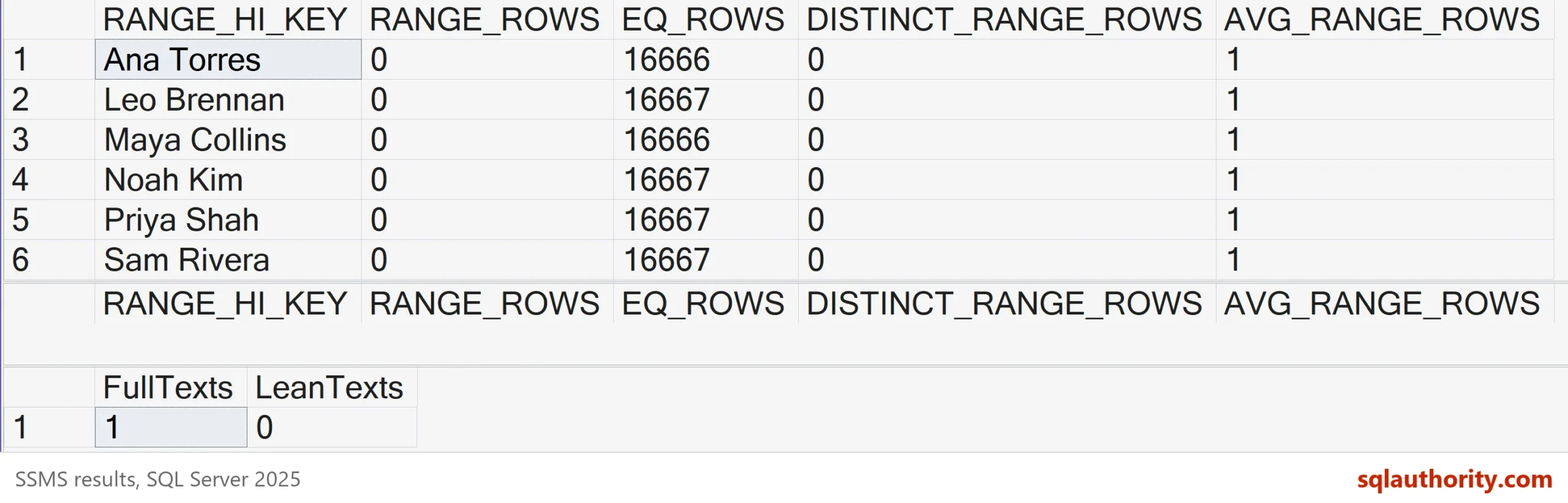
The clone has no rows, yet every customer name is in the histogram, with its row count. On a real table, the histogram holds up to 200 such values for each statistic. Anyone who can read the clone can read them.
Leave Out Statistics and Query Store
The two options fix that. NO_STATISTICS skips the histograms and the row counts of the statistics. NO_QUERYSTORE skips the stored queries, plans and runtime numbers. Stored plans carry the parameter values they were compiled for, so they can hold values too. The next script makes a second clone with both options. It reads the same histogram again. It also counts the stored query texts that contain a customer name.
DROP DATABASE IF EXISTS CloneOptionsDemo_Lean;
GO
DBCC CLONEDATABASE (CloneOptionsDemo, CloneOptionsDemo_Lean) WITH NO_STATISTICS, NO_QUERYSTORE;
GO
DBCC SHOW_STATISTICS (N'CloneOptionsDemo_Lean.dbo.Customers', N'IX_Customers_FullName') WITH HISTOGRAM;
GO
SELECT (SELECT COUNT(*) FROM CloneOptionsDemo_Full.sys.query_store_query_text WHERE query_sql_text LIKE N'%Priya Shah%') AS FullTexts,
       (SELECT COUNT(*) FROM CloneOptionsDemo_Lean.sys.query_store_query_text WHERE query_sql_text LIKE N'%Priya Shah%') AS LeanTexts;
The histogram of the lean clone returns no rows. The Query Store counts are in the next table. The default clone keeps the text of the loading INSERT, which lists six names. The lean clone keeps nothing.
| FullTexts | LeanTexts |
|---|---|
| 1 | 0 |
What the Plan Loses
There is a price. Without statistics, the optimizer guesses. This script runs one query in the source and in both clones, each in its own batch. It then reads the estimated rows from the cached plans.
USE CloneOptionsDemo;
GO
DECLARE @n int; SELECT @n = COUNT(*) FROM dbo.Customers WHERE City = N'Boise'; /*lean probe*/
GO
USE CloneOptionsDemo_Full;
GO
DECLARE @n int; SELECT @n = COUNT(*) FROM dbo.Customers WHERE City = N'Boise'; /*lean probe*/
GO
USE CloneOptionsDemo_Lean;
GO
DECLARE @n int; SELECT @n = COUNT(*) FROM dbo.Customers WHERE City = N'Boise'; /*lean probe*/
GO
USE master;
GO
WITH XMLNAMESPACES (DEFAULT 'http://schemas.microsoft.com/sqlserver/2004/07/showplan')
SELECT DB_NAME(CAST(pa.value AS int)) AS DatabaseName,
       qp.query_plan.value('(//RelOp[@PhysicalOp="Index Seek"]/@EstimateRows)[1]', 'float') AS EstimatedRows
FROM sys.dm_exec_cached_plans AS cp
CROSS APPLY sys.dm_exec_sql_text(cp.plan_handle) AS st
CROSS APPLY sys.dm_exec_plan_attributes(cp.plan_handle) AS pa
CROSS APPLY sys.dm_exec_query_plan(cp.plan_handle) AS qp
WHERE st.text LIKE N'DECLARE @n int%/*lean probe*/%' AND pa.attribute = N'dbid'
ORDER BY DatabaseName;| DatabaseName | EstimatedRows |
|---|---|
| CloneOptionsDemo | 10000.0 |
| CloneOptionsDemo_Full | 10000.0 |
| CloneOptionsDemo_Lean | 316.228 |
The source and the default clone expect 10,000 rows, which is the truth. The lean clone expects 316. A tuner who reads that plan sees the wrong picture. A wrong estimate can change the join type, the index or the memory grant. When you copy database without statistics, you give up the plan fidelity that makes a clone useful. You keep the schema, which is enough to script objects and to test syntax.
Make the Clone Writable
A clone is read-only. When you need a place to load test rows next to the copied schema, switch it to read-write. The clone then accepts data, and the empty tables fill like any other.
ALTER DATABASE CloneOptionsDemo_Lean SET READ_WRITE WITH NO_WAIT;
GO
USE CloneOptionsDemo_Lean;
GO
INSERT INTO dbo.Customers (FullName, City, Notes) VALUES (N'Test Person', N'Austin', N'new row');
SELECT COUNT(*) AS RowsNow, DATABASEPROPERTYEX(DB_NAME(), 'IsClone') AS IsClone, DATABASEPROPERTYEX(DB_NAME(), 'Updateability') AS Updateability;
| RowsNow | IsClone | Updateability |
|---|---|---|
| 1 | 1 | READ_WRITE |
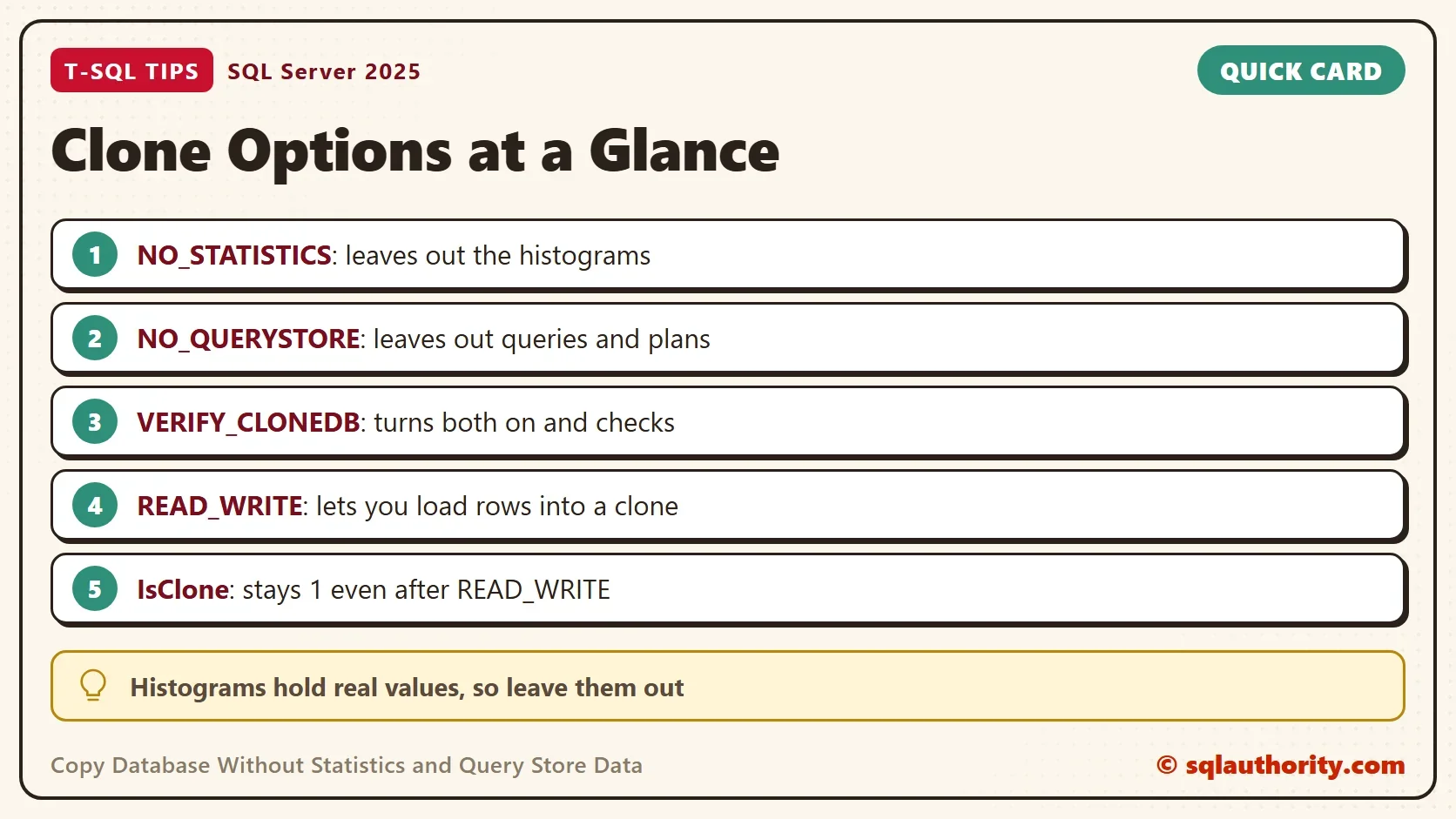
The insert works, and the database stays marked as a clone. IsClone still returns 1. If the flag bothers you, build the test database from a script of the schema instead.
What VERIFY_CLONEDB Does
The VERIFY_CLONEDB option makes the same lean clone and then checks it. It turns NO_STATISTICS and NO_QUERYSTORE on by itself. A verified clone has its own property.
USE master;
GO
DROP DATABASE IF EXISTS CloneOptionsDemo_Verified;
GO
DBCC CLONEDATABASE (CloneOptionsDemo, CloneOptionsDemo_Verified) WITH VERIFY_CLONEDB;
GO
SELECT name, is_read_only, DATABASEPROPERTYEX(name, 'IsClone') AS IsClone, DATABASEPROPERTYEX(name, 'IsVerifiedClone') AS IsVerifiedClone
FROM sys.databases
WHERE name LIKE N'CloneOptionsDemo%'
ORDER BY name;
NO_STATISTICS and NO_QUERYSTORE options turned ON as part of VERIFY_CLONE.
Database cloning for 'CloneOptionsDemo' has started with target as 'CloneOptionsDemo_Verified'.
Database cloning for 'CloneOptionsDemo' has finished. Cloned database is 'CloneOptionsDemo_Verified'.
Database 'CloneOptionsDemo_Verified' is a cloned database.
Clone database verification has passed.
DBCC execution completed. If DBCC printed error messages, contact your system administrator.
| name | is_read_only | IsClone | IsVerifiedClone |
|---|---|---|---|
| CloneOptionsDemo | 0 | 0 | 0 |
| CloneOptionsDemo_Full | 1 | 1 | 0 |
| CloneOptionsDemo_Lean | 0 | 1 | 0 |
| CloneOptionsDemo_Verified | 1 | 1 | 1 |
The message for a verified clone drops the warning about diagnostic use, and the verification line replaces it. A verified clone carries no rows, no statistics and no Query Store. It is a schema copy with a check mark.
Is a Lean Clone Worth Making?
You could argue that a clone without statistics has no use. It is read-only by default and its plans are guesses. For tuning, that is true. The use is a different one. It is a schema copy with no rows, no histograms and no stored queries. Share it with a vendor, script from it, or load synthetic rows into it. Read the object definitions too, because literals can sit in them. Check the first histogram before you trust any clone with real data.
What to Remember
Copy database without statistics when privacy matters more than plans. Histograms and Query Store texts hold real values, so the default clone is not data free. NO_STATISTICS and NO_QUERYSTORE close both gaps, and the cost is a guessed estimate.
A clone keeps its IsClone mark after READ_WRITE. VERIFY_CLONEDB gives a checked schema copy with both options on. When you finish, run the cleanup script.
USE master;
GO
DROP DATABASE IF EXISTS CloneOptionsDemo_Verified;
DROP DATABASE IF EXISTS CloneOptionsDemo_Lean;
DROP DATABASE IF EXISTS CloneOptionsDemo_Full;
GO
ALTER DATABASE CloneOptionsDemo SET SINGLE_USER WITH ROLLBACK IMMEDIATE;
DROP DATABASE CloneOptionsDemo;
A clone without rows is not a clone without data, it is a copy that still remembers the values.
Published by Pinal Dave on SQLAuthority. More of my work at pinaldave.com.
Discover more from SQL Authority with Pinal Dave
Subscribe to get the latest posts sent to your email.