
Clone Database in SQL Server copies the structure and the statistics without a single row. The command is DBCC CLONEDATABASE. It gives you a copy to study query plans on, and the copy holds none of the data.

What a Clone Holds
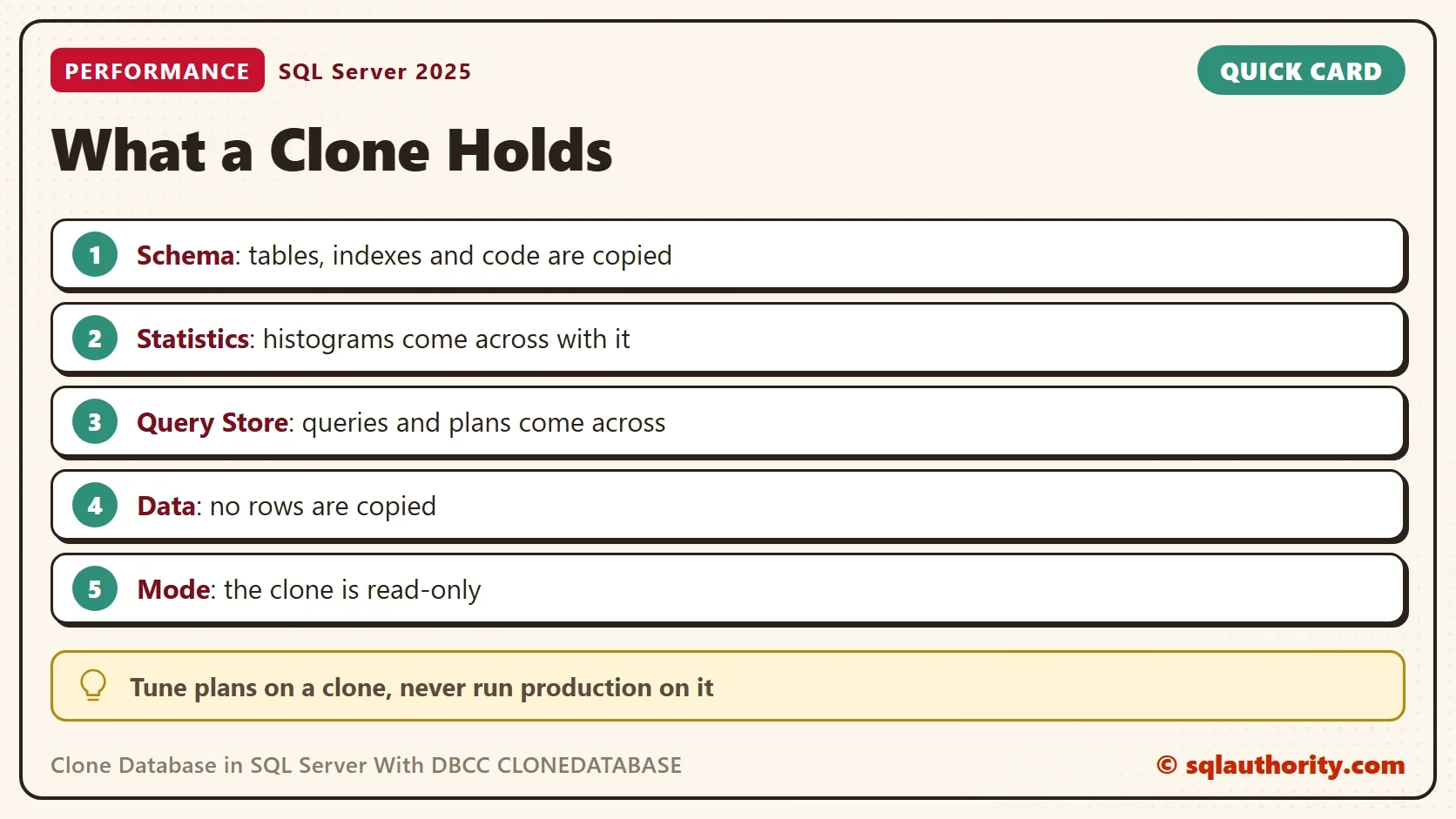
Some environments forbid anyone from reading production data, even with a plain SELECT. Tuning still needs the plans those queries get. Clone Database in SQL Server with this command and you can tune against the copy. The clone copies the schema, which means the tables, indexes, views and procedures. It copies the statistics, which are the row count and value histograms that the optimizer reads. It copies the Query Store, which holds past queries and plans. It copies no rows.
That makes the clone small, and it makes every table empty. The clone is also read-only. SQL Server prints a warning that it is for diagnostics and is not supported in production. The command exists in SQL Server 2014 SP2, 2016 SP1 and later.
Build a Source Database
The demo needs something worth cloning. The script creates a database named CloneSourceDemo with one orders table. The table has 100,000 rows, 5,000 customers and an index on CustomerID. It turns on Query Store in capture mode ALL and runs two queries, so the store has something to copy. Run it on a test server.
IF DB_ID(N'CloneSourceDemo') IS NULL CREATE DATABASE CloneSourceDemo;
GO
USE CloneSourceDemo;
GO
DROP TABLE IF EXISTS dbo.Orders;
GO
CREATE TABLE dbo.Orders (
    OrderID    int IDENTITY(1,1) NOT NULL PRIMARY KEY,
    CustomerID int NOT NULL,
    Amount     decimal(10,2) NOT NULL,
    Notes      nvarchar(100) NOT NULL
);
INSERT INTO dbo.Orders (CustomerID, Amount, Notes)
SELECT n % 5000, n % 97 + 0.5, REPLICATE(N'x', 100)
FROM (SELECT TOP (100000) ROW_NUMBER() OVER (ORDER BY (SELECT NULL)) AS n
      FROM sys.all_columns AS a CROSS JOIN sys.all_columns AS b) AS t;
CREATE INDEX IX_Orders_CustomerID ON dbo.Orders (CustomerID);
ALTER DATABASE CloneSourceDemo SET QUERY_STORE = ON (QUERY_CAPTURE_MODE = ALL);
GO
SELECT COUNT(*) AS OrderCount FROM dbo.Orders;
SELECT MAX(Amount) AS Largest FROM dbo.Orders WHERE CustomerID = 7;
EXEC sys.sp_query_store_flush_db;
Run DBCC CLONEDATABASE
To clone database in SQL Server, give the command the source name and the new name. The new name must not exist, so the script drops an earlier clone first. Run it from master. The Messages tab then shows four lines.
USE master;
GO
DROP DATABASE IF EXISTS CloneSourceDemo_Clone;
GO
DBCC CLONEDATABASE (CloneSourceDemo, CloneSourceDemo_Clone);
Database cloning for 'CloneSourceDemo' has started with target as 'CloneSourceDemo_Clone'.
Database cloning for 'CloneSourceDemo' has finished. Cloned database is 'CloneSourceDemo_Clone'.
Database 'CloneSourceDemo_Clone' is a cloned database. This database should be used for diagnostic purposes only and is not supported for use in a production environment.
DBCC execution completed. If DBCC printed error messages, contact your system administrator.
The third line is the one to read twice. The clone is a diagnostic copy. Treat it that way.
Check What Came Across
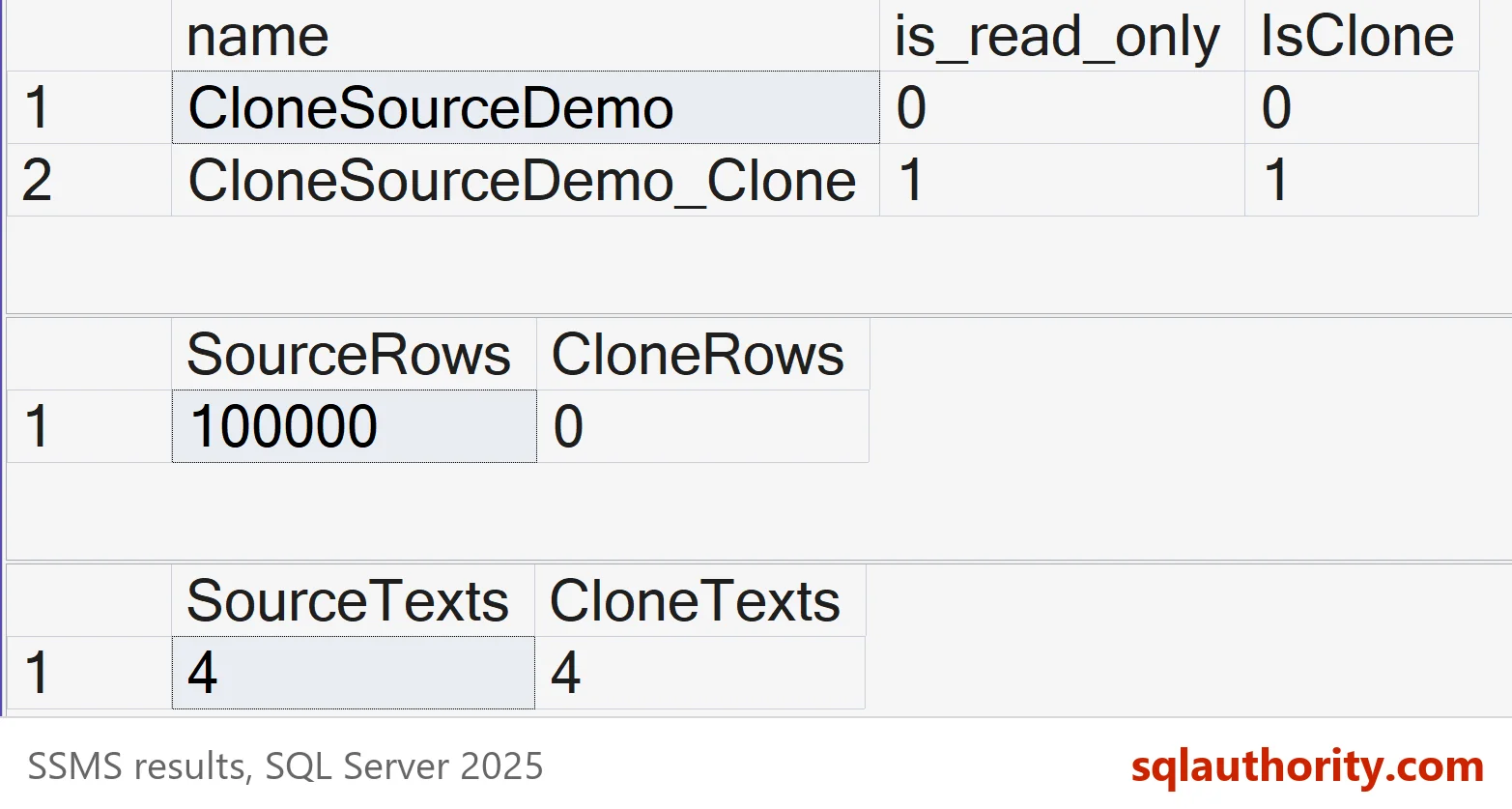
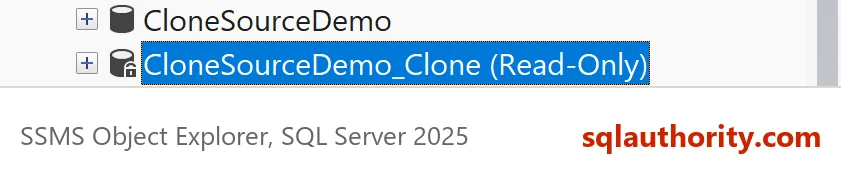
Start with the properties. The clone is read-only, and the IsClone property says that it came from this command. Then compare the row counts.
SELECT name, is_read_only, DATABASEPROPERTYEX(name, 'IsClone') AS IsClone
FROM sys.databases
WHERE name LIKE N'CloneSourceDemo%'
ORDER BY name;

SELECT (SELECT COUNT(*) FROM CloneSourceDemo.dbo.Orders) AS SourceRows,
(SELECT COUNT(*) FROM CloneSourceDemo_Clone.dbo.Orders) AS CloneRows;| name | is_read_only | IsClone |
|---|---|---|
| CloneSourceDemo | 0 | 0 |
| CloneSourceDemo_Clone | 1 | 1 |
| SourceRows | CloneRows |
|---|---|
| 100000 | 0 |
The files tell the same story. The clone has no rows to store, so its files stay small. The query adds up the file sizes of both databases.
SELECT DB_NAME(database_id) AS DatabaseName, CAST(SUM(size) * 8 / 1024.0 AS decimal(9,1)) AS FileMB
FROM sys.master_files
WHERE database_id IN (DB_ID(N'CloneSourceDemo'), DB_ID(N'CloneSourceDemo_Clone'))
GROUP BY database_id
ORDER BY DatabaseName;
| DatabaseName | FileMB |
|---|---|
| CloneSourceDemo | 144.0 |
| CloneSourceDemo_Clone | 16.0 |
Your sizes will differ, because they start from the size of the model database on your server. The gap is what matters. The clone is a fraction of the source.
The table is empty, yet its statistics still describe 100,000 rows. This query reads the statistics of the index inside the clone.
SELECT s.name AS StatisticName, sp.rows, sp.rows_sampled
FROM CloneSourceDemo_Clone.sys.stats AS s
CROSS APPLY CloneSourceDemo_Clone.sys.dm_db_stats_properties(s.object_id, s.stats_id) AS sp
WHERE s.name = N'IX_Orders_CustomerID';
| StatisticName | rows | rows_sampled |
|---|---|---|
| IX_Orders_CustomerID | 100000 | 100000 |
The Query Store came across as well. This count looks for the demo’s query texts in both stores.
SELECT (SELECT COUNT(*) FROM CloneSourceDemo.sys.query_store_query_text WHERE query_sql_text LIKE N'%dbo.Orders%') AS SourceTexts,
(SELECT COUNT(*) FROM CloneSourceDemo_Clone.sys.query_store_query_text WHERE query_sql_text LIKE N'%dbo.Orders%') AS CloneTexts;| SourceTexts | CloneTexts |
|---|---|
| 3 | 3 |
Both stores hold the same query texts, three on the test server. A server that also captures the CREATE INDEX statement shows four in each. The clone starts with the history of the source. Its Query Store reports show the old plans.
Same Statistics, Same Plan
The point of a clone is the plan. Run one query in both databases, each in its own batch. Then read the estimated rows of the cached plans. The clone returns no rows, but the optimizer plans as if it had them.
USE CloneSourceDemo;
GO
DECLARE @a decimal(10,2); SELECT @a = MAX(Amount) FROM dbo.Orders WHERE CustomerID = 11; /*clone probe*/
GO
USE CloneSourceDemo_Clone;
GO
DECLARE @a decimal(10,2); SELECT @a = MAX(Amount) FROM dbo.Orders WHERE CustomerID = 11; /*clone probe*/
GO
USE master;
GO
WITH XMLNAMESPACES (DEFAULT 'http://schemas.microsoft.com/sqlserver/2004/07/showplan')
SELECT DB_NAME(CAST(pa.value AS int)) AS DatabaseName,
       qp.query_plan.value('(//RelOp[@PhysicalOp="Index Seek"]/@EstimateRows)[1]', 'float') AS EstimatedRows,
       qp.query_plan.value('(//RelOp[@PhysicalOp="Index Seek"]/@PhysicalOp)[1]', 'varchar(30)') AS FirstOperator
FROM sys.dm_exec_cached_plans AS cp
CROSS APPLY sys.dm_exec_sql_text(cp.plan_handle) AS st
CROSS APPLY sys.dm_exec_plan_attributes(cp.plan_handle) AS pa
CROSS APPLY sys.dm_exec_query_plan(cp.plan_handle) AS qp
WHERE st.text LIKE N'DECLARE @a decimal(10,2)%/*clone probe*/%' AND pa.attribute = N'dbid'
ORDER BY DatabaseName;| DatabaseName | EstimatedRows | FirstOperator |
|---|---|---|
| CloneSourceDemo | 20.0 | Index Seek |
| CloneSourceDemo_Clone | 20.0 | Index Seek |
Both plans expect 20 rows and seek the nonclustered index. The estimate comes from the histogram, and the histogram came with the clone. That is the whole value of a clone database: the plan matches, and the rows stay behind.
Limits That Matter
A clone lives on the same instance unless you move it. Building it costs some CPU and disk on that server. The statistics are a snapshot, and the read-only clone cannot refresh them. A clone built from stale statistics gives stale plans. Timings, page reads and actual row counts mean nothing, because there is no data. Compare plan shapes and estimates only.
A clone is not a reporting copy either. It is tempting to point a report at it to keep locks off production. The tables are empty, so every report comes back empty. For a copy that holds data, restore a backup under another name. A restored copy also needs its own protection, because it holds the real rows.
Two options change what the clone holds. NO_STATISTICS and NO_QUERYSTORE leave those parts out. VERIFY_CLONEDB turns both on and checks the clone after the copy. A clone can be made writable with ALTER DATABASE … SET READ_WRITE, and IsClone still returns 1. The sibling post shows it, and shows what VERIFY_CLONEDB adds. It is called Copy Database Without Statistics and Query Store Data.
Is a Clone Without Data Useful?
You could argue that a clone proves nothing, because performance depends on data. For timings that is true. A plan is another matter. The optimizer chooses it from the statistics, so a clone shows the choice it makes in production. Use it to ask why the optimizer chose a scan. Then test the fix on a copy that has data.
What to Remember
Clone Database in SQL Server with DBCC CLONEDATABASE when you need the metadata but cannot copy data. It copies the schema, the statistics and the Query Store, and no rows. The clone is read-only and meant for diagnostics. Check it with IsClone, compare plans through estimated rows, and never read results from it as real data.
When you finish, run the cleanup script. It drops the clone and the source.
USE master;
GO
DROP DATABASE IF EXISTS CloneSourceDemo_Clone;
GO
ALTER DATABASE CloneSourceDemo SET SINGLE_USER WITH ROLLBACK IMMEDIATE;
DROP DATABASE CloneSourceDemo;
A clone is not a copy of your data, it is a copy of what the optimizer knows.
Published by Pinal Dave on SQLAuthority. More of my work at pinaldave.com.
Discover more from SQL Authority with Pinal Dave
Subscribe to get the latest posts sent to your email.



6 Comments. Leave new
So, the advantage using the clone database for reporting can avoid locks on the prod DB. Still this db, if it exists on the same prod db Instance, can consume the resources of the prod server. Any other Pros/Cons of this feature ?
There is no data and it can’t be used in the production as the message says.
Thanks so much. Just wondering on the backup date. If this is active DB the last backup (2016) compromises the data. You should have periodic backup schedule.
I use this method for reporting server
And it’s great
For Cloning with production purposes (I Think is only supported in MS SQL Server 2019) use:
DBCC CLONEDATABASE (‘Source’, ‘Destination_ProdReady’)
WITH VERIFY_CLONEDB;
I’ve been using this successfully to build test environments from production: clone a database, rename the files (detach, rename, attach), make the database writable, and then copy a subset of the tables as required for the specific environment (disable foreign keys, non-clustered indexes & triggers, copy tables, then re-enable everything).
This is working well, but DATABASEPROPERTYEX(name, ‘IsClone’) still returns 1. This is not unexpected, but it irks me. Are there any ramifications to this? And if not, is there a way to modify this? Do you know where this is stored (it’s not in sys.databases)?
Even a restored backup of a cloned database still returns IsClone = 1, but I don’t see anything related in the backup header (RESTORE HEADERONLY) either.