
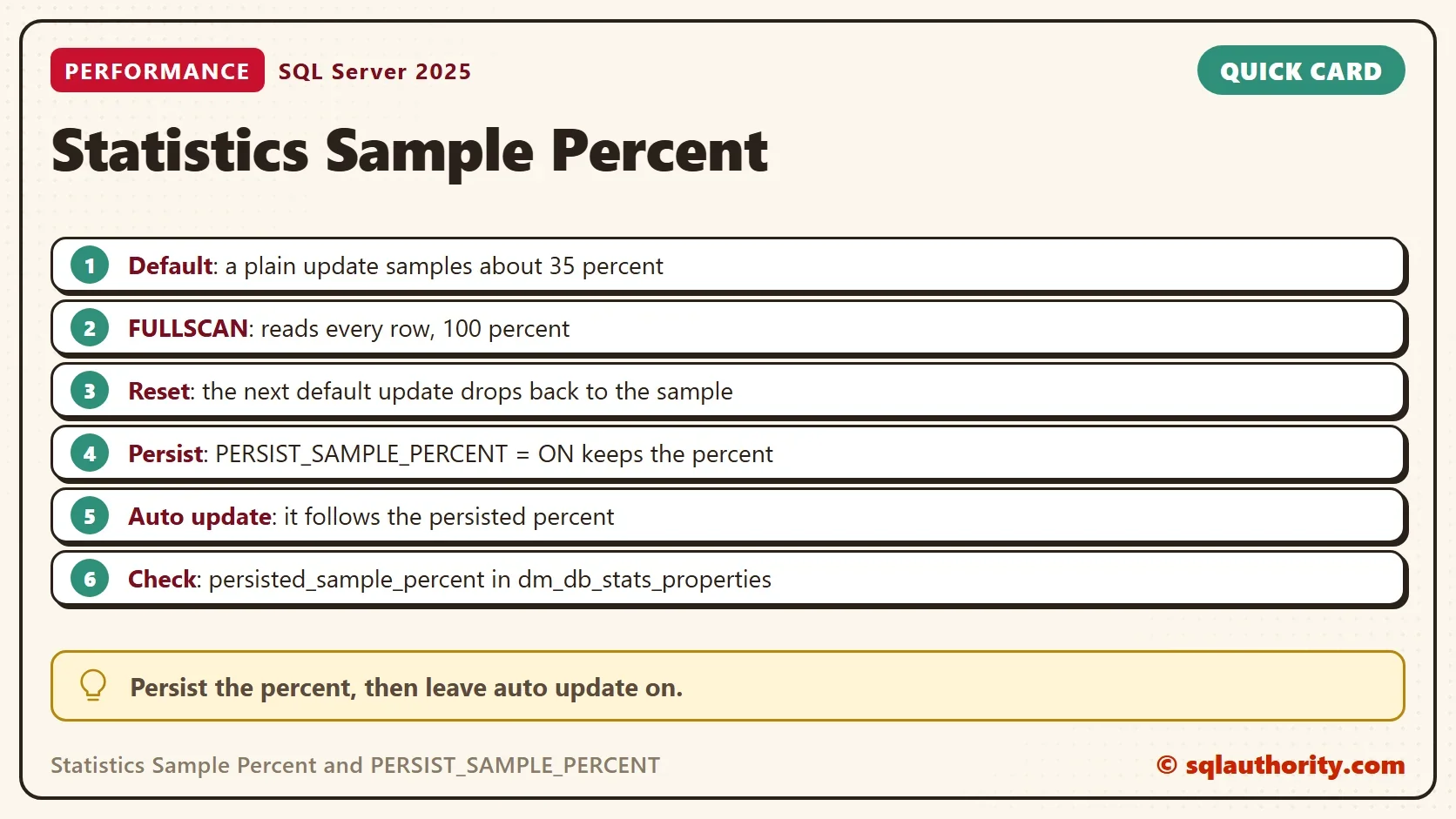
The statistics sample percent decides how many rows SQL Server reads when it updates a statistic. By default the percent shrinks as the table grows, and it resets after every update. PERSIST_SAMPLE_PERCENT keeps the value you choose.

A DBA Who Turned Auto Update Off
During a performance review, a consultant found that a team had switched off Auto Update Statistics. Their reason sounded sensible. A nightly job updated every statistic with a full scan. During the day, an automatic update sometimes replaced those statistics with a low sample, and queries got worse.
That reasoning made sense for older versions. Today there is a better answer. The sample percent can be pinned, so that automatic updates keep the quality of the nightly job.
See the Sample Percent
The statistics sample percent is easy to read. The demo creates a database named SamplePercentDemo with 1,000,000 orders and an index on the customer. The query after it reads the statistic of that index. It shows the rows, the rows sampled and the percent, and the persisted percent.
IF DB_ID(N'SamplePercentDemo') IS NULL CREATE DATABASE SamplePercentDemo;
GO
USE SamplePercentDemo;
GO
DROP TABLE IF EXISTS dbo.Orders;
CREATE TABLE dbo.Orders (
    OrderID int NOT NULL PRIMARY KEY,
    CustomerID int NOT NULL,
    Amount decimal(10,2) NOT NULL
);
INSERT INTO dbo.Orders (OrderID, CustomerID, Amount)
SELECT s.value, ABS(CHECKSUM(NEWID())) % 5000, (s.value % 90) + 10
FROM GENERATE_SERIES(1, 1000000) AS s;
CREATE INDEX IX_Orders_CustomerID ON dbo.Orders (CustomerID);
SELECT sp.last_updated AS LastUpdated,
       sp.rows AS TableRows,
       sp.rows_sampled AS RowsSampled,
       CONVERT(decimal(5,1), 100.0 * sp.rows_sampled / sp.rows) AS SamplePercent,
       sp.persisted_sample_percent AS PersistedPercent,
       sp.modification_counter AS Changes
FROM sys.stats AS s
CROSS APPLY sys.dm_db_stats_properties(s.object_id, s.stats_id) AS sp
WHERE s.object_id = OBJECT_ID(N'dbo.Orders')
AND s.name = N'IX_Orders_CustomerID';| LastUpdated | TableRows | RowsSampled | SamplePercent | PersistedPercent | Changes |
|---|---|---|---|---|---|
| 2026-10-07 11:45:21.6800000 | 1000000 | 1000000 | 100.0 | 0.0 | 0 |
An index build reads every row, so the new statistic was sampled at 100 percent. The persisted percent is 0, which means nothing is persisted. The last column counts changes since the update.
Ten Steps
The next script runs ten steps on the statistic and reads its sample after each one. The steps update by default, with a full scan, and with PERSIST_SAMPLE_PERCENT on and off. Two steps change 100,000 rows and let the automatic update fire. The script logs the elapsed time too.
DROP TABLE IF EXISTS #steps, #log;
CREATE TABLE #steps (Step int, Label varchar(60), Cmd nvarchar(400));
CREATE TABLE #log (Step int, Label varchar(60), ElapsedMs bigint, SamplePercent decimal(5,1), PersistedPercent int, Changes bigint);
INSERT #steps (Step, Label, Cmd)
VALUES (1, 'After the index build', N'SELECT 1;'),
       (2, 'Default update', N'UPDATE STATISTICS dbo.Orders IX_Orders_CustomerID;'),
       (3, 'FULLSCAN', N'UPDATE STATISTICS dbo.Orders IX_Orders_CustomerID WITH FULLSCAN;'),
       (4, 'Default update again', N'UPDATE STATISTICS dbo.Orders IX_Orders_CustomerID;'),
       (5, 'FULLSCAN with PERSIST_SAMPLE_PERCENT = ON', N'UPDATE STATISTICS dbo.Orders IX_Orders_CustomerID WITH FULLSCAN, PERSIST_SAMPLE_PERCENT = ON;'),
       (6, 'Default update, persisted', N'UPDATE STATISTICS dbo.Orders IX_Orders_CustomerID;'),
       (7, 'Auto update after 100,000 changes', N'UPDATE dbo.Orders SET CustomerID = CustomerID + 1 WHERE OrderID <= 100000; EXEC (N''SELECT COUNT(*) FROM dbo.Orders WHERE CustomerID = 777 OPTION (RECOMPILE);'');'),
       (8, 'FULLSCAN with PERSIST_SAMPLE_PERCENT = OFF', N'UPDATE STATISTICS dbo.Orders IX_Orders_CustomerID WITH FULLSCAN, PERSIST_SAMPLE_PERCENT = OFF;'),
       (9, 'Default update, not persisted', N'UPDATE STATISTICS dbo.Orders IX_Orders_CustomerID;'),
       (10, 'Auto update after 100,000 changes', N'UPDATE dbo.Orders SET CustomerID = CustomerID + 1 WHERE OrderID <= 100000; EXEC (N''SELECT COUNT(*) FROM dbo.Orders WHERE CustomerID = 888 OPTION (RECOMPILE);'');');
DECLARE @step int = 1, @label varchar(60), @cmd nvarchar(400), @e0 bigint, @e1 bigint;
WHILE @step <= 10
BEGIN
    SELECT @label = Label, @cmd = Cmd FROM #steps WHERE Step = @step;
    SELECT @e0 = total_elapsed_time FROM sys.dm_exec_requests WHERE session_id = @@SPID;
    EXEC (@cmd);
    SELECT @e1 = total_elapsed_time FROM sys.dm_exec_requests WHERE session_id = @@SPID;
    INSERT #log (Step, Label, ElapsedMs, SamplePercent, PersistedPercent, Changes)
    SELECT @step, @label, @e1 - @e0,
           CONVERT(decimal(5,1), 100.0 * sp.rows_sampled / sp.rows), sp.persisted_sample_percent, sp.modification_counter
    FROM sys.stats AS s
    CROSS APPLY sys.dm_db_stats_properties(s.object_id, s.stats_id) AS sp
    WHERE s.object_id = OBJECT_ID(N'dbo.Orders') AND s.name = N'IX_Orders_CustomerID';
    SET @step += 1;
END;
SELECT Step, Label, ElapsedMs, SamplePercent, PersistedPercent, Changes FROM #log ORDER BY Step;| Step | Label | ElapsedMs | SamplePercent | PersistedPercent | Changes |
|---|---|---|---|---|---|
| 1 | After the index build | 0 | 100.0 | 0 | 0 |
| 2 | Default update | 632 | 35.5 | 0 | 0 |
| 3 | FULLSCAN | 274 | 100.0 | 0 | 0 |
| 4 | Default update again | 624 | 35.5 | 0 | 0 |
| 5 | FULLSCAN with PERSIST_SAMPLE_PERCENT = ON | 231 | 100.0 | 100 | 0 |
| 6 | Default update, persisted | 252 | 100.0 | 100 | 0 |
| 7 | Auto update after 100,000 changes | 1800 | 100.0 | 100 | 0 |
| 8 | FULLSCAN with PERSIST_SAMPLE_PERCENT = OFF | 217 | 100.0 | 0 | 0 |
| 9 | Default update, not persisted | 620 | 35.5 | 0 | 0 |
| 10 | Auto update after 100,000 changes | 1571 | 35.5 | 0 | 0 |
Step two is a plain UPDATE STATISTICS. SQL Server samples 35.5 percent of the rows. Step three uses WITH FULLSCAN and gets 100 percent. Step four runs the plain update again, and the sample drops back to 35.5 percent. A full scan lasts only until the next plain update.
Step five adds PERSIST_SAMPLE_PERCENT = ON. The persisted percent becomes 100. Step six runs a plain update, and the sample stays at 100 percent. The setting does its job.
Does Auto Update Respect It?
Step seven changes 100,000 rows and then runs a query on the column. The change count is above the automatic threshold, so SQL Server updates the statistic first. The changes column is 0 again, and the sample is 100 percent. The automatic update used the persisted percent.
The query that fires the update waits for it: 1,800 ms in step seven. On a large table, test the wait first, and consider AUTO_UPDATE_STATISTICS_ASYNC (documented, not run here).
Steps eight to ten undo the setting. Step eight turns it off with a full scan. Step nine updates by default and gets the 35.5 percent sample. Step ten repeats the automatic update and also gets 35.5 percent. Without the setting, the nightly full scan does not survive the day.
Full Scan or Sample?
The statistics sample percent raises one question: which is better, a full scan or a sample? A full scan is more accurate. A sample is meant to be cheaper. On the test server it was not. The plain update took about 632 ms, and the full scan took about 274 ms. A second server gave the expected order, 259 ms against 432 ms.
One possible reason is that the statistic belongs to an ordered index that a full scan reads in one pass. This was not tested. Test both on your own table before you assume the sample is cheaper. When the statistics are good enough with a sample, the sample is fine. When a plan depends on a skewed value, pay for the full scan once, and persist it.
Which Versions Have It
PERSIST_SAMPLE_PERCENT is available in SQL Server 2019 and later, and this demo ran on SQL Server 2025. Some builds of SQL Server 2016 and 2017 got it through updates. Check your build before you rely on it. The option works with FULLSCAN or with SAMPLE n PERCENT, so you can persist a lower percent too.
Is Auto Update Worth Keeping?
You could argue that a nightly full scan with auto update off is simpler. It is. It also leaves the day unprotected. A large change after the job gets no new statistics until the next night. A persisted percent keeps auto update on, and the statistic follows the data.
What to Remember
Read the statistics sample percent and persisted_sample_percent before you change anything. Use PERSIST_SAMPLE_PERCENT with a full scan for the statistics that decide your worst plans. Turn it off the same way, and expect the sample to return to the default. An index build reads every row, as step one showed, so a rebuild also gives a full sample.
When you finish, drop the demo database.
USE master;
GO
IF DB_ID(N'SamplePercentDemo') IS NOT NULL
BEGIN
    ALTER DATABASE SamplePercentDemo SET SINGLE_USER WITH ROLLBACK IMMEDIATE;
    DROP DATABASE SamplePercentDemo;
END;
A sample percent is not a setting you forget, it is one you have to pin.
Published by Pinal Dave on SQLAuthority. More of my work at pinaldave.com.
Discover more from SQL Authority with Pinal Dave
Subscribe to get the latest posts sent to your email.



1 Comment. Leave new
which option is better full scan or sample?