
Compatibility Level from 2008 to 2019 requires separating database migration from engine upgrade support. SQL Server 2019 supports levels 100 through 150.
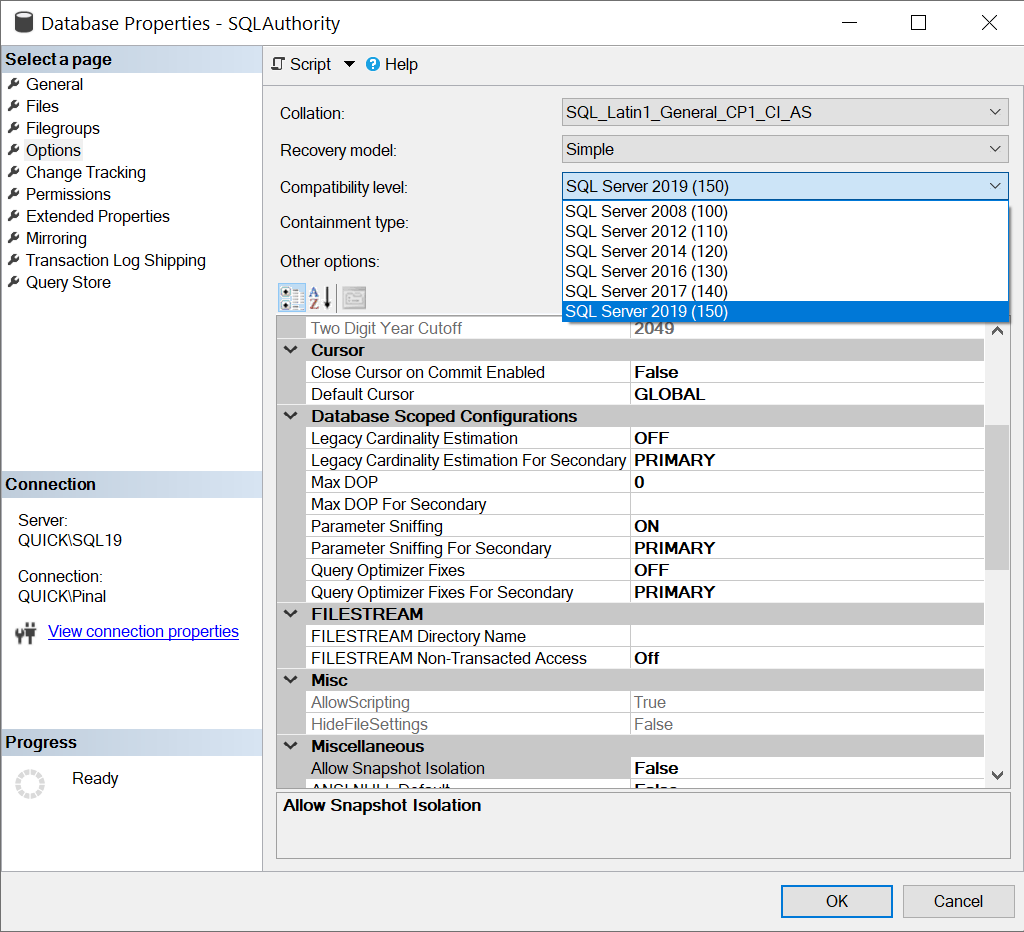
SELECT name, compatibility_level FROM sys.databases ORDER BY name;
-- Approved change on an engine that supports level 150:
-- ALTER DATABASE [YourDatabase] SET COMPATIBILITY_LEVEL = 150;
Compatibility level controls selected language and query-processing behavior. It does not preserve every plan or make upgraded files readable by an older engine. Later engines also support level 150. That setting is not restricted to SQL Server 2019.
I incorrectly described a direct in-place upgrade from SQL Server 2008 or 2008 R2 to 2019. Supported in-place sources start at SQL Server 2012 SP4. Backup-and-restore migration is a separate route for eligible older databases. It needs its own application and feature assessment.
Preserve a restore-tested backup and workload baseline. Validate the migrated database at its retained level. Then test a higher level with representative queries and a rollback plan. Raising the level does not guarantee faster queries.
Reference: SQL Server 2019 upgrade and database-migration paths.
Related reading
Compatibility level is not an older engine executable, it is a supported behavior setting inside the installed engine.
Published by Pinal Dave on SQLAuthority. More of my work at pinaldave.com.
Discover more from SQL Authority with Pinal Dave
Subscribe to get the latest posts sent to your email.



9 Comments. Leave new
Thanks Pinal Dave.
we have 2008R2 with few databases at compatibility level of 90. Can I still upgrade them directly to 2019? Or do I have to update teh compatibility level to 100 first and then do the upgrade?
We have 2008R2 (RTM) with few databases at compatibility level of 90. Can I still upgrade them directly to 2019? Or do I have to update compatibility level to 100 and service pack to SP4 first and then do the upgrade?
Please Suggest.
Did you get the answer for your post
I am also having the same scenario . Also I my DB server is running on SQL 2008R2 RTM version
No, I didn’t get any answer. But I was able to successfully upgrade to 2019. I updated the compatibility level on my databases to 100 , then I did sql upgrade to 2019 from 2008R2 without any issues.
Does features apply to previous compatibility level?
I mean, I’m on SQL Server 2019 but my databases are still on Compatibility Level 110 (SQL Server 2012). I want to rebuild a fragmented index with the options RESUMABLE = ON and OPTIMIZE_FOR_SEQUENTIAL_KEY = ON. Will these new feature apply even if the Compatibility Level is 110?
HI Vijaya can you please me here to upgrade the SQL server 2008 r2 to 2019.
@Vijaya Nettam – Can you add here the steps that you followed for the MSSQL upgrade from 2008 to 2019 please.
Hi
I am not sure the 2008 version compatibility done through the server properties makes it a good database 2019 version with all the features. Some years ago I did an upgrade to azure from a 2008 version by retauring by hand a .bak from 2008 in 2012, then fix the issues, then do again for 2014, then again to 2016 then to azure.