
To find tables containing a column, search the catalog view sys.columns by name. One query lists every match in a database, with its table, schema and data type.

Why Search by Column Name
A large organization used GUID values as primary keys, and performance was poor. A project of one month removed every dependency on those keys and replaced them with a more efficient key. Then the old GUID columns had to leave every table. The challenge was that each table named its GUID column differently. The only common part was the word GUID in the name.
That is a search by pattern, and it is a catalog question. The next script creates two small databases that stand in for such a system. ColumnSearchDemo has columns named like the ones in that case, a view and an odd pair of employee columns. ColumnSearchDemoArchive holds one old table.
IF DB_ID(N'ColumnSearchDemo') IS NULL CREATE DATABASE ColumnSearchDemo;
IF DB_ID(N'ColumnSearchDemoArchive') IS NULL CREATE DATABASE ColumnSearchDemoArchive;
GO
USE ColumnSearchDemoArchive;
GO
DROP TABLE IF EXISTS dbo.OrdersOld;
CREATE TABLE dbo.OrdersOld (OrderID int NOT NULL PRIMARY KEY, OrderGuid uniqueidentifier NOT NULL, ArchivedOn date NOT NULL);
GO
USE ColumnSearchDemo;
GO
IF SCHEMA_ID(N'Sales') IS NULL EXEC (N'CREATE SCHEMA Sales');
IF SCHEMA_ID(N'HR') IS NULL EXEC (N'CREATE SCHEMA HR');
GO
DROP VIEW IF EXISTS Sales.OrderSummary;
DROP TABLE IF EXISTS Sales.Orders, Sales.Customers, HR.Employees, dbo.Products;
CREATE TABLE Sales.Customers (CustomerID int NOT NULL PRIMARY KEY, CustomerGuid uniqueidentifier NOT NULL, FullName nvarchar(80) NOT NULL, Email nvarchar(120) NULL);
CREATE TABLE Sales.Orders (OrderID int NOT NULL PRIMARY KEY, OrderGuid uniqueidentifier NOT NULL, CustomerGuid uniqueidentifier NOT NULL, OrderTotal decimal(10,2) NOT NULL);
CREATE TABLE HR.Employees (EmployeeID int NOT NULL PRIMARY KEY, RowGUID char(36) NULL, emp_id int NULL, empXid int NULL, FullName nvarchar(80) NOT NULL);
CREATE TABLE dbo.Products (ProductID int NOT NULL PRIMARY KEY, ProductGuid nvarchar(50) NULL, ProductName nvarchar(60) NOT NULL);
GO
CREATE VIEW Sales.OrderSummary AS SELECT o.OrderGuid, o.OrderTotal FROM Sales.Orders AS o;
Search One Database
The view sys.columns has one row for every column of every object in the database. Join it to sys.objects for the object name and type, and to sys.schemas for the schema. The filter on type keeps user tables and views. The query lists the tables containing a column, and the views that expose it. The pattern %guid% matches the word anywhere in the name.
SELECT s.name AS SchemaName, o.name AS ObjectName, o.type_desc AS ObjectType, c.name AS ColumnName,
       TYPE_NAME(c.user_type_id) AS DataType, c.max_length AS MaxLength
FROM sys.columns AS c
JOIN sys.objects AS o ON o.object_id = c.object_id
JOIN sys.schemas AS s ON s.schema_id = o.schema_id
WHERE o.type IN ('U', 'V')
  AND c.name LIKE N'%guid%'
ORDER BY s.name, o.name, c.column_id;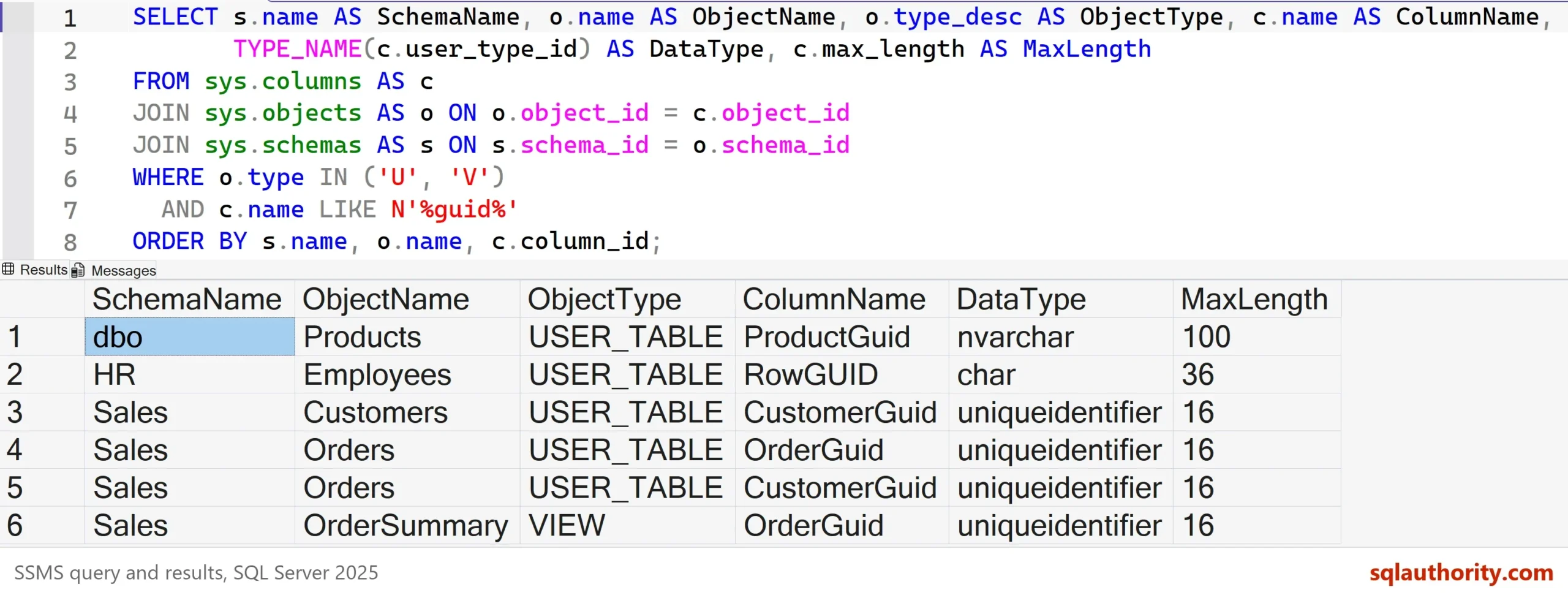
The result has six rows. Five are columns of four tables, and one is a column of the view. MaxLength is in bytes, so nvarchar(50) shows 100. RowGUID matches too, because this database ignores case. On a case-sensitive database, compare LOWER(c.name) with the pattern in lower case.
An Underscore Is a Wildcard
In a LIKE pattern, an underscore stands for any single character. The pattern %emp_id% finds emp_id, and it also finds empXid. Put the underscore in square brackets to match a real underscore.
SELECT c.name AS ColumnName
FROM sys.columns AS c
JOIN sys.tables AS t ON t.object_id = c.object_id
WHERE c.name LIKE N'%emp_id%';

SELECT c.name AS ColumnName
FROM sys.columns AS c
JOIN sys.tables AS t ON t.object_id = c.object_id
WHERE c.name LIKE N'%emp[_]id%';
| ColumnName |
|---|
| emp_id |
| empXid |
| ColumnName |
|---|
| emp_id |
Check That Related Columns Match
A search finds the columns. A second query asks whether they agree. The same kind of value should be declared the same way everywhere. The query groups the matching columns of tables by data type.
SELECT TYPE_NAME(c.user_type_id) AS DataType, COUNT(*) AS ColumnCount,
       STRING_AGG(c.name, N', ') WITHIN GROUP (ORDER BY c.name) AS ColumnNames
FROM sys.columns AS c
JOIN sys.tables AS t ON t.object_id = c.object_id
WHERE c.name LIKE N'%guid%'
GROUP BY TYPE_NAME(c.user_type_id)
ORDER BY ColumnCount DESC;| DataType | ColumnCount | ColumnNames |
|---|---|---|
| uniqueidentifier | 3 | CustomerGuid, CustomerGuid, OrderGuid |
| char | 1 | RowGUID |
| nvarchar | 1 | ProductGuid |
Five columns hold GUID values, and they use three data types. RowGUID keeps the value as 36 characters, and ProductGuid as text. Those two are the columns to review first, because a join to a uniqueidentifier column has to convert them.
Search Every Database on the Server
The catalog views belong to one database, so a server-wide search needs one SELECT per database. The script builds them with STRING_AGG, which needs SQL Server 2017, and joins them with UNION ALL. QUOTENAME protects the database names. The pattern goes in as a parameter of sp_executesql, so it is never pasted into the text.
DECLARE @sql nvarchar(max) = (
    SELECT STRING_AGG(CONVERT(nvarchar(max),
        N'SELECT N' + QUOTENAME(d.name, '''') + N' AS DatabaseName, s.name COLLATE DATABASE_DEFAULT AS SchemaName, '
        + N't.name COLLATE DATABASE_DEFAULT AS TableName, c.name COLLATE DATABASE_DEFAULT AS ColumnName '
        + N'FROM ' + QUOTENAME(d.name) + N'.sys.columns AS c '
        + N'JOIN ' + QUOTENAME(d.name) + N'.sys.tables AS t ON t.object_id = c.object_id '
        + N'JOIN ' + QUOTENAME(d.name) + N'.sys.schemas AS s ON s.schema_id = t.schema_id '
        + N'WHERE c.name LIKE @pattern'), N' UNION ALL ')
    FROM sys.databases AS d
    WHERE d.name LIKE N'ColumnSearchDemo%' AND d.state = 0 AND HAS_DBACCESS(d.name) = 1);
EXEC sys.sp_executesql @sql, N'@pattern nvarchar(128)', @pattern = N'%guid%';| DatabaseName | SchemaName | TableName | ColumnName |
|---|---|---|---|
| ColumnSearchDemo | Sales | Customers | CustomerGuid |
| ColumnSearchDemo | Sales | Orders | CustomerGuid |
| ColumnSearchDemo | Sales | Orders | OrderGuid |
| ColumnSearchDemo | HR | Employees | RowGUID |
| ColumnSearchDemo | dbo | Products | ProductGuid |
| ColumnSearchDemoArchive | dbo | OrdersOld | OrderGuid |
The filter on the database name keeps the demo inside its own two databases. Remove that line to search every database you can open. HAS_DBACCESS skips the ones you can’t, and the state test skips databases that aren’t online.
The COLLATE DATABASE_DEFAULT clauses matter on a real server. Databases on one server can have different collations. A UNION ALL of their names then fails with Msg 451, a collation conflict, without the clauses. The pattern is also compared under each database’s own collation, so a case-sensitive database does not match %guid% against OrderGuid.
Let the Catalog Write the Statements
Once the list is right, the catalog can write the cleanup for you. The next query builds one ALTER TABLE statement for each matching column of a table. It runs none of them. Read every line, because a key, an index or a constraint on the column has to go first.
SELECT CONCAT(N'ALTER TABLE ', QUOTENAME(s.name), N'.', QUOTENAME(t.name), N' DROP COLUMN ', QUOTENAME(c.name), N';') AS DropStatement
FROM sys.columns AS c
JOIN sys.tables AS t ON t.object_id = c.object_id
JOIN sys.schemas AS s ON s.schema_id = t.schema_id
WHERE c.name LIKE N'%guid%'
ORDER BY s.name, t.name, c.column_id;
| DropStatement |
|---|
| ALTER TABLE [dbo].[Products] DROP COLUMN [ProductGuid]; |
| ALTER TABLE [HR].[Employees] DROP COLUMN [RowGUID]; |
| ALTER TABLE [Sales].[Customers] DROP COLUMN [CustomerGuid]; |
| ALTER TABLE [Sales].[Orders] DROP COLUMN [OrderGuid]; |
| ALTER TABLE [Sales].[Orders] DROP COLUMN [CustomerGuid]; |
Two statements hit the same table. A single statement can drop both columns, which is shorter and changes the table once. Filter the list further, or save it to a file for the change review.
INFORMATION_SCHEMA Does the Same
Many scripts use the INFORMATION_SCHEMA.COLUMNS view instead. It follows the SQL standard, so the query works in other database products too. It lists the tables and views of the current database only, so a filter on TABLE_CATALOG is not needed.
SELECT TABLE_SCHEMA, TABLE_NAME, COLUMN_NAME, DATA_TYPE
FROM INFORMATION_SCHEMA.COLUMNS
WHERE COLUMN_NAME LIKE N'%guid%'
ORDER BY TABLE_SCHEMA, TABLE_NAME;
It returns the same six rows. Are these views deprecated? No, because they are part of the SQL standard. The view sys.columns shows more, such as the identity flag or the computed flag, which INFORMATION_SCHEMA doesn’t show.
A Name Is Only a Candidate
You could argue that a search by name is a weak way to find related columns, because names lie. A column called CustomerGuid can hold a name, and a key can hide behind a column called RowID. That’s true. The search gives you candidates. Check the data type and a few values before you change anything. To test one known table, read How to Check if a Column Exists in a SQL Server Table.
What to Remember
Search sys.columns for the pattern, and join sys.objects and sys.schemas for names. Put an underscore in brackets, and group by data type to catch columns that disagree. Use the dynamic query when the column could be in any database. Treat the tables containing a column as a candidate list, not as an answer. Replacing a key column also means dropping every foreign key that points at it first. The statement builder lists columns only, so list the constraints from sys.foreign_key_columns as well.
When you finish, drop the two demo databases.
USE master;
GO
IF DB_ID(N'ColumnSearchDemo') IS NOT NULL
BEGIN
    ALTER DATABASE ColumnSearchDemo SET SINGLE_USER WITH ROLLBACK IMMEDIATE;
    DROP DATABASE ColumnSearchDemo;
END;
IF DB_ID(N'ColumnSearchDemoArchive') IS NOT NULL
BEGIN
    ALTER DATABASE ColumnSearchDemoArchive SET SINGLE_USER WITH ROLLBACK IMMEDIATE;
    DROP DATABASE ColumnSearchDemoArchive;
END;
A column name is not proof, it is the first clue.
Published by Pinal Dave on SQLAuthority. More of my work at pinaldave.com.
Discover more from SQL Authority with Pinal Dave
Subscribe to get the latest posts sent to your email.




6 Comments. Leave new
I found this query to be useful when I’m looking for bad SQL. One of the most common errors is to give the same data element different names and declarations in different tables.
AND (COLUMN_NAME LIKE ’emp_id’
OR COLUMN_NAME LIKE ’employee_id’
OR COLUMN_NAME LIKE ’employee_inbr’
OR …)
After you decide on the data element name, then you need to go back through and check to see their all declared the same way
Hi, how do you make a primary key scheme when the application is used at multiple remote places and gets synced to single database.
Sir,
Any script available to replace all GUID column as primary or foreign key be replaced by identity bigint in all database columns and pk, fk relationship without breaking referential integrity programmatically. Most of the tables have ui as primary key, and tables referring these related other table ui columns have that table name + _ui as fk
Pinal, I thought the information_schema objects were deprecated? Or at least I read that at one point on MSDN. Cannot seem to find it any more.
I do not think it is deprecated and I searched again and did not find anything as well.
Hello Pinal, I usually prefer using sys.tables and sys.columns, since these objects align well with other system views – sys.databases, sys.indexes etc.