
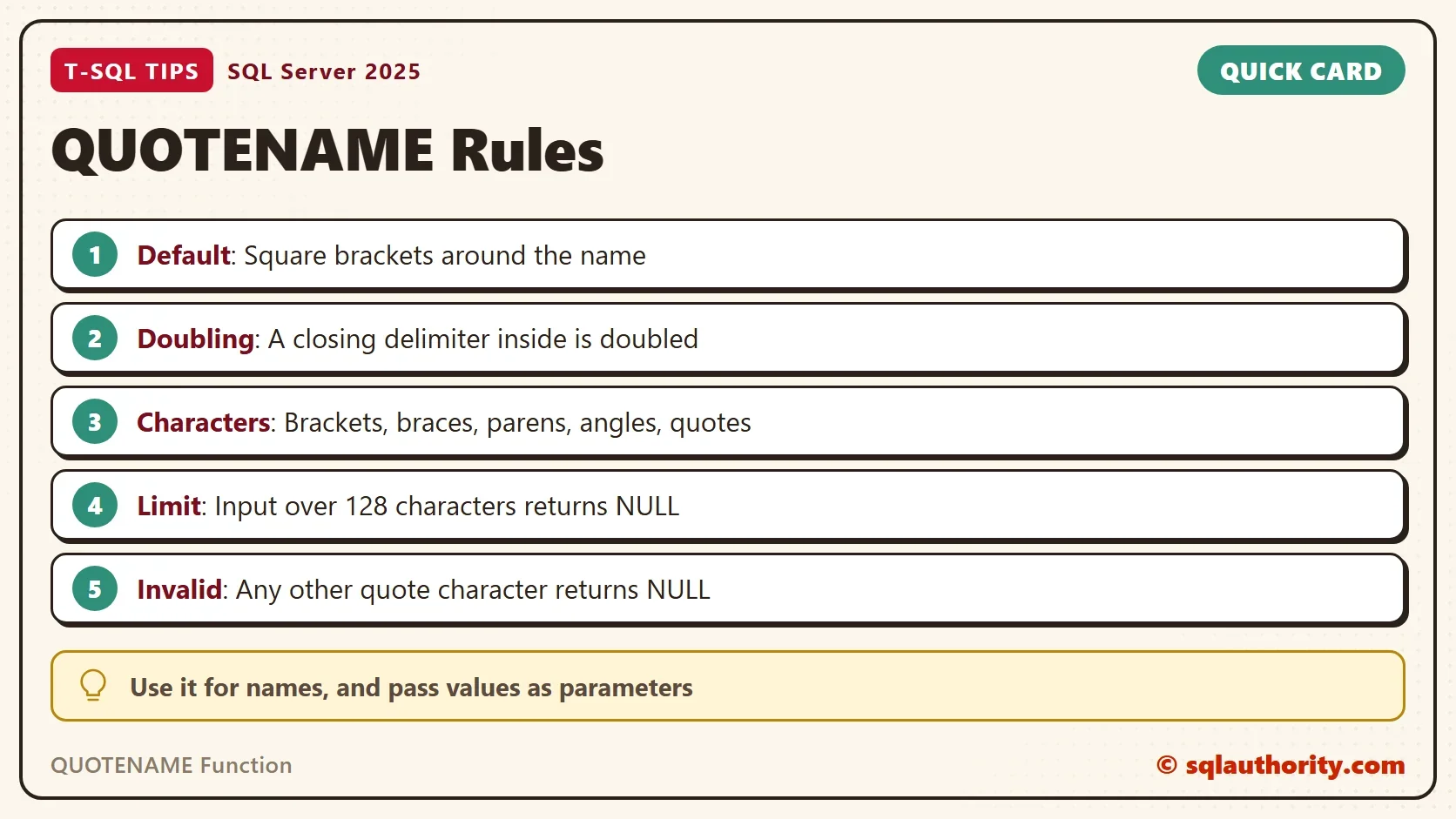
The QUOTENAME function wraps a name in delimiters and doubles any closing delimiter inside it. It is the safe way to turn a name into a piece of dynamic SQL.

What QUOTENAME Returns
A name with a space, a reserved word or a bracket in it breaks a query unless it is delimited. QUOTENAME adds the delimiters for you. By default it uses square brackets. If the name already holds a closing bracket, the function doubles it, so the result is always one valid identifier.
SELECT QUOTENAME(N'My[]Name') AS Brackets,
       QUOTENAME(N'My[]Name', N'{}') AS Braces,
N'[' + N'My[]Name' + N']' AS ByHand;| Brackets | Braces | ByHand |
|---|---|---|
| [My[]]Name] | {My[]Name} | [My[]Name] |
The closing bracket in the first result appears twice. The second argument chose braces, and braces need no doubling here, because the name holds no brace. The ByHand column shows why adding brackets yourself fails. SQL Server reads the first closing bracket as the end of the name, and the rest becomes a syntax error.
Pick Another Quote Character
Brackets suit identifiers. The other characters serve other jobs. Single quotes make a string literal, and double quotes delimit identifiers while QUOTED_IDENTIFIER is on. The second argument sets the character. The next query tries fourteen of them on the same name.
SELECT q.QuoteChar, QUOTENAME(N'Tea', q.QuoteChar) AS Result
FROM (VALUES (N''''), (N'"'), (N'['), (N']'), (N'('), (N')'), (N'<'), (N'>'),
(N'{'), (N'}'), (N'`'), (N'$'), (N'#'), (N'|')) AS q (QuoteChar);| QuoteChar | Result |
|---|---|
| ‘ | ‘Tea’ |
| “ | “Tea” |
| [ | [Tea] |
| ] | [Tea] |
| ( | (Tea) |
| ) | (Tea) |
| < | <Tea> |
| > | <Tea> |
| { | {Tea} |
| } | {Tea} |
| ` | `Tea` |
| $ | NULL |
| # | NULL |
| | | NULL |
Single quotes, double quotes, the backtick and the four bracket pairs work. Either half of a pair gives the same result. Every other character returns NULL. Only the first character of the argument counts, so N'{}' acts like N'{'. An empty argument falls back to square brackets.
What Gets Doubled
QUOTENAME doubles the closing character of the delimiter you chose. That keeps the result valid when the name holds the same character.
SELECT QUOTENAME(N'O''Brien', N'''') AS SingleQuote,
       QUOTENAME(N'a"b', N'"') AS DoubleQuote,
       QUOTENAME(N'a}b', N'{') AS Brace,
QUOTENAME(N'a]b') AS Bracket;| SingleQuote | DoubleQuote | Brace | Bracket |
|---|---|---|---|
| ‘O”Brien’ | “a””b” | {a}}b} | [a]]b] |
The 128 Character Limit
The QUOTENAME function takes a sysname value, which holds up to 128 characters. A longer input returns NULL, with no error. A NULL input returns NULL as well, and an empty string returns an empty pair of brackets.
SELECT LEN(QUOTENAME(REPLICATE(N'x', 128))) AS Length128,
       QUOTENAME(REPLICATE(N'x', 129)) AS Result129,
       QUOTENAME(NULL) AS NullInput,
QUOTENAME(N'') AS EmptyInput;| Length128 | Result129 | NullInput | EmptyInput |
|---|---|---|---|
| 130 | NULL | NULL | [] |
The silent NULL matters for any long text you quote. The statement you build then becomes NULL, and nothing runs. Pass long values as parameters.
Why Dynamic SQL Needs It
Building a statement from a name by plain concatenation trusts the name. A name can carry its own SQL. The next query builds two statements from the same name, one without QUOTENAME and one with it. It only builds text and runs nothing.
DECLARE @table sysname = N'Orders; DROP TABLE dbo.Customers; --';
SELECT N'SELECT * FROM ' + @table AS Naive,
N'SELECT * FROM dbo.' + QUOTENAME(@table) AS Safe;| Naive | Safe |
|---|---|
| SELECT * FROM Orders; DROP TABLE dbo.Customers; — | SELECT * FROM dbo.[Orders; DROP TABLE dbo.Customers; –] |
The first text is a valid batch of two statements, so it would run the DROP TABLE. In the second, the whole name sits inside one identifier, and the extra text is only part of the name. The QUOTENAME function protects names. It does not protect values, so pass those to sp_executesql as parameters.
A realistic job is generating one statement per table. This query handles a name with a space, a reserved word and a stray bracket in one pass.
SELECT N'SELECT COUNT(*) FROM ' + QUOTENAME(n.SchemaName) + N'.' + QUOTENAME(n.TableName) + N';' AS Statement
FROM (VALUES (N'dbo', N'Order Items'), (N'sales', N'Select'), (N'dbo', N'Cafe]Menu')) AS n (SchemaName, TableName);
| Statement |
|---|
| SELECT COUNT(*) FROM [dbo].[Order Items]; |
| SELECT COUNT(*) FROM [sales].[Select]; |
| SELECT COUNT(*) FROM [dbo].[Cafe]]Menu]; |
Names and values need different tools, and a real statement holds both. In the next query, QUOTENAME protects the view name, and sp_executesql carries the schema ID as a parameter.
DECLARE @view sysname = N'schemas';
DECLARE @sql nvarchar(max) = N'SELECT name FROM sys.' + QUOTENAME(@view) + N' WHERE schema_id = @id;';
EXEC sys.sp_executesql @sql, N'@id int', @id = 1;
| name |
|---|
| dbo |
The view name came from a variable, so it needed delimiters. The ID is a value, so it travels as a typed parameter and never becomes part of the text.
You could argue that a careful team avoids odd names, so QUOTENAME is overkill. Names come from people, imports and old systems, though. A function that costs nothing beats a naming rule that nobody checks.
What to Remember
Use the QUOTENAME function for every name you place into a dynamic statement: tables, columns, schemas and databases. Qualify each part separately, as the last query does, so the dot stays outside the delimiters.
Remember the edges. The input stops at 128 characters. The quote character must come from the allowed list. Anything else returns NULL, so check for a NULL before you run the statement you built.
A short guard helps in generated scripts. If QUOTENAME returns NULL for a name that is not NULL, stop and look at that name. The cause is a name over 128 characters or a quote character outside the list.
A quoted name is not a safe query, it is a safe name.
Published by Pinal Dave on SQLAuthority. More of my work at pinaldave.com.
Discover more from SQL Authority with Pinal Dave
Subscribe to get the latest posts sent to your email.


1 Comment. Leave new
Hi Pinal,
Can you give any real life example of this situation?
Thanks.