
This Piecemeal Restore Quiz asks what a database does while part of it is still missing. The answer decides how long your users wait after a disaster. Read the setup, pick your answer, and then run the script to check yourself.

The Quiz
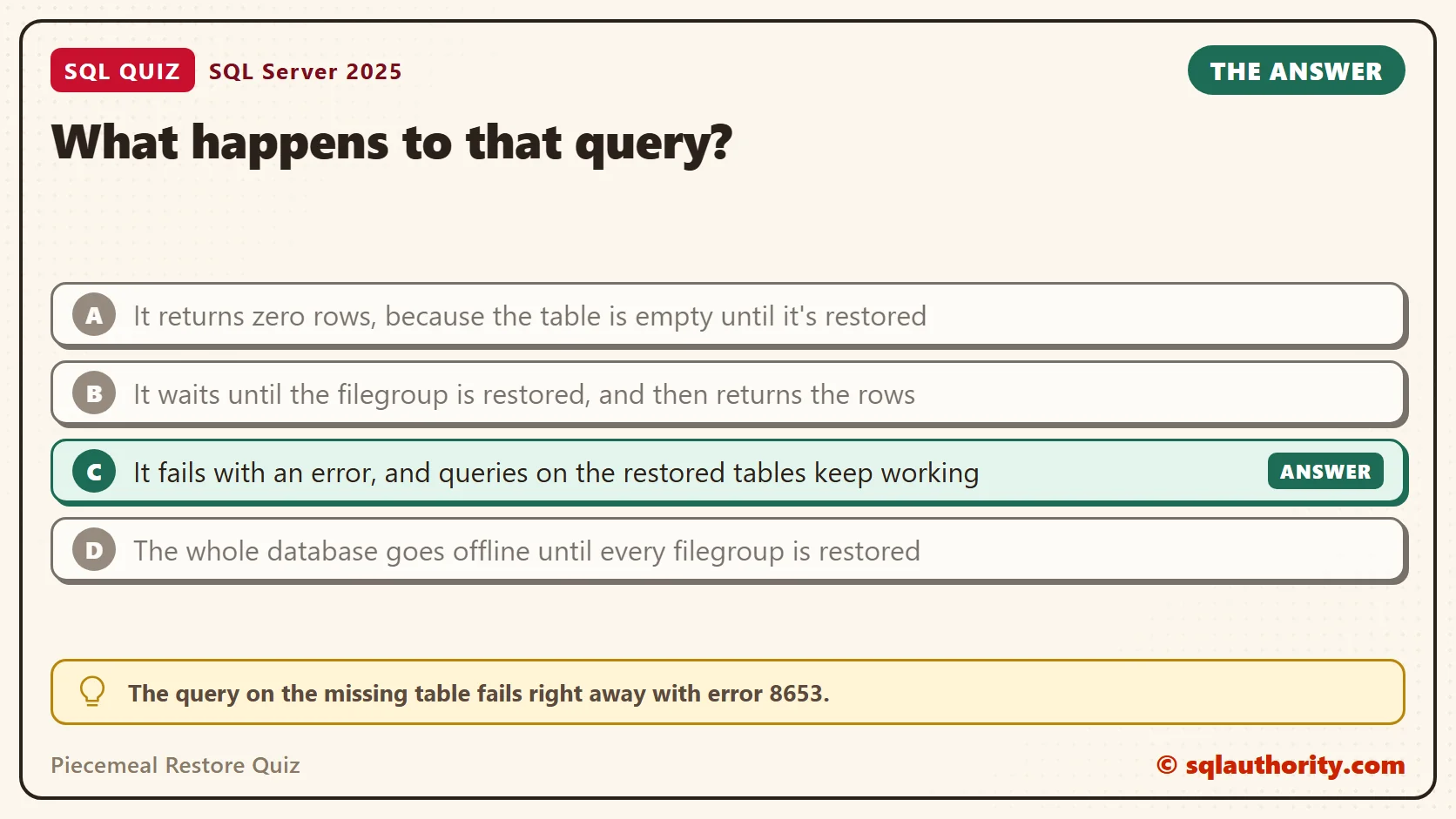
Avery runs the order database for an online tea shop. It has two filegroups. PRIMARY holds the Customer table. A second filegroup, FG_Archive, holds the OldOrder table with years of past orders.
The server fails and the database is lost. Avery restores PRIMARY first with a piecemeal restore, and the database comes online. FG_Archive is still waiting for its restore. Then someone runs a query against the OldOrder table.
What happens to that query?
A. It returns zero rows, because the table is empty until it’s restored
B. It waits until the filegroup is restored, and then returns the rows
C. It fails with an error, and queries on the restored tables keep working
D. The whole database goes offline until every filegroup is restored
Take a moment and pick one before you read on.
The Answer
The answer is C. The query on the missing table fails right away with error 8653. Tables on the restored filegroup work as normal, and they accept new rows too.
A piecemeal restore brings a database back one filegroup at a time, starting with PRIMARY. Each filegroup is online or it isn’t. SQL Server doesn’t guess at data it hasn’t restored yet. It refuses any query that needs that data and leaves everything else alone.
That is the point of the feature. The tables people need first come back first, and the big archive can wait. I wrote about the first step in Piecemeal Restore: Bringing the Primary Filegroup Online First. This post covers what happens next.
Prove It
The first script creates a database called SqlQuizPiecemealRestore, used only for this example, so run it on a test server. It takes a full backup and a log backup. Change the backup folder to one SQL Server can write to. Use Enterprise or Developer edition, because the last step restores a filegroup while the database stays online.
IF DB_ID(N'SqlQuizPiecemealRestore') IS NULL
BEGIN
    DECLARE @dir nvarchar(260) = CONVERT(nvarchar(260), SERVERPROPERTY('InstanceDefaultDataPath'));
    DECLARE @sql nvarchar(max) = N'CREATE DATABASE SqlQuizPiecemealRestore
        ON PRIMARY (NAME = N''SqlQuizPiecemealRestore'', FILENAME = N''' + @dir + N'SqlQuizPiecemealRestore.mdf'', SIZE = 16MB),
        FILEGROUP FG_Archive (NAME = N''SqlQuizPiecemealRestore_archive'', FILENAME = N''' + @dir + N'SqlQuizPiecemealRestore_archive.ndf'', SIZE = 16MB)';
    EXEC (@sql);
END;
GO
USE SqlQuizPiecemealRestore;
GO
ALTER DATABASE SqlQuizPiecemealRestore SET RECOVERY FULL;
DROP TABLE IF EXISTS dbo.Customer;
DROP TABLE IF EXISTS dbo.OldOrder;
CREATE TABLE dbo.Customer (CustomerID int PRIMARY KEY, CustomerName nvarchar(40) NOT NULL) ON [PRIMARY];
CREATE TABLE dbo.OldOrder (OrderID int PRIMARY KEY, CustomerID int NOT NULL, Item nvarchar(40) NOT NULL) ON FG_Archive;
INSERT INTO dbo.Customer VALUES (1, N'Avery'), (2, N'Jordan'), (3, N'Riley');
INSERT INTO dbo.OldOrder VALUES (101, 1, N'Green Tea'), (102, 2, N'Oat Biscuit'), (103, 3, N'Mango Lassi');
BACKUP DATABASE SqlQuizPiecemealRestore TO DISK = N'C:\YourBackupFolder\SqlQuizPiecemealRestore_full.bak' WITH INIT;
INSERT INTO dbo.Customer VALUES (4, N'Morgan');
INSERT INTO dbo.OldOrder VALUES (104, 4, N'Masala Chai');
BACKUP LOG SqlQuizPiecemealRestore TO DISK = N'C:\YourBackupFolder\SqlQuizPiecemealRestore_log.trn' WITH INIT;
Now the disaster. The script drops the database, then restores only PRIMARY. The PARTIAL option starts a piecemeal restore, and the log backup rolls PRIMARY forward.
USE master;
GO
ALTER DATABASE SqlQuizPiecemealRestore SET SINGLE_USER WITH ROLLBACK IMMEDIATE;
DROP DATABASE SqlQuizPiecemealRestore;
GO
RESTORE DATABASE SqlQuizPiecemealRestore FILEGROUP = N'PRIMARY' FROM DISK = N'C:\YourBackupFolder\SqlQuizPiecemealRestore_full.bak' WITH PARTIAL, NORECOVERY;
RESTORE LOG SqlQuizPiecemealRestore FROM DISK = N'C:\YourBackupFolder\SqlQuizPiecemealRestore_log.trn' WITH RECOVERY;
The database is online. Run the two queries below as separate batches. The GO line between them matters, because it lets the second one fail without stopping anything.
USE SqlQuizPiecemealRestore;
GO
SELECT CustomerID, CustomerName FROM dbo.Customer ORDER BY CustomerID;
GO
SELECT OrderID, Item FROM dbo.OldOrder ORDER BY OrderID;
GO
SELECT name, state_desc FROM sys.database_files;
The first query returned all four customers, including Morgan, who was added after the full backup.
| CustomerID | CustomerName |
|---|---|
| 1 | Avery |
| 2 | Jordan |
| 3 | Riley |
| 4 | Morgan |
The second query failed. This is the text SSMS shows in the Messages tab. It is output, not code to run.
Msg 8653, Level 16, State 1, Line 1
The query processor is unable to produce a plan for the table or view 'OldOrder' because the table resides in a filegroup that is not online.
The third query shows why. The data file for FG_Archive is in the state RECOVERY_PENDING, and the other two files are online.
| name | state_desc |
|---|---|
| SqlQuizPiecemealRestore | ONLINE |
| SqlQuizPiecemealRestore_log | ONLINE |
| SqlQuizPiecemealRestore_archive | RECOVERY_PENDING |
Why the Other Answers Are Wrong
A is dangerous. An empty result would look like a table with no history, and someone could act on it. SQL Server never returns an empty set for data it can’t read. It stops the query with an error instead.
B describes a feature that doesn’t exist. SQL Server doesn’t hold a query until a restore finishes. The query fails in the moment it is compiled, and the caller has to try again later.
D is the old behavior people remember from a regular restore, where nothing works until the last page is back. A piecemeal restore changes that. The database is online as soon as PRIMARY is. In the script above, the Customer query worked while the archive was offline.
Find the Offline Tables Before Users Do
After a restore like this, someone will ask which tables still don’t work. The error names a table, but only when a query hits it. A catalog query gives the whole list at once. It follows each table to its filegroup, and each filegroup to the state of its file.
USE SqlQuizPiecemealRestore;
GO
SELECT t.name AS TableName, fg.name AS FileGroupName, df.state_desc AS FileState
FROM sys.tables AS t
JOIN sys.indexes AS i ON i.object_id = t.object_id AND i.index_id IN (0, 1)
JOIN sys.filegroups AS fg ON fg.data_space_id = i.data_space_id
JOIN sys.database_files AS df ON df.data_space_id = fg.data_space_id
ORDER BY t.name;
Here it showed Customer on PRIMARY as ONLINE, and OldOrder on FG_Archive as RECOVERY_PENDING.
| TableName | FileGroupName | FileState |
|---|---|---|
| Customer | PRIMARY | ONLINE |
| OldOrder | FG_Archive | RECOVERY_PENDING |
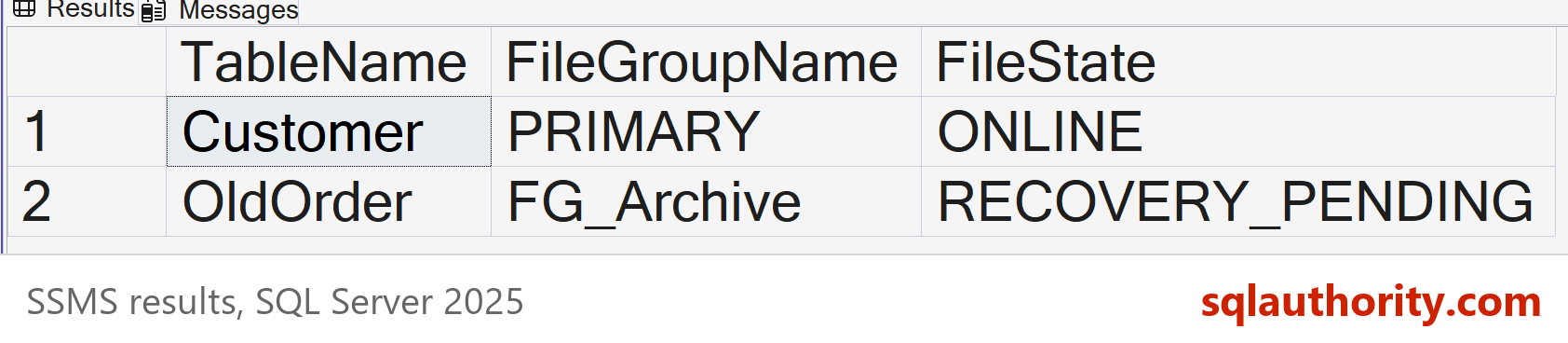
Send that list to the people waiting on the data. They learn what is back and what isn’t, and no one has to guess from an error message. A table with several filegroups needs a wider query, because this one reads only the first filegroup of each table.
Keep Working, Then Bring Back the Rest
The online part isn’t read only. Users can add customers while the archive is still offline. That creates a small problem for the last restore. The new work lives in the log, and the log backup you already have doesn’t contain it. So back up the log again first. Then restore FG_Archive from the full backup and roll it forward through both log backups, in order. The database stays online the whole time.
That last restore is an online restore, and online restore needs Enterprise features. Other editions still support piecemeal restore, but offline. The database is closed to users while a later filegroup comes back.
USE master;
GO
INSERT INTO SqlQuizPiecemealRestore.dbo.Customer VALUES (5, N'Quinn');
GO
BACKUP LOG SqlQuizPiecemealRestore TO DISK = N'C:\YourBackupFolder\SqlQuizPiecemealRestore_log2.trn' WITH INIT;
RESTORE DATABASE SqlQuizPiecemealRestore FILEGROUP = N'FG_Archive' FROM DISK = N'C:\YourBackupFolder\SqlQuizPiecemealRestore_full.bak' WITH NORECOVERY;
RESTORE LOG SqlQuizPiecemealRestore FROM DISK = N'C:\YourBackupFolder\SqlQuizPiecemealRestore_log.trn' WITH NORECOVERY;
RESTORE LOG SqlQuizPiecemealRestore FROM DISK = N'C:\YourBackupFolder\SqlQuizPiecemealRestore_log2.trn' WITH RECOVERY;
GO
SELECT c.CustomerName, o.Item
FROM SqlQuizPiecemealRestore.dbo.Customer AS c
JOIN SqlQuizPiecemealRestore.dbo.OldOrder AS o ON o.CustomerID = c.CustomerID
ORDER BY o.OrderID;
The join ran, so the archive was back.
| CustomerName | Item |
|---|---|
| Avery | Green Tea |
| Jordan | Oat Biscuit |
| Riley | Mango Lassi |
| Morgan | Masala Chai |
Quinn is missing from the join only because Quinn has no old order. Before the restore, the same join failed with error 8653, since it reads OldOrder. A query that touches a restored table and an offline one fails as a whole.
What to Remember
A piecemeal restore trades one long outage for a short one plus a smaller one. The offline tables fail loudly with error 8653, and every other table works. The rest comes back through the same log chain, so keep every log backup in order.
When I plan a restore, I ask which tables the business needs in the first hour. Those go in PRIMARY or in an early filegroup. Archives, history and reporting tables go in their own filegroups, so they can wait.
When you finish testing, remove the example database. The three backup files stay in your backup folder until you delete them.
USE master;
GO
ALTER DATABASE SqlQuizPiecemealRestore SET SINGLE_USER WITH ROLLBACK IMMEDIATE;
DROP DATABASE SqlQuizPiecemealRestore;
A piecemeal restore is not an all-or-nothing recovery, it is a database that comes back one filegroup at a time.
Published by Pinal Dave on SQLAuthority. More of my work at pinaldave.com.
Discover more from SQL Authority with Pinal Dave
Subscribe to get the latest posts sent to your email.




2 Comments. Leave new
hello sir,
i am using sql server 2008 and i have got 5 tables in my database.
i want to make sure that 3 of the 5 tables could not be dropped by any user
(even the admin) and the other two can be dropped.
the 3 tables (not to be dropped) does not have any referential integrity.
does this problem have any other solution than schemabinding, i.e. using triggers?