Long open transactions are the quiet kind of trouble: nothing is running, yet something is unfinished. A connection can sit idle for hours and still hold locks and keep the log from being reused.

The forgotten BEGIN TRAN
Picture a 3 AM alert. The log drive is nearly full, and the database says the log cannot be reused because of an active transaction. Nothing is running. After some digging you find a query window where someone typed BEGIN TRAN, ran an UPDATE, got pulled into a meeting, and never came back.
The tools to find that window are two views, sys.dm_tran_database_transactions and sys.dm_tran_session_transactions, plus the session view. To practice safely, the demo creates its own small database and removes it at the end. It is a database, not a server-level object, so nothing outside it changes.
USE master;
DROP DATABASE IF EXISTS SqlAuthorityDemo;
GO
CREATE DATABASE SqlAuthorityDemo;
GO
ALTER DATABASE SqlAuthorityDemo SET RECOVERY SIMPLE;
GO
USE SqlAuthorityDemo;
GO
CREATE TABLE dbo.TransactionDemo (Id int PRIMARY KEY);
List the transactions that are open right now
The first view shows when each transaction began and how much log it used. The session views tell you who owns it. I also pull the last batch the session sent, which often gives away what it was doing.
SELECT s.session_id, s.status, s.host_name, s.program_name,
       s.last_request_end_time,
       d.database_transaction_begin_time,
       DATEDIFF(second, d.database_transaction_begin_time, SYSDATETIME()) AS AgeSeconds,
       d.database_transaction_log_bytes_used,
       ib.event_info AS LastBatch
FROM sys.dm_tran_database_transactions AS d
JOIN sys.dm_tran_session_transactions AS t ON t.transaction_id = d.transaction_id
JOIN sys.dm_exec_sessions AS s ON s.session_id = t.session_id
OUTER APPLY sys.dm_exec_input_buffer(s.session_id, NULL) AS ib
WHERE d.database_id = DB_ID()
ORDER BY d.database_transaction_begin_time, s.session_id;
The demo database is quiet, so this returns no rows. On a real server, a forgotten transaction usually looks like this: status is sleeping, last_request_end_time is long ago, and AgeSeconds keeps growing. Treat the list as a place to start asking questions, not as a list of sessions to kill.
Watch a transaction open and roll back
Now open a transaction on purpose. The block starts one, inserts a row, and asks about itself. Because this query runs inside the same session, it sees its own open transaction. Then ROLLBACK ends it.
BEGIN TRANSACTION;

INSERT dbo.TransactionDemo VALUES (1);

SELECT s.session_id, s.open_transaction_count,
       d.database_transaction_log_bytes_used
FROM sys.dm_tran_database_transactions AS d
JOIN sys.dm_tran_session_transactions AS t ON t.transaction_id = d.transaction_id
JOIN sys.dm_exec_sessions AS s ON s.session_id = t.session_id
WHERE d.database_id = DB_ID()
  AND s.session_id = @@SPID;

ROLLBACK TRANSACTION;

SELECT COUNT(*) AS RowsAfterRollback FROM dbo.TransactionDemo;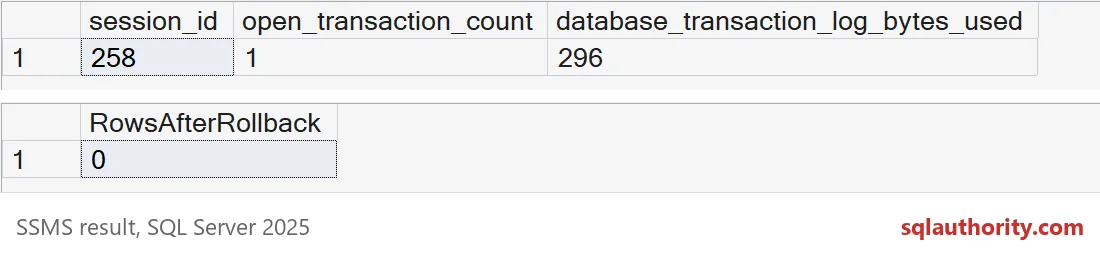
One open transaction, 296 bytes of log used, and zero rows after the rollback. Your session number will differ, and the byte count can too. Even one tiny insert already costs log space, and a large one costs far more.
See what an old transaction does to the log
This is the part that wakes people up at 3 AM. The log can only be reused after the oldest open transaction is gone. Ask the database what is holding the log, first while a transaction is open, then after it ends.
BEGIN TRANSACTION;

INSERT dbo.TransactionDemo VALUES (2);

CHECKPOINT;

SELECT name, log_reuse_wait_desc FROM sys.databases WHERE name = DB_NAME();

ROLLBACK TRANSACTION;

CHECKPOINT;

SELECT name, log_reuse_wait_desc FROM sys.databases WHERE name = DB_NAME();
The first answer is ACTIVE_TRANSACTION. After the rollback and another checkpoint, it is NOTHING. That column is the fastest way to confirm that a transaction, and not something else, is the reason the log is stuck.

Before you pull the plug
Resist the urge to kill the oldest session on sight. Some transactions are legitimate, such as a maintenance job that is meant to run long. Session IDs are also reused, so confirm the session is still the same one right before you act. Ending a session rolls its work back, and the rollback can take as long as the work did.
Better yet, find the owner and ask. Then fix the habit behind it, such as a tool that opens a transaction and never commits. Here is the cleanup for the demo.
USE master;
DROP DATABASE IF EXISTS SqlAuthorityDemo;
Next time the log will not clear, look for the sleeper before you add disk.
A sleeping session is not a finished transaction, it is a connection without a current request.
Published by Pinal Dave on SQLAuthority. More of my work at pinaldave.com.
Discover more from SQL Authority with Pinal Dave
Subscribe to get the latest posts sent to your email.