Masking test data means changing the real values in a copy before anyone else sees it. In SQL Server 2025, REGEXP_REPLACE handles patterns like phone numbers well, and a little help from the row ID keeps fake emails unique.

Why I mask before I share
A developer pings you: “Can I get a copy of production? I can’t reproduce this bug with my three test rows.” You say yes, because you are a helpful person. Then you remember the copy holds real emails and real phone numbers, and it is about to land on a laptop.
The fix is boring, and it works. Restore the copy somewhere locked down, mask it there, and share only the masked result. Everything below runs on two fake rows in a temp table, so you can try it without touching anything real. I ran it on SQL Server 2025.
DROP TABLE IF EXISTS #Customers;

CREATE TABLE #Customers (Id int PRIMARY KEY, Email varchar(100), Phone varchar(30));

INSERT #Customers VALUES
    (1, 'sample.one@example.test', '+1-202-555-0123'),
    (2, 'sample.two@example.test', '+1-202-555-0198');
Pretend these two rows came from that restored copy. Keep every block in the same query window, because a temp table disappears when its session ends.
Replace the sensitive parts, keep the shape
The UPDATE does two jobs. It builds each email from the row ID, so row 1 becomes test.1@example.test. And REGEXP_REPLACE swaps every digit in the phone number for a zero. The pattern [0-9] matches one digit, so the plus sign and the dashes are left alone.
UPDATE #Customers
SET Email = CONCAT('test.', Id, '@example.test'),
    Phone = REGEXP_REPLACE(Phone, '[0-9]', '0');

SELECT Id, Email, Phone
FROM #Customers
ORDER BY Id;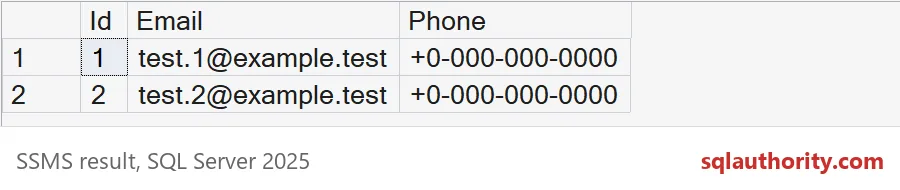
Both phones are now +0-000-000-0000. The IDs did not change. That matters, because other tables point at those IDs.
Check your own work
A script that ran without errors is not the same as a script that worked. Ask the table. The first query counts rows where the email breaks the new pattern, or the phone still has a digit from 1 to 9. The second hunts for duplicate emails.
SELECT COUNT(*) AS BadRows
FROM #Customers
WHERE Email IS NULL
   OR NOT REGEXP_LIKE(Email, '^test\.[0-9]+@example\.test$')
   OR Phone IS NULL
   OR REGEXP_LIKE(Phone, '[1-9]');

SELECT Email, COUNT(*) AS DuplicateCount
FROM #Customers
GROUP BY Email
HAVING COUNT(*) > 1;
BadRows comes back as 0, and the duplicate query returns no rows. Notice that both checks return counts or keys, never the old values. Please do not copy the originals into a log just to compare them.
Be honest about what this proves. It proves this table follows this rule. It says nothing about the notes column someone added last year.

Keep the fake emails unique
Why build the email from the ID instead of using one test address everywhere? Because applications often have a unique rule on email. Watch what happens when every row gets the same address.
CREATE UNIQUE INDEX UX_Customers_Email ON #Customers (Email);

BEGIN TRY
    UPDATE #Customers SET Email = 'test@example.test';
END TRY
BEGIN CATCH
    SELECT ERROR_NUMBER() AS ErrorNumber, ERROR_MESSAGE() AS ErrorMessage;
END CATCH;

SELECT Id, Email
FROM #Customers
ORDER BY Id;
The update fails with error 2601, a duplicate key. The statement fails as a whole, so both rows keep their test.1 and test.2 addresses. Deriving the email from the ID avoids this. The ID is already unique, so the email is too, and you get the same result on every run.
Zeros are not always welcome either. Some applications reject +0-000-000-0000 as a phone number. If yours does, keep the front of the number and change only the last four digits.
SELECT Phone,
       REGEXP_REPLACE(Phone, '[0-9]{4}$', '0100') AS FictionalPhone
FROM (VALUES ('+1-202-555-0123')) AS v(Phone);
That returns +1-202-555-0100. It passes a format check and still looks obviously fake. Every row gets the same number, which is fine unless a unique rule applies.
What masking does not clean up
Updating a table does not clean the things around it. The backup you restored still holds the real values. So can log files, snapshots, exports, and the file you used to load the copy. Treat the restore as sensitive until the masked copy is exported and the original is gone.
Also add a masking decision to your checklist whenever the schema gets a new column. A new column does not inherit anything from an old script. The demo table is a temp table, so closing the window removes it, but the last block drops it anyway.
DROP TABLE IF EXISTS #Customers;Mask first, share second, and write down what you checked.
A masked table is not a sanitized backup, it is one changed copy in a larger lifecycle.
Published by Pinal Dave on SQLAuthority. More of my work at pinaldave.com.
Discover more from SQL Authority with Pinal Dave
Subscribe to get the latest posts sent to your email.