
The primary data file extension is a habit, not a rule: SQL Server does not care whether the file ends in .mdf. Someone once asked me if the primary file could use any other extension. Yes, it can, and I will prove it by building a database that wears the wrong names.

What the extension really is
By default, SQL Server names the primary data file .mdf, secondary data files .ndf and the log .ldf. Those are only suggestions. The engine does not use the extension to decide what a file is. It goes by how you declare the file and by what is inside it.
The demo below creates one database and removes it at the end. It puts the files in your instance’s default data folder. The primary file ends in .pdf, a secondary file ends in .dat, and the log ends in .mdf, just to be rude.
Create a database with odd names
DROP DATABASE IF EXISTS ExtensionDemo;
DECLARE @p nvarchar(260) = CONVERT(nvarchar(260), SERVERPROPERTY('InstanceDefaultDataPath'));
DECLARE @sql nvarchar(max) = N'CREATE DATABASE ExtensionDemo
ON PRIMARY (NAME = ExtensionDemo_data, FILENAME = N''' + @p + N'ExtensionDemo.pdf''),
   (NAME = ExtensionDemo_more, FILENAME = N''' + @p + N'ExtensionDemo_more.dat'')
LOG ON (NAME = ExtensionDemo_log, FILENAME = N''' + @p + N'ExtensionDemo_log.mdf'');';
EXEC (@sql);
No error. SQL Server created all three files without complaint. The dynamic SQL is only there so the code works on any server, whatever its default folder is.
Ask SQL Server what each file is
SELECT name,
       type_desc,
       RIGHT(physical_name, 4) AS Ending
FROM sys.master_files
WHERE database_id = DB_ID('ExtensionDemo')
ORDER BY file_id;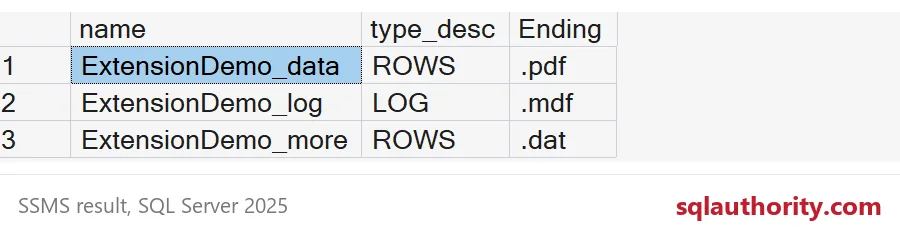
The Ending column shows the last four characters of each path. The .pdf row is listed as ROWS, which means data. The .dat row is also ROWS. The .mdf row is listed as LOG. The type comes from how you declared each file, not from the letters after the dot.
Detach it and attach it again
Attach is the other place this question comes up, so let me take that trip too. Detach the database, then attach it using the same odd names.
EXEC sp_detach_db 'ExtensionDemo';
DECLARE @p nvarchar(260) = CONVERT(nvarchar(260), SERVERPROPERTY('InstanceDefaultDataPath'));
DECLARE @sql nvarchar(max) = N'CREATE DATABASE ExtensionDemo ON
(FILENAME = N''' + @p + N'ExtensionDemo.pdf''),
(FILENAME = N''' + @p + N'ExtensionDemo_more.dat''),
(FILENAME = N''' + @p + N'ExtensionDemo_log.mdf'')
FOR ATTACH;';
EXEC (@sql);
SELECT d.state_desc, f.type_desc,
       RIGHT(f.physical_name, 4) AS Ending
FROM sys.databases AS d
JOIN sys.master_files AS f ON f.database_id = d.database_id
WHERE f.database_id = DB_ID('ExtensionDemo')
ORDER BY f.file_id;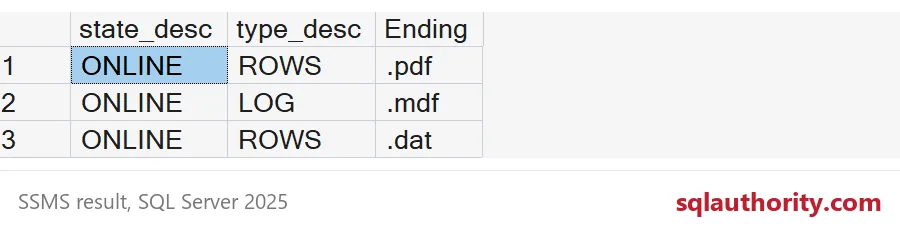
The database comes back ONLINE, and each file keeps its role. The .pdf is still data, and the .mdf is still the log. The attach did not care about the names.
Where odd names bite
SQL Server is relaxed. Everything around it is not. Antivirus exclusions are usually written as a list of extensions, so a .pdf data file can fall outside the list. Backup tools, file screens and cleanup scripts also love to judge files by their ending. A log that is named .mdf will confuse the next DBA at 2 AM, and they will be right to be annoyed.

Check your own server
Before you worry, look. This query lists every data or log file whose ending does not match its role. Data files should end in .mdf or .ndf, and log files in .ldf. On a tidy server it returns nothing. While the demo database is alive, it returns exactly the three demo files. Yes, even the log that wears an .mdf name.
SELECT DB_NAME(database_id) AS DatabaseName, type_desc, RIGHT(physical_name, 4) AS Ending
FROM sys.master_files
WHERE type_desc IN ('ROWS', 'LOG')
  AND RIGHT(physical_name, 4) NOT IN
      (CASE WHEN type_desc = 'LOG' THEN '.ldf' ELSE '.mdf' END,
       CASE WHEN type_desc = 'LOG' THEN '.ldf' ELSE '.ndf' END)
ORDER BY DatabaseName, file_id;
If rows come back on a real server, do not rename files in a panic. Renaming a data file means taking the database offline or detaching it, renaming the file on disk, and attaching with the new name. That is a maintenance window, not a lunch-break fix. First ask who chose the name, and why. Often the answer is a cheerful developer from years ago.
My advice is simple. Keep .mdf, .ndf and .ldf unless you have a real reason. The demo proves you can break the habit. It does not say you should.
DROP DATABASE IF EXISTS ExtensionDemo;Run that last line and the demo database is gone.
An .mdf extension is not a requirement, it is a courtesy to the next DBA.
Published by Pinal Dave on SQLAuthority. More of my work at pinaldave.com.
Discover more from SQL Authority with Pinal Dave
Subscribe to get the latest posts sent to your email.




7 Comments. Leave new
Hey Pinal,
Thanks for the information. Herewith I am attaching the error I am facing while running the query you have mentioned.
Msg 1813, Level 16, State 2, Line 1
Could not open new database ‘tests’. CREATE DATABASE is aborted.
Msg 948, Level 20, State 1, Line 1
The database ‘tests’ cannot be opened because it is version 782. This server supports version 655 and earlier. A downgrade path is not supported.
Please suggest.
I think this is because you have an earlier version of SQL Server.
Try with SQL Server 2014.
Thank you Pinal, Yes I am using version 2008 R2..
Let me try with 2014..
Nice article.
Please be careful with using non-standard approaches (like unusual extensions for primary files). Virus checkers often have an exclude list of file types to ignore (e.g. .mdf), specified at the company level. Using a non-standard extension may mean the virus checker checks your files often and slows down you system,
Thanks
Ian
I am not sure what is the purpose of allowing other customized extensions, seems like a bug to me!
This is interesting but how it is useful? can we really use the DB? are we really making our .mdf file in pdf format and using it to create the DB?
No. The question was about any format – not specific to PDF. One should not convert their file to another format and use it.
This particular thing may be useful if you have received file with different format and you know that it is MDF file.