The best DBCC PAGE alternative is sys.dm_db_page_info. This function returns the header of any page as one row you can query. It arrived in SQL Server 2019. No trace flag is needed, and the result joins to other views like any table.

What DBCC PAGE Does
DBCC PAGE shows the contents of one 8 KB page. It prints the page header and, with a higher print option, the rows. The command is undocumented. Its text reaches the client only after you turn on trace flag 3604. With WITH TABLERESULTS, it comes back as a pile of Field and Value rows. Either way, you read text, and you can’t join it to anything without extra work.
As a DBCC PAGE alternative, the function sys.dm_db_page_info returns the header facts as columns. You give it a database, a file, a page and a mode. It returns one row. You can run it for a thousand pages with CROSS APPLY and sort the result. DETAILED mode reads each page, so try it on a small table first. It needs VIEW SERVER STATE on SQL Server 2019, and VIEW SERVER PERFORMANCE STATE on SQL Server 2022 and later.
Build a Demo Table
Each row in this table is 7,000 bytes wide, so every row fills its own data page. That makes the pages easy to count. The table has a clustered primary key. That gives it a leaf level, an index page above it and a map page.
IF DB_ID(N'PageInfoDemo') IS NULL CREATE DATABASE PageInfoDemo;
GO
USE PageInfoDemo;
GO
DROP TABLE IF EXISTS dbo.Releases;
CREATE TABLE dbo.Releases (
    ReleaseID int        NOT NULL PRIMARY KEY,
    Edition   char(7000) NOT NULL
);
INSERT INTO dbo.Releases (ReleaseID, Edition)
VALUES (1, 'Alpha'), (2, 'Beta'), (3, 'Gamma'), (4, 'Delta'), (5, 'Epsilon');
List the Pages of a Table
Start with sys.dm_db_database_page_allocations. It lists every page that belongs to the table. Pass each page to sys.dm_db_page_info with CROSS APPLY, and you see what each page is. The filter keeps allocated pages only, because the function also lists free pages in the same extent.
SELECT a.allocated_page_page_id AS PageId,
       p.page_type_desc AS PageType,
       p.page_level AS PageLevel,
       p.slot_count AS Slots,
       p.free_bytes AS FreeBytes,
       p.prev_page_page_id AS PrevPage,
       p.next_page_page_id AS NextPage
FROM sys.dm_db_database_page_allocations(DB_ID(), OBJECT_ID(N'dbo.Releases'), 1, NULL, 'DETAILED') AS a
CROSS APPLY sys.dm_db_page_info(a.database_id, a.allocated_page_file_id, a.allocated_page_page_id, 'DETAILED') AS p
WHERE a.is_allocated = 1
ORDER BY p.page_level DESC, a.allocated_page_page_id;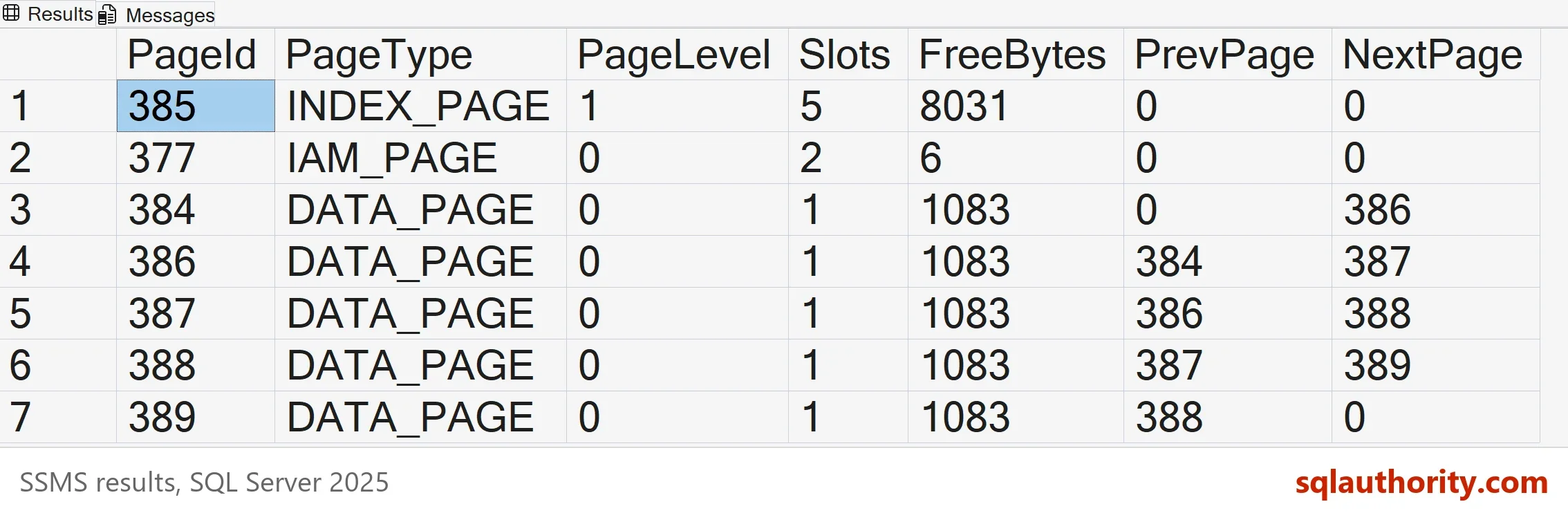
The results below come from a separate run on another server, so their page numbers differ from the picture. Your own page numbers will differ again.
Your page numbers will differ. The shape won’t. The five data pages form a chain, because each PrevPage and NextPage points to the neighbor. The first page has no previous page, and the last has no next page. The index page sits one level above, with one slot for each data page. The IAM page is the map that tells SQL Server which pages the table owns. Every data page has one slot and 1,083 free bytes, which is what a 7,000 byte row leaves behind.
Two columns deserve a closer look. PageLevel is the height in the index. Level 0 is the leaf, and each level above it has fewer pages. FreeBytes is the room left on a page. A table with many pages that hold a lot of free space wastes memory and disk. Add up FreeBytes for each table, and you see how full its pages are, without a single DBCC command.
Compare It With DBCC PAGE
The next script runs DBCC PAGE for the first data page. It keeps the output in a temporary table and then reads the same page through the function. The numbers must agree.
DECLARE @page int = (SELECT MIN(allocated_page_page_id)
                     FROM sys.dm_db_database_page_allocations(DB_ID(), OBJECT_ID(N'dbo.Releases'), 1, NULL, 'DETAILED')
                     WHERE page_type_desc = N'DATA_PAGE');
DECLARE @cmd nvarchar(200) = N'DBCC PAGE (PageInfoDemo, 1, ' + CAST(@page AS nvarchar(10)) + N', 0) WITH TABLERESULTS;';
DROP TABLE IF EXISTS #raw;
CREATE TABLE #raw (ParentObject nvarchar(255), Object nvarchar(255), Field nvarchar(255), Value nvarchar(255));
INSERT INTO #raw EXEC (@cmd);
SELECT COUNT(*) AS RowsFromDbccPage FROM #raw;
SELECT Field, Value
FROM #raw
WHERE Field IN (N'm_type', N'm_level', N'm_slotCnt', N'm_freeCnt', N'm_prevPage', N'm_nextPage')
ORDER BY Field;
SELECT page_type, page_level, slot_count, free_bytes, prev_page_page_id, next_page_page_id
FROM sys.dm_db_page_info(DB_ID(), 1, @page, 'DETAILED');| RowsFromDbccPage |
|---|
| 53 |
| Field | Value |
|---|---|
| m_freeCnt | 1083 |
| m_level | 0 |
| m_nextPage | (1:378) |
| m_prevPage | (0:0) |
| m_slotCnt | 1 |
| m_type | 1 |
| page_type | page_level | slot_count | free_bytes | prev_page_page_id | next_page_page_id |
|---|---|---|---|---|---|
| 1 | 0 | 1 | 1083 | 0 | 378 |
DBCC PAGE returned 53 rows of text for one page. The function returned one row. The fields line up: m_slotCnt is slot_count, m_freeCnt is free_bytes, and m_nextPage is next_page_page_id. The type 1 is a data page in both.
Two Modes
The last argument is the mode, LIMITED or DETAILED. Use DETAILED when you want the page type and every other column. In this test, LIMITED returned NULL for the page type description. The slot count and the free bytes were filled in.
SELECT p.page_id AS PageId, p.page_type_desc AS PageType, p.slot_count AS Slots, p.free_bytes AS FreeBytes
FROM sys.dm_db_database_page_allocations(DB_ID(), OBJECT_ID(N'dbo.Releases'), 1, NULL, 'DETAILED') AS a
CROSS APPLY sys.dm_db_page_info(a.database_id, a.allocated_page_file_id, a.allocated_page_page_id, 'LIMITED') AS p
WHERE a.page_type_desc = N'DATA_PAGE'
ORDER BY p.page_id;
| PageId | PageType | Slots | FreeBytes |
|---|---|---|---|
| 376 | NULL | 1 | 1083 |
| 378 | NULL | 1 | 1083 |
| 379 | NULL | 1 | 1083 |
| 380 | NULL | 1 | 1083 |
| 381 | NULL | 1 | 1083 |
Find the Table Behind a Page Wait
The best use of this DBCC PAGE alternative is a wait on a page. The view sys.dm_exec_requests has a page_resource column for page waits. Pass it to sys.fn_PageResCracker to split it into a database, a file and a page. Pass those to sys.dm_db_page_info, and the object_id column names the table. The old way needed DBCC PAGE and a trace flag for every wait.
No page wait is running in the demo, so the script builds a page_resource value for the first data page. The value is the page id, the file id and the database id, each written backwards in bytes. In a real wait, take the value from page_resource and skip the first three lines.
DECLARE @page int = (SELECT MIN(allocated_page_page_id)
                     FROM sys.dm_db_database_page_allocations(DB_ID(), OBJECT_ID(N'dbo.Releases'), 1, NULL, 'DETAILED')
                     WHERE page_type_desc = N'DATA_PAGE');
DECLARE @resource binary(8) = CAST(REVERSE(CAST(@page AS binary(4))) AS binary(4))
                            + CAST(REVERSE(CAST(1 AS binary(2))) AS binary(2))
                            + CAST(REVERSE(CAST(DB_ID() AS binary(2))) AS binary(2));
SELECT pr.file_id AS FileId, pr.page_id AS PageId, OBJECT_NAME(pi.object_id) AS TableName
FROM sys.fn_PageResCracker(@resource) AS pr
CROSS APPLY sys.dm_db_page_info(pr.[db_id], pr.file_id, pr.page_id, 'DETAILED') AS pi;| FileId | PageId | TableName |
|---|---|---|
| 1 | 376 | Releases |
You could argue that DBCC PAGE is still needed, and it is. The function never shows the rows on a page. For that you still use DBCC PAGE with print option 3. The function wins for header facts across many pages. DBCC PAGE wins for reading one row.
What to Remember
As a DBCC PAGE alternative, use sys.dm_db_page_info with DETAILED mode. Join it to the allocation view to list a table’s pages. Read the type, the level, the slot count and the free bytes as columns. Keep DBCC PAGE for the rows themselves.
When you finish with the demo, run the cleanup script.
USE master;
GO
IF DB_ID(N'PageInfoDemo') IS NOT NULL
BEGIN
    ALTER DATABASE PageInfoDemo SET SINGLE_USER WITH ROLLBACK IMMEDIATE;
    DROP DATABASE PageInfoDemo;
END;
A page is not a black box, it is a row of facts you can query.
Published by Pinal Dave on SQLAuthority. More of my work at pinaldave.com.
Discover more from SQL Authority with Pinal Dave
Subscribe to get the latest posts sent to your email.