
To set ARITHABORT ON for .NET applications, change the server’s default connection options instead of every application. Setting ARITHABORT ON for the server takes one statement. First you need to know why it matters.

Fast in SSMS, Slow in the Application
A common puzzle goes like this. A query is quick in Management Studio and slow from the application. The text is identical and so are the parameters. The difference is in the connection. SSMS connects with ARITHABORT ON. A .NET connection starts with it off.
SQL Server keeps a separate plan in its cache for each combination of connection settings. So the two callers get two plans. If the two plans were built for different parameter values, one of them is slow. That is parameter sniffing, and the settings make it hard to see.
Check the Settings of a Connection
@@OPTIONS is a bit mask of the current session settings. The server’s default for new connections lives in the user options configuration value, which uses the same bits. This query decodes both side by side, so you can read the settings by name.
SELECT v.Bit, v.OptionName,
       CASE WHEN @@OPTIONS & v.Bit = v.Bit THEN 'ON' ELSE 'off' END AS ThisSession,
       CASE WHEN CONVERT(int, c.value_in_use) & v.Bit = v.Bit THEN 'ON' ELSE 'off' END AS ServerDefault
FROM (VALUES (1, 'DISABLE_DEF_CNST_CHK'), (2, 'IMPLICIT_TRANSACTIONS'), (4, 'CURSOR_CLOSE_ON_COMMIT'),
             (8, 'ANSI_WARNINGS'), (16, 'ANSI_PADDING'), (32, 'ANSI_NULLS'), (64, 'ARITHABORT'),
             (128, 'ARITHIGNORE'), (256, 'QUOTED_IDENTIFIER'), (512, 'NOCOUNT'), (1024, 'ANSI_NULL_DFLT_ON'),
             (2048, 'ANSI_NULL_DFLT_OFF'), (4096, 'CONCAT_NULL_YIELDS_NULL'), (8192, 'NUMERIC_ROUNDABORT'),
             (16384, 'XACT_ABORT')) AS v(Bit, OptionName)
CROSS JOIN sys.configurations AS c
WHERE c.name = N'user options'
ORDER BY v.Bit;| Bit | OptionName | ThisSession | ServerDefault |
|---|---|---|---|
| 1 | DISABLE_DEF_CNST_CHK | off | off |
| 2 | IMPLICIT_TRANSACTIONS | off | off |
| 4 | CURSOR_CLOSE_ON_COMMIT | off | off |
| 8 | ANSI_WARNINGS | ON | off |
| 16 | ANSI_PADDING | ON | off |
| 32 | ANSI_NULLS | ON | off |
| 64 | ARITHABORT | off | off |
| 128 | ARITHIGNORE | off | off |
| 256 | QUOTED_IDENTIFIER | ON | off |
| 512 | NOCOUNT | off | off |
| 1024 | ANSI_NULL_DFLT_ON | ON | off |
| 2048 | ANSI_NULL_DFLT_OFF | off | off |
| 4096 | CONCAT_NULL_YIELDS_NULL | ON | off |
| 8192 | NUMERIC_ROUNDABORT | off | off |
| 16384 | XACT_ABORT | off | off |
This session came from sqlcmd, which behaves like an application. Several options are ON because the driver sets them, but ARITHABORT is off. Every server default is off, which is what a fresh instance holds. SSMS shows ARITHABORT as ON in this column.
A .NET connection gives the same answer. This is a PowerShell script, not T-SQL. It opens one connection and reads the bit. Use your own instance name in the connection string.
$cn = New-Object System.Data.SqlClient.SqlConnection 'Server=.\SQLEXPRESS;Database=master;Integrated Security=true;TrustServerCertificate=true'
$cn.Open()
$cmd = $cn.CreateCommand()
$cmd.CommandText = 'SELECT @@OPTIONS & 64'
$cmd.ExecuteScalar()
$cn.Close()
It printed 0, so ARITHABORT is off for a .NET connection too.
See the Two Plans
The demo has a table of 50,000 visits. Only 100 rows belong to Region 1, and the rest belong to Region 2. A procedure returns one value for a region. For Region 1, the best plan seeks the index. For Region 2, the best plan scans the table.
IF DB_ID(N'ArithAbortPlanDemo') IS NULL CREATE DATABASE ArithAbortPlanDemo;
GO
USE ArithAbortPlanDemo;
GO
DROP TABLE IF EXISTS dbo.Visits;
CREATE TABLE dbo.Visits (VisitID int NOT NULL PRIMARY KEY, Region int NOT NULL, Note char(100) NOT NULL DEFAULT 'x');
INSERT INTO dbo.Visits (VisitID, Region)
SELECT TOP (50000) n, CASE WHEN n % 500 = 0 THEN 1 ELSE 2 END
FROM (SELECT ROW_NUMBER() OVER (ORDER BY (SELECT NULL)) AS n
      FROM sys.all_objects AS a CROSS JOIN sys.all_objects AS b) AS x;
CREATE INDEX IX_Visits_Region ON dbo.Visits (Region);
GO
CREATE OR ALTER PROCEDURE dbo.VisitsByRegion @Region int
AS
SELECT MAX(Note) AS LastNote FROM dbo.Visits WHERE Region = @Region;
The next script plays two callers. The application connects with ARITHABORT OFF and asks for Region 1 first. SSMS connects with it ON and asks for Region 2.
SET NOCOUNT ON;
SET ARITHABORT OFF;
EXEC dbo.VisitsByRegion @Region = 1;
SET ARITHABORT ON;
EXEC dbo.VisitsByRegion @Region = 2;
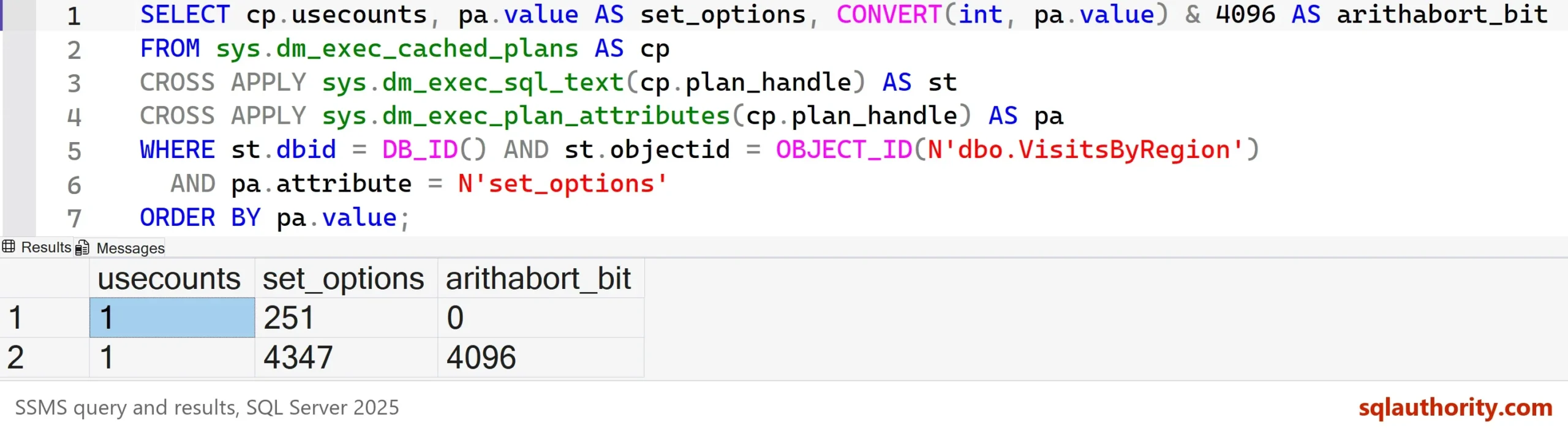
The plan cache now holds two plans for the one procedure. The attribute set_options records the settings each plan was compiled under. The two values differ by 4,096, the bit for ARITHABORT.
SELECT cp.usecounts, pa.value AS set_options, CONVERT(int, pa.value) & 4096 AS arithabort_bit
FROM sys.dm_exec_cached_plans AS cp
CROSS APPLY sys.dm_exec_sql_text(cp.plan_handle) AS st
CROSS APPLY sys.dm_exec_plan_attributes(cp.plan_handle) AS pa
WHERE st.dbid = DB_ID() AND st.objectid = OBJECT_ID(N'dbo.VisitsByRegion')
  AND pa.attribute = N'set_options'
ORDER BY pa.value;
Measure the Cost
Now both callers ask for Region 2. The application’s plan was built for Region 1, so it seeks 49,900 times. SSMS built its plan for Region 2, so it scans once. STATISTICS IO counts the pages each one reads.
SET STATISTICS IO ON;
SET ARITHABORT OFF;
EXEC dbo.VisitsByRegion @Region = 2;
SET ARITHABORT ON;
EXEC dbo.VisitsByRegion @Region = 2;
SET STATISTICS IO OFF;
| Session | Logical reads |
|---|---|
| Off (application) | 152908 |
| On (SSMS) | 729 |
The application’s call reads 210 times as many pages. Nothing in the query text explains it, which is why the case is so confusing.
Set ARITHABORT ON for All Connections
The setting is a bit in user options. The value 64 is the bit for ARITHABORT. The script below reads the current value and sets that bit. It builds the statement and prints it, so nothing changes until you run what it prints.
DECLARE @current int = (SELECT CONVERT(int, value) FROM sys.configurations WHERE name = N'user options');
SELECT @current AS CurrentValue, @current | 64 AS NewValue,
       CONCAT(N'EXEC sp_configure ''user options'', ', @current | 64, N'; RECONFIGURE;') AS StatementToRun,
CONCAT(N'EXEC sp_configure ''user options'', ', @current & ~64, N'; RECONFIGURE;') AS UndoStatement;| CurrentValue | NewValue | StatementToRun | UndoStatement |
|---|---|---|---|
| 0 | 64 | EXEC sp_configure ‘user options’, 64; RECONFIGURE; | EXEC sp_configure ‘user options’, 0; RECONFIGURE; |
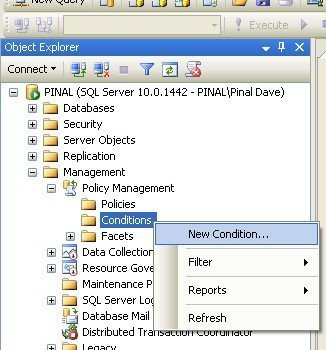
Run the statement in the first column on a test server and reconnect. In SSMS you can set the same value under Server Properties, Connections, Default connection options. Only new connections pick it up. An application that sends its own SET ARITHABORT OFF still wins.
The setting is server-wide, so test it on a non-production server first. Change only this bit. The value of user options holds every other bit as well. A server that already has a non-zero value must keep it. The script does, because it uses @current | 64. Leave NUMERIC_ROUNDABORT off, because turning it on makes some queries fail.
What the Setting Does
ARITHABORT decides what happens when an overflow or a divide by zero occurs. With ANSI_WARNINGS off, the result depends on it. The first query below returns NULL. The second fails with error 8134, and the CATCH block reports it. Without the TRY block, the error would end the batch before the last line restores ANSI_WARNINGS.
SET ANSI_WARNINGS OFF;
SET ARITHABORT OFF;
SELECT 1/0 AS DivideResult;
SET ARITHABORT ON;
BEGIN TRY
    SELECT 1/0 AS DivideResult;
END TRY
BEGIN CATCH
    SELECT ERROR_NUMBER() AS ErrorNumber, ERROR_MESSAGE() AS ErrorMessage;
END CATCH;
SET ANSI_WARNINGS ON;| DivideResult |
|---|
| NULL |
| ErrorNumber | ErrorMessage |
|---|---|
| 8134 | Divide by zero error encountered. |
With ANSI_WARNINGS on, as in most connections, both versions fail. So turning ARITHABORT on rarely changes results. It changes the plan cache key.
A Caution About Procedures
A SET ARITHABORT ON inside a procedure doesn’t fix this. This test creates a procedure with that line, and calls it from a session where the setting is off. The cached plan keeps the caller’s setting.
SET ARITHABORT OFF;
GO
CREATE OR ALTER PROCEDURE dbo.VisitsByRegionSet @Region int
AS
SET ARITHABORT ON;
SELECT MAX(Note) AS LastNote FROM dbo.Visits WHERE Region = @Region;
GO
EXEC dbo.VisitsByRegionSet @Region = 1;
SELECT CONVERT(int, pa.value) AS set_options
FROM sys.dm_exec_cached_plans AS cp
CROSS APPLY sys.dm_exec_sql_text(cp.plan_handle) AS st
CROSS APPLY sys.dm_exec_plan_attributes(cp.plan_handle) AS pa
WHERE st.dbid = DB_ID() AND st.objectid = OBJECT_ID(N'dbo.VisitsByRegionSet')
  AND pa.attribute = N'set_options';
SET ARITHABORT ON;
| set_options |
|---|
| 251 |
The value 251 is the caller’s setting, without the ARITHABORT bit. The line affects the procedure’s run, not which plan the caller gets. Then why does the line sometimes seem to fix a slow procedure? Editing a procedure throws away its cached plan. Any edit looks like a fix until the new plan goes bad.
Does It Only Hide Parameter Sniffing?
You could argue that this only hides parameter sniffing. It does. After the change, SSMS and the application share one plan. A slow plan then shows up in SSMS as well, where you can read it, and that is the point.
What to Remember
When SSMS is fast and the application is slow, compare set_options first. Set ARITHABORT ON for every connection and the two callers use one plan. Then fix the plan itself. Run the cleanup script when you finish.
USE master;
GO
IF DB_ID(N'ArithAbortPlanDemo') IS NOT NULL
BEGIN
    ALTER DATABASE ArithAbortPlanDemo SET SINGLE_USER WITH ROLLBACK IMMEDIATE;
    DROP DATABASE ArithAbortPlanDemo;
END;
ARITHABORT is not a performance setting, it is the label that keeps two callers apart.
Published by Pinal Dave on SQLAuthority. More of my work at pinaldave.com.
Discover more from SQL Authority with Pinal Dave
Subscribe to get the latest posts sent to your email.



5 Comments. Leave new
Hi Pinal,
I have seen one SP which was written by other developer where he set ARITHABORT to ON in his SP, Just like NOCOUNT ON; like below –
CREATE PROCEDURE [dbo].[TestSP]
(
@ParamId INT
)
AS
BEGIN
SET NOCOUNT ON;
SET ARITHABORT ON; <– What is the benefit to add this line in SP?
— OTHER BUSINESS LOGIC
END
So what is the benefit of it? Is it kind of best practice or what?
There is no benefit, that doesn’t work. SQL would have already chosen how it is going to handle the execution of the sp. You need to set this instance-wide, as described above, but be aware that the app/protocol that is establishing the connection to SQL can potentially override this.
I seem ran into parameter sniffing issue and searched for a solution. I have a table-valued function which is a 3-layer nested function(Top function FUNC1 called FUNC2 in it, FUNC2 called FUNC3 in it). I use it to calculate the revenue share in certain period. The page (on a ASP.net 4.7.2 web application) that calls this function is always time out recently, if I set the StartDate and EndDate parameter older than this year. However I can run the same sql script in Visual Studio from the same server much faster.(~4 min -> 4 sec)
Some people suggested SET ARITHABORT ON. So I tried your script to set it instance-wide but it didn’t work. Furthermore, it caused queries from both asp.net app and Visual Studio timed out. Any suggestion?
Using SET ARITHABORT inside an sp DOES work.
I had an sp that was running faster than 1 second from SSMS, but when called from Ajax it was taking 10 seconds or more. The quick solution was to add the line SET ARITHABORT ON inside the sp.
Now you can change this value directly from SSMS, Server properties, Connections, Default connection options.