Transaction log backups based on log size run when the log has grown enough, not when a clock says so. A schedule is the right base. A size check on top of it covers the day a big load fills the disk between two scheduled runs.

When a Schedule Alone Isn’t Enough
A regular schedule of transaction log backups, say every 15 minutes, handles normal days. It fails on a day with an unplanned bulk load or a runaway transaction. The log can write gigabytes between two runs, and a small disk won’t wait for the next one.
A size check closes that gap. A job runs every minute or two. It does nothing until the log written since the last backup passes a limit. Then it takes a backup. This adds to your schedule. It doesn’t replace it, because log backups also set how much work you could lose. Both jobs write to one log chain. A restore needs every file from both. Send them to one folder, or keep a list of both folders.
Read the Log Since the Last Backup
SQL Server 2016 SP2 and later has a function that reports it directly: sys.dm_db_log_stats. The column log_since_last_log_backup_mb is the number the procedure needs. The view needs the VIEW SERVER STATE permission, which the login of the Agent job must hold. The older approach read sys.sysaltfiles, which counts size in 8 KB pages. A script that compares that number to a size in megabytes triggers far too early.
Run the cleanup script before a second run, so the numbers below match. The demo database uses the FULL recovery model, a 16 MB log and one full backup. A log backup isn’t possible until a full backup exists, so the script takes one first. The backup file goes to the instance’s default backup folder.
SET NOCOUNT ON;
IF DB_ID(N'LogGrowthBackupDemo') IS NULL CREATE DATABASE LogGrowthBackupDemo;
GO
ALTER DATABASE LogGrowthBackupDemo SET RECOVERY FULL;
IF (SELECT size FROM sys.master_files WHERE database_id = DB_ID(N'LogGrowthBackupDemo') AND type = 1) < 2048
    ALTER DATABASE LogGrowthBackupDemo MODIFY FILE (NAME = LogGrowthBackupDemo_log, SIZE = 16MB, FILEGROWTH = 8MB);
GO
DECLARE @f nvarchar(300) = CONVERT(nvarchar(260), SERVERPROPERTY('InstanceDefaultBackupPath')) + N'\LogGrowthBackupDemo_full.bak';
BACKUP DATABASE LogGrowthBackupDemo TO DISK = @f WITH INIT, CHECKSUM;
The Procedure
The procedure takes a database name and a limit in megabytes. It refuses to run for a database that doesn’t exist, one in SIMPLE recovery, or one with no full backup. Each refusal is an error, so a scheduled job shows as failed instead of silently doing nothing.
USE LogGrowthBackupDemo;
GO
CREATE OR ALTER PROCEDURE dbo.BackUpLogWhenLarge
    @DatabaseName sysname,
    @LimitMB      int,
    @BackupFolder nvarchar(260) = NULL
AS
BEGIN
    SET NOCOUNT ON;
    DECLARE @dbid int = DB_ID(@DatabaseName);
    IF @dbid IS NULL THROW 50001, N'Database not found.', 1;
    IF (SELECT recovery_model FROM sys.databases WHERE database_id = @dbid) = 3
        THROW 50002, N'The database uses SIMPLE recovery, so it has no log backups.', 1;
    DECLARE @sinceMB decimal(18,1) = (SELECT log_since_last_log_backup_mb FROM sys.dm_db_log_stats(@dbid));
    IF @sinceMB IS NULL THROW 50003, N'Take a full backup first.', 1;
    IF @sinceMB < @LimitMB
    BEGIN
        PRINT CONCAT(N'Log since the last backup: ', @sinceMB, N' MB. Limit: ', @LimitMB, N' MB. No backup taken.');
        RETURN;
    END;
    SET @BackupFolder = COALESCE(@BackupFolder, CONVERT(nvarchar(260), SERVERPROPERTY('InstanceDefaultBackupPath')));
    DECLARE @file nvarchar(400) = @BackupFolder + N'\' + @DatabaseName + N'_log_'
                                + FORMAT(SYSDATETIME(), N'yyyyMMdd_HHmmss_fff') + N'.trn';
    BACKUP LOG @DatabaseName TO DISK = @file WITH CHECKSUM;
    PRINT CONCAT(N'Log backup taken after ', @sinceMB, N' MB.');
END;
The check compares what was written since the last log backup with the limit. Below the limit, it prints one line and stops. At or above it, the procedure builds a file name from the date and time and runs BACKUP LOG.
BACKUP LOG takes the database name from the variable, so no dynamic SQL is needed. The file name carries milliseconds, and the backup has no INIT option. So two backups in the same second can’t overwrite each other and break the chain.
Try Transaction Log Backups Below and Above the Limit
First, call it right after the full backup. The log holds almost nothing, so nothing should happen.
EXEC dbo.BackUpLogWhenLarge @DatabaseName = N'LogGrowthBackupDemo', @LimitMB = 10;
The Messages tab shows this line. It is output, not code to run.
Log since the last backup: 0.1 MB. Limit: 10 MB. No backup taken.
Now write some data. This load puts 3,000 wide rows in a table, which is about 14 MB of log. The query after it reads the log statistics.
DROP TABLE IF EXISTS dbo.Loads;
CREATE TABLE dbo.Loads (LoadID int NOT NULL PRIMARY KEY, Payload char(4000) NOT NULL);
GO
INSERT INTO dbo.Loads (LoadID, Payload)
SELECT TOP (3000) ROW_NUMBER() OVER (ORDER BY (SELECT NULL)), 'x'
FROM sys.all_objects AS a CROSS JOIN sys.all_objects AS b;
GO
SELECT CONVERT(decimal(10,1), total_log_size_mb) AS TotalLogMB,
       CONVERT(decimal(10,1), active_log_size_mb) AS ActiveLogMB,
       CONVERT(decimal(10,1), log_since_last_log_backup_mb) AS SinceLastBackupMB,
       log_truncation_holdup_reason AS Holdup
FROM sys.dm_db_log_stats(DB_ID());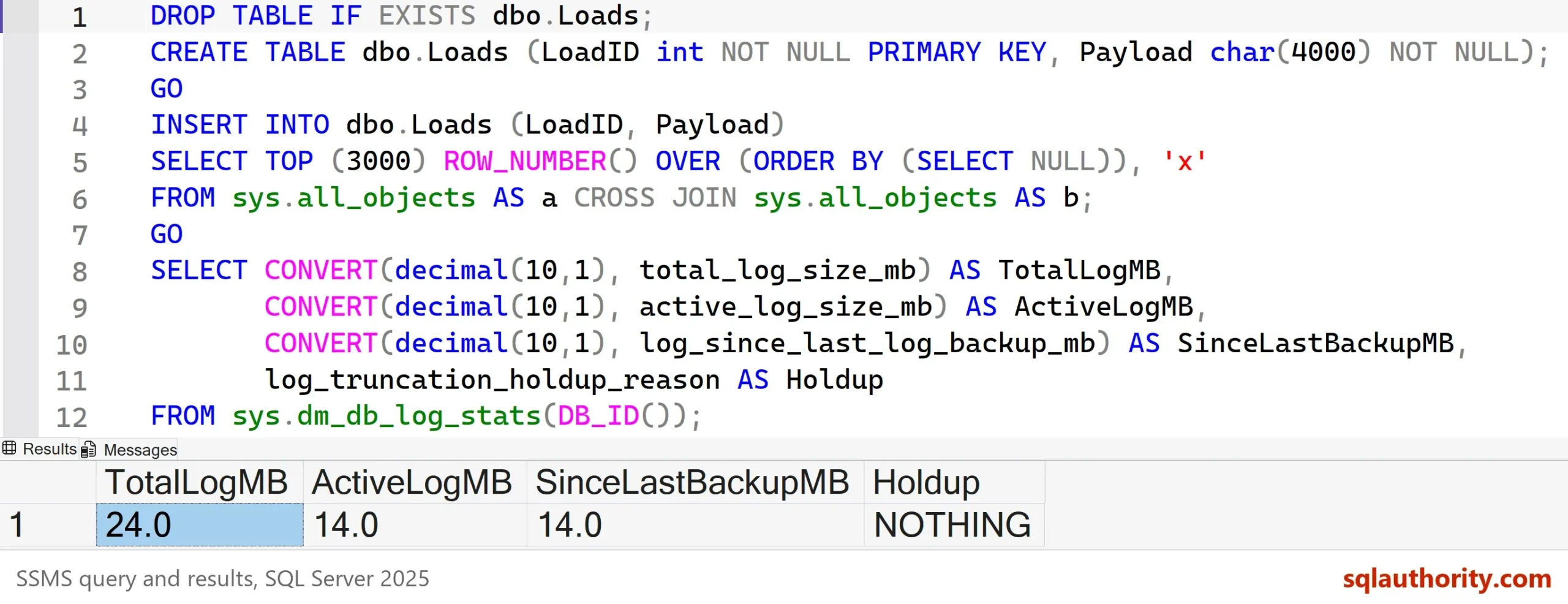
The log grew from 16 MB to 24 MB, and 14 MB of it is waiting for a backup. Call the procedure again with the same 10 MB limit and run the check once more.
EXEC dbo.BackUpLogWhenLarge @DatabaseName = N'LogGrowthBackupDemo', @LimitMB = 10;
GO
SELECT CONVERT(decimal(10,1), log_since_last_log_backup_mb) AS SinceLastBackupMB
FROM sys.dm_db_log_stats(DB_ID());
| SinceLastBackupMB |
|---|
| 0.1 |
This time the Messages tab says the backup was taken after 14.0 MB. The number written since the last backup falls back to nearly zero. The log file keeps its 24 MB, and that space is now free for reuse.
Why There Is No Shrink
The old version of this script shrank the log file after every backup. Don’t. A log backup already makes the space reusable, and the file doesn’t need to be smaller. A shrink forces the file to grow again on the next burst. Each growth waits while the new space is initialized. SQL Server 2022 and later skips that wait for growths up to 64 MB. Repeated growth in small steps can also leave the log with many small internal segments, which slows recovery.
You could argue that a shrink returns space to a full disk. It does, for a moment, and then the next load takes it back. Size the log for your busiest day and keep it that size. Shrink once, by hand, after a one-off event.
What to Remember
Keep the schedule of transaction log backups and add the size check. Run the procedure every minute or two from a SQL Server Agent job. On Express, run it with sqlcmd from Task Scheduler instead. Pick a limit well below the free space on the log disk.
SQL Server doesn’t delete backup files. Before you drop the database, list the files it made. The query reads the paths from the backup history, which the cleanup script removes.
SELECT bmf.physical_device_name
FROM msdb.dbo.backupset AS bs
JOIN msdb.dbo.backupmediafamily AS bmf ON bmf.media_set_id = bs.media_set_id
WHERE bs.database_name = N'LogGrowthBackupDemo';
Now run the cleanup script.
USE master;
GO
IF DB_ID(N'LogGrowthBackupDemo') IS NOT NULL
BEGIN
    ALTER DATABASE LogGrowthBackupDemo SET SINGLE_USER WITH ROLLBACK IMMEDIATE;
    DROP DATABASE LogGrowthBackupDemo;
END;
EXEC msdb.dbo.sp_delete_database_backuphistory @database_name = N'LogGrowthBackupDemo';
Then delete exactly the files the query listed. The log backup name carries milliseconds, so copy each path from the result. This PowerShell line is not T-SQL, and the paths here are examples.
Remove-Item -LiteralPath 'D:\SqlBackups\LogGrowthBackupDemo_full.bak', 'D:\SqlBackups\LogGrowthBackupDemo_log_20261006_200111_424.trn'
A full log is not a surprise, it is a backup you didn’t take in time.
Published by Pinal Dave on SQLAuthority. More of my work at pinaldave.com.
Discover more from SQL Authority with Pinal Dave
Subscribe to get the latest posts sent to your email.