
Question: How can I make sp_spaceused return one result set for database space instead of two?

Answer: The most interesting part of this question was the interview, not the syntax. My co-interviewer, a senior DBA, asked a candidate to combine the two results from sp_spaceused. I objected. I do not keep every stored procedure parameter in my head, and I would not choose a DBA on that basis alone. He asked anyway.
With no object name, the ordinary call gives us two result sets: database size and unallocated space in one, then reserved, data, index, and unused space in the other.
The @oneresultset parameter is available in SQL Server 2016 and later.
EXEC sys.sp_spaceused;The original SQL Server result below makes the problem clear. It is a historical AdventureWorks2014 example, so your sizes will differ.
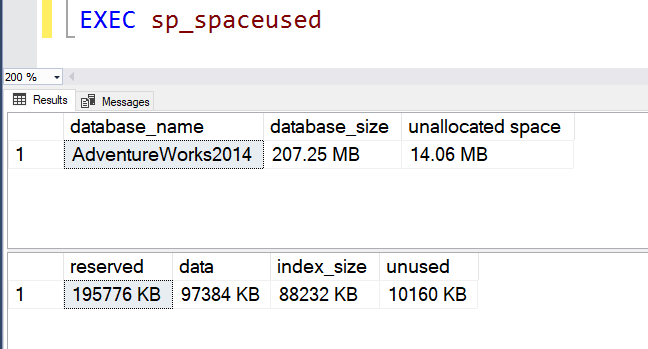
The candidate did not guess at an elaborate temporary-table trick. He asked, “Which version of SQL Server?” The senior DBA said to assume SQL Server 2016 or 2017. The candidate replied, “Use @oneresultset = 1.” I nearly jumped out of my chair. That was a better answer than memorizing a workaround, because he had first checked the version that made the answer possible.
EXEC sys.sp_spaceused @oneresultset = 1;Now the database-level fields appear together in one result set, as the original SSMS capture shows:
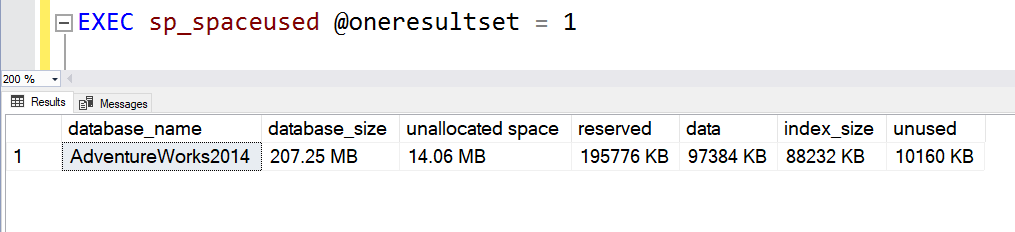
Scope matters: this parameter changes the database-level call when @objname is omitted or NULL. It does not combine arbitrary result sets from other procedures. Check the SQL Server version before using it on an older installation. If you need to store the answer, the single result set is easier to insert into a table whose columns match the returned schema.
Sometimes a small question about the environment is more valuable than a long answer from memory. That candidate reminded both of us.
Published by Pinal Dave on SQLAuthority. More of my work at pinaldave.com.
Discover more from SQL Authority with Pinal Dave
Subscribe to get the latest posts sent to your email.



1 Comment. Leave new
Very nice.Thanks for sharing