Query Store read-only means it stopped recording, and the setting you asked for may not be the state you got. A database can say it wants READ_WRITE while Query Store quietly sits in READ_ONLY. Always read the actual state and the reason before you trust the history.

The Monday morning with no data
It is Monday. You open Query Store to find out what slowed the server on Friday night. The newest data is from Thursday. Nothing is wrong with your query. Query Store ran out of room, switched itself to read-only, and has been silent for days.
Let me recreate that on a small demo database. I give Query Store a limit of only 10 MB and capture every query. Then I run thousands of different statements, so each one needs its own space. The demo creates the SqlAuthorityDemo database and drops it at the end.
USE master;
DROP DATABASE IF EXISTS SqlAuthorityDemo;
GO
CREATE DATABASE SqlAuthorityDemo;
GO
ALTER DATABASE SqlAuthorityDemo SET QUERY_STORE = ON;
ALTER DATABASE SqlAuthorityDemo SET QUERY_STORE
(
    OPERATION_MODE = READ_WRITE,
    QUERY_CAPTURE_MODE = ALL,
    SIZE_BASED_CLEANUP_MODE = OFF,
    MAX_STORAGE_SIZE_MB = 10
);
I turned size-based cleanup off on purpose, so the store hits its limit and we can watch what happens.
Fill it up
This loop sends 5,000 statements that each differ by one number. Query Store treats every one as a new query. Then I flush the in-memory data to disk so the size is counted. It takes some seconds.
USE SqlAuthorityDemo;
GO
DECLARE @i int = 1, @sql nvarchar(400);
WHILE @i <= 5000
BEGIN
    SET @sql = N'DECLARE @x int; SELECT @x = COUNT(*) FROM sys.objects WHERE object_id > '
             + CONVERT(nvarchar(10), @i) + N' AND name <> N''q' + CONVERT(nvarchar(10), @i) + N''';';
    EXEC (@sql);
    SET @i += 1;
END;

EXEC sys.sp_query_store_flush_db;
Read desired state beside actual state
Run this in the database whose history is missing. The columns answer different questions. Desired is what was requested. Actual is what Query Store is really doing. Reason says why they differ.
SELECT desired_state_desc, actual_state_desc, readonly_reason,
       current_storage_size_mb, max_storage_size_mb, query_capture_mode_desc,
       interval_length_minutes
FROM sys.database_query_store_options;

SELECT is_read_only FROM sys.databases WHERE database_id = DB_ID();
Desired is READ_WRITE, actual is READ_ONLY, and the reason is 65536. The current size has hit the 10 MB maximum. The database itself is not read-only, so is_read_only is 0. That is the whole trap: the request says READ_WRITE and nothing is being captured.
Raise the limit, then switch capture back on
Now give it more room. Before you do, ask what filled it: free disk space, retention, and queries that never repeat. A bigger limit only buys time. Here I raise it to 100 MB.
ALTER DATABASE SqlAuthorityDemo SET QUERY_STORE (MAX_STORAGE_SIZE_MB = 100);

SELECT 'limit raised' AS step, desired_state_desc, actual_state_desc, readonly_reason, max_storage_size_mb
FROM sys.database_query_store_options;

ALTER DATABASE SqlAuthorityDemo SET QUERY_STORE (OPERATION_MODE = READ_WRITE);

SELECT 'mode set again' AS step, desired_state_desc, actual_state_desc, readonly_reason, max_storage_size_mb
FROM sys.database_query_store_options;
Look at the first result. The limit is 100 MB, yet the actual state is still READ_ONLY with reason 65536. Raising the limit alone did not restart capture. After I set the mode to READ_WRITE again, the actual state is READ_WRITE and the reason is 0.

The reason is a bitmap
The reason is a bit flag, not a simple status. A flag can hold several reasons at once, so a test with equality can miss one. This small table uses made-up values to show it. The extra bit in 65537 is only an example.
SELECT Reason,
       CASE WHEN (Reason & 65536) = 65536 THEN 1 ELSE 0 END AS StorageBitSet,
       CASE WHEN Reason = 65536 THEN 1 ELSE 0 END AS EqualityWouldMatch
FROM (VALUES (0), (65536), (65537)) AS v(Reason)
ORDER BY Reason;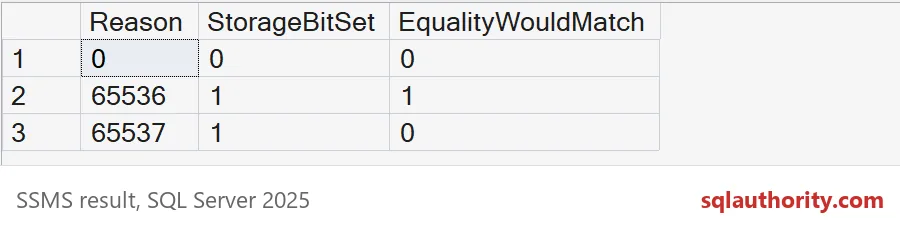
StorageBitSet is 1 for both 65536 and 65537. EqualityWouldMatch is 0 for 65537, so an equality check would miss it. Use the bit test.
Check capture after the fix
After any change, read the actual state again. Then look for new runtime data from a query that really repeats. An old plan only proves Query Store worked earlier.
Finally, give the alert an owner. Watch the actual state and the size together. A recorder that stopped on Friday is useless on Monday.
USE master;
DROP DATABASE IF EXISTS SqlAuthorityDemo;
Check the actual state today, before the incident that needs it.
Query Store read-only is not a quiet state, it is a recorder that stopped.
Published by Pinal Dave on SQLAuthority. More of my work at pinaldave.com.
Discover more from SQL Authority with Pinal Dave
Subscribe to get the latest posts sent to your email.